If you have any questions, please feel free to contact us.| Email Us: info@dcheatpress.com


Views: 222 Author: Site Editor Publish Time: 2026-01-15 Origin: Site


Content Menu
● What Is A Tall Sublimation Tumbler
● Essential Equipment And Materials
● Design Preparation And Logo Sizing
>> Creating The Design Document
>> Matching Logo Height To The Heating Element
● Printing Settings For Sharp Logos
● Single Logo Placement On A Tall Tumbler
>> Surface Prep And Positioning
>> Taping For A Tight, Even Wrap
>> Using A Guide Rectangle In Design Software
>> Wrapping And Aligning In Real Life
● Recommended Time, Temperature, And Pressure
>> Baseline Settings For Logo Transfers
● Dialing In Pressure For Clean Results
● Troubleshooting Common Logo Problems
>> Ghosting, Shadows, Or Double Edges
>> Uneven Top And Bottom Color
● Advanced Production And Branding Tips
● Safety And Maintenance Essentials
● Mug Press Versus Oven For Tall Tumblers
● Turn Designs Into Custom Branded Tumblers
● FAQs
>> 1. Can a logo be added after a tumbler already has a full‑wrap design
>> 2. What time and temperature are common for skinny tumbler logos in a mug press
>> 3. Why does a logo sometimes look dull or washed out after pressing
>> 4. How can two logos be positioned exactly opposite each other on a tall tumbler
>> 5. Can any stainless steel tumbler be used for sublimation
Adding a logo to a tall sublimation tumbler transforms simple drinkware into a powerful branding tool for personal, corporate, or promotional use. With the right design setup, press settings, and workflow, even complex logo projects become repeatable and efficient.[1][2][3]
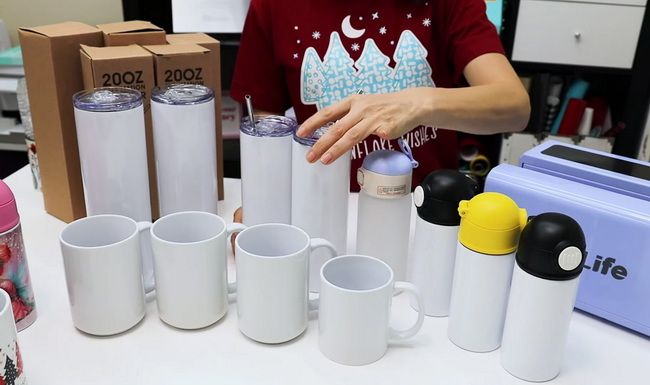
Tall sublimation tumblers, often called skinny tumblers, are insulated, straight‑walled containers coated with a special polymer layer that bonds permanently with sublimation ink. Their slim profile and large printable area make them ideal for logos, patterns, and full‑wrap artwork in small business or promotional production.[2][4][3][1]
These tumblers usually feature:
- Stainless steel construction with a sublimation‑ready coating.
- Double‑wall insulation to keep drinks hot or cold longer.
- A straight or near‑straight wall that simplifies logo alignment and taping.[3][2]
A smooth, consistent logo transfer depends on combining compatible equipment and consumables. Before starting any project, prepare everything you need to avoid interruptions mid‑press.[1][3]
Key items include:
- Sublimation‑ready tall/skinny tumbler blanks with polymer coating.[4][3]
- Sublimation printer loaded with dedicated sublimation ink.
- Sublimation transfer paper sized for your printer and design.[3]
- Heat‑resistant tape to secure the transfer tightly to the tumbler.[5][3]
- Mug or tumbler press with a tall heating element, such as the Signature Series mug press.[6][1]
- Heat‑resistant gloves for safe removal of hot drinkware.[7]
- Optional butcher paper to protect the heating element from stray ink.[8]
You can also keep a lint‑free cloth and isopropyl alcohol on hand to remove dust, fingerprints, and oils from the tumbler surface before pressing.[5][3]
Accurate logo sizing and layout are critical for professional results on tall sublimation tumblers. Working inside a properly set document helps prevent cropping, warping, or misalignment when the transfer wraps around the metal surface.[1]
- Open a graphic design program such as Photoshop, Illustrator, CorelDRAW, or similar software.[1]
- Create a new file that matches your sublimation paper size, for example 8.5 in x 11 in for US Letter.[1]
- Set the resolution to 300 DPI to keep the logo crisp when transferred onto stainless steel.[2][3]
This base document becomes the canvas for one‑side or two‑side logo layouts.
On a press like the HPN Signature Series mug press, the standard heating element height is about 5.25 in, which is usually shorter than the overall tumbler height. To avoid partial or uneven coverage at the edges, the logo height should be slightly smaller than the heated zone.[1]
- Scale the logo to around 4.75 in or less in height to fit comfortably inside the element.[1]
- Leave a small top and bottom margin so the logo never reaches the extreme edges of the heated area.
- For wide logos, maintain aspect ratio while prioritizing a safe height that fits the press.
This approach helps prevent banding, shadowing, or weak transfer near the top and bottom of the imprint.
Color and substrate settings in your print manager have a direct impact on clarity and vibrancy. For Sawgrass systems, a dedicated print manager simplifies this process.[3][1]
Typical starting settings include:
- Substrate: Metal, which approximates the coated stainless surface.[1]
- Paper: Select the exact profile that matches your sublimation paper brand.
- Mirror: Enabled, to ensure the logo reads correctly on the tumbler.[1]
- Color mode: Photographic for detailed logos or Vivid for more saturated, bold designs.[1]
After printing, let the transfer dry briefly and then trim the design close to the inked area with sharp scissors or a trimmer. Clean trimming reduces the chance of ghost lines forming at the edges of the paper.[3][1]
Placing a single logo on one side of a tall sublimation tumbler is ideal for personal gifts or simple branded drinkware. Good surface preparation and taping prevent shifting and preserve edge clarity.[1]
- Remove any lid, straw, or silicone components so only the metal body enters the press.[3][1]
- Wipe the tumbler with a lint‑free cloth and a small amount of isopropyl alcohol to remove oils and residue.[5][3]
- Decide on the orientation: right‑handed viewing, left‑handed viewing, or front‑center when the tumbler faces forward.
Place the printed and trimmed logo against the tumbler at the chosen location, ensuring it sits within the area that the heating element will cover.[1]
Use heat‑resistant tape to secure the transfer tightly. A loose wrap is one of the most common causes of faded sections or ghosting.[5][3]
Best practices include:
- Tape along both vertical edges of the transfer to hold the paper firmly.
- Smooth the paper from the center outward to remove trapped air.
- Add tape at the top and bottom edges if needed to prevent curling in the press.
A smooth, tight wrap allows the ink to sublimate evenly across the logo area.
Dual logos on opposite sides make the tumbler branding visible from multiple angles and are popular for corporate or event merchandise. A simple layout technique helps position two graphics exactly 180 degrees apart.[1]
- Draw a horizontal rectangle inside your design file with a length of approximately 4.52 in, centered on the canvas.[1]
- Place one logo centered on the left edge of the rectangle and the second logo centered on the right edge.
- Once both logos are aligned, hide or delete the rectangle so only the logos print.[1]
When the sheet is wrapped around the tumbler, this spacing places the logos on perfectly opposite sides.
- Wrap the printed sheet snugly around the tumbler, aligning the paper edges so the seam is straight.
- Use several pieces of heat‑resistant tape along the seam, and additional strips at the top and bottom to hold everything tight.[3]
- If your press tends to heat unevenly, mark the seam with a long piece of tape so the tumbler can be rotated 180 degrees and re‑pressed if needed.[8]
This method maintains both spacing and vertical alignment between the two logos.
Time, temperature, and pressure settings determine how completely the ink transfers into the coating. For stainless steel tumblers, starting values are derived from both manufacturer recommendations and practical testing.[7][1]
On a tall sublimation tumbler in a mug or tumbler press, common starting points include:
- Temperature: around 375°F (about 190°C).[1]
- Time: 15–30 seconds in a mug press for a focused logo transfer.
- Shorter times near 15 seconds for simple, single‑color marks.
- Longer times closer to 30 seconds for detailed or highly colorful logos.[6][1]
- Pressure: medium, with consistent contact over the full height of the logo.[9][1]
For stainless steel tumblers in some production setups, time can be extended to 60–90 seconds at around 365°F, especially for broader coverage or different press configurations. Always confirm with blank and press manufacturers and run small tests before large runs.[10]
- Preheat the press to the target temperature before inserting the tumbler.[10][7]
- Place the taped tumbler into the heating element so the entire logo area is within the hot zone.[1]
- Close the press and allow the timer to count down according to the chosen setting.
- When finished, open the press and carefully remove the tumbler using heat‑resistant gloves.[7]
- Set the tumbler on a heat‑safe surface to cool slightly, then peel away the transfer paper to reveal the finished logo.[7][1]
Uneven or incorrect pressure can cause faded sections, banding, or warping of the tumbler. Most mug or tumbler presses use adjustable knobs so the operator can match the clamping force to the blank.[5][3]
Guidelines for medium pressure:
- With the tumbler in the press, closing the handle should produce noticeable but not extreme resistance.[8][1]
- The tumbler should not rattle or shift while clamped, yet the operator should not have to force the handle excessively.
- Adjust both front and back knobs in small increments to keep the pressure balanced along the full height of the heating element.[1]
Testing a blank or misprinted tumbler first is an efficient way to fine‑tune this setting before pressing production pieces.
Even with careful preparation, occasional issues may appear on tall sublimation tumblers. A structured troubleshooting approach helps identify and correct root causes quickly.[11][3]
Potential reasons:
- Temperature too low or time too short for the specific tumbler coating.[10][3]
- Substrate or paper profile in the print manager not matched to the actual materials.[9][1]
- Pressure too light, allowing gaps between the transfer and metal surface.
Typical fixes:
- Increase press time in small increments while monitoring for any signs of over‑pressing.[10][7]
- Confirm the substrate profile and color mode (for example, Metal plus Photographic or Vivid) are correctly selected.[1]
- Tighten the press slightly to achieve even medium pressure.
These effects usually come from paper movement during or immediately after pressing.[12][3]
Solutions include:
- Applying more heat‑resistant tape along seams and edges so the transfer cannot shift.[3]
- Avoiding any rotation or twisting while the tumbler and paper are still hot.
- Allowing a brief cool‑down period before peeling the transfer.
When the top of the logo looks brighter than the bottom, or vice versa, the heating zone and logo height may not be aligned correctly.[11][3]
To correct this:
- Reduce the logo height so it fits inside the most consistent part of the heating element.[1]
- Reposition the logo on the tumbler so it sits centrally within the heated area.
- If needed, press once, rotate 180 degrees, and press again for a shorter time to balance exposure.[11][10]
A simple troubleshooting table here can visually summarize “Issue / Cause / Solution” for faster scanning, which improves overall readability and UX.
Once consistent results are achieved, the focus can shift to workflow efficiency and maximizing brand impact. Small refinements often make a big difference in perceived quality and repeat sales.[11][3]
Ideas to enhance branding:
- Align logo orientation with the most common way customers hold the tumbler so branding is naturally visible.
- Use the opposite side for a secondary mark such as a tagline, website, social handle, or QR code.[4][5]
- Keep background patterns subtle in the logo area so the design remains legible from a distance.
Workflow improvements for growing shops:
- Arrange multiple logo transfers per page to reduce paper waste and printing time.[11][3]
- Standardize settings for each tumbler size and press, documenting them in a quick chart near the workstation.
- Schedule test presses whenever switching to new blanks, paper brands, or ink systems.
Charts or infographics, such as a “Before You Press” checklist, provide a strong visual anchor and help both beginners and experienced operators avoid costly mistakes.[8][7]
Heat pressing involves high temperatures, pressure, and coated metal surfaces, so consistent safety practices and regular maintenance are important. These habits also extend equipment life and keep results stable.[7][3]
Key points include:
- Always wear heat‑resistant gloves when handling tumblers immediately after pressing to avoid burns.[7]
- Remove lids, straws, and plastic accessories before pressing to prevent damage and deformation.[3][1]
- Use butcher paper or protective sheets if stray ink is a concern, helping keep the heating element clean.[10][8]
- Allow the tumbler to cool fully before packaging, stacking, or shipping to avoid smudging or deformation.
Routine checks on press alignment, pressure, and temperature accuracy help maintain consistent performance during longer production runs.[13][9]
Different production environments may prefer a mug or tumbler press, a convection oven, or a specialized sublimation oven. Each method has trade‑offs in speed, coverage, and complexity.[2][3]
Method | Advantages | Limitations |
Mug/tumbler press | Fast cycles, easy setup, excellent for logos and partial prints on tall tumblers. | Element height may not cover full wraps; requires precise pressure adjustments. |
Sublimation oven | Handles full wraps and multiple tumblers per batch; flexible for varied sizes. | Longer cycles, requires wraps or shrink sleeves, and more workspace and heat management. |
For targeted logo decoration on tall sublimation tumblers, a dedicated mug or tumbler press gives a strong balance of simplicity, speed, and repeatability.[4][1]
Every successful project starts with reliable equipment, stable heat, and well‑matched consumables. By following clear design, taping, and pressing workflows, it becomes straightforward to produce tall sublimation tumblers with sharp, long‑lasting logos that support brand recognition and customer loyalty.[10][3][1]
Choose high‑quality sublimation tumblers, dependable heat presses, and consistent inks and papers so each production run meets professional standards across different markets and order sizes. Use these guidelines to refine current processes, test new designs with confidence, and expand your customized drinkware offering to serve more clients and more demanding branding projects.[4][3]
Yes, a second press is possible when the existing wrap is protected with butcher paper and the additional press time and temperature are carefully controlled so the original print is not over‑cooked or faded.[14][7]
A frequent starting point is around 375°F for 15–30 seconds at medium pressure, with shorter times for simple logos and longer times for multi‑color or detailed graphics. Exact values can vary with the tumbler coating and press model.[6][1]
Common reasons include low temperature, insufficient pressing time, mismatched substrate or paper settings in the print manager, or inadequate pressure between the transfer and tumbler. Adjust each of these factors gradually while checking results on test blanks.[9][3]
Place a centered rectangle in the design file, approximately 4.52 in long, and center one logo on the left edge and another on the right edge before removing the rectangle. When the sheet is wrapped around the tumbler, this layout places the logos on opposite sides.[1]
No, only sublimation‑ready stainless steel tumblers with a suitable polymer coating will bond properly with sublimation ink under heat and pressure. Standard uncoated stainless steel does not accept sublimation transfers in a durable, high‑quality way.[10][3]
[1](https://www.heatpressnation.com/blogs/blog/how-to-add-your-logo-on-a-tall-sublimation-tumbler)
[2](https://www.heatpressnation.com/blogs/blog/how-to-fully-personalize-sublimation-skinny-tumblers)
[3](https://www.freesub.com/a-the-ultimate-guide-to-sublimation-tumbler-heat-press-tips-and-techniques.html)
[4](https://makerflo.com/pages/getting-started-sublimation)
[5](https://www.mecolour.com/mastering-heat-press-techniques-for-sublimation-tumblers/)
[6](https://www.youtube.com/watch?v=kL0loAUJtlU)
[7](https://www.agceducation.com/how-to-make-sublimation-tumblers-a-step-by-step-guide/)
[8](https://jennifermaker.com/sublimation-tumblers/)
[9](https://blululi.com/blogs/news/sublimation-heat-press-settings-time-temp-pressure)
[10](https://jotoimagingsupplies.com/pages/heat-press-time-and-temperature-chart-for-sublimation-blanks)
[11](https://artbubbles.com/blogs/16-step-guide-making-sublimation-tumblers)
[12](https://thestainlessdepotcompany.com/blogs/news/sublimation-heat-press-settings-for-shirts-tumblers-mugs-stainless-steel-water-bottles-and-more)
[13](https://galaxy-press.com/heat-press-guide-temperature-and-time-settings/)
[14](https://www.facebook.com/groups/1655261694953377/posts/2107482056398003/)
[15](https://www.youtube.com/watch?v=Fh53968H_Os)
[16](https://www.youtube.com/watch?v=6odRtWINDnA)
[17](https://www.youtube.com/watch?v=ouGvym_y9Fg)
[18](https://www.facebook.com/groups/1655261694953377/posts/2223260138153527/)


