If you have any questions, please feel free to contact us.| Email Us: info@dcheatpress.com


Views: 222 Author: Amanda Publish Time: 2026-01-14 Origin: Site


Content Menu
● Why Advanced Alignment Matters In Modern Heat Printing
● Key Components Of A High-Efficiency Dual-Station Setup
● How Projection-Based Alignment Improves Accuracy
● Cloud Connectivity, Presets, And Production Analytics
● Technical Requirements And Installation Planning
● Typical Use Cases And Application Scenarios
● Step-By-Step Workflow For High-Precision Heat Printing
● Comparison: Traditional Dual-Station vs. High-Tech Aligned Dual-Station
>> Dual-Station Heat Press Comparison
● Industrial-Grade Heat Transfer Solutions For Global Production
● When To Upgrade To A High-Tech Dual-Station Workflow
● Plan Your Next-Generation Heat Printing Line
● FAQs About High-Tech Heat Press Workflows
>> 1. What is the main benefit of combining dual-station presses with modern alignment tools?
>> 2. Do advanced alignment systems work with different transfer technologies?
>> 3. What infrastructure should a shop check before upgrading?
>> 4. How do cloud dashboards and analytics help decorators?
>> 5. Is it better to buy multiple basic presses or one advanced dual-station system?
High-volume apparel decoration is moving toward smarter, more automated workflows that combine dual-station presses, precise positioning tools, and cloud-connected controls. For decorators, print shops, and factories, this shift means faster production, fewer misprints, and more consistent results on every garment.[1][2][3]
Accurate placement is one of the most critical factors in professional heat printing, especially for branding-sensitive products and multi-location designs. Misaligned logos or crooked graphics immediately reduce perceived quality and can lead to expensive reprints or returns.[2][4][1]
Modern systems use visual guides, digital templates, and smart controls to reduce guesswork during setup. By standardizing placements, decorators can maintain brand consistency across large orders, repeat runs, and different product categories.[4][1][2]
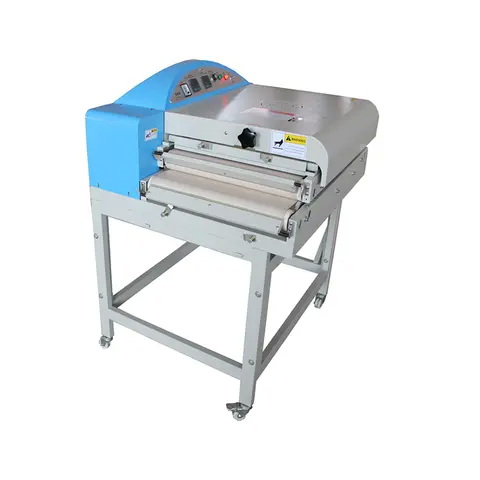
A dual-station heat press is designed to keep operators working continuously by separating loading and pressing into two parallel work areas. While one station is under pressure, the other station is free for garment loading, alignment, and setup.[5][6][2]
Typical characteristics of a high-efficiency dual-station configuration include:
- Two 16" x 20" workstations that alternate under a shared heated platen to maximize throughput.[5][2]
- Pneumatic operation that applies consistent, programmable pressure for different transfer types and fabric thicknesses.[6][2]
- Threadable platens that allow garments to be loaded over the platen to avoid seams and zippers in the press area.[2][5]
- Multiple operating modes so operators can choose full-auto cycles for speed or manual control for specialty work.[6][2]
Projection-based alignment systems use a digital image of the design projected directly onto the lower platen as a placement reference. Instead of measuring by hand or relying on printed templates, the operator simply matches the garment and transfer to the projected layout before pressing.[7][1][2]
Core benefits of projection alignment:
- True-to-scale visualization of the design on the platen, making exact positioning more intuitive.[1][2]
- Reduced dependency on manual measuring tools and homemade jigs for each apparel style.[2]
- Faster training curve for new operators who can follow visual placement guides instead of memorizing measurements.[7][2]
A simple workflow diagram showing “Upload Artwork → Project To Platen → Align → Press” can highlight this process visually and help readers understand how projection integrates into daily production.
Modern heat press control systems often incorporate cloud connectivity, allowing decorators to manage settings and view performance data from a central interface. This brings a level of standardization and oversight that was previously more common in large-scale industrial equipment.[8][9][5][2]
Common digital control capabilities include:
- Touchscreen interfaces with programmable presets for time, temperature, and pressure tailored to specific transfers and fabrics.[9][2]
- Web dashboards that track machine usage, press cycles, and operator performance across multiple presses.[5][2]
- Password-protected configurations to maintain process control and prevent unauthorized setting changes.[2]
- Integration with online portals to upload artwork, manage alignment templates, and store job profiles for repeat orders.[7][2]
Charts or simple UI mockups showing preset lists and basic analytics (jobs per day, average cycle time) can make this section more visual and user-friendly.
Before implementing a dual-station, projection-enabled setup, decorators should evaluate their facility infrastructure and workflow. Proper planning ensures safe, reliable operation and a smoother deployment.[10][8][1][7]
Key considerations typically include:
- Electrical configuration: Systems are commonly available in 120 V and 240 V versions, with total power draw in the multi-kilowatt range.[1][7]
- Compressed air: Pneumatic presses generally require an external air compressor with at least 1 HP output, an 8 gallon tank, and sufficient CFM to maintain consistent pressure.[1]
- Space and ergonomics: Shipping dimensions in the area of 114 cm x 114 cm x 90 cm and weights around 200 kg require solid flooring, safe operator access, and room for material staging.[1]
- Budget and lifecycle costs: Integrated projection and dual-station platforms are positioned as premium solutions, with pricing around the upper tier of the heat press market.[10][7]
A planning checklist graphic placed near this section can help readers quickly see whether their space and utilities are ready for an upgrade.
High-tech dual-station setups with advanced alignment are best suited for decorators that need both volume and precision. Different segments of the apparel and textile market gain unique advantages from these systems.[3][4][2][1]
Common applications include:
- Team sports and uniforms where numbers, names, and logos must be perfectly consistent across every piece in a roster.[4][2]
- Corporate and promotional apparel with strict brand guidelines that demand accurate logo placement on polos, jackets, and workwear.[2][1]
- On-demand ecommerce orders that require fast changeovers between designs without sacrificing placement quality.[9][4][2]
- Fashion, streetwear, and boutique garments where misprints carry a high cost in both materials and brand reputation.[1][2]
A simple table of use cases versus key benefits can help readers quickly map technology features to their own business models.
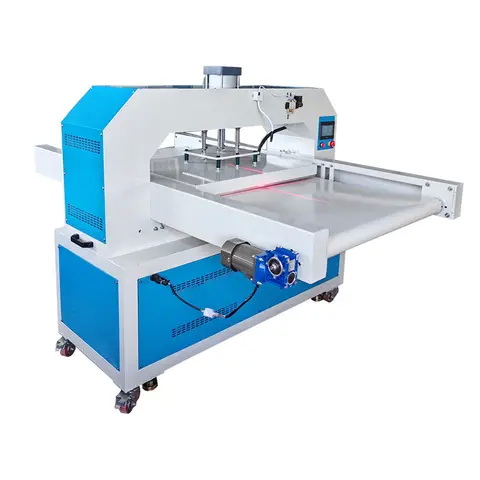
To make the user experience clear, it helps to view high-tech heat printing as a structured workflow rather than a series of disconnected manual tasks. The steps below can be adapted to different shops and equipment brands.[11][8][2][1]
1. Prepare digital artwork
- Finalize the design in graphics software and export it in the correct format for your alignment or projection system.[2][1]
- Organize artwork by client, product type, or campaign so future reorders are easy to manage.[8][2]
2. Configure press presets
- Set time, temperature, and pressure according to transfer manufacturer guidelines and fabric composition.[9][2]
- Save presets with clear names (for example, “Polyester DTF 150 gsm” or “Cotton Vinyl Heavyweight Tee”) to speed up future setups.[8][2]
3. Prepare and align garments
- Thread garments onto the platen to avoid seams under the pressing area and smooth out wrinkles.[5][2]
- Use printed guides, laser guides, or digital projection to verify placement before closing the press.[1][2]
4. Run test prints and quality checks
- Press a small batch of sample garments to confirm placement, color, and durability.[4][2]
- Adjust presets or alignment templates as needed, then lock settings for the full production run.[5][2]
5. Switch to continuous production
- Take advantage of dual stations by loading one garment while the other is being pressed.[6][5]
- Monitor cycle counts and production speed using onboard counters or cloud dashboards where available.[9][5][2]
6. Document results and refine SOPs
- Record final settings and alignment notes in a standard operating procedure to make future repeats more efficient.[12][8]
- Capture images or videos of the process for training new operators.[13][11]
A simple numbered flowchart for this section can further enhance clarity and scanning for readers.
The table below focuses on the practical differences between a basic dual-station configuration and a higher-end, alignment-optimized setup.[6][7][2][1]
Aspect | Standard Dual-Station Heat Press | High-Tech Dual-Station With Advanced Alignment |
Alignment method | Manual measuring, grids, physical templates | Visual guides and digital alignment tools for precise placement |
Setup speed | Depends heavily on operator experience | Faster and more repeatable due to templates and presets |
Operator training | Longer, skill-based learning curve | Shorter training with visual references and named presets |
Pressure and temperature | Manual or basic digital controls | Advanced digital controls with preset profiles |
Data and traceability | Limited or no tracking | Cloud analytics, job histories, and multi-press monitoring |
Error and misprint rate | Higher risk of inconsistent placement | Reduced misprints through repeatable alignment workflows |
A simple bar chart showing estimated misprints and garments per hour for “basic dual-station” vs “high-tech aligned dual-station” can make the comparison even more intuitive.
Industrial manufacturers with deep experience in heat transfer equipment, fusing machines, and embossing machines provide the backbone for high-volume textile and apparel production worldwide. Their systems are engineered for uniform temperature, stable high pressure, and long service life in demanding factory environments.[14][3]
For example, companies such as Dongguan Colorful Equipment Technology Co., Ltd. (COLORFUL) have developed a broad portfolio that includes heat press machines, roll-to-roll heat transfer systems, large-format presses, and advanced textile fusing equipment. With CE-certified products, ISO-based quality management, and a mix of standard and customized solutions, these manufacturers serve both large industrial clients and smaller specialized producers.[15][3][14]
By pairing industrial-grade machinery with modern alignment and control strategies, decorators can scale from small-batch production to continuous, multi-shift manufacturing while maintaining consistent quality standards.[3][2][1]
Moving from basic presses to a smarter dual-station workflow is most impactful when a shop is facing specific growth or quality challenges. Evaluating current pain points provides a clear path toward the right level of automation and control.[12][8][4][7]
Signals that an upgrade may be timely include:
- High misprint or rework rates due to inconsistent alignment across operators or shifts.[4][2]
- Throughput bottlenecks where single-station setups or manual alignment slow down daily order processing.[2][1]
- Expansion into new product lines such as performance wear, complex multi-location branding, or premium limited collections.[3][1][2]
- Need for better traceability and oversight across multiple presses or locations, especially when managing teams and standardized procedures.[8][5][2]
With clear metrics on misprints, cycle times, and labor costs, decorators can model how a more advanced dual-station and alignment solution will affect profitability over time.[10][7][2]
If your heat printing operation is ready to reduce errors, improve consistency, and support higher order volumes, now is the ideal moment to design a next-generation dual-station workflow tailored to your business. Start by reviewing your current equipment, misprint rates, and production goals, then define the alignment tools, digital controls, and industrial-level presses that can close the gap.[3][8][4][1][2]
To move forward with confidence, outline your must-have features, confirm your facility's electrical and air capacity, and consult with an experienced heat press equipment partner that can match you with a scalable solution for both current orders and future growth. By taking these steps now, your shop can transform from manual, error-prone workflows into a streamlined, data-informed production line that consistently delivers professional results on every garment.[14][3][5][1][2]
The primary benefit is higher usable throughput with fewer misprints, because operators can align garments more accurately and keep presses running continuously rather than stopping for manual adjustments and rework.[4][1][2]
Yes, alignment tools are generally independent of transfer type, so they can be used with vinyl, DTF, screen printed transfers, sublimation, and other media, as long as the press settings are adjusted correctly for each process.[1][2]
Shops should confirm electrical capacity (voltage and amperage), compressed air availability for pneumatic systems, workspace layout, and safe operator access paths before installing larger dual-station equipment.[7][1]
Cloud dashboards centralize machine data, allowing owners and managers to track press cycles, heat-on time, and job histories, which supports better maintenance planning, operator training, and process optimization.[9][5][2]
Multiple basic presses can increase raw capacity, but a single advanced dual-station system with strong alignment and control features often delivers more consistent quality and lower waste, making overall output more profitable.[4][2][1]
[1](https://stahlseurope.com/hotronix-dual-air-fusion-proplace-iq/)
[2](https://www.heatpressnation.com/blogs/blog/high-tech-heat-pressing-hotronix%C2%AE-dual-air-fusion-proplace-iq%E2%84%A2)
[3](https://www.dcsbheatpress.com)
[4](https://www.screenprinting.com/products/stahls-hotronix-dual-air-fusion-proplace-iq-heat-press)
[5](https://www.hotronix.com/hotronix-dual-air-fusion-iq-heat-press)
[6](https://lawsonsp.com/products/dual-air-fusion-iq)
[7](https://www.stahls.com/pro-place-iq)
[8](https://mtsoln.com/blog/insights-720/crafting-content-that-connects-a-step-by-step-guide-to-e-e-a-t-optimized-blog-posts-2270)
[9](https://www.screenprintsupplies.com/products/heat-press/automatic/hotronix/)
[10](https://sourceone.nazdar.com/Portals/0/TDS/ProPlace%20IQ%20FAQs-V2-0122324_S1.pdf)
[11](https://www.dcsbheatpress.com/36-halloween-sublimation-designs-spooky-season-ideas-tips-and-project-inspiration.html)
[12](https://storychief.io/blog/eeat-framework-seo-content)
[13](https://www.youtube.com/watch?v=Mw8iADqLk2Y)
[14](https://www.dcsbheatpress.com/top-10-heat-press-machine-manufacturers-in-china.html)
[15](https://www.dcsbheatpress.com/top-heat-press-machine-manufacturers-and-suppliers-in-egypt.html)
[16](https://www.stahls.co.uk/proplaceiq.html)
[17](https://www.hotronix.com/images/uploaded/Manuals/DualAirFusion-PPIQ-OperatorManual-0325.pdf)
[18](https://www.stahls.co.uk/hotronix-dual-air-fusion-heat-press.html)
[19](https://www.youtube.com/watch?v=HGs2givJI1w)
[20](https://www.mhmdirect.co.uk/direct-to-garment-equipment-c65/heat-presses-accessories-c71/stahls-hotronix-dual-air-fusion-iq-heat-press-p276)
[21](https://www.wordstream.com/blog/ws/2023/07/14/google-e-e-a-t)
[22](https://www.youtube.com/watch?v=MydZKHEE5Dk)
[23](https://www.aspendigital.nl/en/insights/e-e-a-t/)


