If you have any questions, please feel free to contact us.| Email Us: info@dcheatpress.com


Views: 222 Author: Amanda Publish Time: 2026-01-14 Origin: Site


Content Menu
● Understanding Why Maintenance Matters
● Safety Precautions Before Any Maintenance
● Weekly and Monthly Preventive Tasks
● Correctly Cleaning Heat Press Platens
● Temperature Calibration and Heat Consistency
● Lubrication and Moving Parts
● Troubleshooting Common Issues
>> Uneven or Incomplete Transfers
>> Scorching, Stains, or Ghosting
● Recommended Maintenance Schedule Overview
>> Heat Press Maintenance Intervals
● Environment, Storage, and Operator Habits
● Long‑Term Strategies To Extend Machine Lifespan
● Put Your Maintenance Plan Into Practice
>> 1. How often should the platen be cleaned?
>> 2. Why is temperature calibration necessary?
>> 3. What type of lubricant is safe to use?
>> 4. When should the lower pad be replaced?
>> 5. How can unplanned downtime be reduced?
A well‑maintained heat press runs more consistently, produces higher quality prints, and can significantly extend the usable life of your equipment. Regular care also reduces unexpected downtime, which is especially critical for busy production environments and growing customization businesses.[1][2][3][4]

Neglecting basic upkeep often leads to uneven heating, unstable pressure, and a higher rate of misprints and reworks. Over time, small issues such as loose screws or residue buildup can turn into expensive repairs or emergency replacements.[2][5][4][1]
Proper maintenance supports three core goals:
- Consistent print quality and strong transfer adhesion.[6]
- Longer equipment lifespan and better return on investment.[1]
- Safer day‑to‑day operation for all machine operators.[3]
Before cleaning, adjusting, or lubricating any part of the machine, safety must come first to avoid injury and accidental damage. Standardizing a short safety routine makes maintenance predictable and repeatable for every operator.[5][7][4][3]
Key safety steps:
- Power off the machine and disconnect it from the outlet before working on it.[2]
- Wait until the platen has cooled before applying cleaners or touching surfaces directly.[7]
- Use heat‑resistant gloves if cleaning while the platen is slightly warm.[1]
- Keep liquids and sprays away from live electrical components.[3]
A simple daily routine helps prevent most common printing issues and keeps the press ready for the next job. These tasks are quick to perform and should be part of the end‑of‑shift workflow.[3][1]
Daily actions:
- Wipe the upper platen with a soft, lint‑free cloth to remove dust and light residue.[6][3]
- Clear lint, scraps, and transfer fragments from the lower platen and surrounding work area.[4][8]
- Confirm that the temperature, time, and pressure settings match your frequently used materials.[2][1]
- Visually check the power cord and plug for kinks, cuts, or burn marks.[9][3]
- Open and close the press a few times to ensure smooth motion and normal sound.[6]
Beyond basic daily cleaning, scheduled weekly and monthly checks help maintain accuracy and mechanical stability. This routine protects the structure of the press and prevents quality drift over time.[4][1]
Weekly tasks:
- Perform a more thorough cleaning of the platen surfaces, especially after adhesive‑heavy or large production runs.[1][6]
- Inspect hinges, handles, pressure knobs, and visible fasteners, tightening them where necessary.[9][2]
- Check the condition of the silicone or foam pad for imprints, cuts, or surface damage.[1]
Monthly tasks:
- Test temperature accuracy with an external thermometer or test kit instead of relying only on the display.[3][1]
- Inspect moving parts for wear, unusual friction, or visible misalignment.[5]
- Look for any early signs of discoloration or heat damage around wiring and connectors that are safely accessible.[4]
Clean platens are essential for avoiding stains, ghosting, and incomplete transfers. The goal is to remove contaminants without damaging protective coatings or affecting heat distribution.[6][3]
Upper platen cleaning tips:
- Use a non‑abrasive cloth with mild dish soap, mineral spirits, or a dedicated platen cleaner approved for your surface type.[3][6]
- Clean when the platen is warm rather than extremely hot, so residue softens without risking burns or damage.[2][1]
- Avoid metal tools or rough pads that can scratch non‑stick coatings and create hot or cold spots.[9][3]
Lower platen and pad care:
- Remove loose fibers and debris using a lint roller or vacuum, especially around the edges.[8][1]
- Check for deep marks, burns, or hardened areas that may cause uneven pressure and replace the pad when required.[4][1]
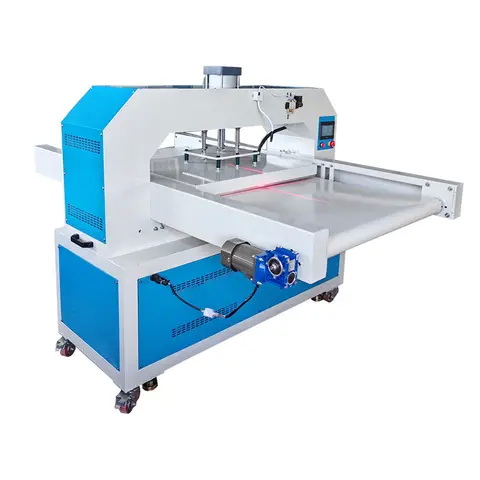
Over time, sensors and controllers can drift slightly, causing the actual platen temperature to differ from the displayed value. Regular calibration ensures that materials cure properly and maintain wash durability.[1][3]
Basic calibration approach:
- Set the machine to a commonly used temperature and allow it to fully reach and stabilize at that setting.[2][4]
- Measure temperature at multiple points on the platen using an external thermometer or thermal strips.[3][1]
- Compare readings to the control panel and note any consistent differences, then adjust settings or schedule service based on those results.[5][1]
If the edges are significantly cooler than the center, it may indicate internal wear or component issues that require professional attention.[5][4]
Friction in hinges, joints, and mechanical linkages can gradually increase operating force and reduce machine responsiveness. Proper lubrication helps these parts move smoothly and reduces long‑term wear.[9][3]
Lubrication guidelines:
- Focus on designated wear points such as pistons, rods, pivots, and key hinge areas listed in the machine manual.[2][3]
- Apply a high‑temperature, non‑melting grease or suitable machine oil according to manufacturer recommendations.[6][3]
- Use only small amounts and wipe away excess to avoid attracting dust or contaminating garments.[9][1]
For presses operating in multi‑shift production, lubrication may be needed more than once a year, depending on usage intensity.[4][3]
When problems arise, a structured troubleshooting method helps identify whether the cause is settings, maintenance, or hardware. Addressing symptoms early can prevent larger failures later.[5][1]
Possible causes:
- Uneven pressure from damaged pads, misaligned platens, or loose hinges.[1]
- Temperature that is different from the displayed value or inconsistent across the platen.[3]
- Residue or contamination on the upper platen or protective sheets.[6]
Practical steps:
- Inspect and replace worn pads, and tighten any loose structural components.[9][2]
- Re‑test temperature and adjust application settings or perform a calibration if needed.[1][3]
- Clean or change protective sheets and perform a deeper platen cleaning.[6][3]
Common reasons include:
- Excessive time, temperature, or pressure for the fabric and transfer type.[4]
- Reused or contaminated protective materials and build‑up on the platen surface.[2][6]
Prevention tips:
- Follow recommended application windows from transfer and material suppliers rather than guessing settings.[5][4]
- Replace stained or damaged protective sheets and keep a separate set for different print types.[2][3]
The following table summarizes a general schedule that many shops can adapt to their workload and equipment type.[1][2]
Task | Suggested frequency | Primary purpose |
Light cleaning of platens | Daily / after each session | Remove fresh residue and prevent buildup |
Clear work area and debris | Daily | Protect surfaces and reduce contamination risk |
Inspect cords and plugs | Daily / Weekly | Catch developing electrical hazards early |
Tighten hinges, bolts, and screws | Weekly | Maintain alignment and stable pressure |
Deep platen cleaning | Weekly / after heavy runs | Remove adhesive and ink residues |
Check pad condition | Monthly | Preserve even pressure across the printing area |
Temperature accuracy test | Quarterly | Ensure curing settings remain reliable |
Lubricate moving parts | Annually or as needed | Reduce wear on joints and moving assemblies |
Machine performance depends not only on hardware but also on the environment and daily handling habits. Stable conditions reduce stress on electrical components and mechanical structures.[4][3]
Best practices:
- Keep the press in a clean, dry area away from excessive dust, humidity, or chemical vapors.[5][2]
- Cover the machine when not in use to protect it from airborne particles and accidental contact.[10][3]
- Encourage operators to report unusual noises, vibrations, or smells instead of ignoring early warning signs.[9][4]
Shops that get years of reliable service from their machines typically use simple but consistent long‑term strategies. These approaches turn maintenance from a reactive chore into a planned process.[4][1]
Helpful strategies:
- Create a written maintenance log that notes dates of cleaning, calibration, lubrication, and part replacement.[5][1]
- Standardize common press settings for each transfer type and keep these at the workstation for quick reference.[3][4]
- Keep essential spare parts such as pads, fuses, and thermocouples on hand to reduce downtime during repairs.[9][2]
A clear, consistent maintenance routine protects print quality, improves safety, and ensures that your heat press supports your business instead of slowing it down. Take a few minutes today to create or update a written checklist based on the steps in this guide, assign responsibilities to your team, and schedule regular reviews so that maintenance becomes a reliable part of your production workflow rather than an afterthought.[2][5][4][1]
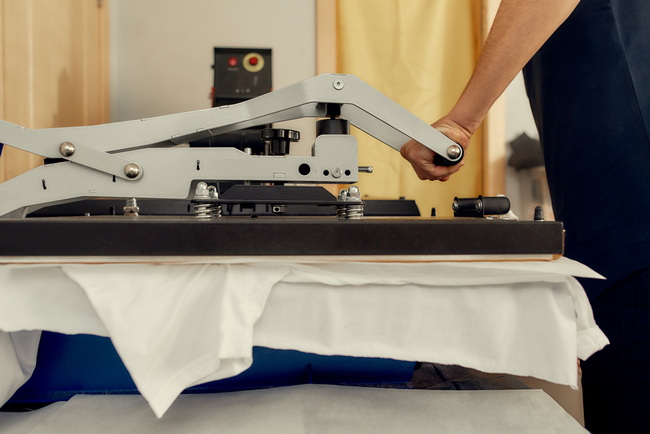
Light cleaning is recommended daily or after every production session, with a more thorough cleaning at least weekly or after heavy adhesive use.[6][1]
Calibration verifies that the displayed temperature matches the actual platen temperature, which is critical for transfer adhesion and long‑term wash durability.[3][1]
Use a high‑temperature, non‑melting grease or appropriate machine oil specified by the equipment manufacturer, and avoid general household lubricants.[6][3]
Replace the pad when it shows deep grooves, burns, compressed areas, or when you notice uneven pressure despite correct machine settings.[4][1]
Unplanned downtime can be reduced by combining a clear maintenance schedule, a simple service log, proactive calibration and inspection, and keeping basic spare parts ready.[5][1]
[1](https://wooter.com/articles/heat-press-maintenance-checklist/)
[2](https://www.industrialandsafetywarehouse.com.au/how-to-maintain-and-care-for-your-heat-press-machine/)
[3](https://www.siser.com/6-ways-to-maintain-a-heat-press/)
[4](https://graphics-pro.com/feature/your-guide-to-maintaining-a-heat-press/)
[5](https://www.heatpressleader.com/blog/hot-press-maintenance-tips-extend-machine-lifespan.html)
[6](https://www.instagraph.com/blog/heat-press-maintenance/)
[7](https://www.heatpressleader.com/blogcopy20260108/hot-press-maintenance-tips-extend-machine-lifespancopy20260108.html)
[8](https://www.heatpressnation.com/blogs/heat-press-tips-tricks/heat-press-maintenance-your-essential-care-guide)
[9](https://www.howardct.com/blog-entries/2021/8/17/6-heat-press-maintenance-tips%3Fsrsltid=AfmBOorkBIxWPAIkPtMnRdedSC65yDRC93ses-YmP21BoPkYs9KMLIzL)
[10](https://eastyltd.com/maintenance-tips-for-calendar-heat-press/)
[11](https://www.heatpressnation.com/blogs/heat-press-tips-tricks/heat-press-maintenance-your-essential-care-guide%3Fsrsltid=AfmBOoqnkU5P7GmlVv8VjwUusLl6lGBqKHOsohvWnzHavqzWKieDYa93)
[12](https://www.heatpressnation.com/blogs/blog/basic-heat-press-maintenance-keep-your-machine-in-top-shape%3Fsrsltid=AfmBOoqGMGfKSZ5JOqBbcva6g95Tkvy6Eep2Jj401swhWDGS9IN3m8_b)
[13](https://www.youtube.com/watch%3Fv=V9b1RUkel90)
[14](https://www.heatpressnation.com/blogs/blog/heat-press-maintenance%3Fsrsltid=AfmBOopSxU3tA18If5nJATyoyyHTKnO4ezzcSdHh8OXhnxJPhDPGjySX)
[15](https://www.freesub.com/a-the-ultimate-guide-to-finding-the-best-small-heat-press-for-your-needs.html)
[16](https://www.youtube.com/watch%3Fv=1yTBugryUzw&vl=en)


