If you have any questions, please feel free to contact us.| Email Us: info@dcheatpress.com


Views: 222 Author: Amanda Publish Time: 2026-01-13 Origin: Site


Content Menu
● What Are Heat Pressed Sublimation Patches?
● Why Choose Sublimation Patches?
>> Decorate Cotton, Canvas And Other Non-Sublimatable Fabrics
>> Faster And More Detailed Than Embroidery
● Tools And Materials You Need
>> Essential Equipment Checklist
>> Why Industrial-Grade Heat Presses Matter
● Step-By-Step: How To Make Sublimation Patches
>> Step 1 – Measure And Design Your Artwork
>> Step 2 – Print Sublimation Transfers
>> Step 3 – Press Artwork Onto The Patches
>> Step 4 – Attach Patches To Hats, Jackets Or Bags
● Recommended Heat Press Settings
>> Typical Time And Temperature Ranges
● Pro Tips For Better Color, Alignment And Durability
>> Before Pressing: Preparation
>> During Pressing: Avoid Ghosting And Scorching
>> After Pressing: Cooling And Quality Checks
● Choosing The Right Heat Press For Sublimation Patches
>> Why Consider COLORFUL Heat Press Machines
● Common Problems And Practical Fixes
>> Peeling Patches Or Weak Adhesion
● Business Applications And Growth Opportunities
>> Scaling Production With Industrial Equipment
● Upgrade Your Sublimation Patch Workflow
● Frequently Asked Questions About Heat Pressed Sublimation Patches
>> FAQ 1 – Can sublimation patches be washed in a washing machine?
>> FAQ 2 – Do I need a special heat press for sublimation patches?
>> FAQ 3 – Why do my patches look blurry or out of focus?
>> FAQ 4 – Can I re-press a patch if it did not adhere properly?
>> FAQ 5 – Are sublimation patches suitable for leather or synthetic leather?
Heat pressed sublimation patches turn ordinary garments into high-value custom products with sharp color, fine detail, and strong durability. By combining high-quality patches with a reliable heat press machine, decorators can build scalable, profitable lines for fashion, sports, and promotional markets.[1][2][3]

Sublimation patches are pre-coated blanks that accept sublimation ink on the front and have a heat-activated adhesive on the back for permanent bonding. They make it possible to apply full-color artwork to fabrics such as cotton, canvas, and denim that cannot be sublimated directly.[4][1]
Compared with traditional embroidered patches, sublimation variants offer:
- High-resolution graphics, gradients, and small text that embroidery cannot reproduce.[1][4]
- Faster production and easier personalization for short runs.[2][5]
- A lighter, smoother feel that many customers prefer for everyday wear.[4]
Direct sublimation typically requires polyester-rich garments, which limits style and fabric choices. Sublimation patches work as an intermediate layer, allowing decorators to place vibrant designs onto cotton caps, denim jackets, canvas bags, and similar materials.[6][4][1]
Key advantages include:
- Using standard cotton and canvas stock instead of specialty polyester items.[4]
- Cleaner, more defined decoration zones by shaping patches to the design.[2][4]
- Easier replacement or upgrading of logos without changing entire garments.[2][4]
Embroidered patches are classic but time-intensive and limited in detail. Sublimation patches provide:[4][2]
- Photo-level detail, smooth gradients, and very fine text.[1][2]
- Shorter production times, especially on large or variable orders.[2][4]
- Lower stitch-related costs and reduced material waste.[4][2]
Producing heat pressed sublimation patches consistently requires a small but professional setup.[1][2]
- Sublimation printer with genuine sublimation inks
- Compatible sublimation transfer paper
- Flat heat press machine and, optionally, a cap press
- Sublimation-ready blank patches with heat-activated adhesive
- Heat resistant tape and parchment/butcher paper or Teflon sheets
- Scissors or cutting tools and a lint roller[1][2][4]
A quality press with stable temperature and pressure directly influences color accuracy, adhesion, and long-term durability.[3][7]
Industrial-grade equipment from manufacturers such as COLORFUL provides uniform heating plates, precise digital controllers, and strong pressure output, all critical for thicker patches and repeatable results. Models with dual-station or large-format platens help increase throughput and maintain consistency in higher-volume production.[8][9][3]
Accurate sizing avoids cut-off edges and misaligned borders.[2][1]
1. Measure patch width and height with a ruler or caliper.[1]
2. Create or adjust artwork to match the patch size, adding 1–2 mm bleed when needed.[2][1]
3. Arrange multiple designs on one sheet to save paper and press time.[1]
4. Use at least 300 dpi resolution for crisp logos and fine text.[2]
Templates supplied by patch manufacturers can speed up layout and reduce alignment errors.[1][2]
Proper print settings ensure vivid, accurate color on the final patch.[2][1]
- Use a dedicated sublimation printer with suitable inks and paper.[5][2]
- Mirror your artwork so it appears correctly after pressing.[4][2]
- In tools like Sawgrass Print Manager, select a polyester substrate preset, the correct paper profile, keep Mirror enabled, and choose Photographic or Vivid mode for rich color.[1]
Let prints dry briefly before pressing to avoid smearing and maintain edge sharpness.[2]
Most sublimation patches respond well within typical time and temperature ranges.[4][1][2]
Common first-press parameters:
- Temperature: 190–196°C (375–385°F)
- Time: 50–90 seconds
- Pressure: Medium to firm[4][1][2]
Recommended sequence:
1. Preheat the press to the desired temperature.[1][2]
2. Place parchment or butcher paper on the lower platen to protect it from ink.[4][2][1]
3. Lay the printed transfer face up on the platen.[4][1]
4. Position patches face down so the coated side contacts the printed area.[4][1]
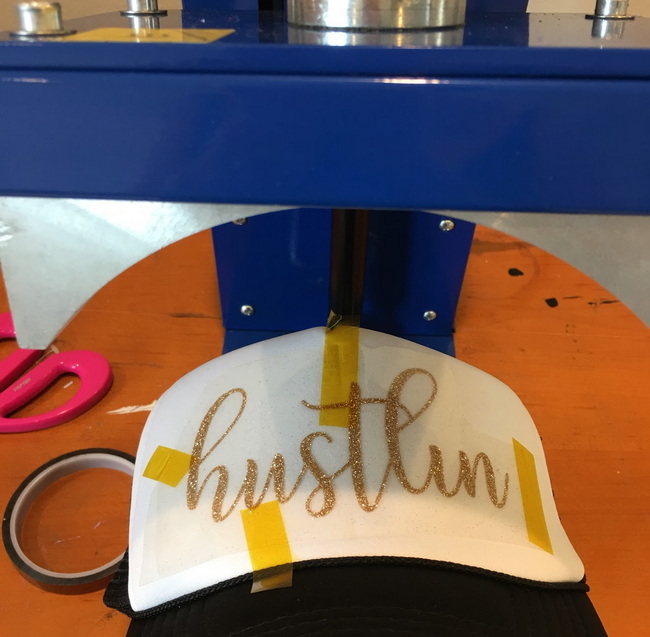
5. Fix patches with heat resistant tape to prevent movement.[2][1]
6. Cover with a fresh sheet of parchment or a Teflon cover.[2][4]
7. Press at the chosen settings, then open the press and allow patches to cool 20–30 seconds before peeling.[1][2]
Letting the patches cool briefly helps avoid blurred lines and surface distortion.[1][2]
Most sublimation patches include a protective layer over the adhesive that must be removed before the second press.[4][1]
1. Peel off the protective film to expose the adhesive backing.[1]
2. Position the patch on the garment, aligning with seams or using guides for consistent placement.[4][1]
3. Use a flat press or cap press set to a lower temperature, typically around 150°C (300°F) for 30–40 seconds at medium-firm pressure.[2][1]
4. Cover the patch with parchment and press.[1]
5. Cool the item and check that all edges are fully bonded; re-press if necessary with protection.[2][1]
Because adhesives vary by brand, always verify recommended second-press settings and perform small tests before full production.[6][2][1]
The following table summarizes typical settings for heat pressed sublimation patches; values may be fine-tuned for specific materials and equipment.[6][4][2][1]
Processing stage | Temperature | Time | Pressure |
First press: print to patch | 190–196°C (375–385°F) | 50–90 s | Medium to firm |
Second press: patch to hat/garment | About 150°C (300°F) | 30–40 s | Medium-firm |
General sublimation guideline (various) | 180–205°C (356–401°F) | 45–90 s | Medium |
Using a press with uniform platen temperature and stable pressure is often more important than targeting an exact number within the ranges.[7][3]
Good preparation reduces waste and helps deliver consistent results.[6][2]
- Pre-press garment areas for 5–10 seconds to remove moisture and wrinkles.[6][2]
- Clean patches and garments with a lint roller to avoid white specks caused by fibers.[2]
- Run color tests on spare patches before large runs, especially with new designs.[5][2]
Movement and excessive heat are the most common causes of quality issues.[6][2]
- Apply enough heat tape so patches cannot shift under pressure.[1][2]
- Use fresh parchment or butcher paper for every press cycle.[4][2]
- If edges appear scorched, lower temperature slightly or reduce press time.[6][2]
Cooling and inspection are essential for long-term durability.[10][2]
- Allow patches to cool fully before stacking or packaging.[2]
- Flex the garment gently to see if any patch edges lift, then re-press if necessary.[1][2]
- For items that will be washed frequently, run a wash test to confirm adhesion and color fastness.[10]
The press is the heart of a sublimation patch workflow, so hardware choice matters.[3][7]
- Even heating across the platen for consistent color and adhesion.[7]
- Clearly adjustable pressure to accommodate varying patch thicknesses.[3][7]
- Digital control of time and temperature for repeatable settings.[11][3]
- Optional dual-station or automatic sliding platens for higher throughput.[9][3]
Manufacturers such as Dongguan Colorful Equipment Technology Co., Ltd. (COLORFUL) integrate R&D, production, and technical service to support global users with complete heat transfer solutions.[8][3]
COLORFUL supplies flat presses, large-format presses, automatic dual-station units, fusing machines, and embossing equipment for textiles, leather, footwear, and advertising products. Many models feature intelligent controllers, uniform heating plates, and durable frames, helping users achieve consistent heat pressed sublimation patches across long production runs.[9][8][3]
For factories seeking higher efficiency, large dual-station hydraulic presses allow operators to prepare new garments on one station while the other is under pressure, significantly improving daily output.[8][9]
Dull patches usually indicate insufficient energy or incorrect print settings.[6][2]
- Increase temperature or extend pressing time within the recommended range.[6][2]
- Double-check that the correct paper profile and print mode are selected.[5][2]
- Confirm that the design file uses appropriate color profiles for sublimation.[5][2]
Ghosting appears as a faint second image or blurry edges.[2]
- Secure patches and transfers firmly with heat tape.[1][2]
- Pre-press patches briefly to drive out moisture.[6][2]
- Open and close the press smoothly to avoid shifting during contact.[2]
If patches peel away or edges lift after washing, the adhesive may not have been fully activated.[10][6]
- Re-press with slightly higher temperature or longer time, protecting the design with parchment.[10][6]
- Ensure adequate pressure on curved surfaces by using a cap press or support insert.[12][7]
- Test against the manufacturer's recommended settings to find the optimum combination.[6][2]
Diversified product lines help capture multiple market segments using the same patch workflow.[4][1][2]
- Fashion and streetwear hats with vivid logos and full-color artwork.[4][1]
- Workwear and uniforms with easily replaceable department or rank patches.[4][2]
- Promotional items such as backpacks, totes, and jackets for events and brand campaigns.[4][1]
Because each patch can carry variable data, personalization becomes easier without dramatically increasing production time.[5][2]
When order volume grows, upgrading to industrial-grade presses, fusing machines, and complementary equipment becomes essential.[3][8]
- Integrated solutions help centralize processes and reduce coordination between multiple suppliers.[8][3]
- OEM/ODM customization from manufacturers like COLORFUL allows buyers to specify platen sizes, pressure levels, and automation options for their patch workflows.[3][8]
For decorators and factories ready to improve consistency, speed, and product quality, upgrading the equipment side of the process is a strategic next step. Explore industrial-grade heat press solutions from COLORFUL, including flat presses, cap presses, and dual-station machines, and consult with technical specialists to match specific patch products, fabric types, and production volumes with the right hardware configuration.[8][3]
Sublimation inks bond into the coating of the patch, providing good wash resistance under normal conditions. For best results, confirm that the adhesive has been fully activated, recommend washing garments inside-out at moderate temperatures, and perform internal wash tests before releasing new product lines.[10][2]
A standard flat press that reaches the correct temperature and maintains even pressure is often sufficient for small runs. However, dedicated cap presses and industrial-grade machines provide better contact on curved surfaces and more consistent results at higher volumes.[7][3][1]
Blurry or soft-looking patches usually stem from moisture, movement, or low-resolution artwork. Pre-press patches, secure them with heat tape, use at least 300 dpi artwork, and confirm that you are printing with the correct sublimation paper and profile.[5][6][2]
If only the edges are lifting, many patches can be re-pressed using a protective sheet over the design and slightly adjusted time or temperature. Avoid repeated overheating, because excessive heat can weaken adhesive performance and dull the printed colors.[10][6][2]
Sublimation patches can often be applied to leather and synthetic leather items when the substrate can tolerate the required heat. Use lower second-press temperatures, extend pressing time, and always test on scrap material or hidden areas to protect the surface finish.[3][8][6][4]
[1](https://www.heatpressnation.com/blogs/blog/heat-pressed-patches-done-easy-with-sublimation)
[2](https://outoftheboxmerch.co.uk/blogs/merchandise-essentials-you-need/how-to-make-custom-patches)
[3](https://www.dcsbheatpress.com)
[4](https://www.brildor.com/blog/en/patches-for-sublimation-in-3-steps/)
[5](https://embroideryhooping.com/blogs/20251014-025323/diy-sublimation-embroidery-patches)
[6](https://www.htvront.com/pages/sublimation-guide)
[7](https://www.heatpressnation.com/pages/heat-press-101-tutorial)
[8](https://www.dcsbheatpress.com/top-10-heat-press-machine-manufacturers-in-china.html)
[9](https://www.dcsbheatpress.com/Hydraulic-dual-station-heat-press-machine-60-120cm-horizontal-transfer-printing-machine-for-jeans-pd564378938.html)
[10](https://www.facebook.com/groups/1655261694953377/posts/2096832934129582/)
[11](https://www.dcsbheatpress.com/ru/automatic-large-format-double-heated-heat-press.html)
[12](https://www.facebook.com/groups/733553463659020/posts/1883970585283963/)
[13](https://www.youtube.com/watch?v=sKGhTkdgZT8)
[14](https://www.youtube.com/watch?v=Z51Geo1uOLA)
[15](https://www.youtube.com/watch?v=mrlpjwHaCv8)


