If you have any questions, please feel free to contact us.| Email Us: info@dcheatpress.com


Views: 222 Author: Amanda Publish Time: 2026-01-14 Origin: Site


Content Menu
● Understanding Heat Transfer Paper Basics
● Match Paper To Your Printer Technology
● Key Selection Criteria for Heat Transfer Paper
>> Durability And Wash Performance
>> Production Volume And Workflow
● Step‑By‑Step Application Workflow
● Frequent Problems And Practical Solutions
>> Color Fading Or Dull Prints
>> Cracking, Peeling, Or Lifting
>> Visible Borders And “Transfer Window”
● Comparison Of Major Heat Transfer Paper Types
● Choose Your Ideal Heat Transfer Paper Setup
● FAQs About Heat Transfer Paper
>> 1. Can a regular office printer be used with heat transfer paper?
>> 2. Which heat transfer paper works best on dark garments?
>> 3. Why do some transfers crack or peel after washing?
>> 4. Is sublimation paper suitable for cotton T‑shirts?
>> 5. Do I need a heat press, or can I use a household iron?
Choosing the right heat transfer paper determines how bright, durable, and profitable your printed products will be. This comprehensive 2026 guide explains how to match paper to your printer, fabric, and production needs so you can achieve consistently professional results.[1][2][3]
Heat transfer paper is a coated paper that lets you print a design and then bond it to a substrate using heat and pressure from a heat press. A thin polymer film on the paper fuses the ink to textiles like cotton, cotton blends, polyester, nylon, and Lycra, creating a permanent image when correctly applied.[2][3][1]
- Common sheet sizes include 8.5" x 11", 11" x 17", and larger formats for commercial workflows.[4][1]
- Different formulations exist for inkjet, laser, white toner, and sublimation systems, and they are not cross‑compatible.[3][1]
- Most products are designed for garments, but some work on other substrates when used with proper coatings.[5][1]
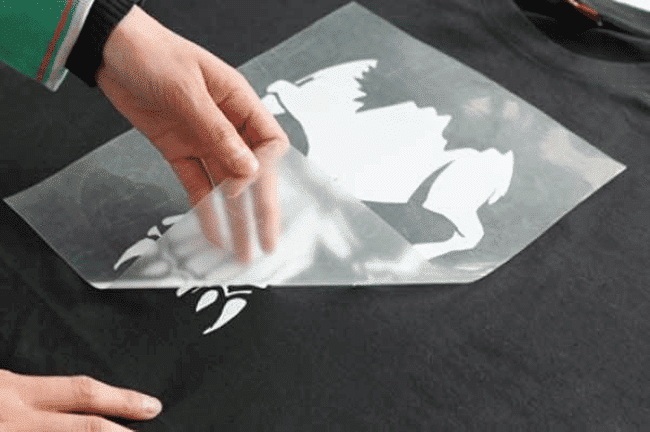
Printer technology is a critical factor when selecting heat transfer paper, because each category is engineered for specific temperatures, inks, and toners. Using an incompatible paper can cause jams, poor image transfer, or even hardware damage.[6][1][3]
Inkjet heat transfer paper is designed for standard home or office inkjet printers and is widely used by start‑ups and small shops. It comes in light and dark fabric versions with coatings optimized for aqueous inkjet inks.[7][1][3]
Key characteristics:
- Suitable for cotton and cotton‑blend garments, plus some synthetics when specified by the manufacturer.[1][3]
- Light fabric versions rely on the garment color showing through unprinted areas, while dark fabric versions include an opaque layer.[8][3]
- Typically offers lower entry cost and easy availability of compatible printers and papers.[4][7]
Laser heat transfer paper is formulated for toner‑based laser or LED printers and operates at higher fusing temperatures than inkjet systems. Some laser printers with very high fuser temperatures or fuser oil can cause issues with certain papers, so compatibility must be verified.[9][6][1]
Highlights:
- Often used for crisp logos, text, and graphic designs on light and dark garments.[10][9]
- Available as single‑step or multi‑step systems, and some versions are marketed as trim‑free to minimize visible edges.[6][9]
- Requires careful selection of printer models capable of handling specialty media without jamming.[5][6]
White toner transfer paper is engineered for printers that include a white toner channel, enabling strong color coverage on dark textiles. These systems are popular for complex full‑color graphics where opacity and vibrancy are essential.[11][9][1]
Notable points:
- Frequently used with a two‑step “A‑sheet/B‑sheet” process that combines color and adhesive.[11][6]
- Works on a wide range of garment colors, including black and heathered fabrics.[9][1]
- Often chosen for premium apparel and short‑run merchandising due to high perceived value.[9][11]
Sublimation transfer paper is built for sublimation printers using special dye‑sublimation inks. During pressing, the ink turns into gas and bonds with polyester fibers or polymer‑coated surfaces, creating highly durable prints.[12][3][1]
Essentials:
- Compatible with polyester fabrics and poly‑coated products like mugs, tumblers, and metal panels.[10][1]
- Not suitable for 100% cotton, because there is no polymer matrix for the dye to bond with.[13][3]
- Produces soft‑hand, fade‑resistant images ideal for sportswear and promotional goods.[12][1]
Choosing the best heat transfer paper involves more than matching it to the printer; the garment, application method, and durability expectations also matter.[4][5]
The fabric composition and shade directly influence which paper will perform best.[3][8]
Important guidelines:
- Cotton and cotton blends pair well with inkjet or laser transfer papers designed for textiles.[1][3]
- Polyester and performance fabrics are better suited to sublimation or specialized laser/white toner solutions.[10][9]
- Light garments can use transparent or light‑fabric papers, while dark garments require opaque or white‑backed solutions.[8][3]
Durability expectations are different for casual merchandise versus workwear or team uniforms. When wash‑fastness is critical, the right combination of paper, press settings, and aftercare is essential.[14][11][9]
Factors to consider:
- Higher quality papers and systems tend to maintain color and adhesion through more wash cycles.[11][9]
- Following brand‑specific time, temperature, and pressure guidelines significantly improves longevity.[15][14]
- Proper post‑press care, like waiting before the first wash and turning garments inside‑out, helps sustain image quality.[15][11]
Visual appearance and tactile feel affect perceived quality and wearability.[16][9]
Key aspects:
- Matte finishes can look more natural on casual garments, while glossy finishes may emphasize vivid graphics.[16][9]
- Thinner coatings usually yield a softer hand; thicker layers improve opacity but may feel heavier.[3][9]
- For dark or patterned fabrics, high‑opacity solutions prevent show‑through and preserve design integrity.[8][9]
Production scale determines whether a given paper is economical and efficient.[16][3]
Consider:
- Manual trimming and weeding can be time‑consuming for high‑volume projects.[3]
- Trim‑free or self‑weeding papers reduce labor and speed up throughput.[6][9]
- For very large runs, complementary methods like screen printing or DTF may be more efficient while still using transfer papers for short runs.[16][3]
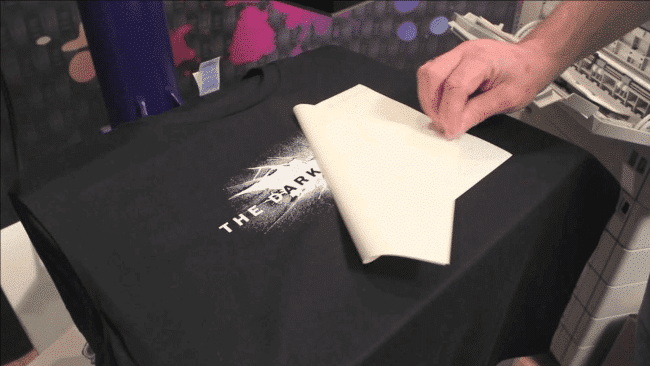
Although settings vary by manufacturer, most heat transfer paper workflows follow similar stages from artwork to final press.[14][5]
Solid preparation improves color accuracy and reduces misprints.[15][14]
Typical steps:
- Choose a paper that matches printer type and garment color, then confirm which side to print on.[5][1]
- Use appropriate printer settings, such as recommended media type and quality mode for the paper.[4][15]
- Mirror the artwork when required, especially for many light‑fabric inkjet and some laser papers, following brand instructions.[7][14]
Proper garment preparation helps ensure strong adhesion and a smooth finish.[14][5]
Best practices:
- Pre‑wash garments when recommended to remove residues and prevent shrinkage.[15][11]
- Pre‑press fabric for several seconds to remove moisture and wrinkles, creating a flat, dry surface.[7][14]
- Use lint removal tools on dark textiles to avoid debris that can interfere with the transfer.[5][15]
Time, temperature, and pressure must match the paper's specifications for reliable results.[14][5]
General considerations:
- Typical ranges for textile transfers are around 350–375°F, medium to firm pressure, and 15–30 seconds, but always verify the exact instructions.[15][14]
- Follow the indicated peel method (hot, warm, or cold), as incorrect peeling can cause lifting or texture issues.[9][14]
- For some laser and white toner systems, a secondary finishing press enhances durability and improves hand feel.[6][9]
Understanding common issues with heat transfer paper shortens the learning curve and reduces waste.[5][3]
Color problems may appear immediately after pressing or develop over multiple washes.[4][16]
Typical causes and responses:
- Incorrect print profiles or media settings reduce saturation and sharpness.[4][15]
- Incompatible ink and paper combinations can limit color gamut or cause bleeding.[3][16]
- Pressing outside the recommended temperature or time can under‑cure or over‑bake the image.[14][5]
Cracks or lifted edges are common complaints when settings or materials are mismatched.[11][9]
Helpful checks:
- Verify that the garment matches the fabric type the paper was designed for.[1][3]
- Confirm that the press delivers even pressure and that the substrate is perfectly flat.[17][14]
- Ensure the correct peel timing and angle, especially with multi‑step laser or white‑toner papers.[6][9]
A noticeable rectangular border can make prints look less professional, especially on dark garments.[9][3]
Ways to minimize it:
- Trim transfers closely around the design when using standard opaque papers.[3][4]
- Consider trim‑free or self‑weeding laser/white toner papers for complex shapes and fine details.[6][9]
- Design artwork with soft edges, fades, or integrated backgrounds that conceal boundaries.[10][16]
The table below summarizes key differences among popular heat transfer paper categories for faster decision‑making.[16][3]
Paper type | Required printer | Main substrates | Suitable garment colors | Typical use cases |
Inkjet light fabric paper | Standard inkjet printer | Light cotton and cotton blends | White and light colors | Budget T-shirts and small custom runs |
Inkjet dark fabric paper | Standard inkjet printer | Dark cotton and blends | Medium to dark colors | Custom dark tees and personalized gifts |
Laser transfer paper | Laser or LED printer | Light and dark textiles depending on type | Light or dark (model specific) | Logos, text, and graphics for businesses |
White toner transfer paper | White toner printer | Various textiles, including dark garments | Dark and saturated colors | Premium apparel and complex artwork |
Sublimation transfer paper | Sublimation printer with dye-sublimation inks | Polyester fabrics and poly-coated hard goods | Best on light colors | Sportswear, mugs, and promotional products |
To improve color quality, durability, and production efficiency, review your current printer, fabric mix, and required finish, then select heat transfer papers that precisely match those needs. Test a small selection of compatible inkjet, laser, white toner, or sublimation papers on your most common garments, document the best press settings, and turn those winning combinations into your standard workflow. By optimizing this match between printer, paper, and heat press parameters, every new job becomes a reliable opportunity to deliver higher‑value custom products to your customers.[14][11][5][16][1][3] Contact us to get more information!
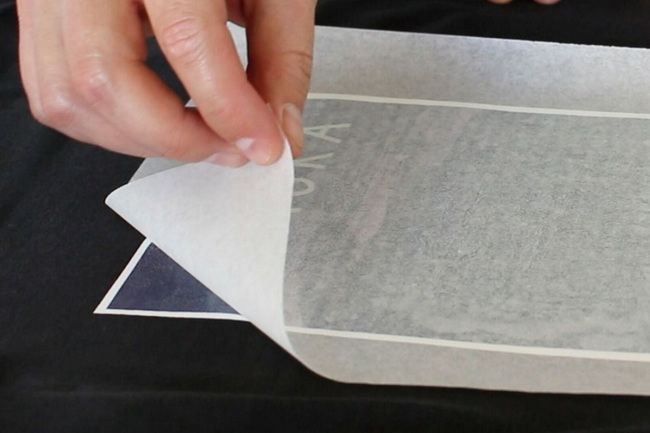
Many desktop inkjet and some laser printers can print on compatible heat transfer paper, but the paper must match the printer technology and fusing temperature range. Always verify compatibility in both the printer specifications and the paper manufacturer's documentation before running transfers.[5][6][1][3]
Dark garments generally require opaque solutions, such as dark‑fabric inkjet papers, certain laser papers, or white toner transfer systems that include a white layer. These products are designed to prevent the garment color from showing through and maintain vivid, accurate graphics.[8][11][9]
Cracking and peeling often result from incorrect temperature, pressure, or pressing time, or from using a paper not suited to the garment fabric. Inconsistent washing practices, such as very hot water or aggressive detergents, can further stress the transfer and shorten its life.[15][11][9]
Sublimation paper is optimized for polyester fabrics and polymer‑coated substrates, where the dye can chemically bond with the material. On 100% cotton, sublimation prints tend to appear weak and wash out quickly, so alternative transfer methods are recommended for cotton garments.[13][12][1][3]
Some heat transfer papers can be applied with a household iron, but consistent results are much easier to achieve with a dedicated heat press that controls temperature, time, and pressure. For ongoing production or commercial use, a heat press is generally considered the more reliable and efficient option.[18][15][14][5]
[1](https://www.heatpressnation.com/pages/heat-transfer-paper-buyers-guide)
[2](https://www.heatpressnation.com/blogs/blog/heat-transfer-paper-buyers-guide-1)
[3](https://ninjatransfers.com/blogs/dtf/heat-transfer-paper)
[4](https://limitlesstransfers.com/heat-transfer/heat-transfer-paper-buyers-guide/)
[5](https://www.visionsub.com/the-ultimate-guide-to-choosing-transfer-paper/)
[6](https://eastyltd.com/heat-transfer-paper-faq/)
[7](https://www.heatpressnation.com/blogs/academy/inkjet-heat-transfer-paper-the-budget-friendly-way-to-start-your-print-business)
[8](https://www.heattransferwarehouse.com/heat-transfer-paper/)
[9](https://bdfgraphics.ca/blog/types-of-heat-transfer-paper)
[10](https://www.longforte.com/blogs/trending-topics/unlock-the-perfect-print-choosing-the-right-heat-transfer-paper-for-your-project)
[11](https://www.hanzeltd.com/best-heat-press-transfer-paper-ultimate-guide.html)
[12](https://www.podbase.com/blogs/sublimation-printing)
[13](https://www.contrado.com/blog/sublimation-paper-heat-transfer-paper-13-questions-answered/)
[14](https://www.allprintheads.com/blogs/news/how-to-use-heat-transfer-paper)
[15](https://www.visionsub.com/essential-tips-for-successful-inkjet-heat-transfers/)
[16](https://raccoontransfers.com/blogs/guides/best-paper-for-heat-transfer)
[17](https://www.heatpressnation.com/blogs/blog/heat-press)
[18](https://www.allprintheads.com/blogs/news/heatpress-buyers-guide)
[19](https://www.youtube.com/watch?v=UVci1rO918M)
[20](https://www.youtube.com/watch?v=hN9866niWGU)
[21](https://www.xtool.com/blogs/xtool-academy/htv-frequently-asked-questions)


