If you have any questions, please feel free to contact us.| Email Us: info@dcheatpress.com


Views: 222 Author: Amanda Publish Time: 2026-01-13 Origin: Site


Content Menu
● What Is New in This Printer Generation
● Usability, Reliability, and Daily Operation
● Print Quality, Color Tools, and Fine Detail
● Software Ecosystem and Workflow Integration
>> Print Management and Color Utility
● Typical Use Cases and Ideal Users
● Practical Setup and Onboarding Steps
>> Network and Software Configuration
● FAQs
>> 1. Is this type of sublimation printer suitable for beginners?
>> 2. When does it make sense to move to a larger format sublimation printer?
>> 4. How important is the print management software for color accuracy?
>> 5. What factors affect ink consumption and running costs?
Selecting a sublimation printer that delivers consistent color, reliable performance, and seamless integration into an existing heat press production line is critical for any serious personalization or garment decoration business. This enhanced article refines structure, clarity, and readability while helping readers understand how these models fit different workflows and growth stages.[1][2][3][4]
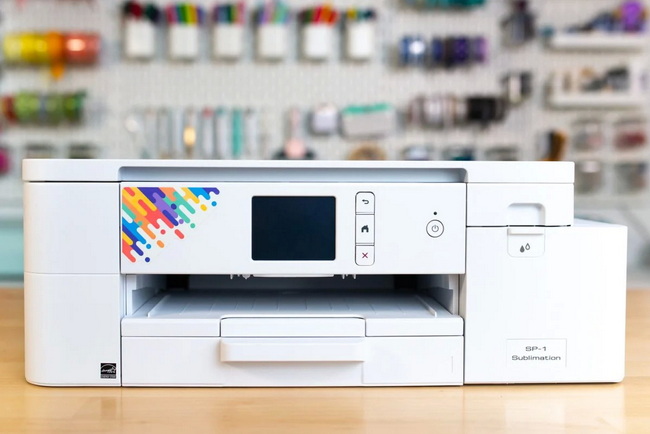
Both models represent a new generation of desktop systems with upgraded usability, connectivity, and durability compared to their predecessors. They are designed to reduce day‑to‑day friction in busy studios where time, color accuracy, and uptime are key.[5][2][4][1]
- A larger backlit LCD makes on‑device navigation and monitoring status much easier in production environments.[2][4]
- The updated button layout creates a more intuitive interface, lowering the learning curve for new team members.[4]
- Integrated WiFi connectivity allows flexible placement in the workspace without relying solely on USB cables.[6][4]
- A redesigned single roller bar helps reduce paper jams and improves media feeding on longer sheets.[7][4]
Everyday experience is heavily influenced by how the printer behaves over hundreds of jobs, not just its specifications. Changes in this generation focus on reducing interruptions and making operation more predictable.[3][8][1][4]
- Automatic maintenance cycles help keep the print head in good condition and reduce clog-related downtime.[8][9]
- Upgraded internal components, including metal parts in place of some plastic parts, increase overall durability and reduce the number of areas that need frequent manual cleaning.[4][7]
- An extended 2‑year warranty from many distributors and ongoing technical support provide extra reassurance for users who depend on consistent production.[9][2][4]
Print quality in sublimation is not only about resolution numbers; it also depends on ink, color management, and software working together. These systems are paired with a dedicated ink set and job management tools developed specifically for sublimation.[10][1][2][8]
- Dedicated sublimation inks are formulated to produce vivid color, deep blacks, and neutral grays with strong resistance to fading on compatible substrates.[1][2]
- Integrated print management software applies pre‑built color profiles that match paper, substrate, and print mode combinations, reducing trial‑and‑error.[11][8]
- A fine detail mode supports high‑definition output for designs with small text, intricate logos, and photographic elements, particularly important in professional personalization work.[12][4]
A key strength of these systems is the software ecosystem surrounding the hardware, which simplifies both design and color control. This ecosystem helps bridge design tools, printers, and downstream finishing processes such as heat pressing or embossing.[10][2][8][4]
The cloud‑based design platform offers ready‑made templates and assets for popular products, from drinkware to apparel and hard goods. This significantly shortens setup time for new designs and supports users who do not work in professional graphics software every day.[2][3][4]
- Product‑specific layouts help ensure that artwork is correctly sized before printing.[2][4]
- 3D or realistic previews can assist in visualizing finished products and reducing misprints.[4]
Print management utilities sit between design software and the printer, enforcing consistent color and appropriate ink laydown. They are essential for maintaining predictable output across different substrates.[8][10][2]
- Presets and profiles exist for common paper and substrate combinations, helping maintain accurate color with minimal manual tuning.[8]
- Advanced features, including spot color replacement and hue or saturation adjustment, make it possible to match corporate or school colors more precisely.[13][10]
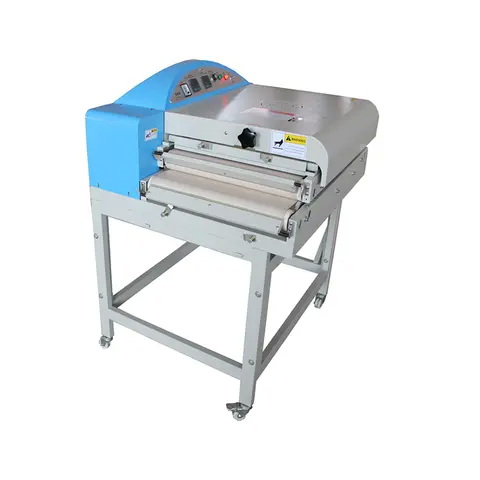
These printers are designed to cover a wide range of personalization and decoration needs, from small gift items to larger apparel and signage. Understanding the intended applications helps readers align printer choice with business goals and production equipment.[14][12][3][1]
- Compact setups in small studios and home businesses benefit from a smaller footprint and support for common formats used in mugs, tumblers, coasters, phone cases, and small clothing transfers.[15][3]
- Growing operations producing full‑front T‑shirt designs, small soft signage, or multiple smaller items ganged on a single sheet can leverage larger media sizes and extended bypass tray capabilities.[16][12]
- Businesses running multiple finishing devices such as heat presses and embossing units can integrate this printing platform as a dedicated sublimation station within a broader production line.[17][2]
A clear onboarding sequence helps first‑time users reduce mistakes and reach sellable results faster. The following steps present a practical, user‑friendly workflow from unboxing to first successful transfer.[14][6][2][8]
1. Place the printer on a stable, ventilated surface away from direct heat and moisture sources.[6][2]
2. Install the supplied ink cartridges in the correct CMYK slots until they lock into place.[2]
3. Power on the device and allow the automatic ink charging and initialization cycle to complete before printing.[6]
1. Use the on‑screen menu to connect via WiFi, Ethernet, or USB, depending on the studio layout.[7][6]
2. Install the print management utility and drivers on each design workstation that will send jobs to the printer.[10][6]
3. Create or sign in to an account for the online design platform, then test output with a simple template.[4][2]
1. Print a full‑color test image using recommended settings for the chosen sublimation paper and substrate.[8][2]
2. Press the transfer to a compatible blank at the time, temperature, and pressure recommended by the substrate or equipment manufacturer.[18][2]
3. Evaluate color, sharpness, and coverage, then fine‑tune press parameters or color presets as needed for future production.[13][8]
For businesses that want stable color, predictable production, and a streamlined workflow from design to finished sublimated product, pairing a dedicated sublimation printer with reliable finishing equipment is a powerful strategy. To build or upgrade a complete solution that includes professional heat press machines, welding systems, and embossing equipment, contact the sales and technical team today for a tailored configuration, practical setup advice, and long‑term support that matches current needs and future growth plans.[17][1][2]

Yes, many entry‑level and small business users choose this platform because it offers straightforward setup, integrated color management, and an online design environment that reduces the need for advanced graphic design experience.[3][1]
Moving to a larger format is recommended when product lines include full‑front apparel prints, larger panels or signs, or when ganging multiple designs on a single sheet can significantly boost efficiency.[12][3]
Yes, as long as substrates are compatible with sublimation, this platform can be added as a dedicated printing station feeding multiple heat presses, embossing machines, or other finishing devices.[17][2]
The print management utility is crucial because it contains substrate‑specific profiles and presets that control ink laydown, which helps achieve accurate, repeatable color across different materials and products.[10][8]
Running costs depend on coverage, image size, print modes, and how efficiently jobs are ganged on each sheet, with higher coverage designs and ultra‑fine modes consuming more ink per print.[12][5]
[1](https://www.sawgrassink.com/products/printers/)
[2](https://walternash.ie/product/sawgrass-sg800-a3-dye-sublimation-printer/)
[3](https://neilanddavid.com/blog/best-sublimation-printers-buyers-guide/)
[4](https://www.youtube.com/watch?v=3FCWcPw9T2Y)
[5](https://bestsublimationprinter.com/sawgrass-sublimation-printer-review-2025-sg500-vs-sg1000/)
[6](https://www.sawgrassink.com/products/printers/sg500/)
[7](https://gjs.co/equipment/new/p4338/sawgrass-sg500-a4-dye-sublimation-printer)
[8](https://www.sawgrassink.com/blog/tech-tip-using-presets-in-printmate/)
[9](https://themagictouch.eu/product/sawgrass-virtuoso-sg500/)
[10](https://www.sawgrassink.com/products/software/)
[11](https://www.pigskinsandpigtails.com/2022/10/5-reasons-the-sawgrass-virtuoso-sg1000-is-the-best-sublimation-printer-for-your-small-business/)
[12](https://www.heattransferwarehouse.com/blog/sawgrass-dye-sublimation-printers-sg500-vs-sg1000/)
[13](https://www.youtube.com/watch?v=ZPXlxWz9-7g)
[14](https://www.sawgrassink.com/blog/finding-the-right-sawgrass-printer-2/)
[15](https://perfecpresshtv.com/blogs/news/buying-guide-for-sawgrass-sg500-sg1000)
[16](https://www.heatpressnation.com/pages/sawgrass-sg1000-sublimation-printer-specifications)
[17](https://www.transferpersshop.nl/blog/sawgrass-sg500-sg1000-kies-de-beste-sublimatie-printer)
[18](https://uscutter.com/Sawgrass-Sg1000-Printer-With-Sublijet-Inks/)
[19](https://www.sawgrassink.com/products/printers/compare/)
[20](https://themagictouch.com/product/sawgrass-virtuoso-sg500/)
[21](https://www.youtube.com/watch?v=LSDsnmZ6ufo)
[22](https://www.youtube.com/watch%3Fv=mKH87EgwUBk)
[23](https://colourvistas.com/best-sawgrass-sublimation-printer/)


