If you have any questions, please feel free to contact us.| Email Us: info@dcheatpress.com


Views: 222 Author: Amanda Publish Time: 2026-01-14 Origin: Site


Content Menu
● Light vs Dark Heat Transfer Paper
>> Light Transfer Paper For Light Fabrics
>> Dark Transfer Paper For Dark Fabrics
● Inkjet vs Laser Heat Transfer Paper
● Sublimation Paper vs Heat Transfer Paper
>> How Sublimation Paper Works
● Key Factors When Choosing Heat Transfer Paper
>> Printer and Ink Compatibility
>> Durability and Wash Resistance
>> Sheet Size and Production Volume
● Step by Step Workflow With Heat Transfer Paper
>> Printing on the Correct Side
>> Peeling and Post Press Care
● Practical Use Cases for Different Users
>> Home Crafters and Hobbyists
>> Production Shops and Online Brands
● Heat Transfer Paper and Sublimation Paper Compared
>> Core Differences at a Glance
● Why Testing Sample Packs Makes Sense
● Take The Next Step With Your Heat Transfer Setup
>> 1. Can I use heat transfer paper in any printer
>> 2. Why do my transfers fade or crack after washing
>> 3. Do I always have to mirror my image
>> 4. Can sublimation paper work on cotton T shirts
>> 5. What is the best way to test a new transfer paper
If you use a heat press for T‑shirts, jerseys or promotional textiles, choosing the right heat transfer paper will determine whether your prints look professional or peel after a few washes. This guide explains the main paper types, printer compatibility, workflows and pro tips so you can confidently match the perfect paper to every project.
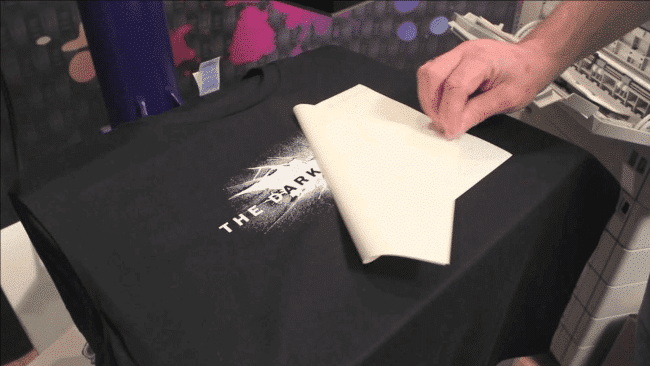
Heat transfer paper is a special coated paper that carries your printed design and releases it onto fabric under heat and pressure. A polymer film on the paper melts, bonding ink and fabric together to create a durable image on the garment surface.
- Works on cotton, cotton blends and many synthetic fabrics such as polyester, nylon and Lycra.
- Common sheet sizes are 8.5" × 11" and 11" × 17", which fit standard home and office printers.
- Unlike HTV, you can print full color images on a single sheet with no layering.
For detailed graphics, you can trim by hand or use a vinyl cutter's contour cut (print and cut) feature to remove unwanted background and improve the final look.
Understanding light versus dark transfer paper is critical to avoiding dull or invisible prints on your garments.
Light transfer paper is formulated for white or very light colored garments and relies on the shirt color itself to display white areas of a design.
- Because most printers do not print white ink, the fabric's own white or light tone becomes the “white” in the image.
- The image must be mirrored before printing so it appears correctly after pressing.
- The polymer layer is very thin, which usually produces a softer hand feel on light garments.
Use this type of paper on white, light gray, pale yellow, light blue and similar pastel tones where the fabric will not distort the colors of your print.
Dark or opaque transfer paper contains an opaque white layer between the design and the garment, which keeps colors bold on dark textiles.
- Designed for black and dark colored fabrics where colors must stay strong and readable.
- The printer treats it like normal paper, using the paper's white base for “white” areas, so mirroring is usually not required unless the instructions specify otherwise.
- The transfer is thicker and more noticeable to the touch but delivers vivid, saturated colors on challenging fabrics.
If you print light paper on a black T‑shirt, the design may look washed out or disappear, so always switch to dark or opaque paper for dark garments.
Different transfer papers are engineered for specific printer technologies, and using the wrong pairing can cause poor results or even printer damage.
Inkjet transfer paper is made for desktop inkjet printers and is widely used by home crafters and small businesses.
- Available in light and dark versions to match garment color.
- Easy to start with, especially if you already own an inkjet printer.
- Works well for photo style images when you use the printer's highest quality mode and manage ink saturation carefully.
Laser transfer paper is formulated for laser printers and behaves differently under heat and pressure.
- Must be used with compatible laser printers and avoided in models that rely on fuser oil or run excessively hot with certain one step papers.
- Comes in several variants, including:
- Single color papers for simple spot color designs.
- Full color papers for light or dark garments.
- White toner laser papers that can print white and bright colors and often self weed the background.
- Popular with small shops that want sharper text, faster output and advanced options such as self weeding transfers.
Laser systems are a strong choice when you need reliable volume printing with crisp lettering and consistent color.
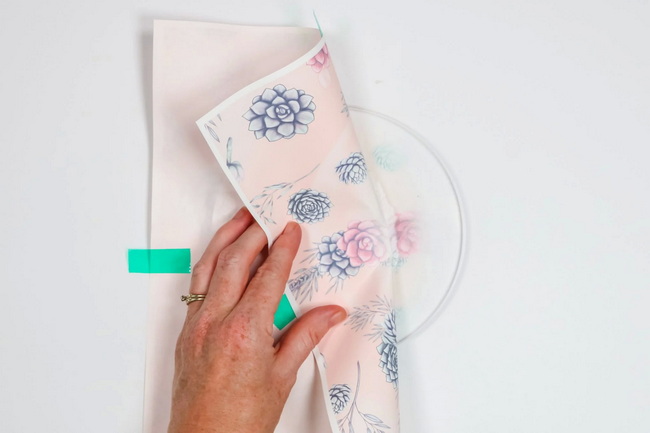
Sublimation paper and traditional heat transfer paper support different printing technologies and cannot be used interchangeably.
Sublimation paper is coated to hold dye sublimation inks that dry as a solid and turn to gas under high heat.
- Under heat, sublimation ink converts to gas and bonds inside polyester fibers or polymer coated surfaces.
- The design becomes part of the substrate, leaving no extra layer on top, which creates excellent durability and a “no feel” finish.
Sublimation paper only works with sublimation printers and inks, not with standard inkjet or laser printers.
Sublimation paper is the better option when you need:
- White or very light colored polyester garments and athletic wear.
- Hard substrates with polymer coatings, such as mugs, coated metal or certain plastics.
Heat transfer paper is preferred when you need to decorate cotton, cotton blends or dark fabrics, or when you only have conventional inkjet or laser printers available.
Beyond basic categories, professional results depend on several selection criteria that should guide your buying decisions.
- Match the paper exactly to your printer type: inkjet paper for inkjet printers, laser paper for laser printers and sublimation paper for sublimation printers.
- For laser printers, confirm acceptable temperature ranges and any warnings related to specific one step transfer papers.
- Heat transfer paper works best with cotton, cotton blends and many synthetics, including polyester, nylon and Lycra.
- Light papers require white or pastel fabrics, while dark papers are essential for black, navy, red and other saturated colors.
Durability varies widely between brands and technologies, so testing is important.
- Higher quality papers typically withstand many wash cycles while maintaining color vibrancy.
- Over saturated prints with too much ink are more likely to bleed, fade or crack during washing.
The feel of the finished print is a major part of the customer experience.
- Light papers with thinner polymer layers usually feel softer on the garment.
- Dark papers and some laser options may feel thicker but give stronger coverage on dark or textured fabrics.
- Standard 8.5" × 11" sheets suit small designs and home use.
- Larger 11" × 17" sheets fit oversized graphics, back prints and more efficient production layouts.
- Many businesses test multiple brands through sample packs before committing to bulk orders.
Following a clear workflow improves consistency, reduces waste and simplifies training new operators.
1. Choose a high resolution design or vector graphic that matches the final print size.
2. For light transfer paper, mirror the artwork before printing. For dark or opaque paper, follow the product instructions, as mirroring is often not needed.
3. Remove or mask unnecessary background areas if you plan to contour cut or want a cleaner border.
- Load the sheet so the printer applies ink or toner to the coated transfer side, not to the backing.
- Use the printer's best quality mode, but avoid pushing saturation to the maximum to reduce the chance of ink bleeding during washing.
- Simple rectangles can be cut with scissors or a straight edge trimmer.
- Complex shapes or logo outlines benefit from using a vinyl cutter with registration marks so you can contour cut precisely.
- For self weeding laser papers, follow the specific activation and separation steps defined by the manufacturer.
Always check the exact instructions for the paper you are using, then fine tune from there.
- Light inkjet papers often require moderate to high temperature and medium to firm pressure for around 15 to 30 seconds.
- Dark inkjet and laser opaque papers frequently use slightly lower temperatures and shorter press times to protect the transfer layer.
- A quality heat press provides much more even temperature and pressure than a household iron and is strongly recommended for consistent results.
- Some papers are hot peel, where you remove the backing immediately, while others require warm or cold peel; follow these instructions closely.
- Allow garments to rest for at least 24 hours before washing for best durability.
- Turn garments inside out, wash in cold or warm water and avoid dry cleaning to extend the life of the print.
Different users and business models naturally favor certain printer and paper combinations.
- Inkjet light and dark transfer papers offer an affordable way to create one off shirts, family gifts, party apparel and fan merchandise.
- Start with small packs, test settings on sample fabrics and keep notes of the best temperature, time and pressure for your specific setup.
- Laser transfer papers and white toner systems give faster output, sharper text and access to self weeding designs with less trimming.
- Combining transfer papers with reliable heat presses, welding and embossing equipment allows you to expand into labels, patches and mixed media garments.
- Use sublimation paper for high volume polyester lines and performance wear where low feel and durability are critical.
- Add heat transfer paper systems for cotton merchandise, dark garments and limited edition runs that require color flexibility and fast turnaround.
- Standardize on a small set of proven paper types, record optimal press settings and train staff on a consistent operating procedure.
Feature | Heat Transfer Paper | Sublimation Paper |
Compatible printers | Standard inkjet or laser printers | Dedicated sublimation printers with sublimation ink |
Best fabric types | Cotton, cotton blends, many synthetics | Polyester and polymer coated surfaces |
Suitable garment colors | Light and dark using light or dark papers | Mainly white or very light colors |
Durability and feel | Adds a visible film layer that can crack over time | Ink becomes part of fibers, very durable, no real feel |
Typical use cases | Custom cotton shirts, small runs, mixed fabrics | Sportswear, premium polyester, mugs, coated panels |
This type of side by side comparison can also be adapted into a simple chart or infographic for your website to help visitors make faster decisions.
If you are new to heat transfer paper or experimenting with new fabrics or printers, sample packs offer a safe and cost effective way to learn.
- Packs that include several sheets of multiple paper types allow you to compare color strength, feel and wash performance side by side.
- Once you identify your preferred papers, you can order full packs with confidence and build repeatable print settings around them.
- Testing under real world washing and wearing conditions is the most reliable way to confirm the right combination for your needs.
Now that you understand how heat transfer paper types, printer compatibility, fabric choice and press settings all work together, it is time to put that knowledge into action. Review your current printer and garment mix, choose appropriate light or dark papers, and run small test batches until you are satisfied with the color, feel and wash durability. Then, scale your production with high quality heat presses and complementary equipment, and work with a trusted supplier who can recommend specific papers, machines and settings tailored to your business goals.
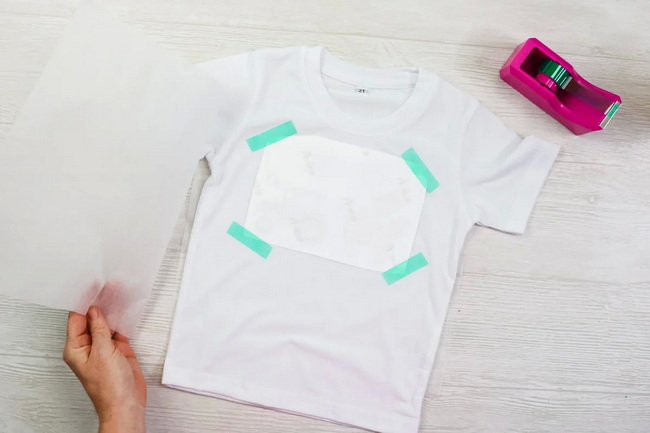
No. You must always match the paper to the printer type, using inkjet papers for inkjet printers, laser papers for laser printers and sublimation papers for sublimation printers. Mixing them can lead to poor results or damage.
Fading or cracking usually comes from low quality paper, excessive ink saturation, incorrect press temperature or time, or washing too soon after pressing. Waiting at least 24 hours and washing garments inside out can improve durability.
You need to mirror the design when using most light transfer papers, because the printed side is placed face down on the fabric. Dark or opaque papers are often printed without mirroring, but you should always check the instructions for the specific product.
Standard sublimation processes require polyester content or polymer coated surfaces, so they are not suitable for 100 percent cotton T shirts without special pretreatments or hybrid transfer systems. For cotton garments, traditional heat transfer papers are generally more appropriate.
Print several small designs on similar fabrics, vary press time and temperature within the recommended range, and then wash test the garments. Compare color, feel and durability after multiple washes to find the settings and paper that perform best.


