If you have any questions, please feel free to contact us.| Email Us: info@dcheatpress.com


Views: 222 Author: Amanda Publish Time: 2026-01-15 Origin: Site


Content Menu
● What Is Heat Transfer Vinyl?
● Essential Tools and Materials
● Step‑by‑Step HTV Application
>> Step 2: Prepare and Cut the Vinyl
>> Step 4: Position on the Garment
>> Step 5: Apply Heat and Pressure
● Types of Heat Transfer Vinyl
>> Overview of Popular HTV Types
● Choosing Compatible Fabrics and Surfaces
● Practical Tips for Beginners and Growing Shops
● Advanced Techniques and Special Effects
● Troubleshooting Common HTV Problems
● Care and Washing Instructions
● Working With Professional Heat Press Equipment
● Start Your Next HTV Project With Confidence
● FAQs About Heat Transfer Vinyl
>> 1. What is the difference between heat transfer vinyl and adhesive vinyl?
>> 2. Can heat transfer vinyl be layered?
>> 3. Why is my heat transfer vinyl peeling after a few washes?
>> 4. Is heat transfer vinyl suitable for children's clothing?
>> 5. Can heat transfer vinyl be applied to surfaces other than fabric?
Heat transfer vinyl (HTV) uses heat and pressure to activate a heat‑sensitive adhesive on the back of the vinyl, creating a durable bond with fabrics such as T‑shirts, bags, and home textiles. When applied with the correct time, temperature, and pressure, HTV designs can withstand many wash cycles without peeling or cracking.[1][2][3]
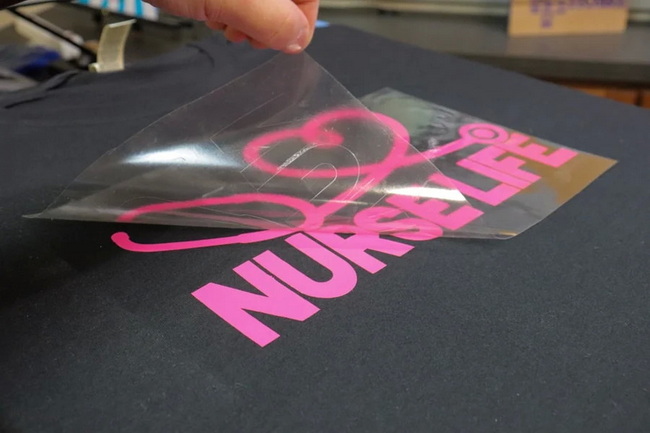
Heat transfer vinyl is a thin polyurethane or PVC‑based film with a colored layer on top and a heat‑activated adhesive layer on the back. The film is cut into a design, weeded, and then pressed onto garments or soft goods using a heat press or an iron.[2][4][5][1]
Key characteristics include:
- A clear carrier sheet that holds the design in place during cutting and pressing.[4][1]
- Multiple finishes, such as matte, gloss, glitter, flock, puff, brick, holographic, and glow‑in‑the‑dark.[6][2]
- Application ranges that typically sit around 260–315°F (130–160°C) for 8–15 seconds, depending on the specific HTV.[7][2]
Heat transfer vinyl relies on a controlled combination of heat, pressure, and time. When the adhesive layer reaches its activation temperature, it softens and flows into the surface fibers of the fabric before solidifying again as the garment cools.[3][1][2]
The bonding process can be summarized as:
- Heat softens the vinyl film and melts the adhesive enough to make it flow.
- Pressure pushes the softened adhesive into the weave of the fabric.
- Cooling locks the adhesive and vinyl into place, forming a flexible, wash‑resistant decoration.[1][7]
For visual support, a simple cross‑section diagram showing the carrier, vinyl, adhesive, and fabric layers during pressing can help readers see how the bond forms.[2][4]
Working efficiently with HTV requires more than just vinyl and fabric. A solid toolkit improves consistency, reduces waste, and helps maintain quality across multiple jobs.[5][8]
Recommended tools and materials:
- Cutting machine such as a Silhouette, Cricut, or professional vinyl cutter for precise, repeatable cuts.[5][1]
- Heat press for even temperature and pressure over the entire design, which is more reliable than a household iron.[9][5]
- Weeding tools including tweezers, hooks, or precision knives to remove unwanted vinyl cleanly.[3]
- Protective cover sheets like Teflon, parchment, or multipurpose paper to protect both the platen and garment.[7]
- Test fabrics or sample garments that allow users to dial in settings before moving to premium blanks.[8][10]
A small flowchart illustrating the basic sequence “Design → Cut → Weed → Position → Press → Peel → Cure” can make the workflow more intuitive for beginners.[1][5]
A clear, repeatable process helps both hobbyists and small shops improve their results over time. Short, distinct steps also support readability and user confidence.[8][5]
- Create the artwork in compatible design software and use simple shapes or bold lettering for early projects.
- Mirror the design horizontally before cutting because the vinyl is cut from the back, with the carrier facing down, so the final image appears correct when flipped onto the garment.[8][1]
- Place the HTV on the cutting mat with the shiny carrier side down and the dull adhesive side up, unless the manufacturer specifies otherwise.[5][8]
- Choose the appropriate material preset (for example, “Heat Transfer – Smooth” or “Heat Transfer – Flocked”) and adjust blade depth so the machine makes a kiss‑cut through the vinyl but not through the carrier sheet.[3][8]
- Make a small test cut to confirm that the vinyl weeds cleanly without tearing or dragging before committing to a full‑size design.[10][8]
- Weed away excess material, leaving only the desired parts of the design on the clear carrier so that edges and details remain sharp.[3][8]
- Lay the garment flat and pre‑press it for a few seconds to remove wrinkles and surface moisture, which can interfere with adhesion.[7][5]
- Position the design on the garment with the carrier facing up and the vinyl against the fabric, using rulers or alignment tools for consistent placement across multiple pieces.[5][8]
- Set the heat press to the correct temperature and time according to the HTV's technical sheet, often between 260–315°F (130–160°C) for 8–15 seconds.[2][7]
- Close the press with firm, even pressure so every part of the design receives similar force, which helps prevent weak spots or early lifting.[7][5]
- Peel the carrier according to the product instructions, which may specify hot peel, warm peel, or cold peel.[6][7]
- If part of the design lifts with the carrier, lay it back down, cover with a protective sheet, and press again for a few seconds to re‑activate the adhesive.[7]
Different HTV films offer distinct textures, finishes, and thicknesses, and each category has preferred settings and use cases. Grouping them by type helps readers choose the right material for specific projects.[6][2]
HTV Type | Main Characteristics | Typical Heat Press Settings | Peel Style |
Standard PU | Thin, flexible, popular for everyday projects | 260–315°F for 8–15 s | Hot or warm |
Glitter | Sparkling textured finish for bold designs | 266–284°F for 8–12 s | Warm or cold |
Flock | Velvety, raised surface that feels like suede | 275–305°F for 10–15 s | Warm or cold |
Puff / 3D | Expands to create a raised three-dimensional look | Around 285–315°F for 10–15 s | Hot or warm |
Brick / Thick 3D | Very thick, rigid surface with strong dimension | About 310°F for 15 s, medium pressure | Cold peel |
A compact table like this can be turned into a visual chart to help readers compare time and temperature ranges across multiple HTV categories.[2][7]
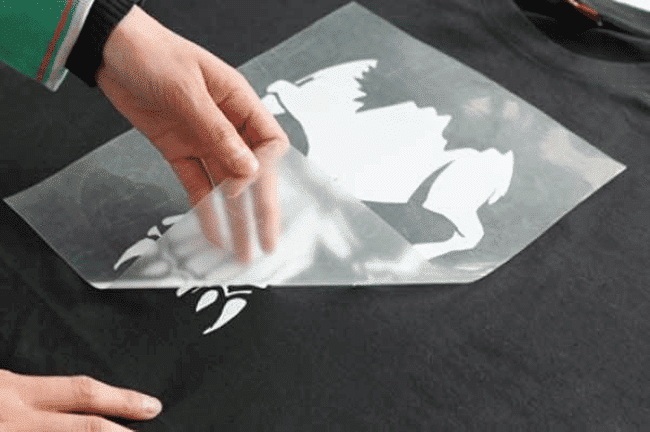
Matching HTV to compatible fabrics is essential for long‑term durability and visual quality. Some fabrics handle standard HTV settings easily, while others are more heat sensitive and require special care.[13][4]
Generally suitable substrates:
- Cotton, polyester, and cotton/poly blends, which respond well to common HTV temperatures and pressures.
- Many performance fabrics, canvas bags, and some caps, provided that initial testing confirms good adhesion and limited dye migration.[4][1]
Materials that need more attention:
- Heat‑sensitive synthetics that can scorch or warp at typical HTV temperatures, such as certain nylon and acetate blends.[13][3]
- Water‑repellent or coated fabrics that may resist standard adhesives and require specialized HTV or lower‑temperature formulas.[4][13]
Beginners benefit from practical guidelines that reduce frustration and wasted blanks, while small shops rely on standardized processes to handle repeat orders. Simple adjustments in workflow can significantly improve results.[8][5]
Helpful practices include:
- Starting with simple, single‑color designs on standard PU HTV to learn cutting and weeding before moving to intricate artwork or layering.[14][8]
- Keeping a written record of successful press settings, including fabric type, HTV brand, temperature, time, and pressure for future reference.
- Using spare garments or scrap fabrics to test new HTV types, specialty finishes, or unfamiliar fabrics before taking on time‑sensitive jobs.[10][3]
More experienced users often explore complex designs and mixed‑media applications to add value and differentiation. Organizing this information into short, focused sections helps readers identify which advanced methods match their current skill level.[15][4]
Popular advanced approaches:
- Layering multiple HTV colors, pressing each layer for a shorter time and finishing with a full press to avoid over‑baking the adhesive.
- Combining direct‑to‑film (DTF) transfers with specialty HTV, such as puff or glitter, to introduce texture and dimension around high‑resolution printed imagery.[15]
- Mixing HTV with other decoration methods like screen print transfers, sublimation on polyester, or embroidery for premium branding on teamwear and corporate apparel.[13][4]
Many issues with HTV come down to a few controllable variables, such as temperature, pressure, time, or fabric choice. A concise troubleshooting section helps users quickly identify and solve frequent problems.[3][7]
Frequent problems and likely solutions:
1- Peeling or lifting after washing
- Often caused by low temperature, insufficient pressure, or a shortened press time.
- Solution: Repress with proper settings and verify fabric compatibility before producing additional pieces.[3][7]
2- Scorching, shine marks, or fabric distortion
- Often caused by too much heat or overly long press times on sensitive materials.
- Solution: Lower the temperature, shorten the press time, or use a pressing pillow and protective sheet.[13][3]
3- Rough edges or lost detail after cutting
- Often connected to incorrect blade depth, a dull blade, or cutting without the appropriate mat.
- Solution: Adjust blade depth for a clean kiss‑cut, replace blades regularly, and follow the cutting machine's recommendations for mat usage.[8][3]
Long‑term durability depends not only on proper application but also on how the garment is washed and dried. Clear aftercare instructions help reduce complaints and extend the life of finished products.[2][3]
Best‑practice care guidelines:
- Wait at least 24 hours before the first wash so the adhesive can finish curing.
- Wash garments inside‑out with mild detergent in cold or warm water and avoid bleach or aggressive fabric softeners.[2][3]
- Tumble dry on low heat or hang to dry, and avoid direct high‑heat contact between the design and irons or very hot dryer drums.[3]
Professional heat presses offer more precise control over temperature, time, and pressure than household irons. This higher level of control supports consistent quality, especially as production volumes increase or specialty HTV types are introduced.[9][5]
Important features to evaluate:
- Even heat distribution across the platen, which reduces the risk of under‑pressed corners or cold spots on larger designs.[9]
- Reliable digital controls for time, temperature, and pressure so operators can match HTV technical sheets accurately.[9][7]
- Robust construction designed to handle repeated open‑and‑close cycles in small‑batch or continuous production environments.[9]
Understanding the structure, tools, and workflow behind heat transfer vinyl makes it much easier to move from theory into real‑world projects. Apply the steps and settings described here, then refine them through testing and documentation to build a repeatable process for your own workshop or business.[4][8][3]
If you are planning to upgrade your equipment or expand into more advanced HTV finishes, now is the ideal moment to review your current setup, define your next project, and put these best practices into action on your next run.
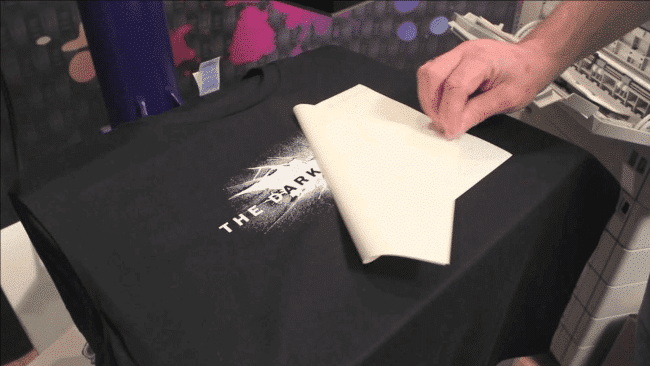
Heat transfer vinyl uses a heat‑activated adhesive and is applied with a heat press or iron onto fabrics and soft goods, while adhesive vinyl relies on a pressure‑sensitive backing for hard surfaces such as glass, plastic, or walls.[4][3]
Many standard PU HTVs can be layered on top of each other, provided that each layer stays within its recommended temperature and time range and the total stack does not become excessively thick.[5][4]
Peeling after washing usually indicates that the vinyl was pressed at too low a temperature, with insufficient pressure, or for too short a time, or that the fabric was incompatible. Repressing with correct settings and verifying the fabric type often resolves the issue.[7][3]
Many major HTV brands offer products tested for safety and free of harmful substances, but it is important to review each product's safety and compliance information before decorating garments for children.[4][3]
Some HTV products can be pressed onto alternative substrates such as wood or certain faux leathers, but adhesion and durability vary widely, so testing is essential before selling or gifting finished items.[13][4]
[1](https://www.craftexpress.com/blog/heat-transfer-vinyl-8/how-does-heat-transfer-vinyl-work-139)
[2](https://teckwrapcraft.com/blogs/tips/how-does-heat-transfer-vinyl-work)
[3](https://excelblades.com/blogs/tool-corner-1/what-is-heat-transfer-vinyl-and-what-tools-do-you-need)
[4](https://www.yoprint.com/blog/the-ultimate-guide-to-heat-transfer-vinyl-htv)
[5](https://blog.stahls.com/how-to-use-htv/)
[6](https://www.heatpressnation.com/blogs/academy/siser-brick-600-a-guide-to-using-3d-heat-transfer-vinyl)
[7](https://www.siserna.com/files/heat-transfer-vinyl-instructions.pdf)
[8](https://www.coastalbusiness.com/blog/heat-transfer-vinyl/heat-transfer-vinyl-101.html)
[9](https://www.heatpressnation.com/pages/heat-press-101-tutorial)
[10](https://signwarehouse.com/blogs/content/basic-guide-to-t-shirt-vinyl-and-heat-transfer-film)
[11](https://kimsdirect.com/blogs/news/heat-transfer-vinyl-and-iron-on-basics-what-you-need-to-know-in-2025%3Fsrsltid=AfmBOor44k8k2NPOVR82Sfl86oSXF8-8OFfG-qLiRTD5WSDgLPbNa7IG)
[12](https://mayflaum.com/2019/10/08/htv-heat-transfer-vinyl-basics/)
[13](https://www.xtool.com/blogs/how-to/heat-transfer-printing)
[14](https://atlantavinylstore.com/blogs/news/a-beginners-guide-to-heat-transfer-vinyl%3Fsrsltid=AfmBOoqZmbw49ntOBCLIw6Npp9FF0ALtA49ciEBN_N3vD48RPZ34KIQp)
[15](https://www.heatpressnation.com/blogs/academy/mixing-dtf-and-specialty-htv)
[16](https://persialou.com/how-to-use-heat-transfer-vinyl/)
[17](https://www.gmcrafts.co.uk/beginner-guide/)
[18](https://thevinylcorporation.co.uk/the-ultimate-guide-to-htv-vinyl-everything-you-need-to-know-in-the-uk/)
[19](https://www.youtube.com/watch%3Fv=ohcDgmR1Cew)
[20](https://www.craftycutter.co.uk/blog/a-guide-to-heat-transfer-vinyl)
[21](https://www.bdedesign.co.uk/mastering-e-e-a-t-the-key-to-ranking-in-2025-and-beyond/)
[22](https://signwarehouse.com/blogs/content/basic-guide-to-t-shirt-vinyl-and-heat-transfer-film%3Fsrsltid=AfmBOoouh2hj5y7s_QJLgkXX9JV2DSnb-YWA5HgUVjywBi_IfXNb1wn3)
[23](https://www.singlegrain.com/seo/e-e-a-t-strategies-that-guarantee-googles-trust-in-2025/)
[24](https://www.stahls.co.uk/blog/five-heat-printing-tips-for-beginners.html%3Fsrsltid=AfmBOoqPPB6HjICahXi84VaMZSquQpQ-5WQ8jcCiNSHNU0MCYklaBFKh)
[25](https://vionsys.com/seo-in-2025-e-e-a-t-sge-and-search-intent-optimization/)
[26](https://www.htvront.com/blogs/basics/what-is-htv)
[27](https://atlantavinylstore.com/blogs/news/a-beginners-guide-to-heat-transfer-vinyl%3Fsrsltid=AfmBOoqy8eysFpC_PdOv7caxYoBWUbECIgJIPhjY1_kOerH2r1KYJAAS)
[28](https://www.linkedin.com/posts/aiswariya-kolora_seo-googleranking-seo2025-activity-7298689821324034048-I411)


