If you have any questions, please feel free to contact us.| Email Us: info@dcheatpress.com


Views: 222 Author: Amanda Publish Time: 2026-01-02 Origin: Site


Content Menu
● How Sublimation Printing Works
● Sublimation Printing Workflow: Step-by-Step
>> Step 2: Print on Sublimation Paper
>> Step 3: Prepare Your Substrate
>> Step 4: Apply Heat and Pressure
>> Step 5: Cool, Inspect, and Finish
● What You Can Make with Sublimation
● Compatible Materials and Blanks
>> Best Materials for Sublimation
>> Materials to Avoid or Treat Differently
● Oven vs Heat Press: Which to Use When
● Advantages of Sublimation Printing
>> Vivid, Photo-Quality Results
>> Cost-Effectiveness for Small Batches
● Limitations and Practical Workarounds
>> No White Ink
>> Restrictions on Dark and Cotton Fabrics
>> Learning Curve for Settings
● Types of Sublimation Printers
>> Dedicated Desktop Sublimation Printers
>> Wide-Format Sublimation Printers
● What to Look for When Choosing a Sublimation Printer
>> Print Size and Media Handling
>> Resolution and Color Performance
>> Ink Delivery and Running Costs
● Practical Setup Checklist for New Users
● Pro Tips for Consistent Sublimation Results
● Equipment Strategy: Combining Presses and Ovens
● Take the Next Step: Turn Designs into Durable Products
● FAQs
>> 1. What is the difference between a regular printer and a sublimation printer?
>> 2. Can any home printer be used for sublimation?
>> 3. Is sublimation printing suitable for black t-shirts?
>> 4. How long do sublimation prints last?
>> 5. Is sublimation profitable for small businesses and crafters?
A sublimation printer is a specialized inkjet device that uses heat-activated dye to permanently infuse full-color designs into polyester fabrics and coated hard goods such as mugs and tumblers. This technology, paired with a heat press or sublimation oven, enables crafters and small businesses to produce durable, high-value custom products on demand.
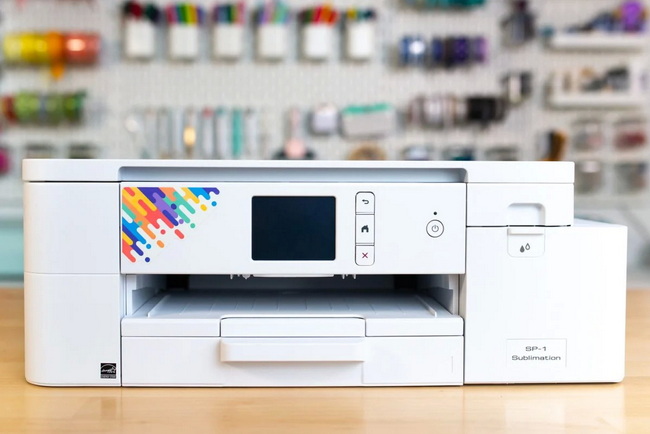
Sublimation relies on a phase change in which solid ink turns directly into gas under high temperature and pressure, without passing through a liquid stage. The gaseous dye penetrates polyester fibers or polymer coatings, and as the substrate cools, the dye re-solidifies inside the material, forming a permanent, full-color image.
The process begins with printing a mirror-image design using sublimation ink on specialized transfer paper. After the print is positioned and secured on a compatible blank, heat and pressure activate the dye, which then bonds with the surface, creating a sharp, vibrant, and long-lasting result.
Start by designing artwork in your preferred software and setting the resolution high enough for sharp printing, typically around 300 dpi. Use color management workflows that convert your design into accurate output profiles, so the printed colors match your on-screen expectations as closely as possible.
Before printing, ensure the design is mirrored; this is often handled automatically by the printer driver or print manager, but can also be done manually in the design software if needed.
Load sublimation ink and coated sublimation paper into your printer and select the correct paper and quality settings. Dedicated sublimation printers typically offer presets optimized for dye-sub inks, which help control ink density and reduce issues like banding or oversaturation.
For consistent results, print in a controlled environment, avoiding high humidity that can affect drying times and color stability on the transfer paper.
Choose blanks made from polyester-rich fabrics or hard substrates with a suitable polymer coating. Before pressing, remove dust and lint with a lint roller and pre-press fabrics briefly to eliminate moisture and wrinkles that could cause fading, spotting, or uneven transfers.
Once the blank has cooled from pre-pressing, position the printed transfer face down on the surface and secure it tightly with heat-resistant tape, ensuring there are no gaps, bubbles, or loose edges.
Use either a flat heat press, a tumbler or mug press, or a sublimation oven, depending on the product and shape. For textiles and many hard goods, temperatures usually fall in the range of 180–205°C (356–401°F), with pressing times adjusted based on substrate thickness and manufacturer recommendations.
Maintaining even pressure is critical, especially on curved items, to avoid light areas, ghosting, or white creases. For ovens, shrink wrap or silicone wraps can help ensure firm, uniform contact between the transfer and the item.
After the pressing or baking cycle, remove the transfer carefully, following the recommended hot or warm peel guidelines for the specific blank. Allow the product to cool fully before packing, wearing, or washing to give the dye time to stabilize and reach optimal durability.
Inspect each item for color consistency, sharpness, and defects, and record the time, temperature, and pressure used so successful settings can be repeated on future jobs.
Sublimation printing supports a broad catalog of custom products that appeal to both personal and commercial markets. This flexibility makes it suitable for home crafters, online sellers, and small production studios.
Common applications include polyester t-shirts, jerseys, and sportswear, where vivid color and breathability are important. It also excels on coated drinkware such as tumblers, mugs, and water bottles, along with accessories like tote bags, cosmetic pouches, and lanyards.
Beyond apparel and drinkware, sublimation is frequently used for mousepads, puzzles, keychains, coasters, aluminum panels, and MDF ornaments. Many creators choose a specific niche, such as team uniforms, corporate gifts, or commemorative items, to build a recognizable brand and streamline production.
Sublimation is most effective on surfaces that contain polyester or are coated with a polyester-based polymer. The higher the polyester content, the more vivid and durable the prints tend to be.
Ideal options include:
- 100 percent polyester fabrics, which provide maximum color vibrancy and wash resistance.
- Poly-blends with at least 65 percent polyester, which offer a softer hand with slightly more muted colors.
- Polymer-coated ceramic mugs, metal panels, tumblers, and MDF boards designed specifically for sublimation.
Cotton and other natural fibers without a specialized coating do not form a permanent bond with sublimation dye. Dark cotton garments are especially challenging, as the absence of white ink and the underlying color can drastically affect the final image.
Uncoated glass, metal, and wood do not accept sublimation dye on their own. When these materials are used, they are usually pre-treated with a sublimation-ready coating or combined with intermediary media, such as sublimation-friendly transfer films, to achieve acceptable results.
A sublimation oven warms the entire product with circulating hot air, which is especially helpful for round or three-dimensional items. This method is often chosen for full-wrap tumblers, intricate mug shapes, and substrates that do not lie flat.
Ovens are also effective when processing several items in a single cycle, making them a practical choice for batch production of drinkware. The trade-off is a larger footprint and slightly more complex handling, since shrink wraps or silicone sleeves are commonly needed to maintain firm contact.
Flat heat presses and cylindrical mug or tumbler presses provide direct contact between heated platens and the product. For t-shirts, hoodies, mousepads, and flat panels, a flat press is typically the fastest and most repeatable option.
A tumbler or mug press is ideal for standard-sized drinkware where dimensions are consistent. These presses allow precise control over temperature, time, and pressure, making them easier to standardize in a production workflow.
A helpful table can summarize the main differences, with columns for equipment type, best product types, capacity per cycle, space requirements, and learning curve, enabling readers to quickly decide which solution suits their studio.
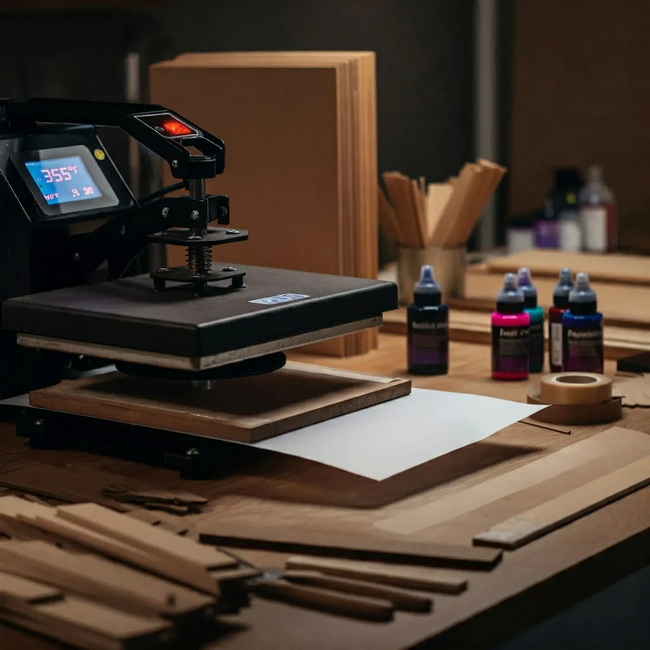
Sublimation is known for producing smooth gradients, detailed photographs, and precise text. Because the dye becomes part of the substrate, printed images often appear clean and uniform even after repeated use and washing.
The process also supports full-color and full-bleed designs without the need for multiple screens or separations, which brings higher design freedom for small runs.
As the dye sits inside the fibers rather than on top, apparel remains flexible and breathable, with no noticeable coating or heavy texture on the surface. This is especially important for sportswear and performance garments that need to stretch and wick moisture without cracking or peeling.
Hard substrates benefit similarly, as the bonded dye resists scratching, fading, and chipping better than many surface-level decorating methods.
Setups do not require screens, plates, or extensive prepress work, making one-off items and short runs efficient to produce. The ability to print each transfer with different names, numbers, or artwork at no additional setup cost is a strong advantage for personalized products.
Sublimation systems commonly use cyan, magenta, yellow, and black inks without a white channel. Areas that appear white in a design are created by revealing the underlying blank, which means light-colored substrates are essential for accurate color reproduction.
To imitate white or pastel features on darker materials, some creators rely on white or light-colored blanks, strategic negative space in artwork, or additional layers of specialty media.
Dark t-shirts and cotton garments are not strong candidates for conventional sublimation. When these products are essential, some operations introduce white toner printers, direct-to-film solutions, or sublimation-compatible transfer films to broaden their catalog.
Another fallback is to limit sublimation designs to light-colored polyester garments and complement them with other techniques for dark cotton products.
Achieving repeatable results requires dialing in time, temperature, and pressure for each substrate type and even each supplier of blanks. Maintaining written records of successful settings, along with test presses for new materials, greatly reduces waste during production.
Dedicated desktop models are designed specifically for sublimation ink and usually support media from standard letter sizes up to larger formats. They often include manufacturer-tested color profiles and driver presets tailored to sublimation workflows.
These devices are ideal for home crafters, studios, and small businesses focusing on items such as t-shirts, mugs, coasters, and small signs.
Wide-format solutions support larger rolls or sheets, enabling all-over prints for apparel, flags, blankets, and banners. They are built for higher duty cycles, faster print speeds, and advanced color control suitable for commercial or industrial use.
This category suits businesses planning to produce large volumes or oversized designs that exceed the capacity of desktop units.
Some users begin by converting conventional inkjet printers to sublimation by flushing the original ink and installing sublimation ink. This approach can reduce initial hardware cost but may involve challenges related to color management, head maintenance, and warranty considerations.
Where color accuracy and uptime are crucial, many operations transition to dedicated sublimation hardware as they scale.
The maximum print size should match your primary product line. Those focusing on drinkware and small items may do well with standard-width equipment, while users needing larger garment panels or full-front prints benefit from wider-format devices.
Media handling features such as sheet capacity, roll support, and straight paper paths also influence productivity and compatibility with thicker transfer papers.
Higher native resolutions and fine droplet sizes generally produce sharper images with smoother gradients. Beyond resolution, consistent color management, support for ICC profiles, and stable ink delivery have a major impact on the overall print quality and repeatability.
Bulk ink tanks or high-capacity cartridges often reduce the cost per print compared with small cartridges. When evaluating total cost of ownership, it is important to consider the price of complete ink sets and how many transfers can be produced before a refill is needed.
Installation wizards, intuitive control panels, and comprehensive documentation significantly shorten the learning curve. Access to training resources, technical assistance, and active user communities also helps new users solve issues quickly and refine their workflows.
A structured setup helps avoid common pitfalls and ensures smoother progress from first test prints to consistent production.
1. Define a primary product niche, whether garments, drinkware, or branded gifts, to guide equipment choices.
2. Plan a clean, well-ventilated workspace with dedicated zones for printing, pressing, cooling, and packing.
3. Install the printer, drivers, and color profiles according to the instructions and run initial nozzle checks.
4. Stock consumables such as sublimation ink, paper, heat-resistant tape, protective paper, and heat-safe gloves.
5. Test various time, temperature, and pressure combinations on sample blanks and record the settings that produce the best results.
6. Create a simple quality checklist to inspect each item before shipment or delivery.
Short, practical tips help both beginners and experienced users reduce waste and improve quality.
- Pre-press garments to remove moisture and use a lint roller to minimize specks and artifacts.
- Wrap and tape curved items firmly so there are no air gaps between the transfer paper and the substrate.
- Avoid pressing the same area multiple times unless necessary, as over-sublimation can shift colors or dull details.
- Allow products to fully cool and, where applicable, wait a recommended period before washing.
- Keep a log of equipment settings, blank suppliers, and observed results to quickly troubleshoot future issues.
As production needs grow, many operations use a combination of equipment types rather than relying on a single device. A flat heat press often handles the bulk of textile and flat-panel work, while a mug or tumbler press manages standard cylindrical drinkware.
For complex shapes or high-volume drinkware runs, a sublimation oven is frequently added to the setup. This adaptable equipment strategy makes it easier to diversify product offerings and respond to different order types without extensive changeovers.
If you are ready to transform your artwork into professional, long-lasting products, the most effective next move is to pair a reliable sublimation printer with robust, precision-controlled heat transfer equipment. Choose presses and ovens that match your core product line, focus on polyester-rich or coated blanks, and develop a repeatable workflow from design to finished item. With a well-chosen setup and consistent practice, you can build a streamlined custom-printing operation that delivers stable quality, supports business growth, and responds quickly to customer demand.
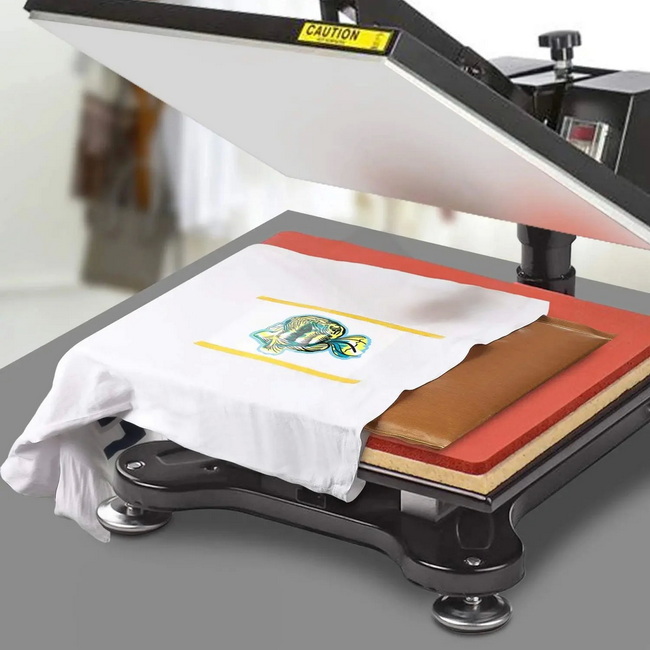
A regular printer uses standard ink that sits on the surface of paper, while a sublimation printer uses dye that turns into gas under heat and bonds with polyester fibers or polymer coatings, creating a permanent transfer on compatible surfaces.
Only certain inkjet printers with suitable printheads can be converted for sublimation, and the process typically involves flushing the original ink, installing sublimation ink, and accepting that manufacturer warranties may no longer apply. Many users find that dedicated sublimation printers offer more consistent performance over time.
Traditional sublimation is not well suited for black or very dark t-shirts because it does not use white ink, and the underlying fabric color overwhelms the design. To decorate dark garments, other technologies or specialized transfer films are usually required.
On quality polyester fabrics and coated hard goods, sublimation prints can remain bright and clear for years when proper pressing settings and care instructions are followed. The embedded dye resists cracking, peeling, and fading better than many surface-level decoration methods.
Sublimation is well suited to small businesses and crafters because it supports one-off and short-run orders without additional setup costs. Personalized items, niche product lines, and on-demand production can all generate healthy margins when equipment, blanks, and workflow are chosen wisely.


