If you have any questions, please feel free to contact us.| Email Us: info@dcheatpress.com


Views: 222 Author: Amanda Publish Time: 2026-02-20 Origin: Site


Content Menu
● Why EasyColor DTV Matters for Inkjet Users
● Key Features of Siser EasyColor DTV
● Compatible Printers and Recommended Setup
● Best Fabric Types and Typical Applications
● Step-by-Step: How to Use Siser EasyColor DTV
● Durability, Washability, and Care Tips
● Ideal Use Cases for Siser EasyColor DTV
● EasyColor DTV vs EasySubli vs Other Transfer Methods
● Common Mistakes to Avoid with EasyColor DTV
● Advanced Tips for Professional Results
● Where EasyColor DTV Fits in a Growing Print Business
● Take the Next Step with EasyColor DTV
● Frequently Asked Questions About Siser EasyColor DTV
>> 1. Do I need a special printer or ink for EasyColor DTV
>> 2. Can I use Siser EasyColor DTV on dark garments
>> 3. Is EasyColor DTV suitable for beginners
>> 4. What fabrics can I decorate with EasyColor DTV
>> 5. Why would I choose EasyColor DTV instead of sublimation
Siser EasyColor DTV is a direct-to-vinyl, print-and-cut heat transfer material that lets you create full-color graphics with almost any standard inkjet printer and apply them to both light and dark fabrics.
Siser EasyColor DTV, short for Direct-to-Vinyl, is an opaque, matte-finish printable heat transfer film designed for inkjet printers that can print on 8.5" x 11" plain paper. It has a soft texture and thin profile similar to other modern heat transfer vinyls, so finished garments feel flexible and comfortable instead of thick or rubbery. The material is engineered to hold vibrant, full-color graphics without requiring a dedicated sublimation printer or expensive industrial equipment.
Once printed, EasyColor designs can be contour-cut with a vinyl cutter and applied with a heat press or suitable home iron, making it accessible for crafters, small shops, and professional print studios. For many users, it is the missing link between simple single-color HTV and more complex technologies like DTF or DTG.
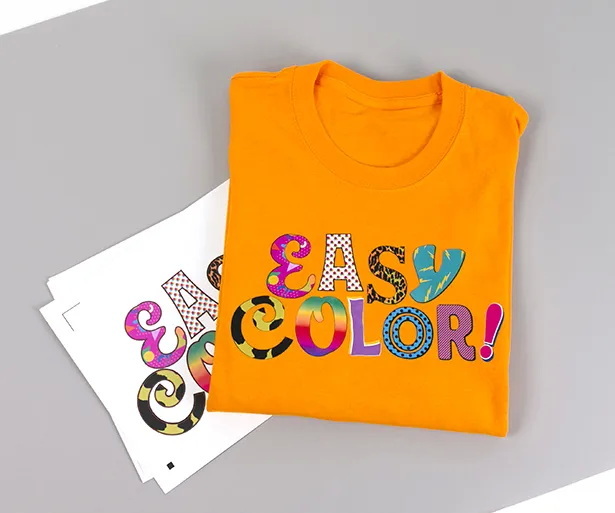
Many creators want full-color transfers but do not have access to sublimation, DTF, or DTG systems, which can be costly and complex to maintain. EasyColor DTV fills this gap by working with virtually any home or office inkjet printer that can handle standard letter-size sheets. This dramatically lowers the barrier to entry for starting a custom T-shirt or merchandise business.
For small brands, EasyColor offers a low-risk way to test designs, run short batches, and personalize individual items without high setup costs or minimum order quantities. It also gives existing shops an efficient option for one-off orders, rush jobs, and personalization that would be inefficient with screen printing.
- Inkjet compatible: Works with most home and office inkjet printers that print on 8.5" x 11" media.
- Opaque and matte: Covers both light and dark garments thanks to its opaque white base and matte finish.
- Soft, thin feel: Comfortable on T-shirts and apparel, with a hand similar to high-quality HTV.
- Full-color graphics: Holds detailed, vibrant multi-color prints suitable for photos, gradients, and illustrations.
- Print-and-cut workflow: Contour cut your design, weed, then transfer with a medium-tack mask.
- Beginner-friendly: Ideal for users taking their first step into printable heat transfers.
EasyColor DTV is designed for standard inkjet printers, including common home and office models, as long as they can print on 8.5" x 11" media. You do not need special inks or cartridges; regular inkjet inks work with the coated surface of EasyColor sheets. For best results, use a high-quality or photo print mode in your printer settings to maximize color saturation and detail.
Avoid laser printers, as they are not compatible with this material and may damage both the media and the printer. Before committing to production, print a small test image and check color accuracy, drying time, and edge sharpness.
Siser EasyColor DTV is compatible with many standard fabric types commonly used in the apparel and promotional industry. You can apply it to light or dark garments because the material itself is opaque and does not rely on the garment color to show the design.
Typical applications include:
- Cotton T-shirts and hoodies
- Polyester and cotton-blend shirts
- Hats and caps
- Tote bags and reusable shopping bags
- Soft home decor items such as pillow covers
- Flags, fabric banners, and pennants
This versatility makes EasyColor a flexible solution for home crafters, online sellers, and local print shops.
1. Create or import your artwork in your preferred design software.
2. Set your page size to 8.5" x 11" to match EasyColor sheets.
3. Arrange designs to maximize sheet usage and reduce waste.
4. Select a high-quality or photo inkjet print setting in your printer driver.
5. Load the EasyColor sheet so the printable side receives the ink.
6. Print your design and allow the ink to dry fully before cutting.
To isolate your printed design, contour cut around its edges with a vinyl cutter or compatible cutting machine. Use registration marks or your cutter's print-and-cut feature to align the cut accurately to the printed artwork. After cutting, weed away excess vinyl, leaving only the printed design areas you plan to transfer.
Clean, careful weeding reduces visible edges and results in a more professional final look. For intricate designs, work slowly around small details and use fine weeding tools.
EasyColor is designed to be lifted with a medium tack mask.
Steps:
1. Cut a piece of mask slightly larger than your design.
2. Carefully lay the mask over the weeded design, starting from one edge to avoid bubbles and wrinkles.
3. Use a squeegee or scraper tool to firmly adhere the mask to the printed vinyl.
4. Peel the mask carrier away, lifting the design off the backing and onto the mask.
Now your design is ready to be positioned and pressed on the garment.
Use a flat, even surface and pre-press your garment for a few seconds to remove moisture and wrinkles. Position the masked design on the garment, then press with the recommended time, temperature, and pressure for EasyColor DTV. Firm, even pressure across the entire design area is essential for good adhesion.
After pressing, allow the garment to cool slightly, then peel the mask according to the recommended peel method. Inspect the edges and, if needed, cover with a protective sheet and give a short second press to lock in the design.
EasyColor DTV is built to withstand regular wear and washing when applied correctly to compatible fabrics. To extend the life of the print, wash garments inside out and use mild detergents. Avoid bleach, strong chemicals, and very high dryer temperatures where possible.
Do not iron directly over the transferred area without a protective sheet, as direct heat may damage the design. Proper curing during the press stage is critical; insufficient time, temperature, or pressure can lead to premature lifting, cracking, or fading.
Siser EasyColor is suitable for both beginners and experienced decorators, offering a flexible solution across a wide range of projects.
Effective use cases include:
- Custom T-shirts for small events such as family reunions, birthdays, and school clubs
- Short-run merchandise for content creators, local bands, and micro-brands
- One-off personalization for names, numbers, and special gifts
- Prototype runs to test new graphic concepts before larger production
- Limited editions or seasonal collections with constantly changing designs
Because it only requires an inkjet printer, EasyColor is especially attractive to home-based businesses and creators who want to upgrade from basic HTV.
To understand where EasyColor fits among other decoration methods, the table below compares it with a typical sublimation workflow and traditional solid-color HTV.
Feature / Aspect | Siser EasyColor DTV (Inkjet) | Sublimation with Transfer Media | Traditional HTV (Solid Color) |
Printer required | Standard inkjet printer | Sublimation printer and inks | None, cut-only |
Full-color capability | Yes, printed graphics | Yes, vivid sublimation prints | No, solid spot colors only |
Works on cotton | Yes, via vinyl layer | Yes, with compatible transfer media | Yes |
Works on dark garments | Yes, opaque media | Limited without extra steps | Yes, depending on color choice |
Feel on garment | Soft, thin vinyl feel | Soft, ink bonded to media or fibers | Very soft, thin vinyl film |
Ideal user | Inkjet owners, beginners, small shops | Sublimation users needing more fabric options | Users needing solid shapes, lettering, simple graphics |
This comparison shows how EasyColor bridges the gap between traditional HTV and sublimation, giving inkjet users an accessible path to full-color garment decoration.
- Using a laser printer: EasyColor is formulated for inkjet printers and is not suitable for laser or toner-based systems.
- Skipping contour cutting: Printing and pressing the full sheet will leave unwanted background film around your design.
- Not using a proper mask: A medium tack mask is important for lifting and placing intricate graphics cleanly.
- Incorrect heat press settings: Too little time, temperature, or pressure can cause poor adhesion and reduced durability.
- Poor garment preparation: Pressing over moisture, wrinkles, or debris can lead to bubbling, uneven adhesion, and lifting.
For more professional output, start with high-resolution artwork and avoid enlarging small, low-quality images. Use color-rich print modes and test small swatches to fine-tune the best balance of vibrancy and detail for your specific printer. When cutting, adjust blade depth and pressure so you cut the vinyl cleanly without cutting through the backing, which makes weeding much easier.
You can also combine EasyColor prints with traditional HTV elements such as solid lettering, borders, or metallic accents. This mixed approach lets you create layered, dimensional designs that stand out while keeping costs under control.
For startups and home-based shops, EasyColor can serve as the primary decoration method while you validate your niche and grow your customer base. As order volumes increase, it remains useful for rush orders, one-offs, and designs that require frequent personalization. Even larger print shops can integrate EasyColor for specialty projects or low-quantity jobs that are inefficient to run on screen printing or other high-setup-cost equipment.
By building EasyColor into your workflow, you can offer full-color printing from day one, then scale into additional technologies such as sublimation, DTF, or screen printing as your volume and budget grow.
If you already own an inkjet printer, you are only a few steps away from producing professional full-color transfers on cotton, polyester, and more. Add high-quality inkjet-printable media, a reliable heat press, and the right accessories to your workflow so you can start offering vibrant custom apparel, tote bags, and soft decor without investing in complex industrial systems. Explore compatible heat presses, transfer materials, and accessories today, and turn your designs into durable, full-color products your customers will love.
Contact us to get more information!
No. EasyColor DTV is designed to work with standard inkjet printers that can print on 8.5" x 11" media, using regular inkjet inks. You do not need special cartridges or a dedicated sublimation printer.
Yes. EasyColor is an opaque, matte-finish material that covers the garment color, so it works on both light and dark fabrics when properly applied. The design sits on top of the fabric, maintaining strong color even on black garments.
Yes. EasyColor is designed as a beginner-friendly heat transfer solution that still delivers professional results. If you already know how to work with basic HTV or a desktop inkjet printer, the learning curve is very manageable.
You can apply EasyColor to many standard fabrics, including cotton, polyester, and cotton-poly blends. It is ideal for T-shirts, hoodies, hats, tote bags, and other soft goods used in everyday custom printing.
Choose EasyColor if you do not have a sublimation printer, want to print on cotton and dark garments, or need a low-cost, flexible entry point into full-color garment decoration using your existing inkjet printer. It is a practical solution for small runs and on-demand personalization.


