If you have any questions, please feel free to contact us.| Email Us: info@dcheatpress.com


Views: 222 Author: Amanda Publish Time: 2026-02-19 Origin: Site


Content Menu
● What a Mug Heat Press Does and When to Use It
● Step 1: Choose the Right Mug Heat Press for Your Needs
>> Dedicated Mug Press vs Combo Heat Press
>> Checklist for Selecting Your First Mug Heat Press
● Step 2: Prepare Your Artwork for a Curved Mug
● Step 3: Print Your Design on Sublimation Paper
● Step 4: Prepare and Wrap the Mug
>> Apply and Tape the Transfer
● Step 5: Set Mug Heat Press Time, Temperature, and Pressure
>> Typical Settings for Ceramic Sublimation Mugs
● Step 6: Press the Mug (First Real Run)
● Step 7: Cooling, Finishing, and First Quality Check
● Troubleshooting Common Mug Press Problems
>> Typical Mug Heat Press Issues and Fixes
● Safety Best Practices for Mug Heat Press Users
● From One Mug to Small Production Runs
● How COLORFUL Equipment Supports Stable Mug Production
● Clear Action Steps for Your First Mug Press Project
● Take the Next Step with Your Mug Heat Press Setup
● FAQs About Using a Mug Heat Press for the First Time
>> FAQ 1: What is the best time and temperature for a ceramic sublimation mug?
>> FAQ 2: Why does my mug color look faded after pressing?
>> FAQ 3: How do I stop ghosting or shadow images on my mug?
>> FAQ 4: Is it safe to cool the mug in water right after pressing?
>> FAQ 5: Do I need a special printer to use a mug heat press?
>> FAQ 6: How often should I maintain or check my mug heat press?
Starting your first project with a mug heat press is exciting, but it can also feel intimidating if you are worried about time, temperature, and safety. This upgraded 2026 guide walks you through everything you need to get consistent results on sublimation mugs, from choosing the right press to your first full production run.
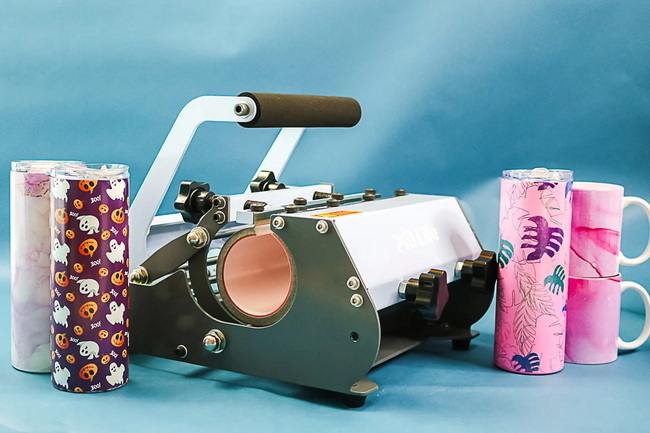
A mug heat press is a specialized machine that applies heat and pressure around the curved surface of a mug to permanently transfer sublimation ink or other heat‑activated graphics. It is ideal for ceramic and metal mugs with a polyester or polymer coating, as well as some stainless‑steel drinkware when used with the correct wrap or attachment.
You will benefit most from a mug heat press if you:
- Produce custom mugs for gifts, events, or online stores.
- Need consistent color and alignment from mug to mug.
- Want faster, safer, and more repeatable results than using a household oven.
You can choose between a dedicated mug press or a multi‑attachment combo press. To refine that decision, focus on these key points.
- Dedicated mug press: Designed mainly for standard mugs (often 11–15 oz), offers simple operation and quick setup, ideal for beginners and small studios.
- Combo heat press with mug attachment: Includes interchangeable elements for standard mugs, latte mugs, water bottles, and sometimes tumblers, ideal if you also press T‑shirts or flat items.
Look for these features before you buy:
- Digital controls for time and temperature.
- Adjustable pressure knob to fit different mug diameters.
- Interchangeable heating elements if you plan to press multiple mug styles.
- Stable frame, quality wiring, and clear safety labeling.
If you run a growing mug business, consider pairing your mug press with pro‑grade heat transfer equipment from expert manufacturers such as COLORFUL, which focus on stable heating and long‑term service for sublimation and other printing applications.
Your artwork should be created in suitable design software and mirrored before printing. You can work in software such as CorelDRAW, Adobe Illustrator, or simpler web‑based tools that support CMYK or sublimation color profiles.
When designing for mugs:
- Set your document to the printable area of the mug, leaving a safe margin near the handle.
- Use high‑resolution artwork (at least 300 dpi) to avoid pixelation when wrapped around the mug.
- Mirror (flip horizontally) the design before printing, because the transfer will be placed face‑down on the mug.
If you print text or logos that must align with the handle, add a faint vertical guide in your layout so you can visually line it up when wrapping the mug.
Your artwork must first be printed onto sublimation paper using sublimation inks. These inks turn into gas under high heat and bond with the mug's polymer coating, forming a durable, dishwasher‑resistant image.
Key printing tips:
- Use compatible sublimation paper designed for mug or hard‑surface blanks.
- Select the manufacturer's recommended print profile and paper type to maintain color accuracy.
- Let the print dry completely before trimming to avoid smearing the ink.
After printing, trim around the design to reduce excess paper and minimize potential press marks on the mug.
Preparation has a major impact on final quality. Proper cleaning and wrapping help prevent dull colors, banding, and ghosting.
- Use a lint‑free cloth and rubbing alcohol to wipe the outside of the mug.
- Remove dust, fingerprints, and any oils that could block the sublimation ink from bonding.
- Let the mug dry completely before applying the transfer.
- Wrap the printed sublimation paper tightly around the mug with the image facing inward.
- Align the design relative to the handle or central viewing area.
- Use heat‑resistant tape along the seam and at the top and bottom edges to prevent shifting.
- Press the paper with your fingers to ensure full contact and remove air gaps.
Some decorators lightly pre‑warm the mug in the press for 10–15 seconds before applying the transfer to reduce the risk of ghosting on thick ceramics, while still staying within the manufacturer's guidelines.
Industry practice for polymer‑coated ceramic sublimation mugs generally falls within specific ranges. Use them as starting points and fine‑tune according to your materials.
Use these as starting points and always confirm with your mug and paper supplier:
- Temperature: 350–400 °F (about 175–205 °C).
- Time: 180–240 seconds.
- Pressure: Medium to firm, enough that the paper and coating make full contact without crushing the mug.
A common starting point for many 11–15 oz ceramic mugs is:
- 375 °F for 210 seconds, medium pressure.
If you use stainless steel tumblers or thicker mugs, you may need slightly different time and temperature, or multiple shorter presses around the circumference.
Before turning on the press:
1- Place a blank mug in the press and close the handle to test pressure.
2- Turn the pressure knob:
- Left to increase pressure.
- Right to reduce pressure.
3- Aim for firm contact that holds the mug securely but does not deform the heating pad or make the handle difficult to close.
Once your design is wrapped and your press is at temperature, you are ready to press.
Follow this basic procedure:
1. Preheat the mug press to your target temperature, waiting until the display stabilizes.
2. Place the wrapped mug into the heating element with the handle centered and the design aligned inside the heated area.
3. Close the press, apply pressure, and start the timer.
4. Expect a slight temperature drop as soon as the mug goes in, which is normal; many presses delay the timer until the element returns to the set temperature.
5. When the timer ends, open the press carefully and remove the mug using heat‑resistant gloves.
6. Peel the paper away in a smooth motion to avoid shifting the still‑hot ink and causing ghost images.
Some users submerge the mug in lukewarm water to cool it quickly, but you must avoid thermal shock that can crack certain ceramics.
Safer cooling options:
- Place the mug upright on a heat‑safe surface and let it cool naturally.
- If you use water, ensure it is lukewarm and avoid dramatic temperature changes.
After cooling:
- Inspect the mug under good light for banding, faded spots, or ghosting.
- Check that colors look vibrant and true to your original artwork, adjusting printer profiles if needed.
Beginners often encounter similar issues when using a mug press for the first time. Use this quick table as a reference.
Problem | Likely Cause | How to Fix |
Faded or dull colors | Temperature too low or time too short | Increase temperature slightly within the 350–400 °F range or extend time by 20–30 seconds. |
Uneven color or light bands | Inconsistent pressure or air gaps | Tighten pressure, re wrap the mug more firmly, and add more heat tape. |
Ghosting or shadows around design | Transfer shifting during pressing | Use more heat resistant tape, pre warm the mug briefly, and open the press smoothly. |
Burned edges or yellowing | Temperature too high or time too long | Reduce temperature or press time and test again. |
Cracked mug after pressing | Severe thermal shock | Avoid cold water and cool the mug gradually on a heat safe surface. |
Running a few test mugs helps you fine‑tune the ideal settings for your exact combination of mug, paper, ink, and press.
Because mug presses operate at high temperatures, you should treat them like any professional heat‑producing equipment.
Key safety guidelines:
- Keep the mug press away from children and pets and never leave it unattended while powered on.
- Ensure good ventilation to reduce exposure to fumes during repeated pressing cycles.
- Always wear heat‑resistant gloves when handling hot mugs or touching near the heating element.
- Keep flammable materials like paper scraps, packaging, and solvents away from the press.
- Turn off and unplug the mug press after use and allow it to cool before moving or cleaning.
- Inspect the press regularly for loose wiring, damaged cables, or worn heating elements.
Building safe habits from the first day supports a more professional workshop and reduces downtime from avoidable accidents.
Once you are comfortable pressing your first mug, you can begin planning small batches for orders or events.
Practical steps to scale:
- Group similar mug types and designs so you can keep the same time and temperature settings longer.
- Prepare and wrap multiple mugs before turning on the press to reduce idle time.
- Track settings, suppliers, and results in a simple logbook so you can repeat profitable combinations.
- When your volume grows, consider adding a second mug press or upgrading to industrial equipment from manufacturers like COLORFUL to increase throughput while maintaining consistent quality.
For very high volumes or diversified product lines, combining a mug press with other heat transfer equipment, such as flat heat presses, fusing machines, or embossing systems, allows you to offer a broader range of custom products with one integrated workflow.
For serious mug printing businesses, using well‑designed heat transfer equipment directly impacts output quality, defect rates, and operator comfort. Manufacturers like COLORFUL, who specialize in research, production, sales, and service of heat transfer equipment, welding machines, and embossing machines, can supply matched mug presses and complementary machines for integrated workflows.
Benefits of working with a professional equipment provider include:
- More stable heating elements and accurate temperature control, reducing color variation between mugs.
- Support for different attachments and mug sizes as your product range grows.
- Technical guidance for choosing suitable machines, matching them with printers and materials, and planning maintenance schedules.
If you are planning to expand into tumblers, bottles, or large‑volume sublimation lines, it is helpful to choose a supplier that can grow with your business and provide long‑term service support.
To summarize the practical workflow:
1. Select a mug press that matches your mug types and production goals.
2. Design your artwork at the correct size and mirror it before printing.
3. Print on sublimation paper with compatible inks and profiles.
4. Clean and wrap the mug carefully, using heat‑resistant tape and firm contact.
5. Set time, temperature, and pressure based on your mug and paper recommendations, then press.
6. Cool safely and inspect each mug, adjusting settings as needed.
7. Document your best settings and scale to small production batches as orders grow.
For businesses ready to standardize this process on professional equipment, you can contact COLORFUL to discuss mug heat press options, custom configurations, and full production‑line solutions that match your target output and budget.
If you are ready to move from test mugs to stable, profitable production, now is the time to standardize your process and upgrade your equipment. Use the workflow in this guide to lock in reliable time, temperature, and pressure settings, then scale up with professional mug heat press solutions from COLORFUL that are tailored to your substrates, volumes, and growth plans. By combining consistent technique with dependable machinery, you can turn custom mugs into a repeatable product line for your brand or printing business.
Contact us to get more information!
Most polymer‑coated ceramic sublimation mugs press well between 350–400 °F for 180–240 seconds at medium pressure, with many decorators using around 375 °F for 210 seconds as a starting point. Always confirm settings with the blank and paper manufacturers, then run test presses and make small adjustments.
Faded colors are often caused by temperature that is too low, pressing time that is too short, or incomplete contact between the paper and the mug. Increase time or temperature slightly, ensure firm pressure all around the mug, and verify that you are using genuine sublimation ink and compatible paper.
Ghosting happens when the transfer shifts while the ink is still hot and gaseous. Use more heat‑resistant tape, open and close the press smoothly, and avoid moving the paper until the mug has cooled enough that the ink has set.
Some people use lukewarm water to speed cooling, but sudden exposure to cold water can crack certain ceramics or damage the coating. It is safer to let the mug cool on a heat‑safe surface or only use water that is close to the mug's temperature to avoid thermal shock.
To create durable, full‑color sublimation mugs, you need a sublimation‑capable printer with sublimation inks and compatible paper. Standard office inkjet or laser printers will not produce true sublimation transfers and may result in washed‑out images or poor durability.
You should visually inspect your mug press regularly for worn wiring, damaged heating elements, or mechanical issues and perform more thorough checks several times a year. Keeping the press clean, tightening loose screws, and following the manufacturer's maintenance guidelines helps maintain both safety and consistent print quality.
1. https://www.heatpressnation.com/blogs/blog/using-your-mug-heat-press-the-first-time-here-s-how-to-do-it
2. https://www.heattransferwarehouse.com/bloghtw-manual-mug-press-beginners-guide/
3. https://vevor.com/diy-ideas/mug-sublimation-time-and-temperature/
4. https://jotoimagingsupplies.com/blogs/blogs/sublimation-mug-printing-guide
5. https://sofontsy.com/blogs/tutorials/how-to-use-a-mug-press
6. https://galaxy-press.com/12-heat-press-mistakes-to-avoid/
7. https://www.stainlessdepotcompany.com/blogs/news/the-ultimate-guide-on-how-to-use-a-heat-press-machine-effectively


