If you have any questions, please feel free to contact us.| Email Us: info@dcheatpress.com


Views: 222 Author: Amanda Publish Time: 2026-02-25 Origin: Site


Content Menu
● What You Will Learn In This Guide
● Why Heat Press Maintenance Matters For Your Business
● Safety First: Essential Precautions Before Any Maintenance
● Daily Cleaning: Keep Surfaces Dust‑Free And Debris‑Free
>> Dry Wipe Down Of Exterior Surfaces
>> Bottom Platen And Work Area Housekeeping
● How To Clean The Top Heating Element Without Damaging It
>> Use Only Heat‑Press‑Safe Cleaning Solutions
>> Step‑By‑Step Platen Cleaning Routine
● Cleaning Crevices, Hinges, And Joints
● Lubricating Moving Parts For Smooth, Consistent Pressure
● Advanced Maintenance Schedule: Daily, Weekly, Monthly Tasks
>> Daily Tasks
>> Weekly Tasks
● Troubleshooting Common Issues Caused By Poor Maintenance
● Expert Best Practices To Protect Your Investment
● When To Call A Professional Technician
● Record‑Keeping: Building A Simple Maintenance Log
● Optimizing Transfer Quality Through Maintenance
● Clear Call To Action: Maintain And Upgrade Your Heat Press Setup
● Frequently Asked Questions (FAQ)
>> 1. How often should I clean my heat press platen?
>> 2. Can I use regular oven cleaner on my heat press?
>> 3. What lubricant is safe for a heat press?
>> 4. How do I know if my press has uneven pressure?
>> 5. When should I replace my platen pad or cover?
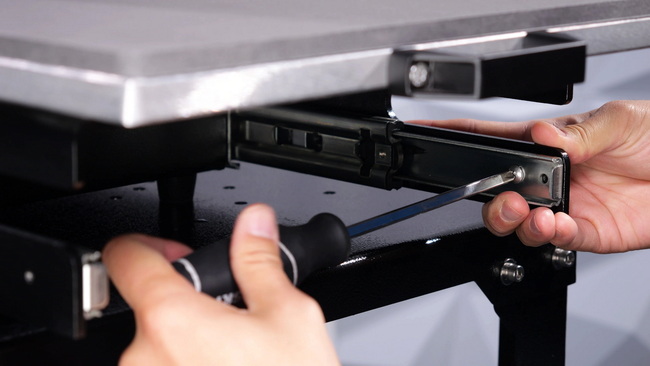
Proper heat press maintenance is the difference between crisp, long‑lasting prints and costly reprints or unexpected downtime. This comprehensive guide shows you exactly how to care for your machine step by step so you get consistent, professional results every day.
- How to clean and protect your heat press safely.
- Essential daily, weekly, and monthly maintenance routines.
- Common problems caused by poor maintenance and how to avoid them.
- Expert tips for transfer quality, safety, and machine longevity.
A heat press is often the heart of a garment or promotional printing business, and any unexpected breakdown can stop production instantly. Regular maintenance helps you:
- Extend the lifespan of heating elements, platens, and mechanical parts.
- Maintain even temperature and pressure for consistent transfer quality.
- Reduce misprints, ghosting, and adhesive residue on garments.
- Lower long‑term repair and replacement costs.
If you run multiple presses or handle large orders, a structured maintenance plan quickly pays for itself in reduced downtime and fewer defective prints.
Before you clean or inspect your heat press, follow these basic safety steps to protect both you and your equipment.
- Turn off and unplug the machine. Never perform maintenance while the press is powered.
- Allow the platen to cool. Cleaning a hot platen with the wrong product can cause burns and damage coatings.
- Use non‑abrasive tools. Choose soft cloths, non‑scratch sponges, and approved cleaners only.
- Check the manual. Always confirm manufacturer‑recommended cleaners and lubricants for your specific model.
A regular dry wipe down is one of the simplest ways to keep your press clean and professional‑looking.
- Use a soft, clean, lint‑free cloth to wipe the outer surfaces.
- Focus on areas where dust, fibers, and fumes settle: the top housing, control panel, and side panels.
- Make sure the machine is powered off and cool before wiping.
This quick habit prevents debris from traveling onto your platen or transfer area later.
A dirty work area often leads straight to contamination on your garments.
- Remove lint, scraps of transfer paper, and loose threads from the bottom platen after each session.
- Inspect teflon sheets, silicone pads, or protective covers for melted vinyl or ink spots and replace if damaged.
- Sweep or vacuum around the base of the machine regularly to keep dust out of vents and moving joints.
The heating element (top platen) is the most critical surface on your heat press, and improper cleaning can permanently damage it.
For adhesive, ink, or transfer residue on the platen:
- Choose a cleaner designed specifically for heat presses, such as specialized platen cleaning paste or solution.
- Do not use oven cleaners or harsh chemicals that can attack the platen coating.
- Apply the cleaner with a soft cloth or sponge using gentle, circular motions.
Avoid steel wool, abrasive pads, or strong solvents that can scratch the platen, creating hot spots and uneven transfers.
- Turn off the press and allow the platen to reach a warm, not hot, temperature if the cleaner requires warmth.
- Apply a small amount of approved cleaner to a soft cloth.
- Gently scrub areas with adhesive or ink build‑up until residue releases.
- Wipe away remaining cleaner with a dry, clean cloth.
- Inspect for scratches or chips in the coating and note any serious damage for professional repair.
Dust and fibers naturally migrate toward crevices and joints, especially near the hinge and pivot areas of a clamshell or swing‑away press.
- Use a soft brush, cotton swab, or small detailing brush to dislodge buildup from tight areas.
- Lightly dampen the swab with a compatible cleaning solution if there is oily residue.
- Avoid soaking these areas, as excess liquid can seep into electrical parts or cause corrosion over time.
Keeping joints clean not only improves appearance but also helps your lubrication work more effectively.
Due to the anatomy of a heat press, metal‑on‑metal contact is normal, but unprotected friction eventually causes wear, noise, and inconsistent pressure.
- Apply a generic lithium grease or manufacturer‑approved lubricant to knobs, bolts, hinge pins, and pivot points as needed.
- Use a small amount and wipe away excess so it does not transfer to garments or platen covers.
- After lubricating, open and close the press several times to distribute the grease evenly.
Proper lubrication reduces grinding sounds, extends mechanical life, and keeps your pressure adjustments smooth and precise.
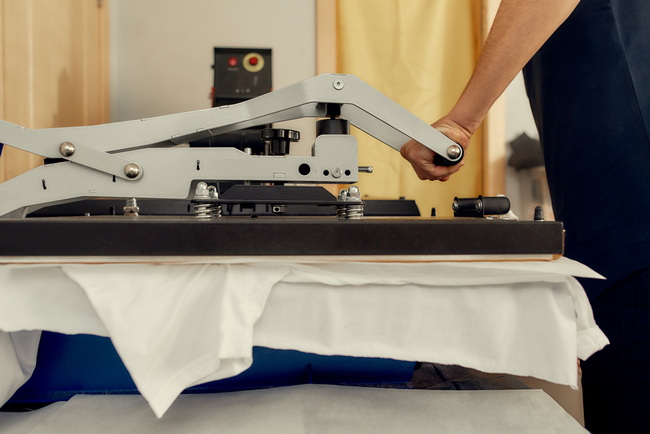
To align with a professional maintenance standard, it helps to treat heat press care like any other industrial maintenance program. The following schedule offers a practical starting point that can be adapted to your production volume.
- Wipe down exterior surfaces to remove dust and light residue.
- Clear lint and scraps from the bottom platen and work area.
- Visually check for obvious residue on the top platen.
- Deep clean the heating element if you use adhesive‑heavy materials regularly.
- Inspect the power cord, plug, and control panel for visible damage.
- Verify that temperature and pressure settings match your most commonly used materials.
- Lubricate moving joints and adjustment knobs where appropriate.
- Check platen alignment and pressure distribution using a test print on all four corners and the center.
- Inspect silicone pads, platen covers, and attachments for wear or deformation.
Even minor lapses in maintenance can show up immediately in your finished products. Use the table below as a quick troubleshooting guide.
| Visible Problem | Likely Maintenance Cause | Recommended Fix |
|---|---|---|
| Uneven transfer or peeling | Dirty or scratched top platen; uneven pressure | Clean the platen, test pressure at multiple points, and inspect pads or covers. |
| Scorch marks on garments | Residue on platen causing hot spots or incorrect temperature | Remove adhesive or ink, confirm accurate temperature with a thermometer, and adjust settings. |
| Ghosting or shadow images | Debris on bottom platen or shifting substrate | Clean the bottom platen, use positioning aids, and apply appropriate covers. |
| Noisy hinge or grinding | Lack of lubrication on joints | Apply lithium grease to contact points and wipe excess. |
| Inconsistent temperature | Neglected heating element or internal electrical issues | Clean the platen, monitor with an external thermometer, and arrange professional servicing if needed. |
Professionals who run their presses all day follow a few consistent habits to reduce risk and extend machine life.
- Standardize settings: Create print profiles for your most common materials and note ideal time, temperature, and pressure.
- Use protective sheets (teflon, parchment, or silicone) to shield both platen and garments from stray ink or adhesive.
- Avoid slamming the press closed; controlled, even motion protects hinges and alignment.
- Keep liquids away from control panels, digital displays, and open vents.
Documenting your maintenance and settings also helps train new staff and ensures consistent results across different operators and shifts.
Not every issue should be handled in‑house, especially when it involves electrical or internal heating components. Knowing when to stop and call a professional protects both your equipment and your staff.
Contact a qualified technician or the manufacturer's service team if you notice any of the following:
- Significant temperature fluctuations despite cleaning and calibration.
- Burning smells, smoke, or visible sparks during operation.
- Cracked or exposed wiring, damaged power cords, or melted connectors.
- Severe platen damage such as deep scratches, warping, or broken coatings.
Attempting to repair these critical areas yourself can void warranties or create serious safety hazards.
A maintenance log is a powerful but often overlooked tool for improving reliability and planning upgrades.
- Record the date and type of cleaning performed.
- List lubrication points serviced and the products used.
- Note any adjustments made to pressure, alignment, or parts.
- Track recurring issues, noises, or temperature inconsistencies.
Over time, patterns in your log help you schedule preventive maintenance before problems interrupt production or damage expensive substrates.
Good maintenance does not just protect your machine; it directly improves how your prints look and feel.
- A clean, smooth top platen ensures even heat distribution, which is critical for durable, wash‑resistant transfers.
- Clean bottom platens and pads prevent impressions of debris or fibers in vinyl, DTF, or sublimation transfers.
- Proper lubrication helps keep pressure consistent across different garment thicknesses and substrates.
Think of each maintenance action as a quality‑control step that happens before you even load the first garment for pressing.
If you want reliable, production‑ready performance, treat heat press maintenance as part of your daily workflow, not an occasional chore. Build a simple checklist, train your team, and keep your machine in peak condition so every transfer meets your quality standards and strengthens your brand.
When you are ready to upgrade your equipment, expand production capacity, or explore more advanced solutions, choose a partner that understands real‑world printing demands. COLORFUL (dcsbheatpress.com) focuses on high‑quality heat transfer equipment, fusing machines, and embossing machines designed for stable temperature, powerful pressure, and long‑lasting durability. Contact our team today to discuss the right heat press solution for your business and get expert support from selection to after‑sales service.
Contact us to get more information!
Light cleaning should be done daily or whenever you notice residue, while deeper cleaning with a specialized solution is recommended weekly or as needed based on usage and materials.
No, oven cleaners and harsh chemicals can damage the platen's non‑stick coating and lead to uneven heating. Always use cleaners specifically formulated for heat presses or recommended by your manufacturer.
A generic lithium grease or manufacturer‑approved lubricant is typically safe for knobs, hinges, and bolts, as long as you avoid electrical components and wipe off excess to prevent contamination.
Place a test sheet or transfer in all four corners and the center of the platen. If some areas transfer differently, you may have uneven pressure or worn pads that need adjustment or replacement.
Replace pads and covers when you see deep impressions, tears, burns, or uneven thickness, as these defects can directly affect print quality, increase waste, and shorten the life of your garments.


