If you have any questions, please feel free to contact us.| Email Us: info@dcheatpress.com


Views: 222 Author: Amanda Publish Time: 2026-03-01 Origin: Site


Content Menu
● Heat Transfer Troubleshooting Basics
● Why Your Heat Transfers Fail (Root Causes Overview)
● Accurate Heat Press Pressure: How to Set It Correctly
>> Understanding Proper Heat Transfer Pressure
>> Practical Methods to Check Pressure
● Setting Perfect Pressure Without Damaging Your Heat Press
>> Avoiding Excessive Pressure and Lock‑Up
>> Ergonomics: Heat Press Height and Operator Safety
● Determining Accurate Heat Press Temperature
>> Why Display Temperature Is Not Enough
>> Tools to Verify Heat Press Temperature
● How to Test for Cold Spots and Uneven Heating
>> Recognizing Distressed or Patchy Prints
>> Testing for Cold Spots with Temperature Strips
● Ensuring a Good Print Every Time: A Simple Test Routine
>> Test Transfers Before Full Production
>> Standardized Heat Transfer Troubleshooting Checklist
● Abnormal or Missing Sounds: What They Mean
● Common Heat Transfer Problems and How to Fix Them
>> Quick Reference Table for Frequent Issues
● Pro‑Level Tips to Reduce Heat Transfer Failures
>> Maintain and Calibrate Your Heat Press Regularly
>> Match Transfers, Fabrics, and Settings
● Why Choosing the Right Heat Press Matters
● Clear Call to Action: Take Your Heat Transfer Results to the Next Level
● Frequently Asked Questions About Heat Transfer Troubleshooting
>> 1. Why do my heat transfers peel after the first wash?
>> 2. How often should I calibrate my heat press temperature?
>> 3. What is the best pressure for heat transfers?
>> 4. How do I know if my heat press has cold spots?
>> 5. Can moisture in garments really affect heat transfer adhesion?
>> 6. When should I replace my heat press instead of repairing it?
Heat transfer printing is one of the most profitable and flexible ways to customize T‑shirts, hoodies, bags, and promotional items, but frequent heat transfer problems can quickly destroy profit and customer trust. To help decorators, print shops, and brand owners get consistent results, this guide explains the most common heat press issues, why they happen, and how to fix them step by step.
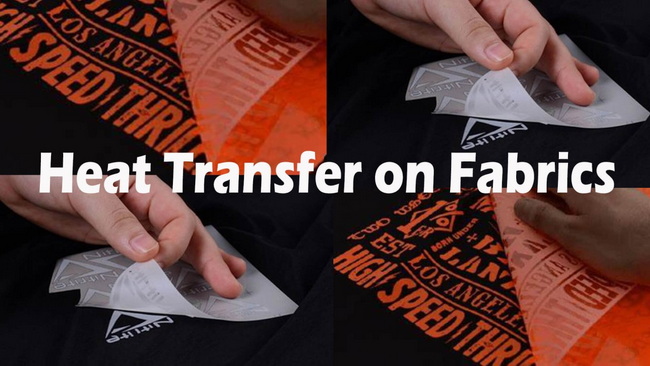
Heat transfer troubleshooting always starts with three core variables: time, temperature, and pressure, applied evenly over the full print area. When any of these are off, or your fabric or transfer type is mismatched, you see peeling, cracking, scorching, or incomplete adhesion.
Most heat press problems can be traced to a few root causes that affect all technologies, including HTV, DTF, screen print transfers, and sublimation.
- Incorrect temperature: Display temperature does not match platen surface, or settings do not match transfer specs.
- Wrong pressure: Too low causes poor adhesion; too high crushes fibers and can distort the print.
- Insufficient time: Adhesive does not fully activate, especially on thicker fabrics and multilayer transfers.
- Uneven heat (cold and hot spots): Parts of the platen underperform, creating patchy, distressed prints.
- Fabric issues: Moisture, coatings, or blends that do not match the transfer chemistry.
- Equipment wear or misalignment: Warped platens, old heating elements, or faulty electronics.
Consistent, correct pressure is just as important as temperature and time in heat transfer troubleshooting. If pressure is too light, adhesive cannot bond deeply into the fibers; if it is too heavy, you risk flattening fabric texture, causing visible marks or difficulty opening the press.
The classic “two‑hand clamp” rule is a helpful quick test. If you can close the press easily with one hand, pressure is probably too light; if you need both hands to lock down the handle, you are closer to the correct range.
For a more repeatable method, use a simple paper pressure test.
Paper pressure test (step‑by‑step):
1. Place a strip of standard printer paper so that half is under the platen and half hangs out.
2. Close and lock the press at your desired pressure setting.
3. Try to pull the exposed paper straight out.
4. If the paper slides out easily, pressure is too low.
5. If the paper tears when you pull, pressure is adequate or slightly high.
On presses with a digital or PSI gauge, log typical pressure values that work for T‑shirts, hoodies, caps, and thick substrates, then reuse them for faster, consistent setups.
If you close your heat press and it will not open, no matter how hard you pull up, you have likely gone beyond the maximum safe pressure. This can strain hinges, gas springs, and frames, and it is a safety risk for operators.
A practical trick to release an over‑tight press is to push down slightly on the heating element, wearing a heat‑resistant glove, while pulling up on the handle. Once opened, immediately reduce pressure and re‑test using the paper method instead of guessing.
The height of the press relative to the operator has a major impact on usability and safety. When the press sits around waist level, the operator can use body weight to push down, reducing strain on the shoulders and arms.
If the machine is set too high, the operator ends up working at awkward angles, which makes heavy pressure settings feel extreme and increases the risk of injury during long production runs. For commercial shops, adjustable stands or benches improve throughput and ergonomics.
The temperature shown on a heat press screen is not always the real platen surface temperature. Over time, sensors drift, electronics age, and heating elements develop inconsistencies, which can create noticeable differences between the display and the actual platen.
Even small deviations can cause transfers to under‑cure or scorch, especially with sensitive materials like performance polyester and specialized films.
At least twice per year, check the actual platen temperature with an independent tool.
Common tools include:
- Metal candy thermometer: A cost‑effective choice for contact temperature checks on the platen surface.
- Wired pyrometer: Provides accurate readings and is well suited for commercial shops.
- Heat press temperature strips: Test strips that change color within a calibrated temperature range when pressure and heat are applied.
- Infrared thermometers: Useful for quick checks, but readings can fluctuate on non‑stick coatings and reflective surfaces.
If you see consistent discrepancies or uncalibrated prints even with correct settings, contact your machine supplier or technical support to review calibration or internal components.
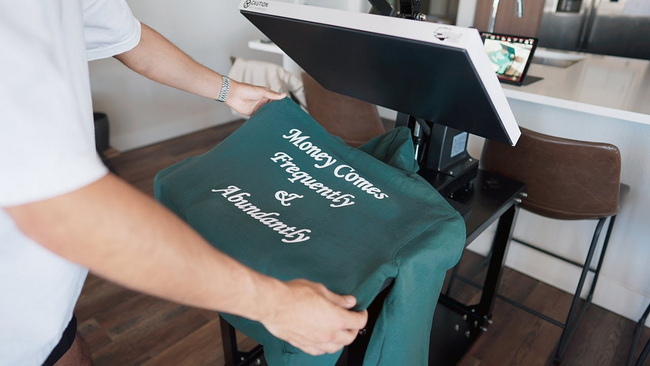
Unplanned distressed prints, where some areas appear faded, cracked, or under‑applied, usually indicate uneven pressure or temperature across the platen. If the same area of every garment shows the defect, you likely have a cold spot or warped platen rather than a random operator error.
This problem is especially common in lower‑cost presses that heat mainly from a central point, leaving edges and corners cooler.
To confirm cold or hot spots:
1. Request temperature test strips from your heat press seller or manufacturer.
2. Place several strips in different areas of the platen surface.
3. Close and lock the press for the recommended time, just as if you were pressing a garment.
4. Compare the color change and recorded temperature across locations.
5. Identify any zones that consistently read below the target temperature.
If temperature differences are significant, you may need servicing, recalibration, or, in severe cases, a new machine.
Before running a full production batch, it is smart to test transfers and adjust your heat transfer settings. A practical method is to cut a transfer into several smaller pieces and press them on different areas of the garment, making small adjustments to pressure and, if needed, time or temperature.
In most cases, fine‑tuning pressure solves adhesion issues. Only occasionally do you need to modify time or temperature if you follow the transfer manufacturer's specifications.
Use this simple checklist whenever you see failed or inconsistent prints:
1. Confirm transfer type and instructions, such as HTV, DTF, screen print transfer, or sublimation.
2. Verify fabric composition and confirm it is compatible with the transfer system.
3. Check platen temperature with strips, a thermometer, or a pyrometer.
4. Run a paper pressure test and adjust pressure to medium or as recommended.
5. Pre‑press the garment for 5–10 seconds to remove moisture on cotton and blends.
6. Press a small test piece and perform a stretch and wash test if possible.
7. Inspect for cold spots by repeating tests in different areas of the platen.
Many modern heat presses use audible beeps or alarms to signal that the press has reached the target temperature or that the press time has finished. If you notice that the alert stops, changes, or sounds abnormal, it may indicate a misaligned timer switch, sensor issue, or incorrect configuration in the control panel.
Because each machine model uses different internal components and logic, the safest approach is to contact the technical support team for your specific press to avoid further damage or safety risks.
Heat transfer problem | Likely cause | Fast fix |
Transfer not sticking or peeling early | Low pressure, low temperature, or short time | Increase pressure, verify surface temperature with test tools, add a few seconds of press time. |
Edges lifting after washing | Incomplete adhesion or fabric moisture | Pre-press garment, re-press with higher pressure, follow the transfer manufacturer's time and temperature. |
Distressed or patchy print | Cold spots or uneven pressure | Test with multiple strips across the platen, service or replace a warped platen. |
Scorch marks or heat lines | Excessive temperature or time | Lower temperature, reduce dwell time, use a protective sheet, and test on scrap garments. |
Very hard to close or open press | Pressure set far too high | Release press carefully, reduce pressure setting, and reposition press to an ergonomic height. |
No beep or strange alarm behavior | Faulty timer or control settings | Check control panel settings and contact technical support for your model. |
Professional shops treat their heat press like any other precision production tool and build maintenance into their schedules.
- Calibrate temperature at least twice per year with test strips or a pyrometer.
- Inspect platens for warping, dents, or uneven wear that can cause cold spots.
- Check pressure mechanisms, such as knobs and springs, for smooth adjustment and replace worn parts.
- Clean platen surfaces regularly to remove adhesive residue that can affect heat transfer.
Not all transfers work on all fabrics, and one transfer will not always perform equally on cotton, polyester, and coated textiles. Always follow the product's data sheet for recommended time, temperature, and pressure, and test on each new fabric type before scaling to full production.
Even with perfect technique, an under‑powered or uneven press will continue to produce inconsistent results, wasted transfers, and product returns. Investing in a reliable heat press with stable temperature, even pressure, and solid support is crucial for long‑term profitability and brand reputation.
A manufacturer specializing in high‑quality heat transfer equipment, welding machines, and embossing machines can design presses to minimize cold spots, maintain accurate temperature, and deliver stable pressure for global customers with diverse printing needs. Choosing such equipment reduces troubleshooting time and lets your team focus on growing your apparel business.
If you are dealing with frequent heat transfer problems such as peeling designs, uneven prints, or presses that are hard to operate, this is the right moment to upgrade both your troubleshooting process and your equipment. Visit COLORFUL at dcsbheatpress.com to explore professional‑grade heat transfer presses, welding machines, and embossing machines designed for accurate temperature, even pressure, and long‑term reliability, so every order you ship builds your brand instead of your rework pile.
Contact us to get more information!
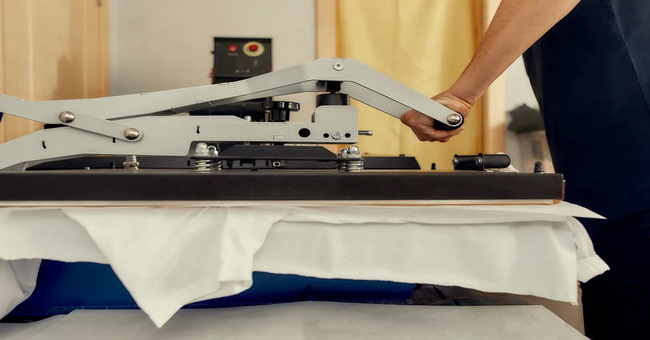
Peeling after the first wash usually indicates incomplete adhesion caused by low pressure, low temperature, or insufficient press time. Check your platen temperature with test tools, increase pressure slightly, and follow the transfer manufacturer's recommended settings exactly.
For most shops, calibrating at least twice per year is a solid starting point, but high‑volume users may need quarterly checks. Always recalibrate whenever you notice unexpected failures, distressed prints, or major differences between displayed and actual temperature.
Most heat transfers require medium pressure, but the exact value depends on the transfer type and fabric thickness. Use your press's gauge when available and confirm with the paper pressure test to ensure the platen grips the garment firmly without making the press impossible to open.
Consistent fading or incomplete adhesion in the same area of multiple garments is a strong warning sign of cold spots. Use temperature test strips across the platen to map real surface temperature and confirm whether you need service, recalibration, or a replacement press.
Yes. Moisture trapped in the fabric can turn to steam during pressing, which prevents adhesive from fully bonding and often leads to cracking or peeling later. A quick pre‑press of 5–10 seconds usually removes this moisture and significantly improves consistency.
If you see persistent cold spots, extreme temperature fluctuations, or critical component failures that keep returning even after service, your press may be near the end of its life cycle. For growing businesses, upgrading to a stable, well‑supported press is often cheaper than ongoing rework, wasted transfers, and unhappy customers.
1. https://www.heatpressnation.com/blogs/heat-press-tips-tricks/troubleshooting-frequent-heat-transfer-problems
2. https://support.heatpressnation.com/en-US/articles/heat-transfer-troubleshooting-56067
3. https://support.heatpressnation.com/en-US/articles/general-heat-press-troubleshooting-56064
4. https://www.transferexpress.com/videos/heat-transfer-troubleshooting-tips
5. https://www.dekographics.com/blog/top-5-heat-transfer-problems-and-how-to-fix-them
6. https://www.screenprinting.com/pages/the-ultimate-guide-to-heat-transfer-press-techniques-tips-and-troubleshooting-sp230084
7. https://www.brildor.com/blog/en/3-most-common-heat-transfer-vinyl-problems
8. https://www.howardct.com/blog-entries/2021/5/10/ultimate-troubleshooting-guide
9. https://galaxy-press.com/12-heat-press-mistakes-to-avoid/
10. https://www.transfersuperstars.com/blogs/dtf-graphics-tips-and-tricks/common-polyester-heat-press-issues-how-to-fix-them


