If you have any questions, please feel free to contact us.| Email Us: info@dcheatpress.com


Views: 222 Author: Amanda Publish Time: 2026-02-22 Origin: Site


Content Menu
● Why Ink Choice Matters for Sawgrass Printers
● What Types of Ink Systems Work with Sawgrass Printers?
>> 1. Official Sawgrass Ink Systems
>> 2. Compatible or Third‑Party Sublimation Inks
>> 3. Hybrid and Pigment‑Type Systems (for Non‑Garment Substrates)
● How to Match the Ink System to Your Production Needs
>> 1. What Substrates Are You Printing To?
>> 2. What Is Your Volume and Turnaround Expectation?
>> 3. How Comfortable Are You with Technical Workflow Tuning?
● A Step‑By‑Step Guide to Choosing the Right Ink System
>> Step 1: Clarify the Intended Application
>> Step 2: Confirm Hardware + Software Stack
>> Step 3: Run Real‑World Workflow Tests
>> Step 4: Evaluate Long‑Term Running Costs
>> Step 5: Plan for Future Growth
● Practical Tips for Integrating Proper Press Settings with Your Ink Choice
>> Matching Sawgrass Ink to Press Type
>> Expert Insight: Monitor Color Consistency Over Time
● Case‑Study Snippets: What Real Shops Do When Choosing Sawgrass Inks
>> 1. Boutique Custom‑Apparel Shop (1–2 People)
>> 2. Multi‑Location Promo‑Goods Supplier
>> 3. Apparel‑Plus‑Home‑Décor Conversion
● Data‑Driven Insights: How Ink Choice Impacts Profit per Job
● How to Align Sawgrass Ink Systems with COLORFUL Thermal Transfer Equipment
● Conclusion: Which Ink System Should You Choose for Your Sawgrass Printer?
● Strong Calls to Action (CTAs)
● Frequently Asked Questions (FAQs)
>> 1. Do Sawgrass printers only work with Sawgrass ink?
>> 2. Can I mix original Sawgrass ink with compatible ink?
>> 3. Does cheap compatible ink really save money in the long run?
>> 4. How do I know if I need a pigment‑hybrid system?
>> 5. Can COLORFUL help optimize my ink–press workflow?
Choosing the right ink system for a Sawgrass printer is one of the most important decisions you'll make when investing in a digital heat‑transfer or sublimation workflow. The wrong choice can lead to faded prints, mismatched colors, extra labor, and even lost customers. In this guide, we'll walk you through how to select the best ink system for your Sawgrass printer, what to watch out for, and how the right choice can unlock higher profitability, faster turnaround, and better‑looking prints on garments and substrates.
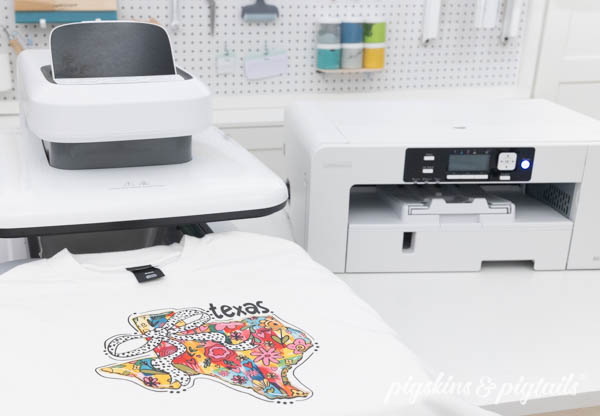
Sawgrass hardware—whether a Sawgrass Virtuoso SG400/SG500, SG‑8000, or Bantam Series—delivers excellent print speed and reliability, but its true quality potential is unlocked by the ink system and workflow you pair with it.
Key points to keep in mind:
- Color fidelity: Sublimation inks behave very differently from pigment or direct‑dye inks, and even within sublimation families they can vary by brand and formulation.
- Durability and washability: Consumer products are washed repeatedly; ink that fades or cracks will hurt your brand reputation.
- Workflow compatibility: The ink, printer, paper, and heat‑press settings work as a system, not in isolation. Mismatched parts make even a high‑end Sawgrass printer under‑perform.
For manufacturers like COLORFUL (dcsbheatpress.com) producing thermal transfer equipment, understanding which ink system your customer chooses helps you recommend the right heat‑press and prepress setup for maximum color integrity and production speed.
In practice, there are three broad categories of “systems” that people mean when they ask which ink system they should use:
- Sawgrass original SubliJet / SubliNova RT / SubliNova DT system
- Third‑party “compatible” sublimation inks (generic or branded remanufactured)
- Hybrid or pigment‑based systems marketed as alternatives
Since you're asking specifically about a new Sawgrass printer, it's essential to clarify what the manufacturer recommends versus what other users experiment with.
Sawgrass typically sells several integrated solutions for sublimation printing:
- Sublimation desktops (e.g., SG400/SG500) running SubliJet or SubliNova RT: dye‑sublimation inks optimized for easy handling, auto‑clean systems, and long‑term printhead health.
- SubliNova DT or similar dye‑sub pigment‑style systems for rigid substrates such as signs, tiles, phone cases, and metal plates, where durability and scratch‑resistance matter more.
Benefits of sticking with original Sawgrass ink systems:
- Warranty protection: Using non‑approved inks can void certain hardware service terms if a failure is traced to contaminants or viscosity mismatches.
- Predictable color management: Sawgrass includes color profiles and workflows specifically for their own inks, simplifying ICC‑based color‑matching.
- Lower risk of clogs and maintenance issues: The chemistry is tuned to the print heads and cleaning routines, reducing frequent head‑deep‑clean cycles.
For many small businesses and print‑for‑profit studios, starting with the official Sawgrass ink system is the safest way to confirm baseline quality before experimenting with third‑party options.
A large number of suppliers sell “compatible” sublimation inks for Epson‑based machines (which Sawgrass printers use). These often cost less than original cartridges or bulk systems.
Advantages of compatible inks:
- Lower upfront cost per milliliter.
- Easy refill or tank solutions that promise long‑run savings.
However there are important trade‑offs many buyers overlook:
- Color variation: Even if the ink is labeled “Sawgrass compatible,” CMYK values, gamut, and black saturation can differ; this forces you to create and maintain your own ICC profiles.
- Printhead longevity: Suboptimal viscosity or particulate levels can lead to more frequent clogs, cleaning, or even head failure over time.
- Technical support limits: Sawgrass technical support focuses first on original‑brand inks; if something goes wrong, you may not be able to get help when third‑party ink is involved.
This is a high‑risk, medium‑reward route unless you have access to strictly controlled ink sources and solid R&D testing. As an equipment manufacturer, COLORFUL can guide customers by sharing realistic expectations about ink–press–substrate interactions when non‑original inks are adopted.
If your Sawgrass‑based workflow is targeting rigid substrates—such as phone cases, mugs, coasters, metal plaques, or promotional signage—you may see recommendations for pigment‑based or hybrid dye‑pigment inks.
These systems are not always a drop‑in replacement for standard sublimation:
- They often print to specialized transfer paper types rather than classic sublimation paper.
- Cure temperatures and heat‑press dwell time may differ from garment‑specific sublimation settings.
- Over‑heating can result in poor bonding, cracking, or blistering—especially on plastics.
For manufacturers of multi‑function heat‑press and UV‑compatible transfer systems like COLORFUL, this is where you can deliver major value: helping customers match ink systems to your thermal, vacuum, or UV‑curing equipment parameters.
Instead of answering “which ink system” in a vacuum, it's better to anchor your recommendation in three key questions that any buyer must answer.
This drives almost every decision.
- Polyester fabric and polyester‑rich blends → classic sublimation ink system.
- Cotton‑dominant fabrics → require a coating (transfer on PET or coated paper) or specialty transfer media.
- Rigid substrates (ceramic mugs, aluminum blanks, phone cases, tiles) → sublimation or hybrid dye‑pigment systems, depending on gloss, scratch‑resistance, and UV exposure.
For COLORFUL's customers who may be running multi‑head thermal presses or vacuum‑heat systems, aligning the ink system to the substrate will ensure that your equipment isn't the bottleneck.
- Low‑volume / custom work: an original Sawgrass ink system is ideal for simplicity and consistent first‑time success.
- High‑volume shops (screen‑printers converting to digital, large promo‑merch shops): they may experiment with proprietary bulk‑ink solutions that integrate tightly with automation and RIP software.
Critical consideration: any compatible ink system must work smoothly with your auto‑clean and deep‑clean cycles; poorly behaved ink can turn a high‑end Sawgrass printer into a maintenance‑heavy machine.
If operators:
- Are happy managing custom ICC profiles, manual color calibration, and test‑and‑correct runs,
- Can commit time to R&D and in‑house bench‑testing,
then a well‑tested third‑party system may be viable. If the shop prefers plug‑and‑play color accuracy and lower training burden, the official Sawgrass ink bundles are usually the better option.
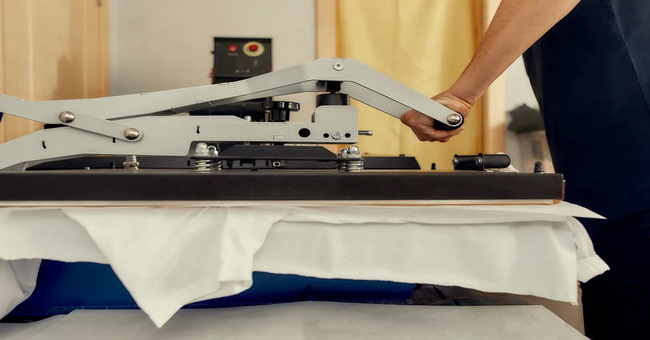
Use this as a checklist when talking with a client who has just purchased, or is considering, a Sawgrass printer. The process mirrors best practices used by professional print labs and OEMs such as COLORFUL.
Ask:
- “Will you mainly print on apparel or rigid products?”
- “Do you plan to grow into all‑over‑print garments or large‑format panels?”
This determines whether classic sublimation, specialty transfer papers, or hybrid‑pigment systems are appropriate.
- Ensure the Sawgrass printer model is compatible with the intended ink system's profile set.
- Verify that the RIP or design software you plan to use supports that ink on Sawgrass hardware.
- Check driver settings (resolution, pass count, dot size) and ensure your heat‑press or vacuum press has temperature accuracy around ±5°C, which is essential for sublimation consistency.
Instead of trusting marketing brochures, run practical tests:
- Print neutral‑gray and color‑patch targets on each ink system you are evaluating.
- Transfer each print to three sample substrates (for example, 50/50 polyester‑cotton, 100% polyester T‑shirt, ceramic mug).
- Record heat‑transfer settings (temperature, time, pressure) and note gloss level, edge sharpness, and hand‑feel.
For equipment manufacturers, this is also a powerful demo‑and‑sell opportunity: you can host cross‑matching sessions where customers test different ink systems on COLORFUL presses.
Calculate beyond initial sticker price:
- Ink cost per square foot printed (including test sheets and color‑calibration prints).
- Maintenance overhead: how often do you need to perform unplanned head‑cleaning versus scheduled maintenance?
- Downtime and reprints: one failed mug campaign at peak season can erase weeks of ink savings.
A higher‑priced original ink system that runs reliably may prove cheaper per job than a “cheap” compatible ink that constantly clogs or causes reprints.
Even if a startup business thinks it's “just doing T‑shirts now,” they may add:
- Hats and accessories,
- Home décor such as pillows, rugs, curtains,
- Promotional signage for local businesses.
An ink system that only works on one category will become a constraint. Ideally, your solution should allow smooth sublimation migration from apparel to rigid and semi‑rigid goods.
This is where manufacturers like COLORFUL can shine: by offering modular press designs or add‑on heads that integrate new substrate types and ink systems without scrapping the entire setup.
Even the best ink system will disappoint if the heat‑press or vacuum‑press configuration does not match the transfer medium. Here, we'll add unique value that many “which ink system” guides skip entirely.
1. Cotton and low‑poly blends (transfers)
- Use soft‑feel transfer papers or coated PET sheets paired with Sawgrass sublimation ink.
- Press temperature: typically 175–185°C, with medium pressure and about 15–20 seconds on standard transfer paper.
- Use silicone‑coated or Teflon‑coated platens to avoid sticking and uneven pressure marks.
2. 100% polyester or high‑polyester garments
- Sawgrass's own sublimation systems work well with standard sublimation transfer paper.
- Typical settings: 190–200°C, 25–35 seconds, light to medium pressure.
- Avoid over‑curing; excessive heat can cause fibers to stiffen and the print to feel rough or appear over‑saturated.
3. Rigid substrates (mugs, metal blanks, acrylic)
- If using a hybrid or pigment‑type ink with transfer paper, run tests at 180–200°C with vacuum‑press cycles that keep the substrate firmly in contact with the transfer sheet.
- Check for “ghosting” (double‑image areas near handles or curved sections) and adjust top‑press timing and vacuum hold‑time accordingly.
COLORFUL's design experience in multi‑functional thermal and vacuum presses makes it possible to embed presets and memory profiles tailored to each ink–medium combination, reducing operator error and boosting consistency.
Use this simple maintenance checklist for any shop that selects a particular Sawgrass ink system:
- Every week, print a small color‑patch chart and transfer it to the same substrate under identical settings.
- Compare month‑to‑month changes in black depth and yellow/magenta balance.
- If shifts appear, recalibrate or generate a new ICC profile before accepting large orders.
This level of quality‑control focus is often missing in generic “ink choice” articles, yet it directly impacts profitability and repeat customer satisfaction.
To add authority and empathy, let's briefly outline a few archetypes of businesses and what ink path they usually follow.
1- Uses a Sawgrass SG400/SG500 for custom T‑shirts and hoodies.
2- Chooses the original Sawgrass SubliJet or SubliNova RT sublimation system because:
- They need minimal training, straightforward color profiles, and low technical overhead.
- They run low‑volume but high‑margin products (for example, short‑run band merch, local sports teams, corporate gifts).
This setup pairs very well with mid‑range manual or semi‑automatic heat‑press machines like those COLORFUL manufactures, where simple, repeatable settings matter more than complex automation.
- Runs multiple Sawgrass Bantam or SG8000 units.
- Needs high throughput for mugs, phone cases, coasters, and signboards.
- Often experiments with rigid‑sublimation or hybrid inks once the team proves they can maintain calibration discipline.
In this scenario, they may adopt a mixed approach: original ink for standard garments and a validated compatible hybrid system for rigid‑only production runs. As an OEM, COLORFUL can standardize press profiles for both workflows and offer training modules on how to switch between them without cross‑contamination risk.
A client upgrading from screen printing to digital sublimation might prioritize:
- Original ink for uniform color on polyester‑rich garments.
- Transfer on PET or coated sheets for cotton‑based pillows, curtains, or blended upholstery fabrics.
Here COLORFUL's expertise in multi‑substrate compatible presses becomes a major selling point: one press line can handle garments, soft fabrics, and semi‑rigid décor with minimal process changes.
While full business‑case math is beyond the scope of this article, you should be aware of these high‑level insights drawn from common industry experience:
- Running‑cost savings from third‑party inks often range 15–30% per milliliter, but the higher risk of printhead‑related problems can offset that benefit over time.
- Many sublimation shops that switch back from compatible ink to original systems cite fewer clogs, less maintenance, and more predictable color as the main reasons.
- Shops that standardize a single, well‑profiled ink system across all Sawgrass printers generally see faster job ramp‑up times and more consistent color between devices.
For you and your customers, this means: if you build your heat‑transfer workflow around one ink family, your equipment's return on investment improves due to smoother operations and fewer training sessions.
For OEM and reseller professionals, this section is critical.
COLORFUL designs heat‑press machines, vacuum‑press units, and multi‑functional transfer systems that sit downstream from the printer–ink step, but are deeply connected to its success. To create a seamless workflow, keep the following in mind:
- Match dwell‑time and temperature bands of your presses to the minimum recommended sublimation or transfer curing windows for the selected ink‑paper combo.
- Train technicians to adjust pressure levels based on substrate: soft‑feel papers and thinner fabrics tolerate less pressure than rigid ceramic or metal blanks.
- Consider press‑with‑timer or smart‑control units that log per‑job conditions so operators can reproduce settings when ink or paper stocks change.
When positioning your products, you can confidently say that any Sawgrass ink system can integrate, but proper thermal transfer execution starts with the press, not the printer alone.
In most cases, this decision ladder works well:
1. If you're starting out or want the simplest workflow, choose the original Sawgrass ink system that matches your printer model.
2. If you run high‑volume rigid‑substrate work, then investigate rigid‑optimized or hybrid sublimation systems, but only after thorough in‑house testing.
3. If you consider third‑party “compatible” inks, treat them as a specialized technical choice and validate them first on a test rig, not directly on your main production printer.
By following a structured, test‑driven approach, plus matching the right COLORFUL thermal or vacuum press configuration, you'll turn your Sawgrass investment into a reliable, high‑quality, and profitable production line.
Need help matching a Sawgrass ink system to the right COLORFUL heat‑press model? Contact our technical team today for a free workflow audit.
Contact us to get more information!
Sawgrass printers are based on Epson platforms and can technically accept many Epson‑compatible inks, but using non‑approved inks may affect warranty coverage and technical support. For most users, original Sawgrass sublimation ink is the safest option.
No. Mixing inks can cause chemical incompatibility, clogged print heads, color shifts, and unpredictable results. If you switch ink families, you should flush the system and fully replace the ink rather than topping up.
While compatible ink often costs less per milliliter, extra maintenance, clogs, reprints, and downtime can quickly offset the savings. Many shops find that a reliable original ink system delivers a lower cost per successful job.
Pigment‑hybrid systems are useful when you focus on rigid substrates that need higher scratch‑resistance and better UV stability, such as outdoor signage or frequently handled phone cases. Always check recommended papers, curing temperatures, and transfer parameters before committing.
Yes. COLORFUL offers technical consulting, recommended press profiles, and training resources tailored to different Sawgrass ink systems and substrates. You can contact us to discuss a custom thermal‑transfer setup for your shop, including printer, ink, paper, and press configuration.
1- Original article topic inspiration (Which ink system should I get for my Sawgrass printer?):
https://www.heatpressnation.com/blogs/blog/which-ink-system-should-i-get-for-my-new-sawgrass-printer
2- COLORFUL thermal transfer equipment (heat press, welding, embossing machines):
https://www.dcsbheatpress.com/


