If you have any questions, please feel free to contact us.| Email Us: info@dcheatpress.com


Views: 222 Author: Amanda Publish Time: 2026-02-18 Origin: Site


Content Menu
● What Is Heat Felt and Why It Matters for Sublimation Tiles
● How Heat Felt Protects Sublimation Tiles
● Recommended Equipment for Using Heat Felt with Tiles
● Ideal Time, Temperature, and Pressure for Sublimation Tiles
● Step‑by‑Step: How to Press Sublimation Tiles with Heat Felt
>> Step 1: Prepare Your Design and Transfer
>> Step 2: Pre‑Heat the Press and Tile
>> Step 3: Tape the Transfer to the Tile
>> Step 4: Build the Pressing Stack with Heat Felt
>> Step 5: Press with Medium‑Light Pressure
>> Step 6: Cool and Peel Without Cracking
● Quick Reference Table: Heat Felt Sublimation Tile Workflow
● Advanced Tips: Avoiding Cracks, Ghosting, and Faded Corners
● When to Choose Heat Felt vs Other Padding Materials
● Practical Use Cases: Where Heat Felt Makes the Biggest Difference
● Action Steps: Start Using Heat Felt with Your Tiles Today
● FAQs About Using Heat Felt with Sublimation Tiles
>> 1. Do I really need heat felt for sublimation tiles?
>> 2. Which side of the tile faces the heat felt?
>> 3. What if my tiles keep cracking even with heat felt?
>> 4. How many tiles can I press at once on heat felt?
>> 5. How long does a heat felt pad last?
Pressing ceramic sublimation tiles can be tricky, but using a high‑quality heat felt dramatically reduces cracked tiles and uneven transfers while giving you smoother, more consistent results. This guide explains how heat felt works, which settings to use, and how to build a reliable workflow with modern heat press equipment for both hobby and production environments.
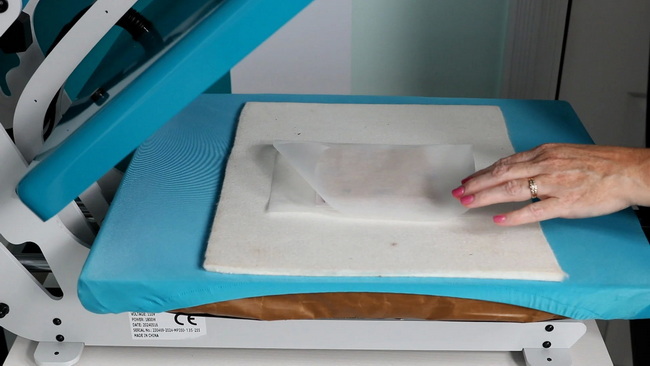
Heat felt (often Nomex heat felt) is a heat‑resistant cushioning pad placed on the lower platen of your press to support delicate, rigid substrates such as ceramic tiles. It absorbs slight height variations and distributes pressure evenly so your tiles are less likely to crack under the press.
Using heat felt is especially important with:
- Ceramic sublimation photo tiles and coasters.
- Tiles with beveled or slightly rounded edges.
- Multi‑tile panels where each piece may vary slightly in thickness.
When you add professional heat press equipment with accurate pressure control and a quality heat felt pad, you greatly improve consistency from tile to tile.
Heat felt solves three common technical problems when sublimating tiles:
- Cracking from excessive or uneven pressure – rigid ceramic tiles can fracture if the platen pressure is slightly too high or not evenly distributed.
- Cold spots and incomplete transfers – uneven contact between the tile and platen can cause faded corners or edges.
- Edge chipping on beveled tiles – direct pressure on sharp edges can chip the glaze or break the tile.
By adding a heat felt pad under the tiles, you create a slightly cushioned surface that still maintains firm, even pressure across the full face of the tile. This reduces stress on the ceramic body and helps the coating receive uniform heat, resulting in more vibrant images and fewer rejects.
For best results, combine an appropriate heat felt pad with a stable, accurate heat press and quality blanks.
Essential tools and supplies:
- Swing‑away heat press with at least a 15" × 15" platen for tiles and multi‑tile panels.
- Nomex heat felt or similar heat‑resistant felt pad sized to cover your pressing area.
- Coated sublimation ceramic tiles (photo tiles or coasters designed for dye‑sublimation).
- High‑quality sublimation transfer paper and compatible sublimation inks.
- Heat‑resistant tape to secure the transfer to the tile.
- Parchment paper or protective paper to prevent ink contamination of the platen and felt.
- Heat‑resistant gloves or a heat mat for safe handling of hot tiles.
Many decorators prefer a swing‑away press for tiles because the platen lifts straight up and swings away, helping maintain consistent pressure across thick, rigid items and reducing the risk of shifting.
Exact settings depend on the tile's size, thickness, and manufacturer, but the working range most often used for ceramic sublimation tiles is:
- Temperature: about 385–400°F (approx. 196–204°C).
- Time: roughly 90–300 seconds, with thicker tiles requiring longer times.
- Pressure: medium‑light when using heat felt, to avoid cracking while still ensuring full contact.
When in doubt, follow the tile supplier's instructions and run small test presses, adjusting time before temperature to avoid overheating the glaze or coating.
Using heat felt with ceramic tiles follows a repeatable workflow designed to minimize cracks and ghosting.
1. Create or import your artwork in your design software and set the document to the exact size of the tile imprint area.
2. Mirror the design so it reads correctly once transferred.
3. Print using sublimation inks on compatible sublimation paper with the manufacturer's recommended print settings.
4. Allow the print to dry fully to reduce moisture and prevent smudging.
1. Pre‑heat the press to your target time and temperature range (for example, 400°F for 180–240 seconds, depending on tile thickness).
2. Place the heat felt pad on the lower platen and let it warm up briefly so your first tile does not start on a cold surface.
3. In colder environments, you can pre‑warm tiles on the open press surface for 30–60 seconds to reduce thermal shock and improve transfer consistency.
1. Trim the printed transfer leaving a small margin around the design.
2. Place the print face up on a sheet of parchment or protective paper.
3. Position the coated side of the tile face down on the print so the image aligns with the print area.
4. Use heat‑resistant tape along the edges to keep the tile firmly attached to the paper and prevent shifting.
1. On the lower platen, confirm the heat felt pad is flat and centered.
2. Place a sheet of parchment paper or protective paper on top of the felt to keep stray ink from staining it.
3. Lay the tile‑and‑transfer assembly image side down, tile back facing up, directly on the parchment‑covered felt.
4. Add another protective sheet on top if you want extra protection for the upper platen.
This stack ensures the tile's printed face is cushioned by the heat felt while still receiving uniform heat and pressure.
1. Close the press carefully and adjust to medium‑light pressure – you should feel resistance without straining the handle.
2. Press for your chosen time and temperature (for example, 400°F for around 180–240 seconds depending on tile thickness and coating).
3. Do not open the press early, as under‑pressing often causes dull, washed‑out images and poor durability.
1. When the timer ends, open the press and use heat‑resistant gloves to move the tile to a heat‑safe mat or cool area.
2. Wait a short moment until the tile stops visibly steaming but is still warm.
3. Peel the transfer paper away in a smooth, confident motion to minimize ghosting.
4. Allow the tile to cool completely before handling or packaging it.
Done correctly, you should see a vibrant, full‑coverage print with no cracks, edge chips, or faded corners.
Step | Action with Heat Felt | Key Settings / Notes |
1 | Print sublimation design | Mirror image, use compatible inks and paper. |
2 | Pre-heat press | 385–400°F depending on tile and coating. |
3 | Place heat felt on lower platen | Let it warm up; keeps pressure even and reduces cracking. |
4 | Tape tile to transfer | Transfer face up, tile face down, secure with heat tape. |
5 | Build pressing stack | Felt → parchment → tile + transfer (image down) → parchment. |
6 | Press | Medium-light pressure, 90–300 seconds depending on tile thickness. |
7 | Cool and peel | Move to heat-safe mat, peel after brief cooling to avoid ghosting. |
To achieve production‑level reliability, focus on these practical tips.
- Dial in pressure with a test tile: if you see faint hairline cracks or feel strain when closing, lower the pressure while relying on the heat felt for contact.
- Increase time before temperature: if edges look light, extend time in 15–30 second increments rather than exceeding 400°F.
- Pre‑warm in cold environments: cold tiles absorb a lot of heat at the start; pre‑warming helps avoid partial transfers and reduces thermal shock.
- Prevent ghosting: use enough heat tape, avoid bumping the press when closing, and peel the paper smoothly once the tile has cooled slightly but is not fully cold.
- Protect your heat felt: always keep parchment between the felt and printed area so stray ink does not permanently stain the pad.
With these adjustments, you can keep reject rates low even when producing larger runs of coasters, photo tiles, or tiled panels.
Different substrates and workflows may use silicone pads, green rubber mats, or pressing pillows alongside or instead of heat felt. Choosing the right pad depends on your priorities.
Padding Type | Best Use Cases | Pros | Considerations |
Heat felt (Nomex) | Ceramic tiles, photo slates, rigid coasters | Excellent cushioning, handles high heat, reduces cracking on hard substrates. | Must be protected from ink; mainly for flat, rigid items. |
Silicone pad | General pressing, soft textiles, some tiles | Even heat distribution, durable, often included with presses. | Less cushioning than felt on sharp edges or very rigid tiles. |
Green conductive rubber mat | High-temp ceramic and glass blanks | Helps maintain temperature and pressure, used in some tile workflows. | Can be more expensive; may require different timing. |
Pressing pillow | Garments with zippers, seams, buttons | Isolates raised areas, prevents seam marks on fabric. | Too soft for heavy ceramic tiles; not ideal as the primary pad. |
For most sublimation ceramic tiles, a heat felt pad on the lower platen is the preferred starting point to balance support and flexibility.
Heat felt is particularly valuable in these scenarios:
- Photo tiles and wall panels – consistent color and fewer cracks on larger sets of tiles that must align in a grid.
- Coasters and small gift tiles – batch production where reject rates must be minimal to remain profitable.
- Curved‑edge or beveled tiles – cushion reduces edge chipping and uneven pressure on raised profiles.
- Shops transitioning from hobby to small‑scale production – improved repeatability and less waste when orders grow.
In each case, a reliable heat press plus heat felt helps you maintain consistent quality without constantly tweaking settings between jobs.
To apply this guide in your own workshop or business:
1. Add a quality heat felt pad sized for your press and tile projects.
2. Standardize baseline settings (for example, 400°F, 180–240 seconds, medium‑light pressure) and record them for future jobs.
3. Run a small test batch of tiles, adjusting time slightly based on thickness and coating until you find your sweet spot.
4. Document your pressing stack and workflow so anyone on your team can repeat consistent results.
5. When you are ready to scale, upgrade to stable, production‑ready heat press equipment that supports long, repeatable tile runs with precise pressure control.
If your business is planning to expand tile sublimation or other rigid‑substrate printing, now is the right time to review your equipment setup and invest in professional‑grade heat presses and accessories that keep your reject rate low and your output consistent.
Contact us to get more information!
You can sublimate tiles without heat felt, but using heat felt significantly reduces cracked tiles and uneven transfers, especially on thicker or beveled tiles. It also makes pressure less sensitive, which is helpful for beginners and small production teams.
In this workflow, the printed transfer faces the heat felt, and the tile's back faces up toward the upper platen. Your stack is: felt → parchment → transfer (face up) → tile (face down) → parchment → upper platen.
Check that your pressure is not too high, lower it gradually, and verify you are within the recommended 385–400°F range. Cold tiles and sudden thermal shock can also cause cracks, so pre‑warming tiles for 30–60 seconds on the open press can help.
You can press multiple tiles at once as long as all tiles have similar thickness and you maintain even pressure across the platen. Leave small gaps between tiles so heat and pressure distribute evenly and avoid placing tiles off the felt edge, which can create uneven pressure and cracks.
A quality Nomex heat felt pad is highly durable and can withstand repeated high‑temperature cycles if you protect it from ink with parchment paper. Replace it if it becomes heavily stained, compressed in certain areas, or visibly damaged, as this can affect pressure distribution.
1. https://www.heatpressnation.com/blogs/blog/using-a-heat-felt-with-sublimation-tiles
2. https://www.youtube.com/watch?v=UYhqxM43Ow0
3. https://athomewithashley.com/sublimation-on-ceramic-tile/
4. https://www.heatpressnation.com/blogs/products/the-ultimate-guide-to-sublimation-printing-supplies
5. https://www.brildor.com/blog/en/sublimable-tiles-secrets-and-keys/
6. https://diy-sublimation-on-ceramic-tiles-example.com
7. https://www.youtube.com/watch?v=2ZwdFHwlCJw


