If you have any questions, please feel free to contact us.| Email Us: info@dcheatpress.com


Views: 222 Author: Amanda Publish Time: 2026-01-06 Origin: Site


Content Menu
● What Is the UNINET DTF Xpress Printer
● Core Specifications and Features
>> Print Performance and Image Quality
>> Ink System and Maintenance Design
● Compact Footprint With Professional Capabilities
>> Space and Power Requirements
>> User Interface and Connectivity
● Automation for Consistent, Repeatable Output
>> Film Handling and Heating System
>> Environmental Monitoring and Status Alerts
>> Included Hardware, Software, and Consumables
>> Training, Warranty, and Ongoing Support
● Practical Use Cases and Ideal Users
>> Businesses That Benefit Most
>> Common Product Applications
● Step‑by‑Step Workflow From Artwork to Finished Transfer
>> Strengths and Trade‑offs of a 17‑Inch DTF System
● Expert Tips to Maximize Return on Investment
>> Environment and Workflow Optimization
>> Matching With the Right Heat Press Equipment
● When This Printer Makes the Most Sense
>> 1. Is this type of 17‑inch DTF printer suitable for beginners
>> 2. What kind of computer and software are usually required
>> 3. What materials can be decorated with DTF transfers from such a system
>> 4. How much space should be reserved for a complete setup
>> 5. What kind of support is usually available after purchase
The UNINET DTF Xpress 17‑inch DTF printer is a compact, industrial‑grade Direct to Film solution designed to give shops faster output, cleaner operation, and more consistent print quality with minimal daily maintenance. This enhanced review explains how the printer works, who it is for, and what to consider before investing in a DTF workflow.

The UNINET DTF Xpress is a 17‑inch roll‑fed Direct to Film printer built for professional garment decorators, print shops, and fast‑growing apparel brands that need reliable, high‑quality transfers at scale. It combines eight industrial‑grade printheads, automated maintenance, and intelligent temperature and humidity monitoring in a footprint small enough to fit through a standard doorway.
Key benefits at a glance:
- High output capacity with up to 60 sq ft per hour print speed, suitable for short runs and continuous production.
- Professional image quality with 1200 x 1200 dpi resolution for sharp text, gradients, and photo‑level artwork.
- Reduced daily maintenance thanks to automatic wet capping and a sealed ink system designed to limit clogs.
- Streamlined operation via a 7‑inch touchscreen, flexible connectivity, and on‑board storage for frequently used jobs.
Suggested visual: At the end of this section, insert a simple comparison chart showing DTF vs DTG vs HTV, with columns for Technology, Typical Use, Initial Investment, and Learning Curve.
Clear technical specifications help both potential buyers and search engines understand where this printer fits in the market. This section focuses on performance, image quality, and core hardware functions.
The printer is engineered for high‑volume transfer production without sacrificing detail. For shops growing beyond small desktop units, these capabilities directly influence throughput and profitability.
- Print speed of up to 60 sq ft per hour supports batch production of T‑shirts, hoodies, and promotional items.
- 1200 x 1200 dpi resolution enables smooth gradients, saturated colors, and crisp small text for neck labels and intricate designs.
- Eight industrial‑grade printheads are designed for accurate droplet placement and consistent output during long production runs.
Suggested visual: Add a bar chart comparing print speed and resolution between this model and a typical desktop DTF printer to highlight the performance upgrade.
Maintenance is one of the biggest concerns for new DTF users, and this printer's ink system specifically targets that issue. A cleaner, more automated ink path means higher uptime and fewer surprises during production.
- Automatic wet capping system helps clean and seal the printheads after printing, reducing manual purging and preserving head performance.
- Sealed ink system limits ink exposure to air and dust, which can help reduce clogging and color inconsistency.
- Automatic maintenance routines trigger cleaning and protection sequences after print jobs, so operators spend less time on daily upkeep.
These features make the machine more approachable for shops migrating from less stable, converted DTF setups.
Although it is a compact 17‑inch printer, the device integrates functions that are often associated with larger industrial DTF systems. This makes it suitable for both smaller studios and established production spaces.
The printer is designed to integrate smoothly into existing environments without extensive remodeling or electrical work.
- Physical dimensions allow the unit to pass through standard doorways, simplifying delivery and positioning.
- Manageable weight makes installation feasible with a small team and basic handling equipment.
- Standard power requirements mean it can run on typical 120 V circuits in many workspaces without specialized wiring.
These factors are crucial when planning layouts around other equipment such as heat presses, screen‑printing carousels, or embroidery machines.
The operator panel and connectivity options aim to simplify everyday use and reduce dependence on a single computer.
- 7‑inch touchscreen display provides quick access to ink levels, job queues, and system diagnostics.
- Multiple connectivity options, such as Ethernet, Wi‑Fi, and USB memory, support flexible job loading and remote workstation setups.
- On‑board storage allows commonly used designs or repeat orders to be stored directly in the printer for fast reprints.
This interface design helps busy shops keep jobs organized and minimizes the number of steps between design approval and production.
In addition to core hardware, the printer offers automation features that stabilize quality and help reduce material waste. Consistency is especially important when fulfilling repeat orders and color‑critical projects.
Correct film handling and drying are critical to reliable DTF production. Poor control in these areas can lead to smudging, banding, or adhesion failures.
- Multi‑zone heater system dries the ink evenly across the film width, which is particularly important for large chest or back prints.
- Dual feeding rollers maintain stable film tension and flatness, helping prevent skewed registration and head strikes.
- Automatic film unwinder simplifies roll loading and supports smoother film transport.
- Inline film cutter automatically separates jobs after printing, saving time and keeping batches properly organized.
Together, these features create a more predictable DTF workflow that is easier for operators to manage shift after shift.
Environmental factors such as temperature and humidity can affect ink behavior and curing. The printer's monitoring functions help keep results stable over time.
- Integrated temperature and humidity sensing allows the system to maintain more consistent print conditions throughout the year.
- Status light and audible alert signal when the machine requires attention, allowing operators to handle other tasks while the printer runs.
Suggested visual: Insert an infographic‑style chart showing recommended temperature and humidity ranges for DTF printing and how automated monitoring helps stay within those ranges.
The printer is typically offered as a near‑turnkey solution, which is particularly helpful for businesses entering DTF for the first time. A well‑matched bundle reduces compatibility issues and accelerates the setup process.
A standard bundle is designed so that shops can move quickly from unboxing to production without sourcing every component separately.
- RIP software and driver tuned for the printer's heads and ink system, enabling detailed control of color, ink limits, and white underbase.
- Starter CMYKW ink set along with cleaning cartridges so initial production and maintenance can begin immediately.
- DTF film roll sized to match the 17‑inch print width for efficient use of media.
- DTF transfer powder optimized to work with the supplied ink and film for dependable adhesion and wash resistance.
- Basic maintenance kit with cleaning liquid, applicators, and lint‑free materials to support proper care procedures.
Support plays a major role in long‑term success with any DTF system. A well‑structured onboarding path helps new owners avoid early mistakes.
- Remote onboarding session led by a technician to cover setup, workflow, and best practices.
- Manufacturer warranty that typically covers the main system for the first year.
- Technical support access for troubleshooting, maintenance guidance, and workflow optimization questions.
These elements help lower the learning curve and reduce downtime while new users grow familiar with the technology.
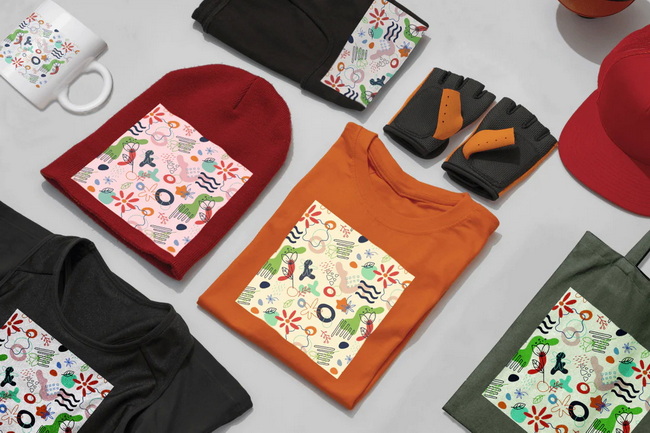
The printer targets both new and established decoration businesses that need flexible, full‑color transfers for different products and fabrics.
The device can be a strong fit for several types of operations.
- Custom apparel shops handling small to medium production runs with frequent artwork changes.
- Promotional product decorators who need vibrant, multi‑color graphics on fabric goods without long setup times.
- Online brands and print‑on‑demand sellers seeking reliable, in‑house control over transfer quality and turnaround.
- Screen printing or embroidery shops that want to add full‑color capabilities without additional screen or digitizing work.
DTF transfers from this type of printer can be pressed onto cotton, polyester, blends, and several specialty fabrics when paired with suitable application settings.
With the correct curing and pressing workflow, the printer supports a wide variety of garment and textile products.
- Streetwear and fashion collections featuring complex, full‑color graphics and gradients.
- Team uniforms, fan gear, and event merchandise requiring quick turnaround and personalized elements.
- Branded corporate apparel, workwear, and promotional textiles.
- Limited edition drops and test runs before scaling designs to other production methods.
Suggested visual: Insert a small gallery graphic showing example garments and accessories decorated with DTF transfers from similar systems.
To provide practical guidance, this section outlines a straightforward operating sequence. This helps readers understand what daily use of the printer looks like.
1. Prepare artwork
Create or import your design in professional graphics software, set the appropriate canvas size, and configure CMYK plus white where needed.
2. Configure the job in RIP software
Import the artwork into the RIP, choose resolution and print mode, and adjust white ink underbase, choke, and color profiles based on the fabric type.
3. Print on DTF film
Load the film roll, confirm correct tension and alignment, and start the print so both color and white layers are laid down in a controlled pass.
4. Apply DTF powder
While the ink is still wet, coat the print with DTF powder to cover all inked areas evenly without excessive buildup.
5. Cure the adhesive layer
Cure the powder using a dedicated oven or a hover mode on a heat press until the powder melts and forms a smooth, glossy adhesive surface.
6. Cool and store the transfers
Allow the film to cool completely. Finished transfers can be stored flat or rolled for later application without losing usability.
7. Press the transfer onto the garment
Position the cooled transfer on the garment and apply it using a reliable heat press, following the recommended time, temperature, and pressure for the specific fabric and powder. After pressing, peel the film according to the required peel temperature and perform a final press if needed.
This structured workflow gives new users a clear picture of how to integrate the printer into daily operations.
The following table summarizes key strengths and possible trade‑offs to support more informed decisions.
Aspect | Advantages | Potential Limitations |
Print quality | High resolution and multi-head design support sharp, consistent results. | Full benefits require proper color management and calibrated workflows. |
Speed | Capable of meaningful production output for growing shops. | May exceed the needs of very small or purely hobby-level operations. |
Maintenance | Automated ink handling reduces daily manual cleaning workload. | Still requires routine checks and consumables to maintain reliability. |
Footprint | Compact width fits in many studios and passes through standard doorways. | Narrower than large-format industrial DTF systems used for very high volumes. |
Ease of use | Touchscreen, bundled software, and guided onboarding support new users. | DTF as a process still has a learning curve, especially for first-time adopters. |
This overview can help readers quickly identify whether the printer aligns with current and future production goals.
To deliver more practical value, this section provides expert‑level suggestions focused on stability, productivity, and long‑term results.
- Control the environment by keeping temperature and humidity within recommended ranges to promote smooth ink flow and consistent curing.
- Standardize RIP presets for common materials and product types so operators can select reliable profiles instead of guessing settings each time.
- Schedule routine maintenance that includes nozzle checks, light cleanings, and visual inspections to catch issues before they affect production.
Because DTF transfers depend heavily on heat and pressure, the choice of heat press is critical.
- Use a flat press of at least 16 x 20 inches to accommodate large designs and varied garment sizes.
- Consider auto‑open or dual‑station presses in higher‑volume environments to increase garments pressed per hour and reduce operator fatigue.
- Document pressing recipes for each fabric category, including time, temperature, pressure, and peel instructions, and post them near the press for easy reference.
These practices help ensure that printed transfers deliver their full potential once applied to finished products.
This type of DTF system works best for businesses that view DTF as a core production method rather than an occasional add‑on.
You should strongly consider this solution if:
- Your order volume and growth plans justify an automated roll‑fed printer instead of a small desktop device.
- You want reduced daily maintenance workload through automated capping and guided processes.
- You need a compact yet professional system that can scale with your apparel or promotional product business.
If your volume is still very low or you are only testing demand, starting with outsourced transfers or a simpler entry‑level setup may be a more cautious approach.
If you are planning to upgrade your production with a compact, high‑performance 17‑inch DTF system, now is the time to evaluate how this type of printer fits into your business roadmap. Analyze your current monthly order volume, fabric mix, and available workspace, then speak with a trusted DTF equipment specialist to walk through live demos, bundle options, and compatible heat press setups. By aligning the printer configuration, consumables, and pressing equipment with your specific workflows, you can build a reliable DTF production line that supports faster turnaround, higher print quality, and sustainable long‑term growth.
Yes. While it is a professional‑grade machine, automated ink handling, guided maintenance functions, and structured onboarding resources make it accessible to new users who are willing to learn the DTF process step by step.
A modern Windows‑based computer is commonly recommended, along with dedicated RIP software provided in the bundle. This combination handles color management, print modes, and job queuing so the printer can focus on reliable mechanical output.
DTF transfers from this category of printer can typically be applied to cotton, polyester, blended fabrics, and selected specialty textiles when the correct powders and pressing settings are used. This flexibility supports a wide range of fashion, workwear, and promotional products.
You should plan space for the printer itself, a curing area for powder, at least one flat heat press, and work surfaces for film handling and finished garments. Allocating a dedicated DTF zone improves safety, cleanliness, and workflow efficiency.
Owners generally receive remote onboarding, access to documentation and training materials, and a defined warranty period on the main system. Many suppliers also provide ongoing technical support for troubleshooting, maintenance questions, and workflow optimization.


