If you have any questions, please feel free to contact us.| Email Us: info@dcheatpress.com


Views: 222 Author: Amanda Publish Time: 2026-02-09 Origin: Site


Content Menu
● What Is TexPrint DT Sublimation Paper?
● TexPrint DT Heavy vs TexPrint DT Light: Key Differences
● Printer, Ink, and Substrate Compatibility
● Real-World Image Comparisons: Panel, T-Shirt, and Mug
>> ChromaLuxe aluminum photo panel
● Decision Guide: Which TexPrint DT Paper Should You Choose?
>> Scenario-based recommendations
● Comparison Table: TexPrint DT Heavy vs Light
● Step-by-Step Workflow: How To Test Heavy vs Light In Your Shop
● Common Problems and How To Fix Them
>> Colors look too strong or oversaturated
>> Banding, smudging, or cockling
>> Ghosting or blurry edges after pressing
● Where TexPrint DT Fits In A Complete Sublimation Setup
● Take The Next Step: Standardize Your TexPrint DT Workflow
● FAQs About TexPrint DT Heavy and Light
>> Q1. Can I use TexPrint DT Heavy and Light with any sublimation printer?
>> Q2. Which paper is better for dark, saturated graphics on polyester shirts?
>> Q3. Which TexPrint DT paper should I use for photo panels and portrait mugs?
>> Q4. Do I need different print settings for Heavy and Light?
>> Q5. How should I store TexPrint DT paper to maintain performance?
Choosing between TexPrint DT Heavy and TexPrint DT Light sublimation paper has a direct impact on your image color, detail, and consistency across different substrates. This in-depth guide will help you confidently select the right paper for your printer, ink, and projects, and optimize your production workflow.

TexPrint DT is a desktop sublimation paper line developed for small-format printers used in apparel, drinkware, photo panels, and other hard-surface blanks. It is designed to hold water-based or gel-based sublimation inks, then release them efficiently under heat and pressure from your heat press.
Two main variants are commonly used by creators and small businesses:
- TexPrint DT Heavy (often labeled “DT Heavy” or “DT/H”)
- TexPrint DT Light (in some markets replacing or related to legacy XPHR-type papers)
Both are compatible with popular sublimation printers and can be used with many different sublimation blanks, from photo panels to mugs and polyester T-shirts.
TexPrint DT Heavy and Light share similar coating technology but behave differently in ink release, color rendering, and substrate performance.
1- Ink release behavior
- DT Light has a higher release of sublimation dye gas, pushing more ink into the substrate.
- DT Heavy holds the ink slightly more, resulting in more controlled, natural color output.
2- Color and tone
- DT Heavy tends to produce more natural tones, especially in skin, gradients, and detailed photographs.
- DT Light increases overall contrast and saturation, which benefits bold, graphic-heavy designs.
3- Paper thickness and handling
- DT Heavy is a thicker sheet designed for high ink saturation, stability at high speed, and resistance to smudging or offsetting.
- DT Light is lighter-weight, engineered for high release while still maintaining good dimensional stability for desktop printers.
4- Ink and printer pairing
- Many users prefer DT Heavy for Epson-style water-based inks used in converted desktop sublimation setups.
- DT Light is often optimized for Sawgrass-style gel-based printers, especially where high-speed printing and high ink loads are involved.
Selecting the right TexPrint DT variant is easier when you first look at your printer, ink, and target substrate.
1- Sawgrass printers (gel-based inks)
- DT Light was originally engineered with Sawgrass-type gel inks and high-speed desktop printing in mind.
- It provides excellent release and color vibrancy without excessive cockling or paper warping.
2- Epson and similar water-based ink printers
- DT Heavy is widely recommended because its thicker base and coating handle heavy water-based ink loads and keep the sheet stable.
- You can still use DT Light, but you may need more testing to avoid oversaturation or bleeding on certain designs.
3- Other compatible systems (Ricoh, etc.)
- TexPrint DT Heavy has documented compatibility with various gel-resin ink systems from multiple brands.
- Both variants remain safe for most sublimation printers as long as you follow recommended print profiles and drying times.
1- Hard substrates (metal, ceramic, coated panels)
- Both Heavy and Light work on polyester-coated hard substrates, but Heavy often produces more controlled, photographic results.
- For high-vibrancy display items, such as signage or colorful art panels, DT Light can add extra punch.
2- Soft substrates and fabrics
- DT Light is frequently highlighted as strong on fabric, particularly where you want vivid colors on polyester garments.
- DT Heavy still performs well on garments, especially where color accuracy is more important than maximum saturation.
Tests with common desktop sublimation printers show clearly how DT Heavy and DT Light behave on different blanks.
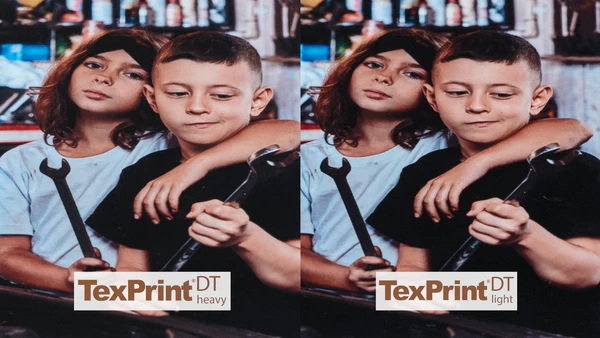
- Using the same photo of two children on identical aluminum photo panels, DT Heavy produced more natural skin tones and more accurate color gradients.
- DT Light looked good overall but appeared slightly oversaturated, particularly in midtones and high-color areas.
- A painterly graphic pressed on a white polyester T-shirt showed stronger vibrancy in darker colors with DT Light.
- DT Heavy came close, but the colors were a touch more restrained, favoring realism rather than high-impact vibrancy.
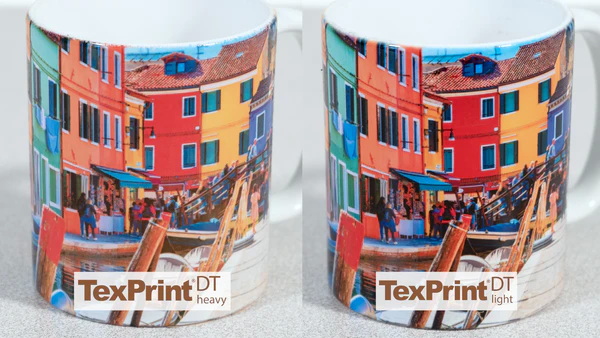
- On a standard 11 oz ceramic mug with a wide vacation image, differences between Heavy and Light were more visible than on some flat substrates.
- Each paper produced its own level of color saturation, with DT Light again leaning toward bolder contrast and DT Heavy toward more faithful reproduction.
Use this section as a quick decision framework before you print.
- Choose DT Heavy if your priority is color accuracy, natural tones, or detailed photography.
- Choose DT Light if your priority is maximum vibrancy, bold graphics, or punchy, saturated colors.
1- Photographers and personalized gift shops
- DT Heavy for portrait mugs, memorial photo panels, and realistic landscape prints.
2- Sports, branding, and merch
- DT Light for jerseys, team shirts, fan merch, and logo items needing strong color pop on polyester.
3- Mixed product catalogs
- Keep both Heavy and Light in stock and build profiles or presets for photographs versus graphics.
| Feature / Use Case | TexPrint DT Heavy | TexPrint DT Light |
|---|---|---|
| Typical printer / ink | Water-based Epson-style, Ricoh, Virtuoso, and other compatible setups | Sawgrass gel-based printers and other high-release workflows |
| Color character | More natural, neutral tones, ideal for photos | Higher saturation and contrast for bold graphics |
| Paper base | Thicker sheet, high ink-load tolerance | Lighter sheet, engineered for high release |
| Best substrates | Photo panels, mugs, detailed prints on hard goods | Polyester shirts, vibrant fabric designs, colorful merch |
| Release characteristics | Slightly lower gas release, controlled transfer | Very high pigment release into substrate |
| Risk of oversaturation | Lower, easier to maintain realism | Higher, especially with already vivid artwork |
| Ideal user profile | Studios needing faithful image reproduction | Creators prioritizing loud, eye-catching colors |
Running a simple test series will help you decide which paper should be your default for each category of product.
- Select three representative designs
Choose one portrait photo with skin tones, one detailed landscape or product image, and one bold graphic or logo-based design.
- Prepare print settings for both papers
Start with your current best sublimation profile. Duplicate it for DT Heavy and DT Light, then adjust only if you see clear over-inking, banding, or color clipping.
- Print and press on multiple substrates
Include at least one photo panel, one polyester T-shirt, and one ceramic mug. Keep all other variables (time, temperature, pressure) constant based on manufacturer guidance.
- Evaluate color and detail under neutral light
Compare skin, gradients, shadows, and black areas between Heavy and Light. Decide whether realism or vibrancy matters more for each product type.
- Document your preferred combinations
Build a simple reference chart listing which paper you prefer for each printer, substrate, and design category, and save presets in your RIP or print driver.
Understanding typical issues with TexPrint DT Heavy and Light makes troubleshooting much faster.
- Try DT Light if you are currently using Heavy and your designs are primarily graphic-based.
- Increase resolution or ink density slightly within recommended limits, and verify you are using a correct sublimation profile for your printer and paper.
- Switch from DT Light to DT Heavy, especially for portraits and photographic prints.
- Reduce saturation in your artwork or lower ink load in your printer settings.
- Ensure your paper type settings match the thickness and coating of the paper you are using. DT Heavy often benefits from a slightly slower, higher-quality paper mode.
- Allow printed sheets to fully dry before pressing and store them in a controlled temperature and humidity environment.
- Use adequate pressure and avoid bumping or shifting the press when opening.
- Secure the transfer with heat-resistant tape and make sure your press surface is flat and properly padded.
TexPrint DT Heavy and Light work best when integrated into a consistent, calibrated sublimation workflow.
A typical desktop sublimation system includes:
- A compatible sublimation printer (Sawgrass, Epson-based, Ricoh, and similar systems)
- Matching sublimation inks from the printer manufacturer or a specialist supplier
- TexPrint DT Heavy and/or Light papers selected according to your primary products
- A reliable heat press with accurate temperature and pressure control for flat items and dedicated presses or attachments for drinkware and other shapes
When each component is tuned correctly, you will achieve repeatable color from screen to substrate, minimize waste, and deliver higher-quality products to your customers.
Now that you understand how TexPrint DT Heavy and TexPrint DT Light differ in color, release, and handling, the next step is to standardize your workflow around the products you sell most. Define whether natural photographic accuracy or high-impact color is your main priority, assign Heavy or Light as your default paper for each product category, and then document those settings for your entire team. When you are ready to upgrade your output and efficiency, review your current sublimation setup, select the TexPrint DT variant that best matches your business needs, and update your printing presets today so your next production run delivers consistent, professional-quality results.
Contact us to get more information!
Yes, both papers are generally safe to use with most desktop sublimation printers, including Epson, Sawgrass, and Ricoh units, as long as you use compatible sublimation inks and appropriate color profiles.
TexPrint DT Light is usually preferred for this scenario because its higher dye release produces very vibrant, high-contrast colors on fabric substrates, especially sportswear and merchandising apparel.
TexPrint DT Heavy is often the better choice for photo panels and portrait mugs because it maintains more natural tones and reduced oversaturation, which is particularly important for skin tones and subtle gradients.
You can start with similar settings for both papers, but you may need to slightly reduce ink load or saturation for DT Light and possibly use a thicker-paper mode for DT Heavy, depending on your printer and the level of detail in your artwork.
Store the paper flat in a cool, dry environment within the recommended temperature and humidity range, and keep it in its original packaging to avoid moisture absorption, curling, and contamination of the coating.
[1] https://www.beaverpaper.com/texprint-for-desktop/
[2] https://www.jpplus.com/texprint-dt-heavy-sublimation-paper-110-sheets/
[3] https://www.jpplus.com/texprint-dt-light-small-format-sublimation-paper/
[4] https://www.heatpressnation.com/pages/sublimation-tutorial/
[5] https://care.sawgrassink.com/hc/en-us/articles/10620711266971-Paper-Tips-Tricks-Information
[6]https://www.heatpressnation.com/blogs/blog/texprint-dt-sublimation-paper-heavy-or-light


