If you have any questions, please feel free to contact us.| Email Us: info@dcheatpress.com


Views: 222 Author: Amanda Publish Time: 2025-12-27 Origin: Site


Content Menu
● What Is a Sublimation Tumbler Heat Press Machine
● Why Invest in a Tumbler Heat Press
● Heater Attachments and Compatibility
● Types of Sublimation Tumblers
● Essential Equipment for Sublimation Printing
● Key Preparations Before Sublimating
● Recommended Tumbler Press Settings (2025 Update)
● Step‑by‑Step Process to Sublimate Tumblers
>> Step 1: Prepare the Artwork
>> Step 2: Print and Dry the Transfer
>> Step 3: Clean and Prepare the Tumbler
>> Step 5: Set Temperature and Pressure
● Two‑Stage Heating System for Efficiency
● Troubleshooting Common Issues
● Professional Tips for Continuous Production
● Equip Your Business for Success
>> Q1. Can I use any tumbler for sublimation?
>> Q2. Why does my tumbler have a faded strip on one side?
>> Q3. Do I always need to press twice?
>> Q4. What is the best temperature for stainless steel tumblers?
>> Q5. How can I prevent ghosting on tumbler edges?
A sublimation tumbler heat press machine applies controlled heat and pressure to stainless steel, ceramic, glass, and aluminum drinkware, embedding printed designs into the polymer‑coated surface. This process transforms plain tumblers, mugs, and bottles into vibrant, full‑color customized products that will not peel or fade over time. With interchangeable curved heater attachments, one machine can handle a wide variety of shapes and sizes, making it ideal for both hobbyists and commercial customization businesses.
A high‑quality tumbler press delivers consistent color accuracy, faster workflow, and professional results compared with ovens or wraps. Its even heat distribution guarantees crisp details, while its efficiency reduces turnaround time for bulk orders. With the growing demand for personalized drinkware, businesses that invest in specialized presses can significantly increase output and profit margins. Once you standardize your process, this equipment becomes one of the most cost‑efficient tools in your production line.
Each tumbler press comes with different heater sizes for specific cup diameters. Choosing the precise heater ensures complete surface contact and prevents color banding or fading. The Ramslide®‑style pressure adjustment system allows quick calibration with built‑in scale marks for common tumbler sizes (15 oz, 20 oz, 30 oz, 40 oz). Such features make it easier to maintain uniform quality, minimize operator fatigue, and improve long‑term durability in production environments.
Heater | Diameter Range | Height | Suitable Drinkware |
11 oz mug heater | 72 mm | 120 mm | Ceramic coffee mugs |
12 oz–17 oz heater | 54–80 mm variable | 116–162 mm | Tapered mugs & tumblers |
30 oz tumbler heater (tall) | 70 mm | 300 mm | Full-height skinny tumblers |
Aluminum bottle heater | 60 mm | 170 mm | Sports bottles |
Shot glass heater | 30–48 mm | 75 mm | 1.5 oz glasses |
Only blanks with a special polymer or polyester coating are compatible with sublimation. These materials allow sublimation ink to become part of the surface, ensuring permanent, dishwasher‑safe prints.
- Stainless steel tumblers – excellent for bright, full‑wrap designs.
- Ceramic mugs – popular for classic promotional drinkware.
- Aluminum bottles – lightweight and ideal for sports or travel.
- Glass tumblers – offer a premium frosted effect but require longer pressing times.
Raw, uncoated plastic or metal cups are unsuitable for sublimation as they cannot handle the necessary heat.
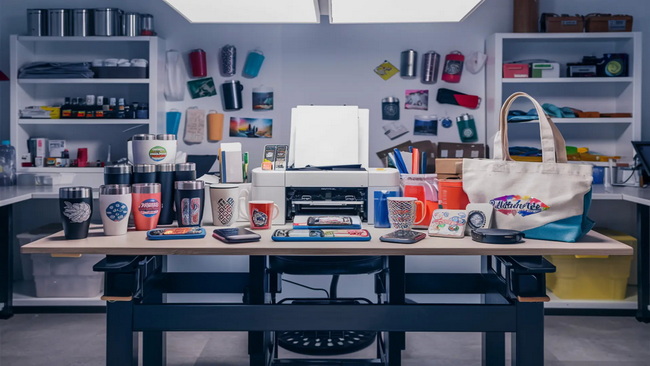
Starting your sublimation workflow requires a complete setup including reliable machinery and compatible materials.
- Sublimation printer with color‑managed inks and custom profiles
- Tumbler heat press machine with temperature and pressure control
- Heat‑resistant tape and sheets to secure transfers and protect heaters
- Protective gloves and mats for safe operation when handling hot blanks
- Sublimation blanks with certified coating for even color absorption
- High‑release sublimation paper chosen to match your ink set
- Professional sublimation inks formulated for durable image transfer
1. Mirror all design images before printing so they appear correctly after transfer.
2. Conduct small test runs at lower temperatures to find the best settings for each blank type.
3. Clean and dry tumbler surfaces thoroughly before pressing to prevent unwanted stains or faded spots.
These careful steps minimize waste and ensure consistent, high‑quality results across your product range.
Material | Pre-Press Temp | Printing Temp | Time | Pressure |
Stainless steel | 160 °C | 175–185 °C | 40–100 s | Medium |
Ceramic mugs | 160 °C | 180–190 °C | 45–60 s | Medium |
Aluminum bottles | 160 °C | 175–185 °C | 25–60 s | Medium |
Glass tumblers | 160 °C | 190–200 °C | 50–300 s | Medium |
Record each successful recipe in a production log detailing temperature, time, and pressure for future reference.
Use a template to size your design correctly and mirror it horizontally. Adjust dimensions based on tumbler circumference and height.
Select “premium matte paper,” set high print quality, disable high‑speed mode, and allow the transfer to dry completely before taping.
Wipe down with lint‑free cloths or alcohol pads to remove oil or dust. Ensure the tumbler is completely dry before attaching the transfer sheet.
Align seams accurately. Apply heat‑resistant tape tightly along the edges and avoid wrinkles or overlaps to ensure even heat distribution.
Pre‑heat the press to the pre‑press temperature. Adjust pressure until the tumbler feels snug but not overly compressed.
Insert the tumbler, close the press, and allow it to reach the printing temperature. After the first cycle, rotate 180° and press again to cover the entire surface evenly.
After pressing, let the tumbler cool partially before removing tape. Peel the paper back slowly at a shallow angle. Inspect all sides for color saturation and clarity.
Advanced tumbler presses maintain a pre‑press temperature to save time between jobs. When a new tumbler is inserted, the press automatically rises to the printing temperature for the full transfer cycle. This function improves consistency across batch production and shortens waiting time between cycles, enhancing workflow efficiency for high‑volume operations.
- Ghosting: Caused by loose taping or movement during press closing. Apply firm tape and steady pressure.
- Light or faded areas: Increase pressure slightly or check for air gaps under the transfer.
- Overcooked prints: Lower the temperature or press time to avoid excessive gassing.
- Moisture marks: Always ensure tumblers and transfers are completely dry.
Keeping a visual defect chart helps your production team quickly trace and correct problems during runs.
Establishing a standardized, document‑based process turns sublimation work into a scalable production system:
- Maintain unified printer profiles and press settings for each blank SKU.
- Track every production variable when changing materials or ink types.
- Inspect all finished tumblers for alignment, seam quality, and coating integrity before packaging.
- For larger factories, consider semi‑automatic presses with digital pressure control and automatic open/close features to increase throughput.
Transform your ideas into profitable products with a professional sublimation tumbler heat press machine. Whether you run a personalization startup or manage industrial‑scale production, investing in precision equipment helps you achieve consistent color, speed, and durability. Explore advanced machines featuring digital pressure control, quick‑swap heaters, and stable temperature systems to grow your customization business efficiently.
Step into the next level of quality and productivity—upgrade your tumbler heat press solution today.
Only tumblers with a polyester or polymer coating are suitable for sublimation. Uncoated plastic or metal materials will not bond with sublimation ink.
This usually occurs when the wrap is not tight enough or pressure is uneven. Re‑tape securely and check for proper alignment before pressing.
Yes, most tumbler presses have a small heater gap. Rotating and pressing again ensures full 360‑degree heat coverage.
A range of 360–385 °F (182–196 °C) at medium pressure for around 60 seconds typically achieves the best results.
Trim the transfer carefully, apply even tape along rims, and maintain steady pressure throughout the pressing process.


