If you have any questions, please feel free to contact us.| Email Us: info@dcheatpress.com


Views: 222 Author: Amanda Publish Time: 2026-01-06 Origin: Site


Content Menu
● What Is Siser Brick 600 3D HTV
● Why Choose Siser Brick 600 Over Standard HTV
● Recommended Equipment and Workspace
● Core Keyword Overview: Siser Brick 600 Heat Transfer Vinyl
● Technical Specs and Compatibility
● Designing Artwork for Siser Brick 600
● How to Cut Siser Brick 600 Correctly
● Weeding Tips for Thick 3D HTV
● Siser Brick 600 Heat Press Settings
● Step‑by‑Step Application Guide
● Layering Rules and Design Strategies
● Durability, Washing, and Aftercare
● Creative Applications and Design Ideas
● Troubleshooting Common Problems
● Quick Reference Table: Siser Brick 600 vs Standard HTV
● How to Integrate Siser Brick 600 Into a Professional Workflow
● Build a Reliable 3D HTV Production Setup
● FAQs
>> FAQ 1: Is Siser Brick 600 suitable for all fabrics?
>> FAQ 2: Can Siser Brick 600 be layered with other vinyls?
>> FAQ 3: What is the correct way to peel Siser Brick 600?
>> FAQ 4: Why is my Siser Brick 600 lifting after washing?
>> FAQ 5: How can I make Siser Brick 600 look more finished?
Siser Brick 600 is a thick 3D heat transfer vinyl that creates a raised, dimensional effect on garments and accessories while remaining flexible and washable when applied correctly. This guide explains how to cut, press, and maintain Siser Brick 600 for professional, repeatable production.[1]

Siser Brick 600 is a polyurethane heat transfer vinyl with a thickness of about 600 microns, much thicker than standard HTV around 90 microns such as EasyWeed. Despite this thickness, it remains flexible enough for hats, shirts, bags, shoes, and other apparel applications.[1]
- Material type: Polyurethane HTV with a matte finish.[1]
- Thickness: Approx. 600 microns for a pronounced 3D lift.[1]
- Backing: Static (non–pressure-sensitive) carrier that influences cutting and weeding technique.[1]
Siser Brick 600 is ideal when you want designs that feel premium and dimensional, not flat. Standard thin HTV works well for large, flexible designs, but Brick 600 excels on smaller elements like chest logos, sleeve badges, and cap front graphics.[1]
Use Siser Brick 600 when:
- You want a bold, raised effect that stands out in person and in photos.
- You decorate sports jerseys, fashion streetwear, or branded uniforms.
- You need a matte, solid look instead of shiny or glitter finishes.[1]
To get consistent results with 600‑micron HTV, a stable, accurate heat press is far more reliable than a home iron, because thick vinyl demands even pressure and stable temperature across the platen. For small studios and growing businesses, dedicated presses for flat garments and caps support higher quality and better productivity.[1]
Consider:
- Flat heat presses with digital temperature and time control for T‑shirts, hoodies, and flat garments.
- Cap presses for structured hats, providing focused pressure on curved surfaces.
- Interchangeable platens or specialty presses for shoes, sleeves, and small accessories.
For search optimization, the primary phrase is “Siser Brick 600 heat transfer vinyl”, supported by related terms such as “3D HTV,” “thick heat transfer vinyl,” and “raised HTV for hats and shirts.” These phrases reflect how decorators look for dimensional vinyl options.
Typical search intent comes from:
- Custom apparel shops exploring 3D vinyl upgrades.
- Sports uniform decorators seeking raised numbers and logos.
- Crafters transitioning from basic HTV to more premium finishes.
Understanding the technical profile of Siser Brick 600 helps set correct expectations and reduce misprints. This information is also useful when writing product descriptions or training new staff.[1]
Key specifications:[1]
- Approx. thickness: 600 microns (0.6 mm)
- Finish: Matte surface
- Colors: Offered in multiple solid colors depending on distributor
- Backing: Static carrier, non‑tacky to the touch
General compatible substrates:
- Cotton and cotton blends
- Polyester and many performance fabrics, with prior testing
- Suitable caps, bags, and shoes that withstand 310°F / 155°C
Because Siser Brick 600 is thick, design choices affect comfort, flexibility, and durability in real‑world wear. Using simpler shapes and moderate coverage helps keep garments comfortable and wearable over time.
Guidelines for artwork:
- Prefer bold text and logos over ultra‑thin lines or tiny details.
- Avoid solid blocks across major flex points such as elbows and underarms.
- Keep minimum line widths larger than with standard HTV to reduce risk of lifting.
- Use Siser Brick 600 as an accent layer (numbers, badges, monograms) instead of full‑front coverage.
Cutting Siser Brick 600 differs slightly from standard vinyl because of its static, non‑tacky carrier and higher thickness. Proper cutting reduces waste and preserves detail.[1]
Cutting steps:[1]
1. Mirror the design in the cutting software.
2. Place Siser Brick 600 on the cutting mat with the shiny carrier side down.
3. Use a sharp blade and increase cut pressure compared with regular HTV.
4. Perform a test cut to confirm the film is cut cleanly without slicing through the carrier.
5. Reduce cutting speed for intricate designs, as the thicker film creates more resistance.
Weeding Siser Brick 600 is generally straightforward because the static backing keeps pieces in place during removal. A careful technique prevents stretching and damage to small elements.[1]
Weeding workflow:[1]
- Start from a corner and pull slowly at a low angle.
- Use a hook or weeding tool to lift small cavities and inner spaces.
- Support delicate areas with your free hand so letters and thin lines do not distort.
- Keep the carrier flat and stable on a clean surface while removing excess vinyl.
Correct heat press settings are essential, as the thick film needs sufficient heat and pressure to bond completely to the fabric. These baseline settings are a starting point that can be fine‑tuned to match your specific press.[1]
Typical starting settings:[1]
- Temperature: 310°F (155°C)
- Pressure: Medium, with even contact across the design
- Time: 15 seconds
Before each run:
- Allow the press to reach full operating temperature.
- Position garments so seams and zippers stay off the main platen.
- Use a heat transfer cover sheet or parchment as protection when required.[1]
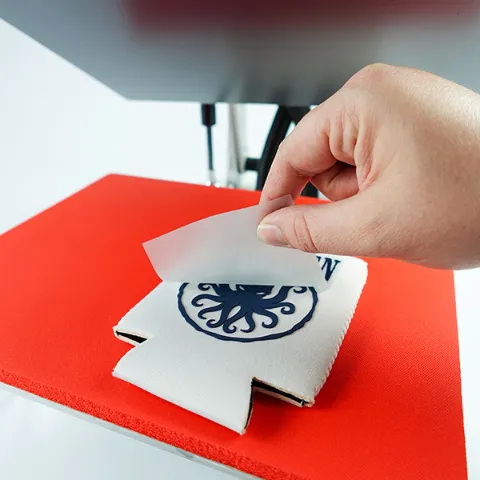
A structured application process helps produce consistent 3D results and minimizes defects.
1. Prepare the garment
- Remove lint and dust.
- Pre‑press briefly to eliminate moisture and wrinkles.[1]
2. Position the design
- Place the Siser Brick 600 transfer with the carrier facing up.
- Align using center marks, rulers, or alignment tools.
3. Press the design
- Set the press to 310°F (155°C) at medium pressure.[1]
- Press for 15 seconds, ensuring full contact across all design areas.[1]
4. Cool and peel
- Let the transfer cool completely; Siser Brick 600 is not a hot peel.[1]
- Peel the carrier slowly at a low angle, checking that edges remain fully adhered.
5. Optional finishing press
- For a semi‑gloss finish or extra edge sealing, cover with a sheet and press another 5–10 seconds.[1]
Because of its thickness, Siser Brick 600 should not be layered on top of itself, as multiple layers of thick vinyl reduce flexibility and wash durability. It can, however, be applied on top of thinner HTVs for a mixed‑height design.[1]
Effective layering choices:[1]
- Use EasyWeed or other thin HTV as a base layer for large color fields.
- Place Siser Brick 600 on top for raised outlines, badges, or lettering.
- Avoid stacking more than one Brick layer, and keep total coverage modest on high‑movement areas.
Properly applied Siser Brick 600 can withstand normal wear and washing, but it responds best to gentle aftercare suited to thicker vinyl. Poor application or harsh washing cycles will reduce product life.[1]
Aftercare recommendations:
- Wait at least 24 hours after pressing before the first wash.
- Wash garments inside out with mild detergent and avoid harsh bleach.
- Use warm or cold water and moderate drying; avoid excessive high heat.
- Do not iron directly over the raised design; if needed, iron inside out with a protective cloth.
Siser Brick 600 is especially effective where texture and depth elevate perceived value and brand impact. Using it selectively makes designs feel more exclusive.
Common applications:
- Sports numbers, name badges, and team marks on jerseys and hoodies.
- Streetwear logos on chest, sleeves, or pant legs.
- Premium branding on caps, backpacks, and travel bags.
- Accent details on shoes and accessories where a raised edge catches light and attention.
Most issues with thick 3D heat transfer vinyl come from insufficient pressure, uneven pressing surfaces, or incorrect peel timing. Simple checks usually resolve these problems.
Typical issues:
1- Edges lifting after washing
- Verify medium pressure, full 15‑second press time, and adequate pre‑pressing to remove moisture.[1]
2- Uneven raised effect
- Ensure collars, seams, and pockets are kept off the pressing area, using pressing pads if needed.
3- Carrier difficult to peel
- Allow more cooling time and peel slowly from a corner at a low angle.[1]
Feature | Siser Brick 600 3D HTV | Standard HTV (e.g., EasyWeed) |
Approx. thickness | 600 microns raised 3D profile | Around 90 microns, thin profile |
Surface finish | Matte, strongly tactile surface | Matte or semi-gloss, relatively flat |
Backing type | Static, non-tacky carrier | Often pressure-sensitive carrier |
Typical press settings | 310°F, medium pressure, 15 s | Similar temperatures, often shorter times |
Layering capability | On top of thin HTV only, no Brick-on-Brick | Multiple layers usually possible |
Best use cases | Logos, numbers, badges, premium accents | Full-front designs, text, general graphics |
For decorators moving from hobby level to commercial orders, Siser Brick 600 can be positioned as a premium upgrade within a layered product ladder. Pairing it with standard HTV and sublimation allows differentiated pricing and higher perceived value.
Workflow suggestions:
- Offer a “3D raised logo” or “embossed effect” surcharge for teams, brands, and corporate apparel.
- Standardize heat press profiles so operators can switch between standard HTV and Brick with minimal downtime.
- Use reliable heat presses with accurate digital controls to ensure stable results across long production runs.
To fully benefit from Siser Brick 600, decorators need consistent temperature, pressure, and workflow control rather than treating 3D vinyl like basic craft materials. Investing in stable, well‑built heat transfer equipment and clearly documented press profiles makes it easier to scale from test orders to ongoing production while maintaining uniform 3D quality on every piece.
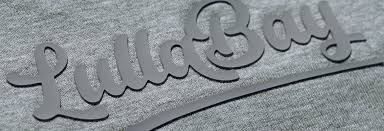
Siser Brick 600 works well on many cottons, cotton blends, and polyester garments that can tolerate 310°F and medium pressure. For performance fabrics, heavily textured surfaces, or coated materials, test on a hidden area or sample blank before full production.[1]
Siser Brick 600 should not be stacked on top of itself, but it can be applied over thinner HTVs such as EasyWeed for a raised accent layer. Keep Brick as the final top layer and limit overall coverage in high‑movement areas to maintain comfort and wash performance.[1]
Siser Brick 600 is designed as a cool peel, so the carrier should be removed only after the transfer has cooled fully. Peeling too early or too quickly can cause edge lifting, so wait, then peel from a corner at a slow, low angle.[1]
Lifting usually indicates insufficient pressure, inadequate dwell time, or residual moisture in the garment during pressing. Check that you pre‑pressed the fabric, used 310°F (155°C) for 15 seconds at medium pressure, and followed recommended washing guidelines such as washing inside out after a 24‑hour cure period.[1]
For a more refined, semi‑gloss appearance, place a heat transfer cover sheet over the design and press again for 5–10 seconds after peeling the carrier. This finishing press can further seal edges, smooth the surface, and give the raised vinyl a more polished look.[1]
[1](https://www.heatpressnation.com/blogs/academy/siser-brick-600-a-guide-to-using-3d-heat-transfer-vinyl)


