If you have any questions, please feel free to contact us.| Email Us: info@dcheatpress.com


Views: 222 Author: Amanda Publish Time: 2026-01-28 Origin: Site


Content Menu
● Overview: Sawgrass SG500 & SG1000 Desktop Sublimation Printers
● New Hardware Upgrades and User-Friendly Design
>> Improved Interface and Paper Path
>> Energy Efficiency and Connectivity
● SubliJet-UHD Sublimation Ink and Ultra Fine Photo Mode
● Sawgrass Print Manager and Online Design Tools
>> Sawgrass Print Manager (SPM)
>> CreativeStudio and MySawgrass Designer
● Print Sizes, Applications, and Model Selection
>> SG500: Compact Desktop Workhorse
>> SG1000: Larger Format for Apparel and Panels
● SG500 vs SG1000: Practical Comparison for 2026 Buyers
● Reliability, Maintenance, and Warranty
● Included Software, Training, and “Business-in-a-Box” Ecosystem
● Strategic Buying Advice: Who Should Choose Which Model?
>> When the SG500 Makes More Sense
>> When the SG1000 Is the Better Investment
● Expert Tips for Getting the Best Results with SG500 and SG1000
● How Professional Heat Press Equipment Complements Sawgrass Printers
● Clear Call-to-Action: Build Your Ideal Sublimation Setup Now
● Frequently Asked Questions (FAQ)
>> 1. What is the main difference between the Sawgrass SG500 and SG1000?
>> 2. Do the SG500 and SG1000 both support Ultra Fine Photo mode?
>> 3. How does automatic self-maintenance work on these printers?
>> 4. What software do I need to design and print with these Sawgrass printers?
>> 5. Are there differences in warranty coverage for SG500 and SG1000 printers purchased in 2026?
Sublimation businesses in 2026 need printers that offer reliable color, flexible print sizes, and streamlined software from design to production. The Sawgrass SG500 and SG1000 desktop sublimation printers combine upgraded hardware, UHD inks, and an integrated software ecosystem that helps both beginners and professionals achieve predictable, profitable results on a wide range of substrates.
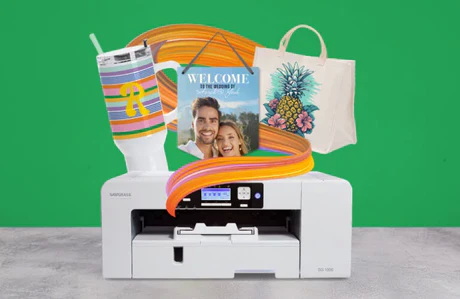
The Sawgrass SG500 and SG1000 are purpose-built desktop sublimation printers designed for hard substrates such as mugs, panels, and phone cases, and for polyester or poly-coated soft goods. Both models ship with SubliJet-UHD ink and are optimized to work with Sawgrass Print Manager and cloud-based design tools such as CreativeStudio and its newer alternatives in the Sawgrass ecosystem.
Key shared characteristics include:
- Ultra Fine Photo mode with very high resolution for detailed prints.
- Built-in automatic self-maintenance to reduce clogging and manual cleaning.
- Wi-Fi connectivity, compact desktop footprint, and an improved backlit control panel.
Compared with earlier models, the SG500 and SG1000 feature a larger, backlit display and a redesigned button layout to make navigation easier in bright or low-light workspaces. Under the hood, they use a single roller bar paper path that helps minimize jams and misfeeds when printing standard sublimation paper and longer sheets via the optional bypass tray.
Core usability upgrades:
- Backlit control panel for better visibility of status messages and settings.
- Simplified physical buttons for faster access to key functions.
- Enhanced paper handling that supports multiple sizes and reduces downtime from feed issues.
Both printers are engineered to be more energy-efficient than their predecessors, which helps studios that run multiple devices or operate many hours per day. Integrated Wi-Fi makes it possible to place the printer away from the design workstation or share it between several computers without a direct USB connection.
Practical advantages of Wi-Fi:
- Flexible placement on shelves, carts, or small benches.
- Easier collaboration in small offices where multiple users send jobs to the same printer.
- Cleaner cable management and fewer physical connection issues over time.
At the core of these systems is Sawgrass SubliJet-UHD, an updated sublimation ink set designed to produce rich, vibrant color on both rigid and soft substrates. Ultra Fine Photo mode lets the printers achieve extremely high resolutions, which is valuable for photographic panels, fine gradients, and detailed artwork.
Key benefits of SubliJet-UHD with Ultra Fine Photo mode:
- Vibrant colors and smooth gradients suitable for premium photo products.
- Sharper fine detail on text, logos, and line art, especially on coated metals and quality photo panels.
- Compatibility with longer print lengths via bypass trays for full-bleed designs on larger blanks.
Because Ultra Fine Photo mode is slower than high-speed modes, many shops reserve it for top-tier photo work while using faster settings for standard mugs, coasters, and signage.
Sawgrass Print Manager is the dedicated utility that optimizes ink output, color management, and media profiles for the SG500 and SG1000. It reduces ink waste, improves color accuracy, and automates many of the technical decisions that new users often find confusing.
Main functions include:
- ICC-based color handling tuned for Sawgrass inks and popular substrates.
- Preset print modes (High Speed, High Quality, Advanced Photo, Ultra Fine Photo) with matching media profiles.
- Integration with cloud-based design tools for one-click printing.
CreativeStudio is Sawgrass's cloud-based design environment with thousands of licensed, royalty-free templates, graphics, and fonts tailored to common sublimation products. As Sawgrass updates its platform, users can also explore newer web design tools that offer modern interfaces and direct integration with current printers.
Advantages of these design tools:
- Template-driven layouts for mugs, phone cases, photo panels, and more, reducing setup time.
- Built-in asset libraries that save beginners from purchasing stock designs separately.
- Cloud access from any compatible browser, with printing routed through SPM for consistent output.
The SG500 is the smaller of the two models, with a standard maximum media size around 8.5 × 14 inches and extended length capability via an optional bypass tray. Its compact footprint suits home crafters, kiosks, and small studios that focus on smaller blanks rather than large apparel pieces.
Typical SG500 applications:
- Drinkware such as coffee mugs, tumblers, and water bottles.
- Small photo gifts including coasters, keychains, ornaments, and plaque nameplates.
- Narrow or tiled designs for phone cases, badges, and promotional giveaways.
The SG1000 prints up to 11 × 17 inches out of the box and can reach 13 × 19 inches with its optional bypass tray. This makes it a better fit for T-shirt transfers, medium-sized photo panels, and other larger substrates that need full-area coverage.
Key SG1000 advantages:
- Larger imaging area for adult T-shirts, sweatshirts, and full-bleed prints on bigger blanks.
- Compatibility with extended ink cartridges that help lower cost per print for higher-volume users.
- The same Ultra Fine Photo mode and maintenance features as the SG500, but on a larger scale.
Feature | Sawgrass SG500 | Sawgrass SG1000 |
Max standard print size | Approx. 8.5 × 14 in (longer with bypass tray) | 11 × 17 in standard; up to 13 × 19 in with bypass tray |
Ideal users | Home studios, kiosks, small gift shops | Growing apparel shops, photo labs, production studios |
Ultra Fine Photo mode | Yes, very high-resolution photo mode available | Yes, high-resolution photo mode for detailed work |
Ink type | SubliJet-UHD desktop cartridges | SubliJet-UHD, with extended cartridge options |
Connectivity | USB, Wi-Fi | USB, Wi-Fi |
Self-maintenance | Automatic cleaning cycles when left powered on | Automatic cleaning cycles when left powered on |
Best for product types | Mugs, phone cases, small panels, gifts | Apparel, medium photo panels, larger soft goods |
This comparison helps buyers quickly identify whether a compact footprint or larger transfer area is more important for their specific product mix and future growth.
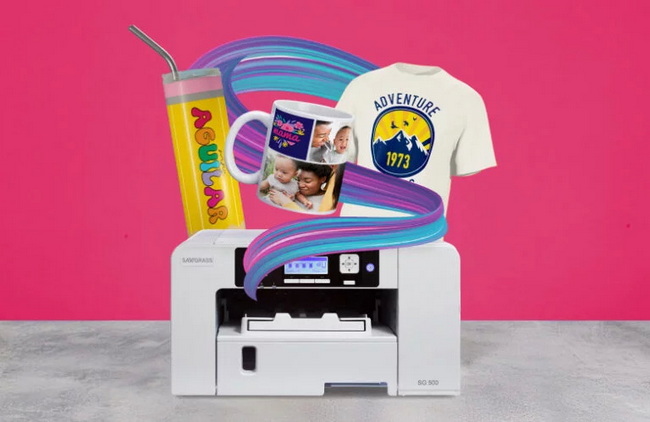
Both printers include automatic self-maintenance that runs periodic cleaning cycles when the machine is powered on to keep nozzles clear and reduce manual upkeep. This is especially helpful for part-time decorators or seasonal businesses that may not print every day but still want their printer ready to go at any moment.
These desktop systems are backed by multi-year warranties and ongoing technical support from the manufacturer and authorized dealers. Users can access phone assistance, online documentation, and video training to resolve print, color, or software questions as their business scales.
Sawgrass supports its printers with a broader ecosystem that includes training content, marketplaces, and fulfillment networks. Sawgrass Academy, an online learning platform, offers video lessons and certifications that walk beginners through design, printing, and business-building topics at their own pace.
Additional digital resources include:
- CreativeStudio and related web tools for design and template-based product creation.
- Online marketplace options where users can list customized designs and reach customers worldwide.
- Fulfillment networks that connect experienced Sawgrass decorators for outsourced production and drop-shipping.
For many new decorators, these tools turn a basic printer package into a more complete “business in a box”, reducing time from purchase to first profitable order.
The SG500 is a strong entry point for creators who have limited space, smaller budgets, and a product line focused on small-format items. Its compact design and efficient ink use make it an attractive option for beginners who want to validate demand for mugs, small promotional items, and specialty gifts before upgrading to larger equipment.
Choose the SG500 if you:
- Mainly sell small sublimation items such as mugs, coaster sets, keychains, and nameplates.
- Operate from a home studio, craft room, or shared space with strict size limits.
- Prefer a lower initial investment while still accessing the Sawgrass software ecosystem.
The SG1000 is better aligned with apparel-led shops, photo labs, and studios that need generous print areas and longer print runs. With its larger format and extended cartridge options, it offers a lower cost per print for businesses that regularly process full-size T-shirts and medium-sized panels.
Choose the SG1000 if you:
- Produce apparel as a core part of your business and need larger transfer areas.
- Want room to grow into poster-style panels, flags, or larger soft signage.
- Expect higher monthly print volumes where extended cartridges and fewer changeovers save time.
For consistent, high-quality output, decorators should pay close attention to print settings, substrate selection, and pressing technique. Using compatible sublimation papers, correct time, temperature, and pressure on a stable heat press, and color-managed workflows through Sawgrass Print Manager all contribute to predictable color and durability.
Practical tips:
1. Always leave the printer powered on so automatic maintenance cycles can run as designed.
2. Use profile-matched settings in Sawgrass Print Manager for each substrate type, such as ceramic, metal, or fabric.
3. Run test prints when changing paper or substrate brands to verify color and transfer efficiency.
4. Keep your workspace clean and free of lint to avoid specks on high-resolution photo transfers.
A high-quality sublimation printer needs to be paired with a consistent, even-heating press to fully realize its color and detail potential. Flat heat presses, mug presses, and specialty presses with accurate temperature and pressure control help ensure that the vivid output from SubliJet-UHD ink transfers cleanly and permanently onto the blank.
For decorators planning to scale production, using an industrial-grade heat press or roll-to-roll system can:
- Improve edge-to-edge color consistency across large batches of garments or panels.
- Reduce rejects caused by cold spots, uneven pressure, or unstable timing.
- Shorten cycle times and support higher throughput during peak seasons.
If you are planning to upgrade or launch a sublimation business, now is the time to match the right printer with the right press and workflow. Start by clarifying your main product line, your available space, and your target monthly output, then decide whether the compact SG500 or the larger SG1000 fits your current and future needs best.
Once you have chosen your printer, pair it with a reliable, even-heating press, set up Sawgrass Print Manager and cloud design tools, and create a simple test product line to validate your market. Taking these concrete steps now will turn your ideas into a repeatable production workflow and position your business for sustainable growth in custom sublimation printing.
Contact us to get more information!
The SG500 is a compact desktop model with a maximum standard print size around 8.5 × 14 inches, making it ideal for smaller items such as mugs and phone cases. The SG1000 prints up to 11 × 17 inches by default and up to 13 × 19 inches with an optional bypass tray, which is better suited to apparel, medium photo panels, and other larger substrates.
Yes, both printers include an Ultra Fine Photo mode that allows very high-resolution printing for photographic and high-detail work. This mode is slower than standard settings but produces sharper images and smoother gradients on compatible sublimation blanks.
The SG500 and SG1000 perform scheduled maintenance cycles when left powered on, including automatic printhead cleaning that helps prevent clogs and banding. Users are generally advised not to unplug the printers between sessions so these routines can run and keep the system ready to print at any time.
Most users install Sawgrass Print Manager on their computer and create designs in a cloud-based design tool such as CreativeStudio or its newer alternatives via a web browser. The design environment provides templates and graphics, while Sawgrass Print Manager handles color management, media profiles, and communication with the SG500 or SG1000.
Both printers are covered by multi-year warranties, and many bundles include extended coverage and lifetime technical support from Sawgrass and authorized dealers. Buyers should always confirm current warranty terms with their supplier at the time of purchase, as coverage and conditions can change over time.
1. https://www.heatpressnation.com/blogs/blog/introducing-the-new-sawgrass-sg500-sg1000-desktop-sublimation-printers
2. https://www.heatpressnation.com/blogs/blog/how-to-print-for-sublimation-with-sawgrass-creative-studio-myexpert-blog
3. https://www.heatpressnation.com/products/sawgrass-virtuoso-sg500-complete-sublimation-printer-kit
4. https://www.screenprintsupplies.com/products/sublimation/sawgrass-1000/
5. https://www.sawgrassink.com/products/printers/


