If you have any questions, please feel free to contact us.| Email Us: info@dcheatpress.com


Views: 222 Author: Amanda Publish Time: 2025-12-24 Origin: Site


Content Menu
● What Is Mixed-Media DTF + HTV?
● Why Mix DTF and Specialty HTV?
>> Key Creative and Commercial Benefits
● Best Use Cases for Mixed-Media Designs
● Tools and Materials You Need
● Recommended Time, Temperature, and Pressure Ranges
>> Quick Settings Reference Table
● Step-by-Step Workflow for Mixing DTF and HTV
>> Step 1 – Plan the Layered Design
>> Step 2 – Print and Cure the DTF Transfer
>> Step 3 – Cut and Weed the Specialty HTV
>> Step 4 – Press the DTF Layer First
>> Step 5 – Align and Press the HTV Layer
>> Step 6 – Inspect and Test for Durability
● Pro Tips for Alignment, Layering, and Durability
>> Alignment and Registration Tips
>> Layering Strategy for Comfortable Garments
● Practical Design Ideas for Mixed-Media Apparel
>> Flock and Textured Concepts
● Business Perspective: Pricing and Positioning
>> Turning Mixed Media into Profit
● Launch Your Next Mixed-Media Series
● FAQs About Mixing DTF and Specialty HTV
>> 1. Should DTF or HTV be applied first?
>> 2. Can specialty HTV be pressed on top of DTF?
>> 3. Are mixed-media DTF + HTV designs durable in the wash?
>> 4. Which specialty HTV types work best with DTF transfers?
>> 5. How can misalignment between DTF and HTV be prevented?
Mixed-media decoration combines direct-to-film (DTF) transfers with specialty heat transfer vinyl (HTV) on the same item to achieve complex color and strong visual effects in a single design. DTF delivers full-color, high-detail images, while specialty HTV adds textures such as puff, glitter, flock, metallic, or glow that standard ink systems cannot reproduce.[1]
This hybrid method helps decorators produce apparel that looks and feels more premium than single-technology prints, supporting higher perceived value and better differentiation in crowded markets.[1]
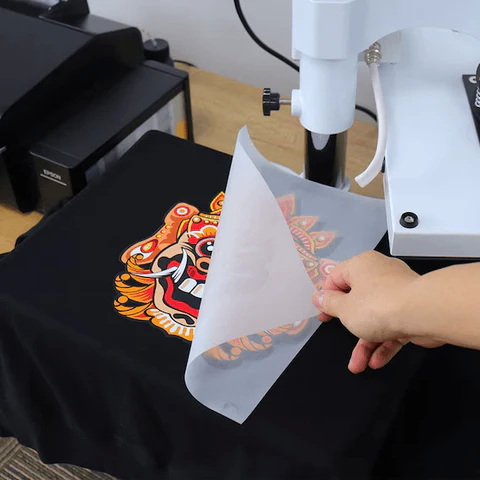
Blending DTF and specialty HTV is both a design and business decision, because it enhances aesthetics while also justifying higher pricing.[1]
- Premium visual impact with full-color DTF artwork and bold HTV accents on the same garment.[1]
- Tactile surfaces from puff, flock, and textured films that customers can feel immediately in person.[1]
- Special effects such as glow, metallic shine, and raised elements that stand out in photos and social media content.[2][1]
For many shops, mixed-media pieces become signature styles that attract repeat orders and referrals, especially in niches like streetwear, events, and team apparel.[3][1]
Certain markets benefit disproportionately from the extra depth, texture, and uniqueness that mixed-media designs provide.[3][1]
- Streetwear drops and limited runs needing bold, distinctive looks.[3][1]
- School, team, and club merchandise where mascots and lettering can be outlined or raised with specialty HTV.[1]
- Festival, concert, and nightlife merch using glow-in-the-dark or metallic accents.[2][1]
- Children's apparel with fun puff or glow details that encourage interaction.[2][1]
Focusing mixed-media efforts on these categories helps maximize return on the extra design and production time involved.[3][1]
For reliable mixed-media production, consistent temperature, pressure, and registration are essential.[4][1]
- DTF system: Printer, compatible inks, film, adhesive powder, and curing unit.[5][1]
- Vinyl cutter: With suitable blades and software profiles for cutting specialty HTV.[6][1]
- Heat press: Flat press with accurate digital control of time, temperature, and pressure; optional specialty presses for caps or other shapes.[7][1]
Supporting tools such as heat-resistant tape, Teflon or parchment sheets, lint rollers, and weeding tools further improve workflow stability and finished quality.[4][1]
Different HTV categories contribute distinct effects when combined with DTF prints.[1]
- Puff HTV for 3D, raised designs and bold borders.[8][3][1]
- Glow-in-the-dark HTV for night visibility and event wear.[2][1]
- Flock or textured HTV for a suede or velour feel.[8][1]
- Glitter, metallic, or holographic HTV for high-shine, eye-catching details.[1]
Selecting a small, reliable set of films and mastering their settings simplifies training and reduces production variability.[9][4]
Precise settings must follow each manufacturer's instructions, but practical ranges help plan your sequence when mixing DTF and HTV.[7][4][1]
- DTF transfers: approximately 305–330°F, 10–15 seconds, firm pressure.[10][7][1]
- Puff HTV: around 285°F, about 10 seconds, medium pressure.[8][3][1]
- Other specialty HTV types: typically 280–320°F for 10–15 seconds at medium to medium-firm pressure.[6][9][1]
Total dwell time across multiple presses should be considered carefully so that fabrics do not scorch and puff or textured films do not flatten.[9][4]
Material | Typical Temp Range | Time Range | Pressure | Practical Note |
DTF transfer | 305–330°F | 10–15 sec | Firm | Core full-color layer; follow specific film guidelines. |
Puff HTV | ~285°F | ~10 sec | Medium | Expands under heat; avoid over-pressing. |
Glow-in-the-dark HTV | 280–310°F | 10–15 sec | Medium | Ideal for night/event graphics. |
Flock / textured HTV | 300–320°F | 10–15 sec | Med–firm | Provides suede-like texture; limit stacking. |
Second DTF touch-up | 305–320°F | 5–10 sec | Firm | Brief press to secure edges if needed. |
This table should be used as a planning tool, then adjusted through small test presses for each specific film and garment combination.[4][9]
Effective mixed-media projects start in the design file, where DTF and HTV roles are clearly defined.[11][3][1]
- Assign full-color, detailed areas to DTF for efficiency and visual complexity.[5][1]
- Reserve borders, outlines, short text, and key accents for specialty HTV.[8][3][1]
- Build both components from a single master layout so alignment remains consistent across production.[4][1]
Creating intentional “knockout” regions—where one material is removed to make room for the other—prevents overly thick stacking while maintaining sharp edges.[11][1]
The DTF layer typically carries the main graphic information.[5][1]
1. Import the artwork into the DTF RIP, sizing it for the target garment and print area.[5][1]
2. Print onto DTF film using compatible ink profiles and color management settings.[5][1]
3. Apply adhesive powder while the ink is still wet, then shake off any excess.[4][1]
4. Cure the transfer in a DTF oven for the specified time until the adhesive becomes uniform and glossy.[5][1]
Allowing the cured film to cool on a flat surface helps keep the adhesive layer even and prevents unwanted warping.[4][1]
Specialty HTV elements deliver the tactile and visual effects that define mixed-media pieces.[6][9][1]
1. Load the selected HTV (puff, glow, flock, etc.) into the cutter with a suitable blade and pressure.[6][8][1]
2. Mirror the design if required by that film type.[6][1]
3. Cut using the manufacturer's recommended settings for speed and force.[6][1]
4. Weed away excess material, leaving only the final shapes on the carrier.[6][1]
Keeping HTV portions relatively simple reduces weeding time and improves consistency when scaling to larger batch runs.[9][1]
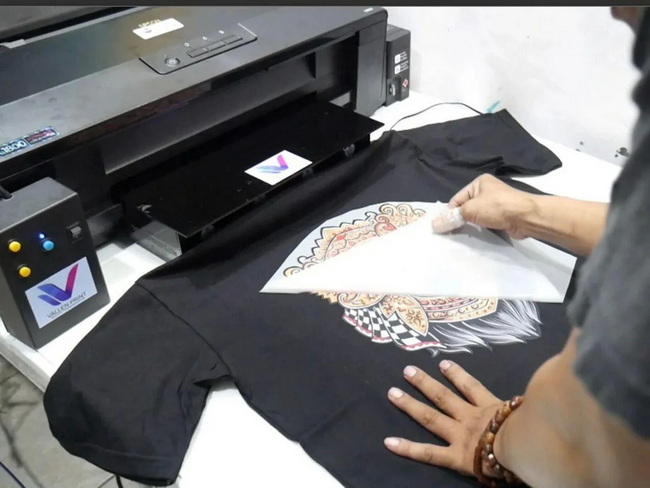
DTF is most often applied directly to the fabric before any HTV is added.[12][11][1]
1. Pre-press the garment for 5–10 seconds to remove moisture and wrinkles.[5][1]
2. Position the DTF transfer accurately, using alignment grids or rulers if available.[4][1]
3. Press at the recommended DTF temperature, time, and pressure for the specific film.[10][7][1]
4. Peel the film according to the product's peel type (hot, warm, or cold).[10][1]
If any corners lift, a short second press with a protective sheet can improve adhesion without overbaking the film.[10][4][1]
Once DTF is in place, HTV accents are added with careful alignment.[11][3][1]
1. Place the HTV carrier over the cured DTF, matching edges or reference points from the master design.[4][1]
2. Use heat-resistant tape if needed to minimize shifting during press closure.[4]
3. Cover the entire design with a Teflon or parchment sheet for protection.[1][4]
4. Press at the HTV's recommended settings, adjusting as needed to avoid flattening puff or textured films.[3][8][1]
5. Peel the carrier hot or cold according to the HTV's instructions.[6][1]
Maintaining a moderate number of HTV elements keeps the garment flexible and more comfortable to wear.[9][4]
Final checks confirm that the mixed-media piece will withstand use and washing.[4][1]
- Run fingers along all edges to detect any lifting or bubbling.[1][4]
- Examine the fabric for scorching or color shift around the print zone.[7][4]
- Conduct wash tests on samples before sending mixed-media garments into regular production.[9][4]
Documenting successful settings for each combination of film and garment builds a reliable reference for future jobs.[4]
Accurate registration is the difference between a professional mixed-media finish and a flawed design.[9][4]
- Use built-in alignment guides or printed marks to position HTV relative to DTF.[4]
- Keep designs modular, reducing the number of tiny HTV elements that require precise placement.[9][4]
- Test alignment using plain carrier or low-cost vinyl before committing specialty HTV.[9]
Laser or mechanical alignment accessories can further reduce misplacement errors on high-volume production runs.[4]
Layer management affects both aesthetics and garment comfort.[9][1][4]
- Avoid stacking several thick HTV layers directly on top of one another over DTF.[9][1]
- Prefer “side-by-side” or “knockout” layouts where DTF and HTV meet cleanly without heavy overlapping.[11][1]
- Reserve puff and heavy textures for smaller areas so the overall print remains flexible.[8][3]
This approach preserves a soft hand feel while still highlighting specialty effects in strategic focal points.[9][4]
Puff HTV is especially effective when combined with flat DTF color fills.[3][8]
- Raised outlines around DTF logos or characters to create a 3D frame.[8][3]
- Bold, simple text in puff paired with detailed DTF imagery in the center of the design.[3]
This contrast between flat print and raised borders naturally draws the viewer's eye to key brand or message elements.[8][3]
Glow-in-the-dark HTV adds value to designs used in darker environments.[2][1]
- Night-themed or festival artwork with glowing stars, outlines, or lettering over or around DTF scenes.[2][1]
- Children's graphics where selected features glow when lights are off, creating a playful reveal effect.[2][1]
These concepts work particularly well for event merch, safety-adjacent designs, and novelty items.[2]
Flock and textured films create a tactile, fabric-like surface.[8][1]
- Vintage sports designs with flock numbers or letters paired with DTF backgrounds.[8][1]
- High-end streetwear pieces where flock panels frame full-color DTF artwork.[1]
Combining flock with subtle DTF textures can mimic premium embroidery or appliqué at a lower production cost.[8]
Mixed-media designs can serve as premium offerings within a broader catalog.[15][3][1]
- Price mixed-media garments higher than single-method prints to reflect added materials and perceived value.[15][3]
- Promote features such as 3D textures, glow effects, and metallic highlights in product descriptions.[2][3]
- Use detailed lifestyle photography and close-ups to justify the premium and communicate quality.[2][3]
Highlighting the craftsmanship and technology behind these pieces reinforces a brand's reputation for innovation and reliability.[16][1]
Mixed-media DTF + specialty HTV is a practical path to creating high-impact, high-margin apparel that stands out in any catalog. To put these ideas into action, start by selecting one core design that aligns with your audience, then test it with different specialty HTV films—puff for bold outlines, glow for night events, and flock for premium textures—until you identify the combinations that perform best in your market. Once the winning settings and materials are documented, standardize them into your production workflow and pair them with robust, industry-grade pressing equipment so every mixed-media project you deliver showcases reliable adhesion, clean alignment, and professional finish that keeps customers returning.[16][7][3][2][8][1][4]
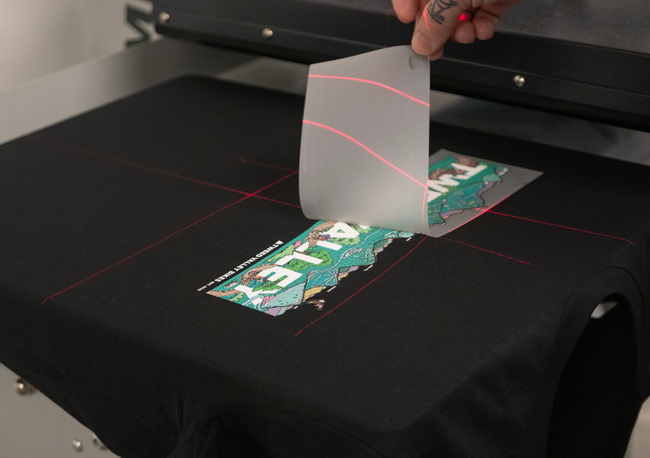
In most workflows, DTF is applied first so that its adhesive bonds directly to the garment, and specialty HTV is pressed afterward as an accent or overlay where appropriate. This sequence supports stronger adhesion and helps maintain consistent color and texture across the design.[12][11][1][4]
Specialty HTV can be pressed partially on top of DTF as long as both materials share compatible time and temperature ranges and overall thickness remains manageable. Using knockouts or minimal overlapping areas helps preserve flexibility and reduces stress on the garment during wear and washing.[11][9][1]
When pressed correctly at the recommended time, temperature, and pressure settings, mixed-media designs can withstand regular laundering when garments are washed inside-out with mild detergents. Over-stacking layers or using incorrect settings may shorten lifespan, so wash testing remains essential before large-scale production.[9][1][4]
Puff, glow-in-the-dark, flock, glitter, metallic, and holographic HTVs all pair effectively with DTF transfers when used within their specified application ranges. Choosing a focused selection of films and mastering their behavior produces more consistent and repeatable mixed-media results.[3][2][8][9][1][4]
Misalignment issues can be minimized by designing both elements from a single master file, using reference marks, and securing carriers with heat-resistant tape during pressing. Testing registration with inexpensive materials before running full batches of specialty HTV further reduces waste and rework.[9][1][4]
[1](https://www.heatpressnation.com/blogs/academy/mixing-dtf-and-specialty-htv)
[2](https://www.youtube.com/watch?v=jvCcy__d09M)
[3](https://www.youtube.com/watch?v=P6VXkF6n3Qw)
[4](https://www.xtool.com/blogs/xtool-academy/can-dtf-transfers-be-layered)
[5](https://www.heatpressnation.com/blogs/academy/beginners-guide-to-direct-to-film-dtf-transfer)
[6](https://blog.stahls.com/how-to-layer-htv/)
[7](https://perfecpresshtv.com/blogs/news/dtf-heat-transfer-temperature-and-time-settings-explained)
[8](https://perfecpresshtv.com/blogs/news/puff-htv-design-ideas-for-unique-apparel)
[9](https://www.visionsub.com/9-dos-and-9-donts-of-layering-heat-transfer-vinyl/)
[10](https://ninjatransfers.com/pages/heat-press-instructions-for-dtf-transfers)
[11](https://www.dtfrunner.com/blogs/news/how-to-combine-dtf-transfers)
[12](https://www.facebook.com/groups/dtftransferuvdtfprintingheatpress/posts/1597153461332890/)
[13](https://www.youtube.com/shorts/2RByYKBib7c)
[14](https://www.youtube.com/watch?v=nBm7UwbSz3g)
[15](https://www.youtube.com/watch?v=N6hYMfCs9bg)
[16](https://www.heatpressnation.com)


