If you have any questions, please feel free to contact us.| Email Us: info@dcheatpress.com


Views: 222 Author: Amanda Publish Time: 2026-01-28 Origin: Site


Content Menu
● What Is Trapping in Printing?
● Why Trapping Matters for Modern Printing
● Core Trapping Concepts and Terminology
>> Critical Scenarios for Trapping
● How Trapping Works in Prepress
>> Typical Trap Widths and Parameters
● Trapping vs Overprint vs Knockout
● Trapping in Different Printing Processes
● Design Best Practices for Effective Trapping
● Step-by-Step: How Prepress Teams Typically Set Traps
● Common Trapping Mistakes and How to Avoid Them
● Trapping and Heat Transfer / Sublimation Workflows
● How Professional Equipment Supports Stable Trapping Workflows
● Practical Checklist for Designers and Print Buyers
● Build More Stable Print and Transfer Workflows
● Frequently Asked Questions About Trapping in Printing
>> 1. What is trapping in printing and why is it necessary?
>> 2. How is trapping different from overprint?
>> 3. Who is responsible for setting traps: the designer or the printer?
>> 4. Do digital printing and inkjet devices still need trapping?
>> 5. How can I tell if my job has been trapped correctly?
Trapping in printing is a prepress technique that prevents visible gaps or halos when two or more colors meet, ensuring clean, professional results across packaging, commercial print, and heat transfer applications. By understanding how trapping works and when to apply it, designers, prepress technicians, and print buyers can dramatically reduce waste, reprints, and customer complaints caused by misregistration.
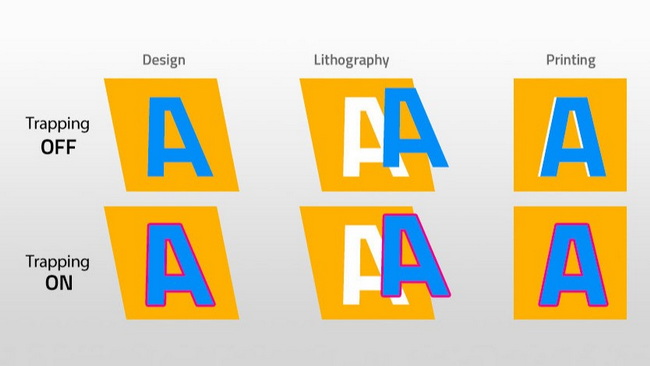
Trapping is the process of intentionally creating a small overlap between adjoining colors to compensate for slight misalignment of printing units on press. Instead of leaving a perfect edge-to-edge join, one color is slightly spread or choked so that any registration movement is hidden inside the overlap, not as a white line on the finished piece.
In practical terms, trapping is a safety margin for color boundaries. Without it, even small shifts in paper, cylinders, or plates can cause thin flashes of unprinted stock that are very noticeable, especially on high-contrast edges or small type.
No printing process is perfectly stable; sheets stretch, webs move, and cylinders can shift very slightly during production. Trapping protects print quality in this imperfect reality by ensuring color boundaries remain visually solid even when registration is not absolutely perfect.
Key reasons trapping is critical today:
- It prevents white halos at color joins, especially in branding elements and fine line-work.
- It maintains the perceived sharpness of logos and type on varied substrates like paperboard, films, and textiles.
- It reduces reprints and quality disputes by making minor mechanical tolerances invisible to the end user.
Understanding a few fundamental terms makes trapping easier to plan and communicate with your prepress or print partner.
- Registration tolerance: The amount a press can safely wander before misalignment becomes visible, guided by press type, speed, and substrate.
- Spread: Expanding a lighter object so it overlaps into a darker background, hiding potential gaps.
- Choke: Reducing the size of a lighter background or object so a darker element overlaps into it.
- Halos / flashes: Thin, unintended lines of unprinted stock visible between colors when trapping is missing or poorly set.
These principles apply across offset, flexo, gravure, and some hybrid systems, even though the exact trap width and method may differ.
Trapping is not required in every design, but there are clear situations where it becomes essential.
- Two solid colors abutting with no shared component in CMYK, such as bright cyan against warm red.
- Small serif type or fine line-art printed in multiple colors or placed over tinted backgrounds.
- High-speed production on newsprint, film, or flexible packaging, where substrate and press movement are more pronounced.
- Large flat areas of color that meet along long boundaries, where even a small registration drift becomes highly visible.
If two adjoining colors share a common component, such as a dark blue and a violet both containing cyan and magenta, the need for trapping can be reduced because any misregister is less obvious.
Most modern trapping is applied in the prepress stage, either automatically by workflow software or manually by experienced operators. The goal is to create just enough overlap to hide misregistration without creating visible dark edges or color shifts.
Trap values depend on press type, substrate, and print quality expectations.
- Sheetfed offset on quality paper may need a small trap, often just a few thousandths of an inch.
- Web offset on more absorbent stocks often requires more generous trapping.
- Flexo and packaging applications may use traps in the range of fractions of a millimeter up to a couple of millimeters, depending on press stability and artwork.
Your printer usually sets preferred trap amounts and color rules, but designers still need to understand how those choices affect appearance.
Designers often confuse trapping with overprint or simple knockout. Each plays a different role in managing color interactions.
Concept | What it does | Typical use case |
Trapping | Creates a small overlap (spread/choke) between colors to hide misregistration. | Abutting shapes or type in separate colors on conventional presses. |
Overprint | Prints one color directly on top of another without knocking out the underlying color. | Black text over tints, rich blacks, and some special effects. |
Knockout | Removes underlying color where objects overlap so the top color prints on bare substrate or base layer. | Standard behavior for most vector objects and placed elements. |
Overprinting is the simplest way to avoid gaps, but it can alter color when a light color sits on a darker background. Trapping is more controlled, preserving the look of each color while still guarding against misregistration.
Not all printing methods behave the same, so trapping strategies must match the process and substrate.
Offset presses typically have good registration but still benefit from moderate trapping, especially on fast web presses and lower-grade stocks. Designers should be particularly careful with small type, reverse-out text, and high-contrast color boundaries.
Flexo is widely used for packaging films, labels, and flexible pouches, where substrate stretch and press variability can be higher. For flexo jobs, trapping is often more pronounced, using thin overlapping strokes around colored elements to hide misalignment on plastic films and paperboard.
Gravure cylinders and hybrid lines that combine flexo with offset or digital modules also rely heavily on trapping and controlled ink acceptance. When properly tuned, hybrid combinations can achieve high trapping values and improved color consistency compared to single-process printing.
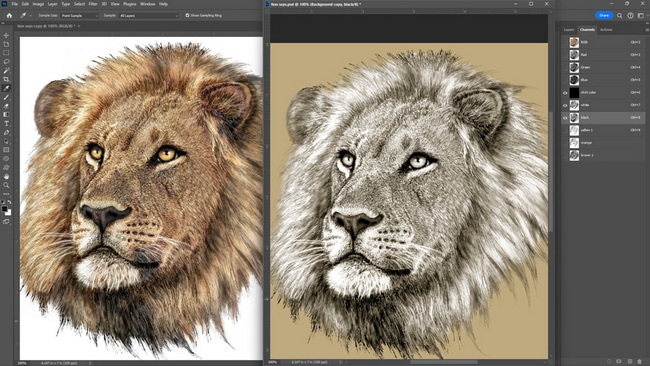
Good trapping begins with smart design decisions that make overlaps easier and less noticeable.
- Let the darker color hold its shape, and trap the lighter color into it.
- Avoid extremely thin, isolated strokes in light colors against dark backgrounds, or prepare to trap and overprint carefully.
- Simplify complex edges where possible, so small overlaps will not create visible color distortion.
- For small black type, overprint the black rather than trap multiple colors underneath.
- Avoid very small reversed text in multiple colors, which is difficult to trap cleanly at high speed.
- Ensure that fine keylines or outlines are thick enough that a subtle trap does not visually distort them.
While specific workflows differ by shop, a typical trapping process follows a predictable sequence.
- Review the supplied artwork and identify all abutting colors and critical edges, including logos, type, and line-art.
- Apply global trapping rules in the workflow, such as trap widths for each press and substrate combination.
- Set color-by-color priorities so darker colors hold their shape and lighter colors spread or choke into them.
- Inspect problem areas manually, adjusting trap widths, joins, and miter settings for fine details.
- Output proofs or high-resolution previews to verify that traps are effective but remain visually unobtrusive.
This process can be largely automated, but complex packaging and brand-critical work still benefits from manual checks and adjustments by experienced operators.
Even with powerful software, poor decisions can create visible artifacts or inconsistent color at boundaries.
- Over-trapping, where overlaps are too wide and create dark, muddy edges around shapes.
- Under-trapping, where aggressive press conditions are not matched by sufficient trap width.
- Incorrect color priorities, such as allowing a darker color to spread into a lighter one and distort brand hues.
- Ignoring substrate and speed, using the same trap settings for coated sheetfed work and fast, flexible packaging runs.
Clear communication between designer, prepress, and printer, plus a few carefully chosen press checks, can eliminate most of these issues.
For companies producing heat transfers, DTF prints, or sublimation sheets that will later be pressed with professional heat press equipment, trapping remains a valuable tool. When multi-color graphics are printed onto transfer media, small misalignments at color joins can become much more obvious once they are transferred onto apparel or hard substrates.
By building appropriate traps into the artwork used for transfer printing, you help ensure that:
- Edges remain visually solid after pressing, even if the transfer film or paper shifts slightly under heat and pressure.
- Fine outlines and text in brand colors remain sharp on fabrics, metal plates, or coated substrates.
- Production rejects are minimized, improving yield in high-volume heat transfer operations.
For industrial transfer lines using gravure, flexo, or hybrid processes ahead of pressing, integrating solid trapping strategy with stable heat press parameters for time, temperature, and pressure produces reliable, repeatable results for global customers.
For print providers who also perform heat transfer, embossing, or welding steps, prepress trapping is only one part of a stable production system. High-quality heat press, welding, and embossing machines help ensure that the carefully trapped artwork created in prepress is faithfully transferred to the final product.
By combining accurate trapping for multi-color designs with reliable equipment, you can:
- Keep registration-related defects invisible at the artwork level.
- Maintain consistent time, temperature, and pressure during transfer and finishing.
- Deliver repeatable print quality across textiles, films, and rigid substrates for demanding customers and long production runs.
This alignment between digital prepress techniques and robust physical equipment is what ultimately protects brand color, print clarity, and product value from file to finished item.
Use this quick checklist whenever you prepare a multi-color job for production on offset, flexo, gravure, or hybrid lines.
- Confirm the printing process, substrate, and expected press speed with your supplier.
- Ask for the printer's recommended trap widths and overprint rules for your job category.
- Ensure darker colors hold their shape and lighter colors are set to spread or choke into them.
- Use overprint for small black type over other colors where appropriate.
- Review proofs at 100 percent and at magnified view to see where trapping has been applied.
Following this structured approach helps reduce surprises on press and ensures your designs print as intended across different equipment and markets.
If you are preparing multi-color artwork for packaging, textiles, or heat transfer applications, now is the right moment to refine your trapping and equipment strategy. By combining smart prepress trapping with dependable heat press, welding, and embossing machines, you can build a more predictable production line, reduce waste, and deliver consistent quality to customers in every region you serve.
Review your current projects, identify jobs where misregistration has created visible halos or gaps in the past, and work with your production team to implement proper trapping settings and invest in precise equipment that protects your brand standards on every run.
Contact us to get more information!
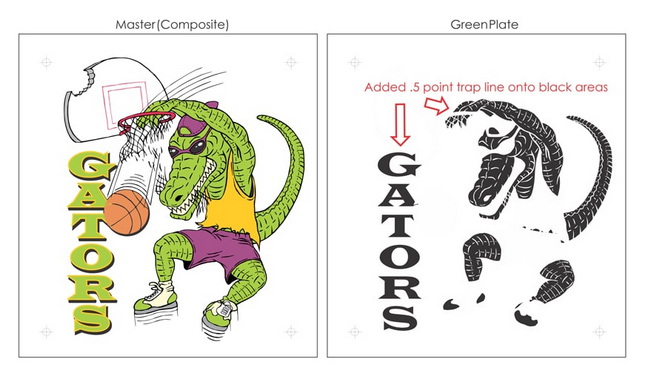
Trapping is the intentional overlap between adjoining colors in a printed design, created to hide small misregistrations between printing units. It is necessary because no press is perfectly accurate; without trapping, slight shifts can create visible white lines or halos between colors, especially on high-contrast edges.
Trapping adjusts shapes to overlap slightly, while overprint leaves shapes unchanged but prints one color directly on top of another. Overprint can cause color mixing when a light color sits on a darker background, whereas trapping is designed to preserve each color's appearance while hiding misregistration.
In many workflows, the printer or prepress provider sets traps using workflow software based on their press and substrate standards. However, designers should understand trapping basics, avoid risky layouts such as tiny reversed multi-color type, and coordinate with printers on critical brand elements.
Some digital systems with precise registration and single-pass heads may need less conventional trapping, especially for simple jobs, but many hybrid or multi-unit systems still benefit from overlaps at color joins. Packaging, labels, and transfer sheets printed on mixed processes or high-speed lines remain strong candidates for traditional trapping techniques.
You can inspect high-resolution digital proofs at enlarged view to look for subtle overlaps at color joins without obvious dark edges. On printed samples, use a loupe to check that there are no white gaps between colors and that edges of logos, type, and line-work appear clean and consistent across the run.
1. https://www.heatpressnation.com/blogs/blog/importance-of-trapping-in-printing
2. http://s-wilson1013-dc.blogspot.com/2011/10/what-is-design-for-printtrappingknock.html
3. https://flexiblepouches.com/blog/what-is-trapping-in-printing-why-it-matters-for-packaging/
4. https://www.packdemy.com/trap-for-perfecting-flexo-printing/
5. https://printhouse.co.uk/2010/01/what-is-trapping-and-how-is-it-used-in-print/
6. https://aprcreative.com.au/trapping-what-it-is-why-its-needed-and-what-you-need-to-consider-in-your-designs/
7. https://www.trebnick.com/post/trapping-vs-overprint
8. https://printwiki.org/Trapping
9. https://www.linkedin.com/pulse/principles-ink-trapping-hybrid-printing-technology-sanyal


