If you have any questions, please feel free to contact us.| Email Us: info@dcheatpress.com


Views: 222 Author: Amanda Publish Time: 2025-12-22 Origin: Site


Content Menu
● What a Heat Press Machine Is Used For
● When to Use a Heat Press Machine
>> Direct-to-Film (DTF) Transfers
● Core Heat Press Settings: Temperature, Time, and Pressure
>> How to Choose the Right Settings
● How to Set and Check Pressure
>> Adapting Pressure for Different Substrates
● Step-by-Step: How to Use a Heat Press Machine
>> Step 1: Prepare Your Artwork
>> Step 2: Prepare the Transfer
>> Step 3: Prepare the Substrate
>> Step 4: Position the Design
>> Step 5: Run the Press Cycle
>> Step 6: Peel the Carrier or Cover Sheet
● Troubleshooting Common Heat Press Problems
>> Cracking or Peeling After Washing
>> Difficult or Damaging Peeling
>> Color Migration on Dyed Fabrics
>> Stains, Bubbles, or Surface Defects
>> Banding and Image Artifacts
● Essential Accessories for Better Heat Press Results
>> Heat Press Covers and Teflon Sheets
>> Heat-Resistant Tape and Safety Gloves
● Cleaning a Heat Press Machine
● Routine Maintenance and Safety Practices
● Take the Next Step with Your Heat Press Workflow
● FAQ
>> 1. What temperature should I start with on a new heat press job?
>> 2. How do I know if the pressure on my heat press is correct?
>> 3. Why do my prints crack or peel after washing?
>> 4. Can I use the same settings on cotton, polyester, and blends?
>> 5. How often should I clean and maintain my heat press?
Using a heat press machine correctly is essential for producing clean, durable prints on garments and hard substrates. Proper control of temperature, pressure, and time reduces misprints and guarantees consistent quality in both small studios and industrial environments. With a structured workflow and basic troubleshooting skills, operators at any level can run stable, efficient heat transfer production.
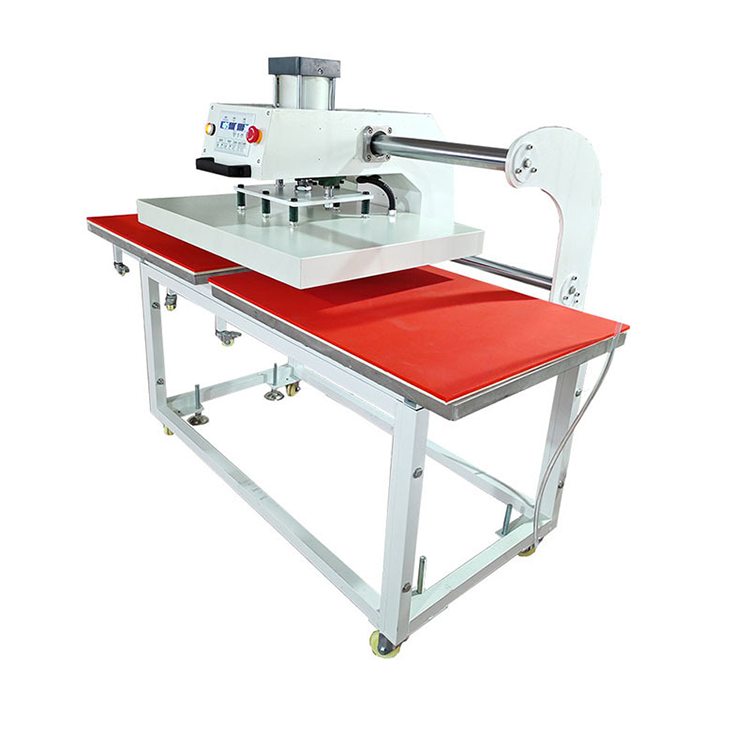
A heat press machine combines controlled heat and pressure to permanently bond ink, film, or vinyl to a substrate. Compared with a household iron, a professional press offers stable temperature, even pressure, and reproducible results across many pieces. Typical applications range from custom T-shirts and hoodies to caps, bags, mugs, and coated photo panels.
Different printing technologies depend on a heat press at one or more stages of production. Understanding the core use cases helps you choose the right transfer method for your fabric, design type, and order volume.
Sublimation uses heat to turn solid dye into gas and infuse it into polyester fibers or polymer-coated surfaces. This is ideal for performance sportswear, technical apparel, mugs, metal plates, and other coated blanks that require vivid, wash-resistant images. Because the dye penetrates the substrate, the resulting print has a soft hand feel and excellent durability.
DTF printing outputs designs onto special coated films that are then transferred to fabrics using a heat press. This method works on cotton, polyester, and blends, and supports detailed graphics, gradients, and multiple colors. It is especially suited to small and medium apparel brands that need flexibility in fabric selection and order size.
Heat transfer vinyl involves cutting designs from vinyl sheets and pressing them onto garments. It is widely used for names and numbers on jerseys, simple logos, slogans, and short-run personalization projects. Because HTV does not require a dedicated printer, it is popular with crafters, small shops, and on-demand decoration workflows.
Plastisol transfers are screen-printed onto transfer sheets and later applied to garments with a heat press. This approach combines the look and durability of screen printing with the flexibility of stocking transfers instead of printed inventory. It is common in sportswear, promotional apparel, and any scenario that repeats designs over time.
Heat presses can be used in hover mode to pre-heat garments for direct-to-garment printing, helping improve ink adhesion and drying consistency. They also play an important role in attaching patches, labels, and badges to clothing, bags, and shoes where durable bonding and precise positioning are required.
Every transfer process depends on three main variables: temperature, time, and pressure. Properly balancing these for each transfer material and substrate is the foundation of repeatable quality.
Most modern heat presses allow digital adjustment of temperature and time, while pressure is usually set mechanically. The ideal combination is determined by the transfer type, fabric composition, and substrate thickness. Always begin with the parameters recommended by your transfer supplier, test them on scrap material, and then record successful settings for later use. Over time you can build a reference chart for the fabrics and transfers used most often in your production.
Many professional presses provide multiple preset slots so operators can store commonly used temperature and time combinations. Presets can be assigned to standard jobs such as cotton DTF, polyester sublimation, or HTV on blends. Clear labeling of each preset and inclusion in standard operating procedures improves training and reduces human error.
Because most heat presses do not show numeric pressure values, operators rely on simple tests and experience to set pressure correctly. Pressure that is too low can cause poor bonding and premature peeling, while pressure that is too high can crush fibers and leave visible platen marks.
The paper test is a practical way to evaluate pressure without instrumentation. Place a sheet of plain copy paper between the platens, close the press at the intended pressure, and gently pull on the sheet. If the paper slides out with almost no resistance, pressure is too low; if it cannot be moved at all, pressure is too high. Correct pressure is reached when the paper moves with light resistance. For large platens, place paper in each corner and adjust pressure until resistance feels similar across the surface.
Thick substrates such as slates, glass blocks, or cutting boards typically require higher pressure to achieve full contact. Lightweight T-shirts or delicate polyester fabrics usually need medium pressure to avoid flattening or shine marks. Whenever you switch to a different substrate thickness or construction, adjust pressure gradually and re-check using the paper method or a test press.

This section outlines the complete workflow from artwork preparation to final inspection, suitable for both new operators and production teams.
Correct artwork preparation is essential for sharp prints, clean cutting, and predictable color. For many transfers and films, the artwork must be mirrored so the final design reads correctly on the garment. Transparent or certain double-sided blanks may not require mirroring, so always follow material guidelines. Use at least 300 DPI at final print size for raster images to avoid pixelation, and choose vector formats for solid logos and text where possible.
For color management, design in RGB to access a wide color gamut, then preview in CMYK to understand how colors may shift on print. Saving in sRGB is often recommended when using professional RIP software, which will handle conversion to printer-specific color spaces. Convert all live text to outlines or curves to prevent font issues, especially when sending files between different computers or software versions.
For HTV, weld or unite overlapping vector shapes so cutters do not create unnecessary internal cuts that complicate weeding. For DTF, avoid soft, semi-transparent edges, drop shadows, and gradual fades, which can transfer poorly and reduce wash durability.
You can either purchase ready-to-press transfers or produce them in-house. Ready-to-press options reduce setup and are ideal for personal gifts, small runs, and occasional orders. In-house printed transfers require investment in printing equipment and consumables but lower unit costs and allow faster turnaround, especially for business users with regular or growing order volumes.
Substrate preparation has a direct impact on adhesion, color vibrancy, and finish. Pre-wash garments or at least ensure they are free of dust, oils, and finishing agents that could reduce bonding. For sublimation on hard goods, use blanks with reliable polymer coatings or apply compatible coatings as required by your process. Before pressing, pre-heat garments briefly to remove wrinkles and moisture, which is particularly important for DTF and HTV on thicker or more absorbent fabrics.
Accurate placement is part of the perceived quality of the finished product. Use a measuring guide or placement chart to maintain consistent positions for left chest logos, full-front designs, back prints, and sleeve prints. Secure the transfer to the fabric using heat-resistant tape to prevent shifting or ghosting during the press cycle. Avoid standard tapes that may melt or leave residue.
Set the temperature, time, and pressure according to the requirements of your transfer and substrate. Confirm that the press has fully reached the target temperature before starting production. Close the press smoothly and allow it to complete the full cycle without opening early. For new combinations of fabric and transfer, press a test sample first and inspect adhesion, color, and surface finish before starting a full run.
Peel timing and method are critical to a clean edge and strong bond. Follow the instructions from your transfer supplier regarding hot, warm, or cold peel. Peel the film or paper back slowly and evenly at a low angle, watching for any edges that fail to release cleanly. If part of the design lifts, place the carrier back down and re-press briefly instead of forcing the peel, then check again.
Even with good preparation, issues such as peeling, fading, scorching, or color shifts can occur. Having a structured troubleshooting approach reduces scrap and protects your brand reputation.
When designs do not stick properly or peel quickly after the first wash, adjust one parameter at a time. Increase pressure slightly and test again; if adhesion remains weak, extend pressing time by a few seconds. If the problem persists, raise temperature in small steps and repeat the test. Also review fabric compatibility, as some materials like nylon, rayon, or highly stretchy blends may require specialized transfers. Pre-pressing garments to remove moisture and surface contamination further improves bonding.
Scorch marks and sticking often result from excessive heat, pressure, or dwell time. Start by reducing pressure, then lower temperature if marks continue to appear. Always use a Teflon sheet or silicone pad between the upper platen and the substrate to prevent direct contact, reduce the risk of scorching, and keep ink or adhesive off the platen.
Uneven or faded areas may indicate inconsistent temperature across the platen or residual moisture in the fabric or paper. Use temperature strips or an infrared thermometer to check different points on the platen and ensure that actual temperature matches the setting. Pre-press both the fabric and the transfer paper briefly to drive out moisture before the final press. Regular calibration of your heat press and strict adherence to recommended settings are essential for stable, repeatable color.
Cracks and peeling after multiple washes are usually linked to sub-optimal pressing conditions, unsuitable ink systems, or harsh laundering practices. Whenever possible, use pigment-based inks or transfer systems designed for long-term wash durability. Press within the recommended temperature and time windows, and avoid under-pressing even if the transfer looks acceptable immediately after application. Provide clear care instructions that recommend washing inside-out, using mild detergents, and avoiding high-heat drying cycles.
If transfer paper or film tears, leaves residue, or is very hard to remove, verify that pressing temperature and time are within specifications. Test different peel temperatures (hot, warm, cold) recommended for your specific transfer film or paper. If adhesion between paper and adhesive layer seems excessive, reduce pressure slightly and test again. Using parchment or silicone sheets as a barrier can also make peeling smoother and more predictable.
Color migration occurs when garment dyes, especially on deeply colored or sublimated fabrics, move into transfer layers and shift the print color. To reduce this, choose transfers with dye-blocking layers designed for problematic fabrics and avoid unnecessarily high temperatures or long press times. Test settings on sample garments before full production, and consider using a barrier layer as an underbase when working with particularly unstable dyes.
Visible stains, bubbles, or blisters can be caused by moisture, dust, or overheating. Remove lint, hairs, and dust with a lint roller before positioning the transfer, and pre-press the garment to eliminate moisture. Apply enough pressure to ensure full contact, but avoid over-pressing that could push excess adhesive or ink outward and create rings or halos. Protect the surface with a Teflon sheet or clean cover paper during pressing.
Banding and certain other visual artifacts most often originate from the printing step rather than the press itself. Perform regular printhead maintenance, use compatible inks and papers, and verify that print settings such as resolution and pass count suit the job. Once prints are uniform, a properly calibrated press will transfer them more reliably.
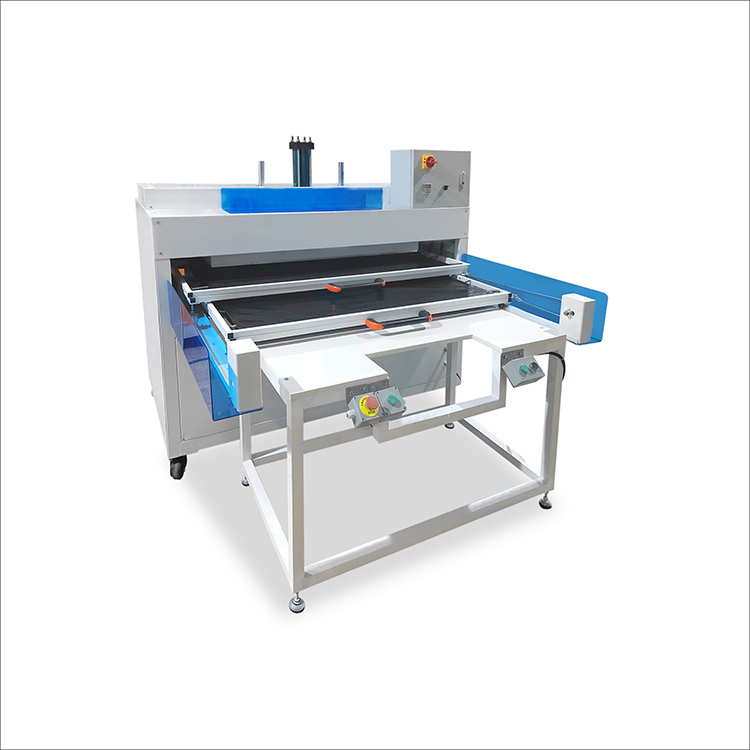
Accessories help optimize pressure distribution, protect equipment, and improve safety and ergonomics in daily operation.
Teflon pillows are soft, heat-resistant cushions placed under garments when pressing over thick seams, zippers, or buttons. They raise the print area so that pressure is concentrated on the design instead of on obstructing elements. This reduces platen marks and yields more even bonding on hoodies, jackets, and bags.
Heat press covers protect the platen surface from ink, adhesive, and scorch marks, extending its life and maintaining clean contact. Teflon sheets act as non-stick protective layers that ensure even heat distribution and prevent vinyl or ink from fusing to the platen. Because they are durable, washable, and cuttable to custom sizes, they are practical for a wide range of jobs.
Interchangeable lower platens allow operators to switch quickly between different sizes and shapes tailored to sleeves, youth garments, pockets, bags, or oversized prints. Correctly matched platens improve contact, reduce the need to stretch or distort the fabric, and make it easier to align designs consistently.
Heat-resistant tape secures transfers in place during pressing without melting or leaving adhesive traces on fabrics or platens. Heat-resistant gloves protect operators when handling hot substrates, reducing the risk of burns and allowing faster unloading in higher-volume production.
Regular cleaning prevents buildup that can cause marks on products or affect temperature and pressure performance. If a transfer is accidentally pressed upside-down, remove ink or adhesive as soon as possible while the platen is warm and residues are still soft. Turn off the press and allow it to cool to a safe working temperature, then wipe with a soft cloth and a non-abrasive cleaner compatible with the platen coating. Avoid metal scrapers and harsh pads that can scratch non-stick coatings and create local hot spots or sticking areas. Use appropriate cover sheets during production to minimize contamination and keep the platen clean longer.
Preventive maintenance extends machine life, improves safety, and stabilizes output quality over time.
Keep the surrounding area free of dust, especially around vents and control electronics, to help prevent overheating and malfunctions. Lubricate key mechanical components such as pivot points and rods with suitable high-temperature grease at intervals recommended by the manufacturer, wiping away excess to avoid contamination of garments. Inspect the upper and lower platens for physical damage, worn coatings, or compressed pads, and replace consumable elements when they are visibly degraded.
Always use power cables that meet the machine's voltage and current requirements, and route them away from hot surfaces or moving parts. Periodically verify actual platen temperature using a separate measuring device to ensure that the displayed temperature corresponds to reality. Consult the user manual for model-specific maintenance procedures and adhere to any inspection schedules and replacement part recommendations provided.
If you are ready to reduce misprints, stabilize quality, and scale your decoration business, now is the time to review your current heat press workflow and equipment. Standardize your artwork preparation, build a clear settings library for different fabrics and transfer types, and equip your production line with suitable accessories and maintenance routines. Once these foundations are in place, reach out to your equipment supplier or technical partner to discuss whether your existing presses, platens, and accessories match your current and future product mix, and plan the upgrades needed to support higher efficiency and more demanding orders.
Start with the temperature, time, and pressure recommended by your transfer or vinyl supplier for the specific fabric and transfer type. Run a test press on a sample piece and adjust in small increments if adhesion, color, or finish are not satisfactory, documenting the final settings once you are satisfied.
Use the paper test or similar method to evaluate pressure. When the press is closed, you should be able to pull a sheet of paper with moderate resistance but not effortlessly, and the garment should not show deep platen marks. If transfers are under-bonded or edges peel, increase pressure slightly and test again.
Cracking or peeling after washing usually indicates that pressing conditions were not optimal or that the transfer system is not suited to the fabric or wash conditions. Make sure you use compatible materials, press at the correct temperature and time, and advise end-users to wash garments inside-out with mild detergents and avoid aggressive drying cycles.
Cotton, polyester, and blends respond differently to heat and may require distinct settings to avoid scorching, color shifts, or weak adhesion. It is good practice to maintain separate standard settings for each fabric category and to test every new garment supplier or fabric construction before production.
Light cleaning should be done as soon as any ink or adhesive appears on the platen, and protective sheets should be inspected regularly. A more thorough maintenance session that includes lubrication, temperature checks, and inspection of cables, platens, and pads should be carried out at least once a year, or more frequently for high-volume use.


