If you have any questions, please feel free to contact us.| Email Us: info@dcheatpress.com


Views: 222 Author: Amanda Publish Time: 2026-01-23 Origin: Site


Content Menu
● Target readers and core benefits
● Why use shrink wraps and ovens for multiple tumblers
● Recommended equipment and core settings
>> Essential production equipment
>> Typical time and temperature baseline
● Step-by-step workflow for batch sublimation tumblers
>> Step 1 – Prepare artwork and print transfers
>> Step 3 – Wrap and tape each tumbler
>> Step 4 – Apply the first shrink wrap
>> Step 5 – Add a second protective shrink wrap
● Batch loading and oven management
>> How many tumblers per batch
>> Time, temperature, and adjustments
● Cooling, peeling, and quality checks
>> Cooling and peeling process
● Extending the workflow to can coolers and other blanks
● Designing an efficient production layout
>> Suggested workstation zones
>> Basic productivity estimation table
● Common problems and troubleshooting tips
>> Problem 1 – Faded prints or dull colors
>> Problem 2 – Ghosting, double images, or smudging
>> Problem 3 – Uneven color from batch to batch
● Choosing the right oven and heat equipment for scaling up
>> What to look for in a sublimation oven
>> Where specialized heat presses still help
● Action call – Upgrade your tumbler production workflow now
● FAQs about multiple sublimation tumblers production
>> FAQ 1: How many tumblers can I sublimate at once?
>> FAQ 2: Why do I need a separate oven just for sublimation?
>> FAQ 3: What temperature and time should I use for stainless steel tumblers?
>> FAQ 4: Why do my shrink wraps peel or scorch during baking?
>> FAQ 5: Can I use this method for can coolers and other drinkware?
Producing multiple sublimation tumblers at scale is one of the fastest ways to grow a profitable drinkware business, but only if your process is optimized for consistent color, wrap pressure, and oven capacity. This enhanced guide expands the basic tutorial into a full production workflow using shrink wraps, convection ovens, and quality heat transfer equipment suitable for both small studios and growing factories.

This guide is written for:
- Small businesses upgrading from a single mug press to batch tumbler production.
- Print shops and factories that need more predictable time, temperature, and pressure workflows.
- New users who want clear steps, safety tips, and troubleshooting to avoid costly misprints.
By the end, you will understand:
- How to choose the right sublimation tumblers, shrink wraps, and ovens for batch production.
- How to set up a repeatable time–temperature–pressure recipe for stainless steel tumblers.
- How to design an efficient workstation layout that reduces handling time and misalignment.
Using sublimation shrink wraps with a dedicated convection oven lets you sublimate several tumblers at once instead of one-by-one in a mug press. This is especially valuable when working with larger batches or tight deadlines because a larger oven can hold multiple shrink-wrapped tumblers per shelf.
Key advantages:
- Higher throughput: A 2-shelf or larger oven can cook more tumblers in the same 6–8 minute window, multiplying your hourly output.
- More even coverage: Wraps apply uniform pressure around the full tumbler, which helps achieve top-to-bottom coverage without cold spots or gaps.
- More flexibility in size: The same oven can handle different diameters (skinny tumblers, can coolers, etc.) as long as shrink wraps match the blank dimensions.
For production lines, combining a reliable oven with stable, programmable heat systems and standardized workflows is critical for consistent color and minimal reprints.
To tackle multiple sublimation tumblers efficiently, you will need a minimum equipment set plus some safety gear.
- Sublimation printer and paper: A reliable sublimation printer capable of full-bleed wrap designs sized to your tumblers.
- Sublimation tumblers (11–20 oz): Stainless steel, polymer-coated tumblers designed specifically for sublimation, most commonly 11–20 oz skinny or straight-wall styles.
- Sublimation shrink wraps for tumblers: For example, 4.9" × 9.8" wraps for skinny tumblers and 7.5" × 5.1" wraps for can coolers.
- Heat gun: To shrink the wraps evenly around the transfer and tumbler body.
- Convection oven for sublimation only: A countertop or wall oven that reliably reaches around 350–400 °F (about 176–204 °C).
Safety and handling:
- Heat resistant gloves: Crucial for loading and unloading hot tumblers and avoiding burns while adjusting or peeling wraps.
- Ventilation: Since sublimation turns ink into gas, a well-ventilated area or fume extraction improves operator comfort and safety.
A practical starting recipe for stainless steel sublimation tumblers with shrink wraps is:
- Temperature: 350–360 °F (176–182 °C).
- Time: 6–8 minutes per batch in a convection oven.
- Preheat: Allow the oven to reach the target temperature and stabilize before loading any tumblers.
Exact settings can vary by oven size, airflow pattern, coated blank brand, and load quantity, so always perform a test run before full production.
This section turns the process into a repeatable, production-friendly standard operating procedure.
1. Measure the printable area of your tumbler (height and circumference).
2. Set your design canvas slightly larger than the tumbler circumference to ensure a full seam overlap.
3. Print using your sublimation printer on compatible transfer paper with the correct color profile and mirror mode enabled.
For production environments:
- Create saved templates (for example, 20 oz skinny or 16 oz cooler) so your design team uses consistent dimensions.
- Batch multiple tumbler designs on a single print run to maximize printer efficiency and reduce paper waste.
Before taping designs, preheat the oven to about 350–400 °F, with 356 °F as a practical baseline for stainless steel. Preheating at this stage ensures the oven is stable by the time your first wrapped batch is ready for loading.
Tips:
- Use an oven thermometer to verify the real internal temperature versus the control panel setting.
- Allow a few extra minutes after reaching the setpoint for the temperature to stabilize, especially with larger ovens.
As the oven preheats, tightly wrap and tape your printed transfers onto each tumbler.
Best practices:
- Clean the tumbler body with a lint-free cloth and isopropyl alcohol to remove dust or oils before taping.
- Align the transfer carefully so the seam runs straight; tape along the seam with high-temperature heat tape.
- Ensure the bottom and top edges are firmly taped with no loose gaps where the paper could lift.
Well-taped transfers reduce the risk of ghosting and outgassing marks, especially along the seam and near the rim.
Once all transfers are taped:
1. Insert each tumbler into a sublimation shrink wrap sleeve suited to its size, such as 4.9" × 9.8" for standard skinny tumblers.
2. Use the heat gun to shrink the wrap evenly, rotating the tumbler to avoid overheating any single area.
3. Make sure the wrap conforms tightly to the full tumbler surface with no visible air pockets.
The primary purpose of the first wrap is to create uniform pressure on the transfer and tumbler surface during cooking.
For production environments, a second wrap helps protect against rack burns and abrasion.
- Slide the already wrapped tumbler into a second shrink wrap sleeve.
- Use the heat gun again until the second wrap also shrinks snugly into place.
This double-wrap method provides extra protection where tumblers contact hot metal oven racks and helps maintain consistent color across large batches.
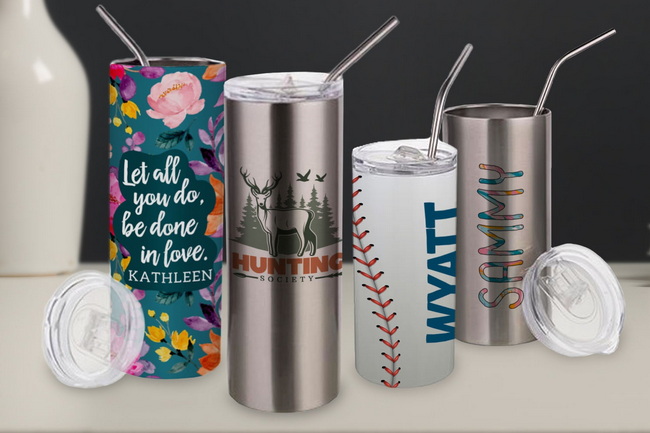
A small single-shelf oven can often handle around four tumblers, while a 2-shelf or larger oven can handle more at the same time if airflow remains unobstructed.
General guidelines:
- Do not overcrowd; leave space between tumblers so hot air can circulate evenly.
- Use multiple shelves for vertical stacking, but avoid placing tumblers directly above each other if hot air distribution is uneven.
- Track your practical maximum load where color remains consistent from batch to batch and treat this as your standard capacity.
Once all tumblers are double-wrapped and the oven is preheated:
1. Load tumblers quickly but safely while wearing heat resistant gloves.
2. Cook for at least 6 minutes at your baseline temperature, then evaluate the results.
3. If you notice shrink wraps peeling too early during cooking, lower the temperature slightly or reduce cook time to prevent scorching and distortion.
Always perform a test run with 1–2 tumblers before full production:
- Adjust time and temperature based on ink density, wrap behavior, and oven airflow.
- Record your final settings as a standard operating recipe for that tumbler model and wrap type.
When the cook time is finished:
1. Using heat resistant gloves, remove the tumblers from the oven and place them on a heat-safe surface.
2. Allow them to cool for 30–50 seconds before handling without gloves or starting to peel.
3. Once cool enough to touch comfortably, peel away the outer and inner shrink wraps, then remove the transfer paper.
The result should be a top-to-bottom sublimated design with strong color and minimal banding.
For consistent production, inspect each batch for:
- Color density and vibrancy across all tumblers in the load.
- Seam quality, with no ghosting, double images, or misalignment lines at the back.
- Edge coverage near the top and bottom; designs should reach as close to the rim and base as your artwork allows.
- Surface defects such as scratches, rack marks, or uneven gloss caused by overheated wraps.
This quality control step is essential when supplying wholesale or branded orders, where small visual defects can lead to returns or reprints.
The same shrink-wrap oven workflow applies to sublimation can coolers and similar cylindrical items.
- For can coolers, use appropriately sized wraps such as 7.5" × 5.1" shrink sleeves to ensure a snug fit.
- Recalculate artwork dimensions for the shorter height and tighter circumference.
- Run a separate test to confirm ideal time and temperature, as thinner blanks may require slightly shorter cook times.
You can also adapt the process to different tumbler sizes and shapes, as long as the blanks are polymer-coated for sublimation, the wrap sizes match the blank dimensions without excessive slack, and the oven capacity and airflow are sufficient for even heating.
To move from hobby-level projects to production-level output, you need an efficient layout for operators and equipment.
Organize your workspace into clear zones:
- Printing and trimming zone: Design computers, sublimation printer, paper storage, cutting tools.
- Preparation zone: Tumblers, cleaning area, tape, shrink wraps, heat gun.
- Oven zone: Convection oven, heat-resistant racks or trays, gloves, timers.
- Cooling and QC zone: Cooling racks, trash bins for wraps and paper, quality checklist, packaging supplies.
A linear flow from printing → wrapping → oven → cooling → QC reduces backtracking and handling time per tumbler and makes training new staff easier.
You can estimate output per hour based on batch size and cook time:
Oven load per batch | Time per batch (including load/unload) | Estimated tumblers per hour |
4 tumblers | 10 minutes | ~24 |
8 tumblers | 12 minutes | ~40 |
12 tumblers | 14 minutes | ~48–50 |
These figures assume continuous operation with one operator managing wrapping and unloading while the oven runs. Adjust according to your actual oven size, number of operators, and preparation speed.
Production inevitably reveals small problems that are easy to fix once you know the cause.
Possible causes:
- Temperature too low or cook time too short.
- Printer not using the correct sublimation profile or low ink density.
- Wrap not tight enough, leading to micro-gaps between transfer and tumbler.
Solutions:
- Increase the cook time by 30–60 seconds or raise temperature by 5–10 °F and test again.
- Verify printer settings and use the correct paper and color profile for your ink system.
- Ensure shrink wraps are fully shrunk and transfers are tightly taped, especially around edges and seams.
Ghosting appears as a light shadow or duplicate outline around text or graphics.
Common causes:
- Transfer paper shifting during heating or cooling.
- Loose tape or insufficient wrap pressure.
- Peeling wraps while the tumbler is still too hot and the ink is still mobile.
Fixes:
- Use more heat-resistant tape along seams and edges.
- Double-check shrink wraps for full contact and even shrinkage.
- Allow a bit more cooling time before peeling, especially with heavier or double-wall tumblers.
Typical causes:
- Overcrowding the oven so airflow is blocked.
- Large temperature swings when opening the door or loading cold tumblers.
- Inconsistent preheating and recovery time between batches.
Solutions:
- Reduce the number of tumblers per batch until color is consistent across all positions.
- Work quickly but safely when loading, and allow the oven to recover temperature between loads.
- Use a thermometer and an external timer to double-check true internal temperature and cook time.
As order volumes grow, your choice of oven and supporting equipment becomes a strategic decision for your business.
When selecting or upgrading ovens for tumblers:
- Dedicated for sublimation: Always use an oven exclusively for sublimation, not shared with food.
- Stable temperature control: The oven should hold 350–400 °F consistently across shelves.
- Uniform airflow: Convection fans that distribute heat evenly help minimize hot and cold spots.
- Interior capacity: Choose a size that matches your target batch volume, from countertop units to larger wall-mounted or floor-standing ovens.
Even with an oven workflow, a tumbler heat press remains useful for:
- Small rush orders or one-off personalization jobs.
- Testing new designs, inks, or transfer papers without committing an entire oven batch.
- Complementing oven production when capacity is constrained or when you want to separate prototypes from live production.
For factories and growing brands, investing in industrial-grade heat transfer equipment with accurate digital controls and reliable pressure systems reduces downtime and improves long-term consistency.
If you are ready to move from single-mug setups to efficient batch tumbler production, this workflow gives you a clear roadmap for using shrink wraps and a dedicated convection oven. To achieve stable, repeatable quality with fewer misprints, pair this process with reliable, industrial-grade heat transfer equipment that offers precise temperature and pressure control. As a manufacturer focused on high-quality heat press, welding, and embossing machines, COLORFUL can help you design a scalable tumbler production line that matches your order volume, product mix, and automation goals. Visit dcsbheatpress.com today to discuss your project requirements, get tailored equipment recommendations, and start upgrading your sublimation tumbler production from test batches to true mass production.
Contact us to get more information!
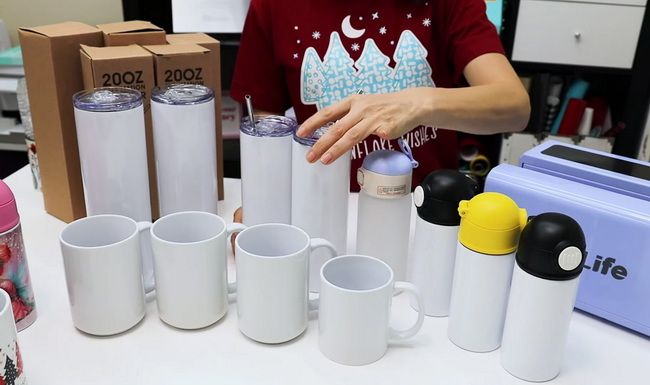
The number of tumblers per batch depends on your oven size and airflow, but many small single-shelf ovens can handle around four tumblers comfortably. Larger two-shelf or multi-shelf ovens may handle significantly more per batch as long as you leave enough space for hot air circulation and maintain consistent color across all positions.
Sublimation turns solid ink into gas, and those vapors can leave residues inside the oven that are not suitable for food use. For safety and hygiene, it is strongly recommended to dedicate an oven only to sublimation instead of sharing it with cooking or baking.
A practical starting point for stainless steel sublimation tumblers is around 350–360 °F with a minimum cook time of about 6 minutes in a convection oven. Because ovens and tumbler coatings vary, adjust your settings after running one or two test tumblers until you achieve full color development without scorching.
If shrink wraps peel or scorch too early, your oven temperature may be too high or the cook time too long for that combination of wrap and tumbler. Lowering the temperature slightly or shortening the time usually stabilizes the wrap while still allowing the design to transfer completely.
Yes, this method works well for sublimation can coolers and other compatible drinkware as long as you use the correct wrap size and adjust your artwork dimensions. Always run separate tests for each new blank type to confirm ideal time and temperature before committing to full production.


