If you have any questions, please feel free to contact us.| Email Us: info@dcheatpress.com


Views: 222 Author: Amanda Publish Time: 2026-01-23 Origin: Site


Content Menu
● Why Sock Inserts Are Essential
● Tools and Materials You Will Need
● Recommended Heat Press Settings for Socks
● Step‑by‑Step: How to Sublimate Socks With Inserts
>> Step 1: Prepare Your Artwork
>> Step 2: Insert and Align the Sock
>> Step 3: Position and Secure the Transfer
>> Step 4: Press the First Side
>> Step 5: Press the Second Side
● Pro Tips to Improve Print Quality
● Choosing the Right Sock Inserts
>> Recommended Insert Features
● Common Problems and How to Fix Them
● Scaling Up: From Hobby to Production
● Safety and Maintenance Best Practices
● When to Upgrade Your Heat Press
● Start Printing Better Sublimation Socks Today
● FAQs About Sublimating Socks
>> FAQ 1: What type of socks are best for sublimation?
>> FAQ 2: Do I really need sock inserts to sublimate socks?
>> FAQ 3: Can I sublimate dark‑colored socks?
>> FAQ 4: Why are my sublimated socks coming out dull?
>> FAQ 5: How can I avoid ghosting on my sock prints?
Sublimation socks are one of the most profitable and creative products in custom printing, but professional results depend on more than just good artwork and ink. The right sock inserts, heat press settings, and workflow will determine whether you get vibrant all‑over prints or faded, uneven socks.
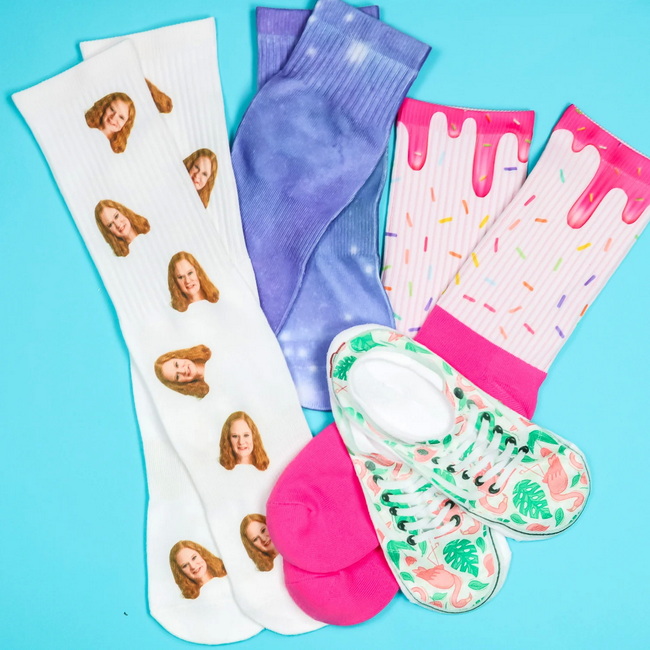
Sublimation sock printing is a process where special sublimation ink turns into gas under high heat and bonds permanently with polyester fibers. This creates a soft‑hand, full‑color print that does not crack or peel like traditional vinyl or screen printing.
- Works best on white or light‑colored polyester socks.
- Ideal for sports teams, streetwear brands, gift shops, and print‑on‑demand sellers.
- Requires a heat press, sublimation printer, polyester socks, and properly sized sock inserts.
To get full coverage and avoid white creases, socks must be stretched evenly during pressing. Specially shaped sock inserts keep straight or L‑shaped (hockey stick) socks flat and in position inside the press.
- Inserts prevent the sock from folding or wrinkling, which causes unprinted “smile lines” on the edges.
- They help maintain consistent pressure, so colors look even from toe to cuff.
- Different shapes (straight vs L‑shaped) match different sock styles for better alignment.
Suggested visual: Diagram showing a sock without an insert (with creases) vs a sock on an insert (flat and ready to press).
Before starting, prepare all sublimation and heat transfer tools to keep your workflow smooth and efficient.
- Heat press machine (clamshell or swing‑away) capable of 385°F (196°C) with medium pressure.
- Polyester socks (straight or L‑shaped) with at least 85–100% polyester content for best results.
- Sock inserts sized to your sock style and length.
- Sublimation printer with compatible inks and transfer paper.
- Heat‑resistant tape or fabric‑safe adhesive spray to secure transfers.
- Parchment paper or protective sheets to prevent ink transfer onto the press platen.
Optional but recommended: lint roller, heat‑resistant gloves, and a T‑square or grid system for more precise alignment.
Consistent settings are crucial to avoid scorching, ghosting, or dull colors. The following starting point works for most polyester socks and sublimation papers:
- Temperature: 385°F (about 196°C).
- Time: 60 seconds per side.
- Pressure: Medium, just enough to ensure full contact without flattening the sock texture excessively.
Always run a test press on a spare sock when switching to new blanks, paper, or ink, then fine‑tune time or pressure if needed.
This process is designed for consistent, repeatable, production‑ready results, whether you are pressing a few pairs or fulfilling large orders.
A well‑planned design ensures that key elements do not fall off the edge or sit in areas that stretch too much.
1. Create a template matching your sock insert's dimensions, including front and back.
2. Mirror your design if required by your RIP or printer settings.
3. Extend background colors or patterns slightly beyond the sock edges (bleed) to avoid white lines.
Proper loading of the sock onto the insert is the foundation of a clean, edge‑to‑edge print.
1. Slide the insert fully into the sock, aligning the toe and cuff so the fabric is flat and snug.
2. Smooth out any wrinkles or twists along the leg, heel, and toe area.
3. Make sure the seam is positioned consistently, for example placed at the back or centered along one side, to keep prints uniform across pairs.
Movement during pressing is one of the main causes of ghosting or blurry edges.
1. Place the printed sublimation transfer on the sock with the printed side facing the fabric.
2. Align key design elements such as logos, text, and patterns along the shin or outer side of the sock, depending on your design.
3. Use heat‑resistant tape or light adhesive spray to secure the paper so it will not shift during pressing.
Pressing one side at a time ensures the insert and sock stay aligned and evenly heated.
1. Place a sheet of parchment paper on the lower platen to protect it from stray ink.
2. Lay the sock on the insert with the transfer facing up, then cover with another sheet of parchment paper.
3. Press at 385°F for 60 seconds with medium pressure.
4. Open the press carefully and allow the sock to cool 30–60 seconds before handling to avoid smudging.
The second press should match the first side in alignment and color density.
1. Turn the sock over on the insert so the unprinted side faces up.
2. Attach the second transfer sheet, making sure the design lines up at the edges with the first side.
3. Cover with parchment paper and press again at 385°F for 60 seconds with medium pressure.
4. Once cooled slightly, peel off the transfer paper to reveal the finished print.
You now have professionally customized sublimation socks ready for wear or sale.
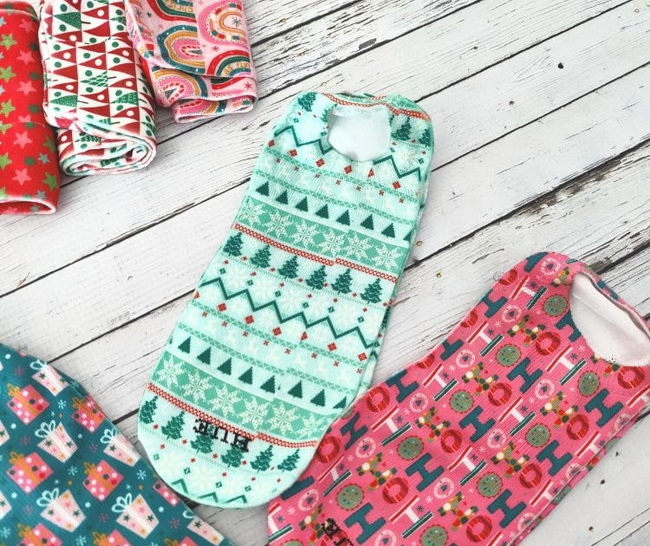
Small process improvements can dramatically increase consistency and reduce waste in a production environment.
- Pre‑press socks for 5–10 seconds to remove moisture and minor wrinkles before applying transfers.
- Use a lint roller to remove dust or fibers that may block ink from bonding with the fabric.
- Keep a written log of time, temperature, and pressure settings for each sock style and supplier.
- Batch similar sock types together to minimize adjustments during production.
Suggested visual: Simple flowchart of the full workflow from artwork creation to final quality check.
Different markets and designs call for different sock shapes and lengths, and your inserts should match them.
- Straight inserts are ideal for crew and tube socks without a pronounced heel.
- L‑shaped (hockey stick) inserts are designed for socks with a distinct heel angle, improving print alignment around that area.
- Thick, durable insert materials resist warping under repeated high‑heat cycles.
Look for these characteristics when sourcing professional‑grade sock inserts for a production shop.
- Smooth edges that will not snag or distort the sock fabric.
- Heat‑stable material that will not bow or melt at 385°F.
- Sizes for kids, women, and men to match your core product offerings.
Production issues cost time and money, but most have straightforward solutions once the cause is isolated.
Problem | Likely Cause | Solution |
White lines along edges | Sock not fully stretched or no inserts used | Use properly sized inserts and add bleed to the artwork. |
Dull or faded colors | Low temp or time, or wrong fabric blend | Confirm polyester content and test slightly higher time or pressure. |
Ghosting or double images | Transfer shifted during pressing | Use more tape or adhesive and firm, even pressure. |
Scorch marks or yellowing | Temperature too high or time too long | Reduce temperature or press time in small increments. |
Visible seam through the print | Sock seam placed in a critical design area | Adjust artwork or seam position during loading. |
Using a standard troubleshooting checklist helps new operators in your team resolve these issues quickly.
As sock sublimation orders grow, a more robust workflow and equipment selection becomes essential.
- Upgrade from small hobby presses to medium or large platen heat presses for higher throughput and more stable temperatures.
- Introduce alignment systems, jigs, or templates so every operator can place socks and transfers consistently.
- Standardize artwork templates for each sock size to simplify design work and reduce artwork errors.
For businesses already offering T‑shirts or mugs, sublimation socks are an effective way to increase average order value with add‑on items.
Sublimation is generally safe, but shops should follow basic safety and maintenance guidelines.
- Keep hands clear of the heat platen and wear heat‑resistant gloves when needed.
- Regularly inspect power cords, press handles, and pressure knobs for wear.
- Clean the heat platen periodically and always use protective sheets to prevent ink buildup.
- Store socks and transfer paper in a cool, dry space to reduce moisture‑related issues.
These preventive steps extend equipment life and reduce unexpected downtime.
Consistent, high‑volume sock sublimation depends on a reliable heat press. Signs that it may be time to upgrade include:
- Uneven temperature readings across the platen creating hot and cold spots.
- Inconsistent closing pressure resulting in color variation between pairs.
- Increased maintenance or frequent component failure that slows production.
Modern presses with advanced pressure controls and digital readouts offer more repeatable results, which is critical when scaling sock production.
With the right sock inserts, dialed‑in heat press settings, and a standardized workflow, any shop can produce high‑margin, professional‑grade sublimation socks consistently. If your business is ready to upgrade its sock production, now is the moment to evaluate your equipment, refine your process, and implement inserts and templates that reduce waste and increase output. Take action today by optimizing your sublimation setup and start delivering premium custom socks that keep your customers coming back and your production line running efficiently.
Contact us to get more information!

Polyester or high‑polyester‑content socks, typically 85–100% polyester, work best because sublimation ink bonds directly with polyester fibers. Cotton socks usually result in dull, washed‑out prints.
Technically, socks can be pressed without inserts, but you risk white lines, uneven colors, and misaligned designs. Inserts keep socks stretched and flat, giving consistent, professional results and fewer misprints.
Sublimation ink is transparent, so it shows best on white or very light socks. Dark socks will not display colors accurately, and designs may not be clearly visible.
Common causes include low polyester content, incorrect temperature or time, or insufficient pressure. Check the sock material specifications and run test presses while slightly adjusting settings until colors appear vibrant.
Ghosting usually happens when the transfer paper shifts while the press closes or opens. Use adequate heat tape or adhesive spray and open the press smoothly, then allow the sock to cool briefly before removing the paper.
[1] https://www.heatpressnation.com
[2] https://jennifermaker.com/sublimation-socks
[3] https://www.heattransferwarehouse.com/blog/how-to-dye-sublimate-silky-socks
[4] https://jennifermaker.com/sublimation-heat-press-settings
[5] https://www.heatpressnation.com/blogs/blog/how-to-sublimate-socks-with-sublicraft-sock-inserts


