If you have any questions, please feel free to contact us.| Email Us: info@dcheatpress.com


Views: 222 Author: Amanda Publish Time: 2026-02-06 Origin: Site


Content Menu
● Why Mug Sublimation Matters for Your Custom Printing Business
● Core Principles of Mug Sublimation: Time, Temperature, Pressure
● 1. Check Whether the Mug Is Fully Cooked
● 2. Cool the Mug Correctly to Lock In the Image
● 3. Measure Mug Taper and Layout for Perfect Alignment
● 4. Maintain Consistent Clearance Near the Handle
● 5. Set and Verify Oven Temperature Accurately
● 6. Trim the Transfer Paper to Avoid Wrinkles and Ghosting
● 7. Preventing Ghosting, Fading, and Common Print Defects
● 8. Can You Re-Bake or Re-Sublimate a Mug?
● 9. Step-by-Step Mug Sublimation Workflow
● 10. Recommended Settings Reference Table
● 11. When to Use a Mug Press vs. Sublimation Oven
● 12. Quality Control Checklist Before Shipping
● Clear, Conversion-Focused Call to Action
>> 1. Why do my sublimation mugs look faded after pressing?
>> 2. How close can I print to the handle of the mug?
>> 3. Can I re-sublimate a mug that has a bad print?
>> 4. Why does my transfer paper wrinkle on the mug?
>> 5. Do I need a separate thermometer for my sublimation oven?
When done correctly, mug sublimation delivers vibrant, durable, and profitable products, but small mistakes in time, temperature, or pressure can ruin an entire batch.
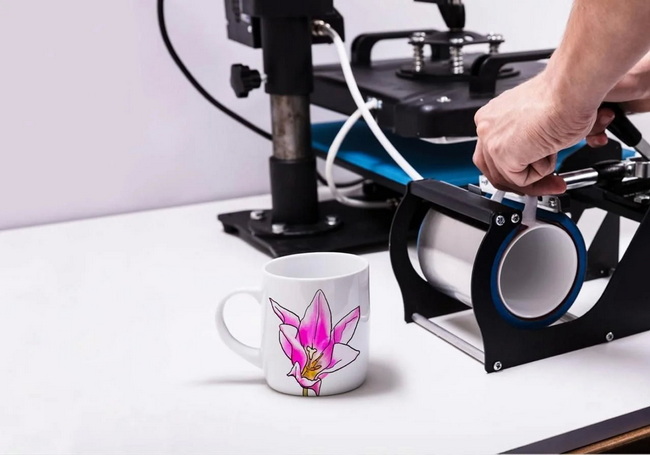
Personalized sublimation mugs remain one of the most in-demand and cost-effective products in the custom printing industry. They are affordable to produce, highly customizable, and ideal for corporate gifts, brand merchandise, and personal presents alike.
From a business perspective, perfecting mug sublimation helps you:
- Reduce wasted blanks, paper, and ink.
- Deliver consistent quality for repeat clients.
- Scale production with predictable results.
- Build a recognizable brand standard for print quality.
For manufacturers such as COLORFUL and professional print shops, mastering these fundamentals is the foundation for profit and customer retention.
Every successful sublimation mug print is controlled by three main variables: time, temperature, and pressure.
- Time: Too short leads to faded, under-cooked images; too long can blur or darken designs.
- Temperature: Ovens are typically set to around 400°F (about 204°C) for mugs.
- Pressure: Insufficient pressure causes dull, uneven transfers; excessive pressure can distort paper and create wrinkles.
Aim for a balanced combination of these three factors, then fine-tune them for your specific mug material, coating, and press or oven model.
A simple but effective quality-control technique is to gently lift a corner of the transfer paper to see whether the image has fully transferred to the mug.
Follow these steps to check completion safely:
1. After pressing or baking, remove the mug and quickly peel a small corner of the transfer paper.
2. Inspect the exposed edge of the image for:
- Solid, rich color without graininess or fading.
- Sharp lines at the edge of the design.
3. If the image looks dull or washed out, the mug was likely under-cooked, and you should increase time or temperature slightly on the next mug.
If the paper corner is difficult to peel away, your time or temperature may have been too low, or pressure insufficient, and the sublimation process has not fully completed.
Proper cooling stops sublimation ink from continuing to gas off and shifting while the coating is still hot.
Best practices for cooling include:
- Removing the transfer quickly once the mug exits the press or oven.
- For ceramic mugs, cooling in room-temperature water to help halt sublimation and stabilize the print.
- Avoiding very cold water that can shock the ceramic and cause cracking.
- Keeping mugs upright and avoiding direct contact with the printed area while still hot.
Rapid but controlled cooling preserves color accuracy and reduces ghosting or blurry edges.
Mugs are rarely perfectly straight from top to bottom, and most have a slight taper that directly affects print alignment and pressure.
Accurate measurement and layout are critical:
- Measure the diameter at the top print area and at the bottom print area, and build your design around the straightest band.
- Keep text and logos away from heavily curved sections to avoid distortion.
- Always print test grids or borders when setting up a new mug style to check for warping and misalignment.
Precise measurement and template design reduce trial and error and prevent stretched or uneven artwork.
Handles are the most challenging area on a mug for even pressure and contact. If your design wraps too close to the handle, pressure will drop and the transfer may look faded or incomplete.
Use these handle-area guidelines:
- Leave at least ¾ inch of space at the top and bottom of the handle region on both sides.
- Avoid placing small text or fine details close to the handle edges.
- When doing full-wrap designs, test and note the maximum safe width your press or oven can handle without quality loss.
This simple spacing rule dramatically improves consistency in full-wrap mug designs.
For oven-based sublimation, a common cooking temperature for mugs is around 400°F. However, many sublimation ovens do not display accurate internal temperatures, so relying solely on the built-in display can cause under- or over-cooking.
To keep temperature accurate:
- Use an independent oven thermometer to confirm the real internal temperature.
- Preheat the oven fully before inserting mugs.
- Record the time required to reach stable temperature and keep it consistent between production runs.
When temperature is too low, mugs are under-cooked and colors appear dull or incomplete. When too high, color can oversaturate and fine details may blur.
Excess paper, especially over tapered sections of the mug, tends to wrinkle under pressure and can cause ghosting or banding on the print.
Use these trimming techniques:
- Use a rotary trimmer or sharp scissors for clean, straight edges.
- Trim paper so it fits only within the flat print zone identified by your measurements.
- Ensure paper edges lie flat against the mug surface with no gaps or bubbles.
Well-trimmed paper ensures better contact and smoother, more professional results.

One of the most frequent practical issues in mug sublimation is ghosting, where a faint shadow or duplicate of the design appears near the main print.
Common causes of ghosting and how to avoid them:
- Loose taping: Always use heat-resistant tape to secure the transfer firmly along the edges.
- Movement while hot: Do not slide or adjust paper once the mug has started heating.
- Insufficient pressure: Check that your press or wrap applies even pressure across the full design area.
- Overheating: Excessive time or temperature can cause ink to migrate and blur.
If a mug is badly ghosted or misprinted, it is usually more practical to discard it and adjust your settings rather than repeatedly rebaking, which rarely restores a clean image and can damage the coating.
Although it is tempting to try to fix a bad print by rebaking, sublimation coatings are designed for one high-quality transfer cycle.
Important considerations:
- Once ink has fully sublimated into the coating, it cannot be cleanly removed by reheating.
- Re-baking may lighten color slightly but usually creates uneven, muddy, or burnt-looking images.
- Applying a new poly coating over a misprinted mug is technically possible but rarely cost-effective for production environments.
For professional standards, treat misprinted mugs as losses, refine your process, and focus on first-time accuracy rather than salvage attempts.
Use this practical workflow as a baseline for consistent, repeatable results from design to cooling.
1. Prepare your artwork
- Set image at 300 dpi or higher.
- Match color profile to your printer and ink.
- Design within the safe print area, respecting taper and handle clearance.
2. Print on sublimation paper
- Use compatible sublimation ink and paper.
- Print mirror-image if the design includes text.
3. Prepare the mug
- Use sublimation-ready, poly-coated ceramic mugs.
- Clean the mug surface to remove dust, oils, or fingerprints.
4. Apply the transfer
- Wrap paper tightly around the mug so the printed side touches the coating.
- Align to your desired height and distance from the handle.
- Secure with heat-resistant tape, especially along edges and near the handle.
5. Press or bake the mug
- For ovens, preheat to around 400°F.
- For mug presses, follow the manufacturer's time and pressure guidelines.
- Start with a test mug and adjust for your specific blanks.
6. Check completion
- Carefully peel a corner of the paper to inspect color density and sharpness.
- Adjust time or temperature if necessary for the next run.
7. Cool and finish
- Remove the transfer quickly after cooking to stop sublimation.
- Cool the mug, for example, in room-temperature water.
- Dry and inspect the mug for any defects before packing.
This structured process helps you train staff, scale production, and document exact parameters for reliable quality.
Use this simplified table as a starting reference and always fine-tune for your own mugs, ink, and equipment.
Parameter | Typical Starting Point | Notes |
Oven temperature | 400°F (≈204°C) | Verify with independent thermometer; many ovens read inaccurately. |
Press time (oven with wraps) | 10–15 minutes | Adjust for mug thickness and coating quality. |
Clearance from handle | ≥ ¾ inch each side | Helps avoid low pressure and incomplete transfer near the handle. |
Paper coverage | Flat mid-section only | Trim top and bottom to stay off tapered areas. |
Cooling method | Room-temperature water | Helps stop sublimation and preserve image sharpness. |
Different production setups benefit from different hardware approaches, and choosing the right equipment is crucial for efficiency and consistency.
Mug press advantages:
- Faster setup for single or small-batch orders.
- Direct control of time, temperature, and pressure per mug.
- Easier to train new operators for standard sizes.
Sublimation oven advantages:
- Higher throughput when combined with mug wraps.
- More flexibility for unusual shapes or full-wrap designs.
- Potentially more even heating around the entire mug.
For high-volume production of standardized mugs, either approach can work effectively as long as you maintain consistent temperature verification and repeatable process parameters.
Create a simple quality control checklist to ensure each mug meets your brand standards before shipment.
Key points to check:
- Colors match client expectations, with no unexpected color shifts.
- Lines and text are sharp, not fuzzy or doubled.
- No ghosting, banding, or faded sections in the design.
- Design is properly aligned and centered on the mug.
- Coating is intact, with no cracks or chips near the print area.
A consistent quality control process minimizes returns and strengthens your reputation as a reliable supplier.
If you are ready to elevate your mug production with more consistent, professional results, this is the ideal moment to upgrade your sublimation equipment and workflow. Partner with a specialized manufacturer like COLORFUL (dcsbheatpress.com) to equip your business with reliable heat presses, sublimation ovens, and accessories engineered for high-quality, high-volume mug printing. Take the next step today, optimize your production line, and let every mug you ship reflect the standard of quality your brand promises.
Contact us to get more information!

Faded prints usually indicate that the mug was under-cooked, the temperature was too low, or contact and pressure were insufficient. Check that your oven or press reaches the recommended temperature, verify that time settings are correct, and ensure the transfer paper is tightly wrapped against the mug surface.
To maintain even pressure and avoid faded areas, leave at least ¾ inch of space around the handle region on both sides. Printing too close to the handle often leads to incomplete or patchy transfers because the press or wrap cannot apply consistent pressure in that area.
Once the image has fully sublimated into the coating, it cannot be cleanly removed just by reheating. Re-baking may slightly change the color but usually introduces more defects, so it is generally better to discard the mug, analyze what went wrong, and adjust your process for the next run.
Wrinkling occurs when there is excess paper over tapered sections or when the paper is not wrapped tightly. Trim the top and bottom edges so the paper stays within the flat print zone, then tape it securely to the mug surface to eliminate gaps, air pockets, and movement during pressing.
Using a separate thermometer is highly recommended because many ovens do not display accurate internal temperatures. A reliable thermometer allows you to confirm that the oven is truly at the target temperature before you start production, which reduces under-cooked and over-cooked results and improves overall consistency.
1. https://www.heatpressnation.com/blogs/blog/sublimate-mugs-successfully-with-these-5-tips


