If you have any questions, please feel free to contact us.| Email Us: info@dcheatpress.com


Views: 222 Author: Amanda Publish Time: 2026-01-22 Origin: Site


Content Menu
● What Is Light Inkjet Heat Transfer Paper?
● Best Use Cases and Advantages
● Essential Equipment and Materials
● How to Prepare Artwork and Files
● Printing on Light Inkjet Transfer Paper
>> Printer and Driver Settings
>> Drying and Handling the Printed Sheet
● Cutting and Trimming the Transfer
● Recommended Time, Temperature, and Pressure
● Step‑by‑Step: Pressing Light Inkjet Transfer Paper on Light T‑Shirts
>> Step 1 – Preheat and Check the Press
>> Step 2 – Prepare the T‑Shirt
>> Step 3 – Position the Transfer
>> Step 4 – Press the Transfer
● Post‑Press Washing and Care Instructions
● Common Problems and How to Fix Them
● Expert Tips for Business‑Grade Results
● When to Choose Heat Press Over Home Iron
● How COLORFUL Heat Press Machines Support Better Inkjet Transfers
● Take the Next Step with COLORFUL
● FAQ: Light Inkjet Heat Transfer Paper on Light T‑Shirts
>> 1. Do I need to mirror the image before printing on light inkjet transfer paper?
>> 2. What temperature and time should I use on my heat press?
>> 3. Why do my light inkjet transfers crack or peel after washing?
>> 4. Can I use light inkjet transfer paper on dark T‑shirts?
>> 5. Is a home iron good enough, or do I need a heat press?
Using light inkjet heat transfer paper on white or pastel T‑shirts is one of the fastest, lowest‑cost ways to produce full‑color custom garments at home or in a small business. This updated 2026 guide explains each step in detail, adds expert tips, and shows how a reliable COLORFUL heat press helps you get consistent results from your inkjet transfers.

Light inkjet heat transfer paper is a coated sheet that accepts inkjet inks and then bonds them to white or light‑colored fabrics under heat and pressure. The coating is engineered to melt and fuse with the fibers of cotton or cotton‑blend garments, leaving a soft, flexible print when properly pressed.
- Designed for inkjet printers only, typically with dye or pigment inks.
- Optimized for white and pastel garments, where the fabric color helps brighten the image.
- Works best with an even‑heating heat press rather than a home iron, especially for business use.
For COLORFUL users, this guide applies to flat heat press models commonly used for T‑shirts and other garments.
Light inkjet transfer paper is ideal for fast customization and small runs where other printing methods would be too complex or expensive. It is especially attractive for start‑ups and creators who want color without investing in large equipment.
- Perfect for birthday shirts, event tees, prototypes, school clubs, family reunions, and test designs.
- Low minimums: print a single shirt or a short batch with minimal waste.
- Lower upfront cost if you already own an inkjet printer and a heat press.
Compared with dark transfer paper, light inkjet paper usually feels softer and more integrated into the fabric when applied correctly.
To press light inkjet transfer paper correctly, prepare all materials before you start.
- Inkjet printer with good color control; pigment‑ink models improve durability.
- Light inkjet heat transfer paper specifically labeled for light fabrics and inkjet printers.
- Heat press machine with accurate temperature, timer, and pressure control, such as a flat‑bed COLORFUL press.
- Cover sheet: non‑stick sheet or parchment to protect the press platen and transfer surface.
- Cutting tools: scissors, craft knife, or a contour‑cut capable vinyl cutter for precise edges.
- Light‑colored T‑shirts in 100% cotton or high‑cotton blends for best results.
For professional workflows, a digital thermometer, pressure gauge, and test garments help fine‑tune your COLORFUL heat press.
Correct artwork preparation significantly improves the final print quality and reduces waste.
Light inkjet transfers work best with full‑color artwork that does not require white ink. Because the paper relies on the garment's light color, white areas in your design will show the shirt color.
- Use high‑resolution images, ideally 300 dpi at final print size.
- Avoid very small text and ultra‑thin lines that may not print cleanly.
- For photos, adjust brightness and contrast slightly higher to compensate for fabric absorption.
Most light inkjet transfer papers require mirroring before printing, because the printed side is placed face down on the shirt.
- Enable “Mirror” or “Flip Horizontal” in your design software or printer driver.
- Double‑check this step for text and logos, where reversed prints will be obvious waste.
Once your artwork is ready, focus on accurate printing settings for your chosen paper.
Each printer and paper combination behaves differently, but there are proven starting points.
- Media type: photo paper or specialty transfer setting, as recommended by the paper brand.
- Print quality: high quality or “Best” for vivid colors, unless the paper brand suggests otherwise.
- Color management: turn off automatic color corrections if using a custom profile; otherwise, start with default.
Run a small test print on regular paper first to confirm layout, scaling, and mirroring before using transfer sheets.
Fresh inkjet prints need time to stabilize before cutting or pressing.
- Allow the print to dry completely, usually at least 5–10 minutes in a dust‑free area.
- Avoid touching the printed surface; handle edges to prevent fingerprints and smudges.
- Store printed transfers flat and away from humidity until you are ready to press.
Unprinted areas of light transfer paper may leave a faint film on the shirt if not removed. For professional results, trim closely around the design.
- Use scissors or a craft knife for simple shapes and basic production.
- For complex shapes or regular production, a contour‑cut vinyl cutter gives precise edges and saves time.
- Round sharp corners where possible; rounded edges resist peeling better during washing.
This trimming step is where businesses can improve finish quality compared to many home‑made shirts.
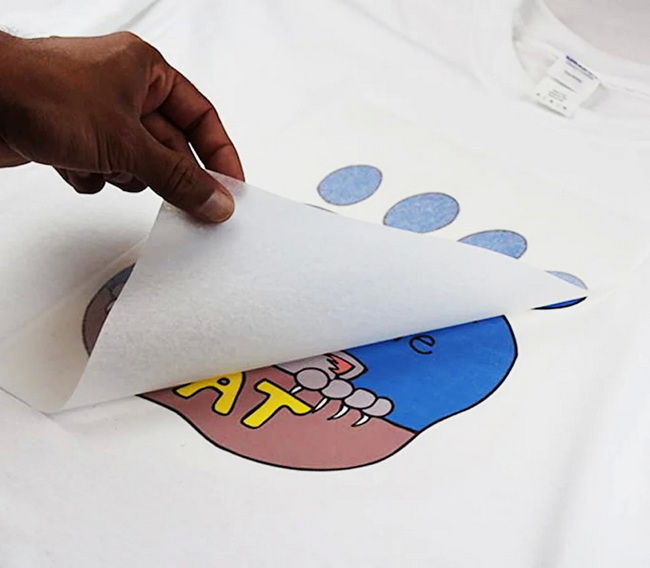
Exact settings depend on your paper brand, ink, and fabric, so always read the manufacturer's instructions first. The following ranges are common starting points for light inkjet transfer paper on light cotton shirts.
| Parameter | Typical Range for Light Inkjet Paper on Cotton | Notes |
|---|---|---|
| Temperature | 180–190 °C / 356–374 °F | Common for many light transfer papers. |
| Time | 15–30 seconds | Longer end for heavier fabrics. |
| Pressure | Medium to firm | Even, consistent pressure improves bonding. |
Many popular light inkjet transfer papers press successfully around 350–375 °F for 15–30 seconds with medium‑firm pressure on flat cotton shirts. COLORFUL flat heat presses provide the stable temperature and uniform pressure needed to keep results consistent across multiple garments.
Tip: Once you find a setting that works for your specific paper and ink, record temperature, time, pressure level, and shirt type so your team can repeat the process easily.
This step‑by‑step workflow follows standard instructions for light inkjet transfer paper, adapted to a modern flat heat press.
- Turn on your COLORFUL heat press and set temperature, time, and pressure according to your paper's instructions.
- Wait until the press reaches target temperature and stabilizes before starting production.
- Test the actual platen temperature with a surface thermometer if you notice inconsistent results.
- Place the light‑colored T‑shirt on the lower platen, smoothing out wrinkles by hand.
- Pre‑press the garment for 3–5 seconds to remove moisture and creases.
- Let the shirt cool slightly so the transfer does not start melting prematurely when placed.
- Place the trimmed transfer face down on the shirt, centered and aligned where you want the design.
- Use a ruler or alignment guide for consistent placement across multiple garments.
- Cover with a non‑stick sheet or parchment to protect both shirt and upper platen.
- Close the press and apply medium to firm pressure for the recommended time.
- Do not open early; consistent pressing time is critical for complete bonding.
- When the timer finishes, open the press smoothly to avoid shifting the transfer.
Many light inkjet papers recommend stretching the fabric slightly immediately after pressing.
- Remove the cover sheet and gently stretch the printed area in opposite directions to soften the feel.
- Follow your paper's peel instructions: some are hot peel, others warm or cool peel, so timing matters.
- Peel the backing in a smooth, continuous motion; if you see lifting, pause and repress with slightly more pressure or a few extra seconds.
Place the shirt on a flat surface and allow it to cool completely before folding or packaging.
Proper care extends the life of light inkjet transfers and keeps colors vivid.
- Wait at least 24 hours before the first wash so the transfer can fully cure.
- Wash garments inside out in cold or warm water using mild detergent.
- Avoid bleach and harsh chemicals, which can break down the transfer layer.
- Hang dry or tumble dry on low; high heat can reduce flexibility and cause cracking.
- Do not iron directly on the printed area; if needed, press from the back or use a protective sheet.
Providing clear care labels or printed instruction cards is a professional way to reduce complaints and returns.
Even experienced users occasionally run into transfer issues. The table below highlights frequent problems and practical fixes.
Problem | Likely Cause | Solution |
Dull or washed-out colors | Temp too low, time too short, wrong media setting | Increase temperature slightly, extend press time, adjust media. |
Edges lifting after washing | Insufficient pressure or time, sharp corners | Increase pressure, repress, round artwork corners. |
Scorch marks or yellowing | Temp too high, time too long | Lower temperature or shorten pressing time. |
Ghosting or shadow image | Transfer shifted during press | Use more pressure, avoid opening press early, keep platen level. |
Rough or stiff feel | Over-pressing or thick ink load | Reduce time/temperature, lower ink saturation in artwork. |
A consistent, well‑calibrated COLORFUL press reduces most of these issues by maintaining even heat and pressure across the platen.
For small studios and growing brands, incremental improvements create a noticeable difference in customer satisfaction and repeat orders.
- Always test on scrap shirts or misprints when working with a new paper, fabric blend, or printer profile.
- Standardizing one or two paper brands and locking in recipes for them makes training staff easier.
- Document your best settings for each garment type in a simple chart near the press.
- Combine light inkjet transfers with COLORFUL presses featuring digital controls to reduce operator error and improve consistency in small batch production.
For growing operations, adding multiple COLORFUL stations allows you to separate printing, trimming, and pressing to increase throughput.
Some tutorials show how to use a home iron, but serious users quickly discover its limits.
- Irons produce uneven pressure and inconsistent temperature across the soleplate.
- Many light inkjet transfer papers are tested specifically on professional presses, not irons.
- A COLORFUL heat press gives repeatable, measured time, temperature, and pressure, which is critical for commercial orders and quality control.
For hobby use, a home iron may be enough to experiment. For customer‑facing products, investing in a stable heat press is strongly recommended.
For consistent, professional results, equipment choice matters as much as paper and artwork. COLORFUL heat presses are designed for stable heating, uniform pressure, and repeatable settings, all of which directly affect inkjet transfer quality.
- Digital temperature and time controls help operators keep transfers within the optimal window for light inkjet papers.
- Even platen pressure across the entire print area reduces partial adhesion and edge lifting.
- Durable build and reliable electronics support continuous use in small garment studios and factory sample rooms.
For users who want to expand into sublimation, DTF, or vinyl, COLORFUL presses also support multiple transfer methods on the same press line.
Light inkjet heat transfer paper on light T‑shirts is a powerful entry point into custom printing, from home crafters to professional studios. To get smooth, durable, and repeatable results, pair high‑quality transfer paper with a reliable COLORFUL heat press and the step‑by‑step process outlined in this guide. If you are ready to upgrade from a home iron, standardize production settings for your team, or add new inkjet transfer products to your catalog, explore COLORFUL's range of flat heat press machines today and contact our technical team for a configuration that matches your paper, fabric, and production volume.
Contact us to get more information!

Yes. For most light inkjet transfer papers, the design is printed on one side and then placed face down on the garment, so the image must be mirrored before printing. If you do not mirror it, text and logos will appear reversed on the finished shirt.
Always start with the paper manufacturer's instructions, but many light inkjet transfer papers work around 350–375 °F (180–190 °C) for 15–30 seconds with medium to firm pressure on cotton shirts. Fine‑tune within this range using test garments and record your best recipe.
Cracking or peeling usually comes from insufficient pressure, low temperature, or short pressing time, or from washing too hot or too soon. Increase pressure slightly, ensure the press reaches stable temperature, and remind customers to wash inside out in cold or warm water after a 24‑hour wait.
No. Light inkjet transfer paper is designed for white and pastel fabrics, using the garment color to brighten the design. For black or strongly colored shirts, use dark inkjet transfer paper or another process designed for dark textiles.
A home iron can work for simple hobby projects, but it rarely delivers the even heat and consistent pressure needed for professional‑grade results. A COLORFUL heat press makes it much easier to get vibrant, durable transfers, especially when producing multiple shirts.
1. https://www.heatpressnation.com/blogs/blog/how-to-press-light-inkjet-heat-transfer-paper-on-light-t-shirts
2. https://www.youtube.com/watch?v=TzmXDPI_2w8
3. https://www.heatpressnation.com/pages/transfer-instructions
4. https://galaxy-press.com/heat-press-guide-temperature-and-time-settings/
5. https://www.visionsub.com/essential-tips-for-successful-inkjet-heat-transfers/
6. https://www.coastalbusiness.com/beginners-guide-inkjet-heat-transfer-paper
7. https://blog.koalapaper.com/t-shirt-transfer-papercomplete-professional-guide-for-2026/
8. https://www.heatpressnation.com/pages/paropy-inkjet-light-classic-heat-transfer-paper
9. https://www.allprintheads.com/blogs/news/how-to-use-heat-transfer-paper
10. https://www.youtube.com/watch?v=Fuq03lYnWw8


