If you have any questions, please feel free to contact us.| Email Us: info@dcheatpress.com


Views: 222 Author: Amanda Publish Time: 2026-01-22 Origin: Site


Content Menu
● Core keywords and who this guide is for
● Understanding heat transfer vinyl basics
● Key HTV pressing variables: time, temperature, pressure
● Recommended HTV time and temperature overview
● Choosing the right equipment for HTV
● How to read HTV instructions correctly
● Step-by-step: how to press heat transfer vinyl
>> Step 1: Prepare your artwork and cut file
>> Step 2: Cut and weed the vinyl
>> Step 3: Pre-press the garment
>> Step 5: Press with correct settings
>> Step 6: Peel the carrier correctly
● Fabric types and HTV compatibility
● Fine-tuning pressure like a pro
● Common HTV pressing mistakes and how to fix them
● Advanced workflow tips for small production shops
● When and how to stretch-test HTV
● Expert weeding and handling tips
● HTV application settings overview
● Care, durability, and customer instructions
● Why equipment quality matters for HTV
● FAQs about pressing heat transfer vinyl
>> 1 – Why is my HTV peeling after washing?
>> 2 – Can I press HTV with a household iron?
>> 3 – How do I know which side of HTV to cut?
>> 4 – Do I really need to pre-press garments?
>> 5 – Can I layer different HTV types together?
Pressing heat transfer vinyl (HTV) is straightforward when you understand how time, temperature, and pressure work together with different fabrics and vinyl types. When you dial in a consistent workflow and use reliable equipment like COLORFUL heat presses, you get faster production, fewer misprints, and longer-lasting prints for your customers.
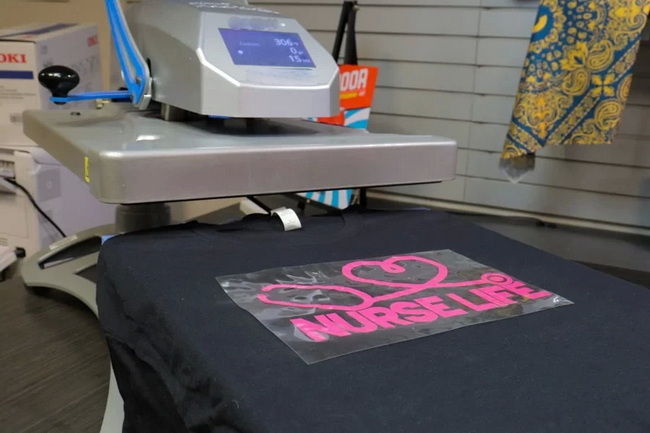
This guide targets the primary keyword “how to press heat transfer vinyl” and related phrases such as “HTV pressing time and temperature,” “how to use a heat press for HTV,” and “best settings for heat transfer vinyl.” It is written for:
- Small custom apparel businesses and print shops
- Hobby crafters upgrading from iron-on to a professional heat press
- Growing brands using HTV alongside sublimation and DTF transfers
Heat transfer vinyl is a polyurethane (PU) or PVC film that is cut into shapes or text, weeded, and then heat-applied to garments using a heat press. Each HTV has its own recommended time, temperature, and pressure to ensure the adhesive activates correctly without scorching the fabric.
Most modern HTV is formulated for:
- Cotton, polyester, and cotton/poly blends
- Moderate temperatures around 285–320 °F (140–160 °C), depending on brand and finish
Getting professional results with HTV depends on balancing three core variables:
- Temperature: Controls how quickly the adhesive melts and bonds to fibers.
- Time: Ensures the adhesive fully flows and anchors to the fabric without overbaking.
- Pressure: Drives the melted adhesive into the garment surface for strong wash resistance.
For example, a popular product like Siser EasyWeed is pressed at about 305 °F (151 °C) for 10–15 seconds using medium to firm pressure. Other films, such as stretch or thick specialty HTV, may need slightly different settings and often higher pressure.
Use the manufacturer's spec sheet as your primary reference, then fine-tune based on your fabrics and press. A typical starting point for common HTV categories is:
- Standard everyday HTV (e.g., EasyWeed): around 300–305 °F for 10–15 seconds, medium pressure
- Stretch HTV: similar or slightly lower temperature, firm pressure to help the film move with performance fabrics
- Glitter or flock HTV: often a little higher temperature and full-firm pressure for thicker films
When switching brands or series, always check the product page or instructions tab for the exact application settings.
Using a stable, evenly heating press is as important as picking the right vinyl. A professional press from COLORFUL helps you keep consistent temperature across the platen, accurate pressure, and repeatable dwell times across long runs.
When selecting a press for HTV:
- Prefer a clamshell or swing-away heat press over a household iron for even pressure
- Look for a digital time and temperature controller for repeatability
- Choose models with reliable heating elements and solid platens to reduce cold spots and avoid partial adhesion
Many decorators underuse the manufacturer's application guide, but this is your best roadmap to reliable results.
When you open a product page for an HTV, look for:
- The “Instructions,” “Details,” or “Application” tab
- Listed temperature, pressing time, pressure level, and peel type (hot, warm, or cold peel)
Make it a habit to save or print a short cheat sheet for your most common films so staff can quickly confirm settings at the press.
Follow this practical workflow to press HTV on T-shirts and similar garments using a professional heat press.
- Create vector art in software like Illustrator, CorelDRAW, or cutting software
- Mirror the design before cutting so it reads correctly when flipped onto the garment
- Set your cut settings by doing a small test cut to confirm clean cuts with easy weeding
- Load the HTV with the shiny carrier side down so the cutter blade contacts the dull adhesive backing
- After cutting, weed away the excess vinyl, leaving only the design on the clear carrier
- A helpful trick is to slightly warm the vinyl to make weeding faster; briefly heating the lower platen and weeding above it can soften the adhesive and speed up removal
- Place the garment on the press and pre-press for 2–5 seconds at application temperature to remove moisture and wrinkles
- Smooth out seams or folds and use a pressing pillow or pad if seams or zippers are near your design area
- Lay the weeded design (carrier side up) on the garment, aligning it visually or with a T-square or alignment tool
- Keep common placement standards in mind, such as 2–3 cm below the collar for front chest designs
- Set your temperature, time, and pressure based on the HTV's application guide
- Close the press and let the full dwell time count down; avoid opening the press early, which can reduce adhesion
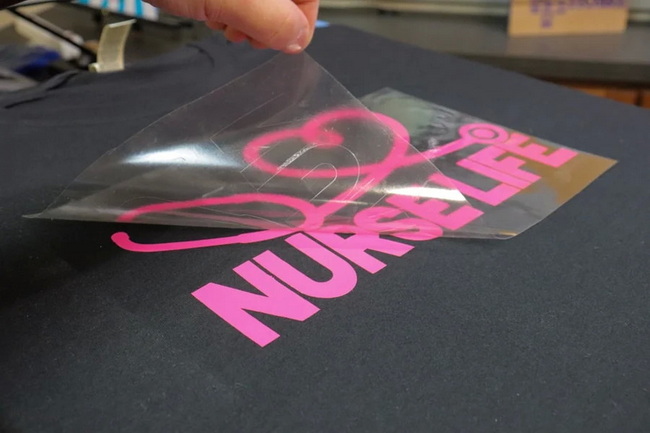
- Peel according to the product instructions: hot, warm, or cold peel
- If edges start to lift when peeling, lay the carrier back down, re-press for a few seconds, and peel again within the recommended temperature window
Different fabrics react differently to heat and pressure, so matching HTV to fabric type is critical.
- 100% cotton: very HTV-friendly and forgiving; standard HTV settings work well
- Polyester and blends: watch for dye migration on sublimated fabrics; lower-temp HTV and shorter dwell times help
- Performance or stretch fabrics: choose stretch HTV with strong elasticity and apply with firm, even pressure
Always do a small test press on new fabric types before running a full order.
“Medium” or “firm” pressure can sound vague, but in practice they refer to how hard the top platen presses into the garment.
For consistent pressure:
- Ensure the garment is fully flat and free of seams under the design area
- Use pressing pads to raise print zones above seams, zippers, or pockets
- If designs are washing off or lifting at edges, increase pressure slightly and test again
Many professional shops note that HTV generally performs best under medium to firm pressure, especially for stretch and specialty films.
Even experienced decorators occasionally see lifting, wrinkling, or scorching. Understanding root causes helps you solve problems quickly.
Typical issues include:
1- Lifting corners or edges after washing
- Often caused by too little pressure, insufficient time, or peeling too cold or too hot
- Solution: Re-press with slightly higher pressure, confirm full dwell time, and follow the recommended peel window
2- Scorch marks or shiny rectangles
- Common on sensitive fabrics like tri-blends or dark poly
- Solution: Lower temperature, add a protective sheet, and reduce dwell time while staying within the vinyl's activation range
3- Vinyl feels stiff or thick
- May be layering too many films or using HTV not suited for fine detail
- Solution: Use thin, soft HTV for large coverage and keep layering to a minimum
Once you move from one-off projects to daily production, small workflow improvements can significantly boost throughput and consistency.
Consider these process upgrades:
- Create laminated HTV setting charts and hang them near each press
- Use heat press test strips or temperature probes periodically to verify even heat across the platen
- Standardize your pre-press, pressing, and post-press steps so any operator can achieve the same quality
Pairing these practices with stable COLORFUL heat presses and accessories helps shops scale from hobby volumes to reliable batch production.
Stretch-testing is a useful quality check, but it must be done correctly.
Use stretch tests when:
- You are applying stretch HTV on leggings, sportswear, or compression garments
- You need to confirm the vinyl remains flexible and does not crack after cooling
How to stretch-test:
- Allow the garment to cool completely after pressing
- Gently stretch the fabric in multiple directions and observe whether the vinyl moves with the fabric
- Minor distortion may appear on some finishes, but obvious cracking or separation suggests incorrect settings
Weeding becomes faster and more accurate with simple technique improvements.
- Lightly heating the lower platen and weeding your HTV just above a warm surface can soften the adhesive and make details easier to remove
- Use good lighting and a weeding tool or hook to pick small cavities
- Keep cut depth shallow so the blade does not cut into the carrier, which makes weeding slower and can cause lifting
Building consistent weeding habits is crucial when running multiple cutters and presses in a small factory or studio.
HTV type | Typical temp (°F) | Time (seconds) | Pressure level | Peel type (example) |
Standard everyday HTV | ~300–305 | 10–15 | Medium | Warm or hot peel |
Stretch HTV | ~280–305 | 10–20 | Medium–firm | Warm peel |
Glitter / flock HTV | ~320–330 | 12–20 | Firm | Warm or cold peel |
Values shown are general examples; always confirm your exact film's instructions on the product page before pressing.
Proper after-care keeps HTV designs looking sharp even after dozens of wash cycles.
Recommended care guidelines:
- Wait at least 24 hours after pressing before the first wash so the adhesive fully sets
- Wash garments inside out in cold or warm water; avoid harsh chemicals and bleach
- Tumble dry on low if needed, and avoid ironing directly on the vinyl surface
Clear care labels and instructions help reduce returns and strengthen your brand's reputation for quality.
Even the best HTV will fail if pressed with inconsistent heat or pressure. This is why many shops invest in robust, industrial-grade heat presses rather than entry-level hobby units.
For manufacturers and growing studios:
- A COLORFUL heat press offers stable heating elements, precise temperature control, and repeatable pressure, which are critical for large HTV runs
- Matching your press size and style (clamshell, swing-away, dual-station) to your production volume allows you to deliver consistent results while reducing operator fatigue
If you are ready to move from basic crafting to professional HTV production, pair high-quality vinyl with a reliable COLORFUL heat press to unlock consistent, scalable results. Visit dcsbheatpress.com to explore presses, accessories, and technical support designed for global decorators who need stable performance, efficient workflows, and durable prints on every order.
Contact us to get more information!
Peeling usually indicates insufficient pressure, time, or temperature, or peeling the carrier outside the recommended hot, warm, or cold window. Re-press with slightly higher pressure and confirm that your settings match the manufacturer's HTV instructions.
A household iron can work for simple projects, but it rarely offers the even pressure and stable temperature needed for professional results. For consistent quality and repeatable production, a dedicated heat press is strongly recommended.
Most HTV loads with the shiny carrier side down and the dull adhesive backing facing the blade. If unsure, gently lift a corner to see which layer is the clear carrier and which is the vinyl film before cutting.
Yes, a quick 2–5 second pre-press removes moisture and wrinkles, which helps the adhesive bond more evenly. Skipping this step can lead to inconsistent adhesion and shorter design life.
Many standard HTVs are designed to be layered, but some specialty finishes like thick glitter or metallics should only be used as top layers. Always check the product guidance before layering and use slightly shorter times for base layers to avoid over-baking.
1. https://www.heatpressnation.com/blogs/blog/how-to-press-heat-transfer-vinyl
2. https://www.siserna.com/application-instructions/
3. https://www.stahls.com/heat-transfer-vinyl-application
4. https://www.specialtymaterials.com/htv-application-guides/
5. https://www.gc-garmentprinting.com/blog/heat-transfer-vinyl-guide/


