If you have any questions, please feel free to contact us.| Email Us: info@dcheatpress.com


Views: 222 Author: Amanda Publish Time: 2026-01-21 Origin: Site


Content Menu
● Core keywords and who this guide is for
● Materials, tools, and safety
● Step 1 – Measure beanies and design for curved, stretchy surfaces
● Step 2 – HTV workflow for acrylic beanies (StripFlock‑style designs)
>> A. Prepare HTV artwork and cut settings
>> B. Press setup for acrylic beanies
● Step 3 – Sublimation workflow for polyester beanies
>> A. Design and print sublimation transfers
>> B. Press setup for polyester beanies
● Step 4 – Avoiding distortion, scorching, and dye migration
● Comparing HTV vs sublimation on beanies
● Business and pricing tips for custom beanies
● Quick troubleshooting checklist for beanie printing
● Action steps: From first test to reliable production
● Take your beanie personalization to the next level
>> 1. What is the best way to personalize beanies: HTV or sublimation?
>> 2. What heat press settings should I use for acrylic beanies?
>> 3. Can I sublimate onto any beanie?
>> 4. How do I prevent beanies from stretching or warping during pressing?
>> 5. How should customers wash personalized beanies?
Beanies are a high‑margin, cold‑season product, and personalizing them with heat transfer vinyl (HTV) or sublimation is one of the fastest ways to add value for gifts, brands, and small apparel businesses. At the same time, their stretchy knit structure and curved shape mean you must adjust your design, padding, and heat press settings to avoid distortion, scorching, and uneven prints.

This guide targets phrases such as personalize beanies, custom beanie HTV, sublimation beanie printing, acrylic beanie heat press settings, and related long‑tail queries like how to heat press beanies without melting and polyester sublimation beanie tutorial.
Use it if you are:
- A home crafter wanting to customize winter hats with names or logos.
- A small shop offering branded beanies for schools, clubs, and companies.
- A decoration business owner who needs repeatable, low‑waste workflows on professional heat press equipment.
Before starting, gather the right materials so your beanies press cleanly, with minimal stretching and heat damage.
Recommended beanie types:
- Acrylic beanies (typical cuffed winter hats) – ideal for flocked or thicker HTV; heat sensitive, so they require careful temperature control and added padding.
- Polyester beanies – especially sublimation‑ready blanks that accept full‑color prints when pressed at higher temperatures.
Core tools for personalization:
- Quality heat press with accurate temperature, time, and pressure control.
- Pressing pillow or heat‑resistant foam insert to even out seams and knit texture.
- Protective sheets: parchment paper or Teflon to prevent dye migration and scorching.
- Cutting software (for HTV), such as Silhouette Studio, and compatible vinyl cutters.
Basic safety and quality habits:
- Keep hands clear of heated platens and allow beanies to cool before handling.
- Use light adhesive sprays away from the press to avoid fumes and overspray.
- Always perform a small test press on a spare beanie or scrap area first to verify temperature, time, and pressure.
Unlike flat T‑shirts, beanies wrap around the head, and the cuff often folds, so the design scale and placement matter more. Start with precise measurements to avoid text disappearing into the fold or warping when the fabric stretches.
How to measure your beanie:
1. Lay the beanie flat and measure the total height and width.
2. Measure the cuff height when folded to its typical wearing position.
3. Note any seams, tags, or ribbing that might interfere with a flat press area.
Design guidelines:
- Match the design width to the cuff width but leave 0.3–0.5 in of margin on each side to avoid seams.
- Limit design height to the cuff height, so all content remains visible when worn.
- Use thick fonts or bold logos for HTV; they hold shape better on stretchy knits than thin lines.
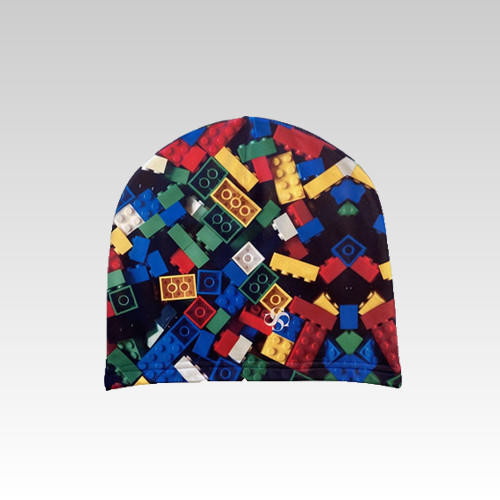
For sublimation beanies, you can use patterns, gradients, and photos as long as the art is mapped to the cuff and crown measurements for front and back.
Thicker flocked HTV is ideal for acrylic beanies because the raised texture hides minor knit irregularities and gives a premium, fuzzy look. The key is to combine proper cut settings with a padded press setup that supports the curved crown and cuff.
- Create your text or logo in design software and size it to fit the cuff measurements.
- Add a weed box around the design to make weeding faster and cleaner.
- Mirror the artwork and select a flocked HTV material preset such as “Heat Transfer, Flocked”.
Typical starting cut settings for flocked HTV in consumer cutters:
- Blade depth: 3–4.
- Force: around 6 (may vary by machine).
- Speed: about 5 to maintain control on thicker vinyl.
Always run a test cut and adjust blade depth or force until the vinyl weeds cleanly without cutting through the carrier.
To protect heat‑sensitive acrylic and avoid imprinting seams, your pressing pillow or foam insert is critical.
Recommended starting point for flocked HTV on acrylic beanies:
- Temperature: around 305–310 °F (about 152–154 °C).
- Time: 15–30 seconds, depending on HTV brand.
- Pressure: medium or slightly lighter if you add thick padding.
Setup steps:
1. Place a pressing pillow or foam on the lower platen to raise the print area and isolate seams.
2. Turn the beanie inside out and position it like an upside‑down cone on the pillow, so the future cuff edge sits on the raised surface.
3. Place the HTV transfer carrier‑side up at what will become the top of the folded cuff.
4. Cover with a Teflon sheet or parchment paper, then close the press for the recommended time.
5. Allow the beanie and vinyl to cool to a warm temperature, then peel the carrier according to the vinyl's warm or cold‑peel requirement.
If desired, add a second HTV layer for outlines or shadows, but use a shorter second press to avoid over‑heating the acrylic.
Polyester beanies designed for sublimation allow full‑color graphics and patterns with a soft hand feel because the ink bonds directly with the fibers. However, they require higher temperature and careful protection against dye migration and ghosting.
- Use vector or high‑resolution raster art sized to the cuff and crown, mirrored before printing.
- In sublimation printing software, select Polyester as the substrate and the correct paper profile.
- Leave Mirror enabled and choose a color mode such as Photographic or Vivid depending on detail and saturation needs.
Once printed, trim individual graphics to reduce excess paper that might collect stray ink or cause ghosting.
Sublimation typically requires higher heat and longer dwell than HTV.
Common starting range for polyester beanies:
- Temperature: 380–400 °F (about 193–204 °C).
- Time: 50–60 seconds.
- Pressure: medium, firm enough to keep the transfer flat without crushing the knit.
Workflow:
1. Cover the lower platen with parchment paper to protect the pillow and press from stray dyes.
2. Insert a folded sheet of parchment inside the beanie to block any possible ink bleed‑through.
3. Position the beanie on top of the pillow, then place the sublimation transfer ink‑side down where you want the design.
4. Secure the transfer with heat‑resistant tape or a light mist of adhesive spray applied off‑press.
5. Cover with another sheet of parchment, then press for the specified time.
6. Open the press, let the beanie cool briefly, and peel the paper carefully to minimize ghosting.
After cooling completely, repeat the process for the back of the beanie, always using fresh parchment to avoid transferring residual dyes.
Beanies are more prone to damage than T‑shirts because of their tight knits, elastic fibers, and smaller surface area. A few technical habits dramatically improve durability and appearance.
Prevent stretching and warping:
- Use light to medium pressure and, if needed, slightly longer dwell instead of very high pressure.
- Place an insert or extra padding inside the cuff to stabilize the knit and reduce lateral stretching.
- Avoid pulling or stretching the beanie when removing it from the press; let it cool flat first.
Prevent scorching and shine:
- For acrylic, stay at the lower end of the temperature range recommended for your HTV or transfer type.
- Cover the surface with parchment or a Teflon sheet to diffuse direct heat and reduce platen shine.
- If you see color darkening or a melted surface, shorten the press time or reduce temperature, then retest on a scrap.
Control dye migration in sublimation:
- Always protect pillows and platens with parchment so stray inks cannot retransfer onto other items.
- Replace parchment between presses and use internal inserts for double‑sided beanies.
- Avoid moving the paper while the beanie is still hot to reduce ghost shadows.
The table below summarizes when to choose HTV or sublimation for personalized beanies.
Aspect | HTV on Acrylic Beanies | Sublimation on Polyester Beanies |
Best for | Simple logos, bold text, team names. | Full-color art, patterns, gradients, photos. |
Material | Works well on acrylic; flocked HTV hides knit texture. | Requires high-polyester content and sublimation-ready blanks. |
Feel | Raised, textured, or smooth vinyl surface. | Soft “in-the-fabric” feel with no added thickness. |
Typical settings | Around 305–310 °F, 10–30 s, medium pressure. | Around 380–400 °F, 50–60 s, medium pressure. |
Durability | Very durable when properly pressed and peeled. | Excellent when washed cool and dried low; ink is part of the fibers. |
Limitations | Large, detailed photos may feel heavy or crack over time. | Only works on light-colored polyester; cannot print on dark acrylic. |
Personalized beanies can be a profitable winter add‑on product for print shops, clubs, merch brands, and event organizers. With the right workflow, you can launch small runs quickly and upsell matching scarves, hoodies, or jackets.
How to calculate margins:
- Add up blank beanie cost, transfer media, ink or vinyl, plus press time and labor.
- Build in extra for misprints and test runs when working with new fabrics or suppliers.
- Price higher for multi‑color art, personalization such as names or numbers, or rush orders.
Smart product bundle ideas:
- Winter sets: beanie plus scarf plus gloves with matching HTV or sublimation patterns.
- Team and club packs: numbered beanies for players, plus branded versions for fans.
- Corporate gifts: logo beanies for staff and clients featuring subtle, tone‑on‑tone flocked HTV.
Professional‑grade heat press equipment with precise temperature and pressure control helps keep these runs consistent, especially when you use inserts and pillows for curved winter hats.
When issues appear on beanies, they often repeat across the whole batch, so a short checklist can save time and blanks.
Common issues and quick fixes:
1- Vinyl is lifting at the edges
- Cause: Insufficient time, temperature, or pressure, or knit not fully supported.
- Fix: Increase dwell by 3–5 seconds or slightly raise pressure; ensure a pillow or insert sits directly under the design.
2- Beanie looks stretched or distorted
- Cause: Too much pressure or aggressive handling while hot.
- Fix: Lower pressure, use thicker padding, and allow items to cool flat before moving.
3- Scorch marks or shine on acrylic
- Cause: Excessive heat or direct platen contact.
- Fix: Reduce temperature by 5–10 °F, add parchment or Teflon cover, and press for a shorter time.
4- Ghosting or blurred sublimation edges
- Cause: Paper shifted while hot or insufficient tape or adhesive.
- Fix: Use more heat tape, ensure even pressure, and peel carefully after a brief cool‑down.
To turn this knowledge into a repeatable personalization workflow, use the following simple roadmap for any new beanie style.
1. Identify fabric: Confirm whether the beanie is acrylic, polyester, or a blend from the care tag.
2. Choose method: Select HTV for bold logos and names, or sublimation for photo‑quality art and all‑over patterns.
3. Measure and design: Record total height and cuff height, then build artwork with safe margins and bold shapes for HTV.
4. Set up press and padding: Place a pressing pillow or foam under the print area and protect platens with parchment or Teflon.
5. Run test press: Use one sample beanie to dial in time, temperature, and pressure, then adjust until adhesion and fabric appearance look right.
6. Press production run: Standardize your settings and steps, and log them for each specific beanie style and transfer material.
If you operate a growing decoration business, upgrading to stable, industrial‑grade heat press equipment with accurate temperature recovery and even pressure distribution will make beanie production faster and more consistent batch after batch.
If you are ready to turn beanie personalization into a dependable revenue stream, standardize your measurement, design, and press workflows and combine them with reliable heat press equipment that delivers stable temperature, even pressure, and consistent results on curved winter hats. Start with a small range of acrylic and polyester beanies, document your best HTV and sublimation settings, and then expand into full winter collections and bundled gift sets that keep your customers warm and your production schedule busy.
Contact us to get more information!
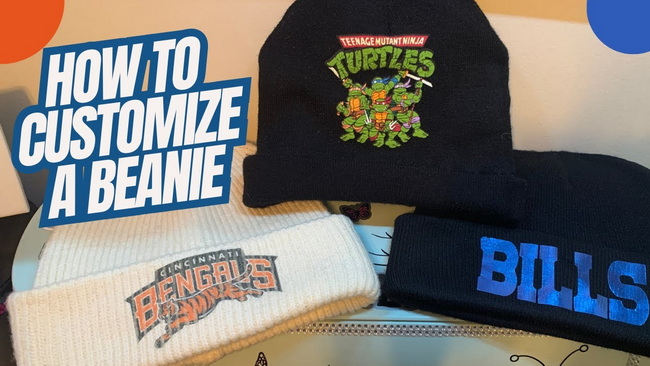
For single‑color logos and names on typical acrylic beanies, HTV, especially flocked or thicker films, is usually easier and more forgiving. For all‑over patterns, gradients, and photographic art on light‑colored polyester beanies, sublimation offers softer feel and long‑lasting color.
Many decorators start around 305–310 °F with 10–30 seconds and medium pressure when applying flocked HTV to acrylic beanies, always following the vinyl manufacturer's instructions. Because acrylic can be heat sensitive, it is safer to use a pressing pillow, protect the surface with parchment, and run test presses before full production.
Sublimation requires high‑polyester content, so it works best on sublimation‑ready polyester beanies in light colors that allow the dyes to show clearly. Cotton or standard acrylic beanies cannot be sublimated directly because the inks do not permanently bond with those fibers.
Use inserts or foam under the cuff, light to medium pressure, and avoid pulling the beanie while it is still hot, which can distort the knit. After pressing, let beanies cool flat before folding the cuff or putting them on a display head.
Recommend gentle washing inside‑out in cool water with mild detergent and low‑heat or air drying to extend the life of both HTV and sublimation prints. Harsh detergents, high‑heat drying, and aggressive stretching can prematurely age the decoration and the knit fabric.
1. https://www.heatpressnation.com/blogs/blog/how-to-personalize-beanies
2. https://www.youtube.com/watch?v=ltQTxV5tUvE
3. https://blog.transferexpress.com/applying-heat-transfers-to-acrylic-apparel/
4. https://www.heattransferwarehouse.com/sublimation-beanie-hat-by-silky-socks/
5. https://www.youtube.com/watch?v=TaOfDpbO0CY
6. https://www.stahls.com/play-video?id=_0aBavhBYuE
7. https://www.heatpressnation.com/blogs/blog/sweaters-and-jackets-and-beanies-oh-my
8. https://www.etsy.com/market/htv_beanie
9. https://www.reddit.com/r/heatpress/comments/1pxc9lh/ok_so_i_need_help_so_i_have_been_inspired_to/
10. https://www.facebook.com/stahlsheatprinting/videos/melting-beanies-not-anymore-heres-how-to-heat-press-acrylic-without-ruining-y/


