If you have any questions, please feel free to contact us.| Email Us: info@dcheatpress.com


Views: 222 Author: Amanda Publish Time: 2026-01-01 Origin: Site


Content Menu
● What Is a Sublimation Tumbler
● Who This Guide Helps and Core Keywords
● Essential Supplies for High-Quality Sublimation Tumblers
>> Core Materials You Will Need
● Step 1: Prepare a Seamless Tumbler Design
>> Design Software and Canvas Setup
>> How to Create a Seamless Wrap
● Step 2: Print the Sublimation Transfer
>> Printer Settings for Reliable Transfers
● Step 3: Prepare and Wrap the Tumbler
>> Surface Cleaning and Handling
>> Wrapping and Taping the Design
● Step 4: Heat Settings for Press and Oven
>> Typical Time and Temperature Ranges
>> Using a Convection or Sublimation Oven
● Step 5: Post-Press Care and Customer Instructions
>> Care Guidelines for Final Products
● Pro Tips for Seamless, Professional Tumblers
>> Design and Wrapping Refinements
>> Heat and Workflow Refinements
● Common Sublimation Tumbler Problems and Solutions
● Scaling From Hobby to Small Production
● Take the Next Step With Reliable Sublimation Equipment
● FAQs About Sublimation Tumblers
>> 1. What do I absolutely need to make a sublimation tumbler at home?
>> 2. Can I sublimate any metal or plastic tumbler?
>> 3. What is the best time and temperature for stainless steel sublimation tumblers?
>> 4. Why do my sublimation tumbler colors look dull on paper?
>> 5. How can I avoid ghosting on my tumblers?
Creating vibrant sublimation tumblers is one of the fastest ways to launch a personalized drinkware brand or expand a custom-printing business. This enhanced guide walks beginners and growing shops through every step, from design to pressing, so you can achieve clean, professional results with fewer misprints.
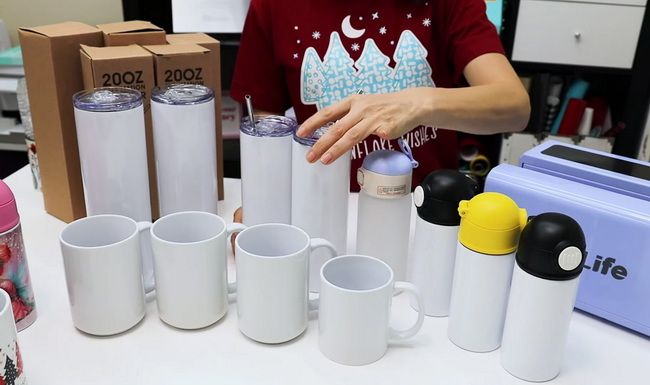
A sublimation tumbler is a polymer-coated cup (often stainless steel) that bonds with sublimation ink under high heat to create a permanent, full-color print. Unlike vinyl or stickers, sublimation becomes part of the coating, so it does not peel or crack under normal use.
- Works best with polymer-coated stainless steel or aluminum surfaces specifically manufactured for sublimation.
- Ideal for durable branding, photo gifts, and bulk personalized orders for online shops, events, and corporate clients.
This article is designed for beginners learning how to create sublimation tumblers at home and for growing workshops or small factories that want to refine their production workflow. It targets search phrases like “how to make sublimation tumblers,” “sublimation tumblers for beginners,” “sublimation tumbler time and temperature,” and “seamless sublimation tumbler wrap tips.”
Longer search phrases such as “how to sublimate a tumbler with a convection oven,” “best settings for stainless steel sublimation tumblers,” and “how to avoid ghosting on sublimation tumblers” are also naturally incorporated to improve search visibility.
To achieve consistent, high-quality results, you need sublimation-ready materials and reliable heat equipment. Cutting corners here is the fastest way to faded colors, ghosting, or peeling prints.
- Sublimation tumbler blanks: Polymer-coated, white, and logo-free surfaces designed for sublimation.
- Sublimation printer: Either a dedicated sublimation printer or a compatible inkjet that has been converted.
- Sublimation ink and paper: Must be formulated for sublimation and compatible with your printer.
- Heat-resistant tape: Keeps the transfer tightly in place and prevents shifting during heating.
- Heat-resistant gloves: Essential for safe handling when removing hot tumblers from the press or oven.
- Sublimation oven or tumbler heat press: Dedicated equipment used only for sublimation, not food.
- Well-ventilated workspace: Helps manage fumes generated during the sublimation process.
For higher-volume production, professional-grade heat presses, tunnel ovens, and precise temperature controllers help maintain consistent results and reduce the rejection rate.
Proper design preparation prevents white edges, misaligned seams, and blurry details and makes the pressing step far more forgiving. Designing with production in mind saves time and material in the long run.
- Use Adobe Illustrator, Photoshop, Affinity Designer, or Canva to build your tumbler wrap.
- Set the canvas to match the exact height and circumference of your tumbler, then add a small extra margin to the width.
- Aim for at least 300 DPI resolution to keep text and fine lines sharp.
- Export as PNG (for transparency) or high-quality JPEG.
- Use recommended color profiles or ICC settings from your ink provider when available to help maintain predictable color.
To make a seamless sublimation wrap, focus on what happens where the ends of the design meet.
- Solid backgrounds: A solid color or subtle gradient is the easiest option and hides the seam with a slight overlap.
- Repeating patterns: Plaid, floral, or geometric tiles must be scaled so the pattern lines up when overlapped.
- White or light seam strategy: Adding a white or light-colored edge, a ripped-paper look, or a fade at both ends reduces the visibility of minor misalignment.
Sublimation prints look dull and slightly washed out on paper, which is normal. The ink activates and becomes vibrant during pressing, not during printing.
- Install sublimation ink and load sublimation paper in the printer.
- Turn on mirror printing in your printer driver or design software so text and images appear correctly on the tumbler.
- Use high-quality print mode or equivalent and avoid stacking too many automatic color enhancements.
- Print in one consistent orientation (portrait or landscape) to keep color uniformity during larger runs.
If initial prints appear too light, test different combinations of paper settings, quality modes, and ICC profiles, then record your best-performing configuration for future jobs.
Strong, vibrant color depends on both heat and intimate contact between the ink and the coated surface. Small gaps, wrinkles, or dust can easily show up in the final result.
- Wipe the tumbler thoroughly with a lint-free cloth or microfiber towel.
- Use isopropyl alcohol wipes to remove oils, fingerprints, and manufacturing residues from the surface.
- Avoid touching the cleaned print area directly with bare fingers.
- Trim the printed wrap so it covers the full printable area and includes a narrow margin at the top and bottom.
- Wrap the paper tightly around the tumbler and align the seam so both edges meet cleanly with a slight overlap.
- Tape straight down the seam from top to bottom with heat-resistant tape, smoothing the paper as you go.
- Tape the top and bottom edges to prevent the paper from lifting when heated.
- For some oven workflows, a shrink-wrap sleeve can be added over the taped design to provide even pressure.
Different coatings, metals, and wall thicknesses require customized settings, but most stainless steel sublimation tumblers fall into a well-established range. The goal is to reach full ink activation without scorching or warping the coating.
Method | Temperature (°F) | Time | Key Notes |
Tumbler heat press | 360–365°F | 40–90 seconds total | Often pressed on one side then rotated once to cover the full surface. |
Convection or sublimation oven | 375–400°F | 5–8 minutes | May require rotation if the tumbler is lying horizontally. |
Always confirm the recommended settings provided by your tumbler supplier and then fine-tune them in your own environment using test blanks.
- Preheat the press to about 360–365°F.
- Place the wrapped tumbler into the press with the seam facing the side of the heating element.
- Close the press with firm, even pressure and start the timer.
- After the first cycle, rotate the tumbler to face the seam toward the opposite side and press again for the same duration.
- Remove the tumbler using heat-resistant gloves and allow it to cool slightly before peeling.
- Preheat the oven to 375–400°F as recommended for your specific blank.
- Stand the tumbler upright whenever possible; if it must lie horizontally, rotate it halfway through the cycle.
- Typical durations range from 5 to 6 minutes at 375°F for many stainless steel tumblers.
- Allow the tumbler to cool for a short time, then carefully remove the wrap; if the paper adheres strongly, some users briefly dip the tumbler in cool water before peeling.
Clear care instructions protect both your brand and your customer experience. Even the best print will degrade faster if the product is used incorrectly.
- Hand wash only with a soft cloth or sponge and mild detergent.
- Do not place in the dishwasher, especially on high-heat cycles.
- Do not use in the microwave, as most tumblers are metal.
- Avoid dropping or hitting hard surfaces, which can damage the coating or insulation.
Including a printed care card in every package helps reduce complaints and returns while signaling a professional level of quality.
Once the basic process feels comfortable, small refinements can dramatically improve seam quality and consistency. Treat each step like a repeatable production process rather than a one-off craft project.
- Make the wrap slightly wider than the tumbler's measured circumference to ensure overlap at the seam.
- Use a scraper, squeegee, or firm card over the seam to push the paper tight and remove trapped air.
- For dark or highly saturated designs, pay extra attention to the seam edge and re-tape if any gap appears.
- Keep a simple record sheet listing tumbler type, supplier, time, temperature, and result notes.
- Test one blank from every new batch of tumblers, ink, or paper before starting a large order.
- Use equipment with stable heating elements and precise control for consistent results across multiple units.
Troubleshooting is a normal part of mastering sublimation. Use the following table as a quick reference when results are not as expected.
Problem | Likely Cause | Solution |
Faded or dull colors | Insufficient time or temperature, or incompatible supplies | Increase time or temperature slightly, ensure you are using true sublimation ink and paper, and verify full contact. |
Ghosting or shadows | Paper shifted or lifted during heating | Tape the seam, top, and bottom securely and avoid moving the tumbler while it is still hot. |
White line at the seam | Wrap not wide enough or misalignment at the seam | Add extra width and carefully align the edges; smooth and tape the seam thoroughly. |
Uneven color bands | Uneven pressure or hot and cold spots | Check pressure settings, rotate the tumbler, and verify oven or press temperature with an external thermometer. |
Burned or browned areas | Overheating or excessive press time | Reduce temperature or time in small increments and re-test with a spare blank. |
As you move from one-off projects to regular orders, consistent equipment and standardized procedures become critical. A structured process improves quality, saves time, and reduces waste.
- Document a fixed process for each tumbler type: design size, paper type, time, temperature, and cooling method.
- Use checklists for preparation, wrapping, pressing, and packing to reduce human error.
- Organize workstations so that printers, presses, and packing areas follow a logical, efficient flow.
- Consider industrial-grade heat presses and ovens when you begin handling frequent or large orders.
- Look for features like accurate digital temperature control, stable heating elements, and compatibility with multiple tumbler sizes.
- Better equipment typically leads to fewer misprints, improved seam quality, and easier scaling when you expand your product line.
If you are ready to move beyond trial-and-error crafting and into stable, repeatable production, now is the time to upgrade your workflow with dependable heat equipment. Choose high-quality sublimation presses, ovens, and related machinery that deliver accurate temperature control, even pressure, and compatibility with different tumbler sizes, so every print looks as good as your design. By investing in robust, professional-grade solutions, you can reduce misprints, improve turnaround times, and confidently grow your custom tumbler business from small batches to large, profitable orders.
You need sublimation-ready tumbler blanks, a sublimation-compatible printer, sublimation ink and paper, heat-resistant tape, heat-resistant gloves, and a dedicated tumbler press or oven, plus a clean, ventilated workspace.
No. Only tumblers with a special polymer coating formulated for sublimation will bond correctly with sublimation ink; uncoated metal or plastic usually results in weak or temporary prints.
Many stainless steel tumblers perform well at around 360–365°F for 40–90 seconds in a heat press, or approximately 375°F for 5–6 minutes in a convection or sublimation oven, but you should always confirm with your blank supplier and run test prints.
Sublimation ink is formulated to look lighter before pressing. The colors become bright and vivid only after the ink is heated, turns to gas, and bonds with the coated surface of the tumbler.
Ghosting usually occurs when the transfer paper moves or lifts during heating. You can avoid it by wrapping tightly, taping the seam, top, and bottom firmly, using consistent pressure, and allowing the tumbler to cool before removing the paper.


