If you have any questions, please feel free to contact us.| Email Us: info@dcheatpress.com


Views: 222 Author: Amanda Publish Time: 2026-02-04 Origin: Site


Content Menu
● What Are Custom Dad Hats and Why Use Transfer Paper
>> Benefits of Using Transfer Paper for Dad Hats
● Essential Equipment and Materials
● Step 1: Measure and Plan Your Dad Hat Design
>> How to Measure the Printable Area
● Step 2: Prepare and Print Your Transfer Paper
>> Printer Settings for Dad Hat Transfers
● Step 3: Cut and Weed the Printed Transfers
>> Option A: Scissors for Simple Shapes
>> Option B: Contour Cutting with a Vinyl Cutter
● Step 4: Set Up Your Cap Heat Press
>> Recommended Starting Settings
● Step 5: Position, Press, and Peel the Transfer
>> Place and Press the Transfer
● Pro Tips for Professional‑Quality Dad Hats
● Common Issues and How to Fix Them
● When to Use Transfer Paper vs Heat Transfer Vinyl on Dad Hats
● Ideas for Profitable Custom Dad Hat Designs
● Choose Reliable Heat Press Equipment for Consistent Results
● Action Steps: Start Producing Custom Dad Hats Today
● Take the Next Step with Professional Heat Press Solutions
● FAQs About Making Custom Dad Hats with Transfer Paper
>> Q1: Do I need to mirror my artwork when using dark transfer paper on dad hats
>> Q2: What temperature and time work best for dad hats
>> Q3: Can I cut the transfers without a vinyl cutter
>> Q4: What types of hats work best with transfer paper
>> Q5: How can I avoid the transfer cracking or peeling over time
Designing and pressing custom dad hats with transfer paper is one of the fastest ways to add profitable, full‑color products to your apparel or gift business. In this guide, you will learn exactly how to plan, print, cut, and press high‑quality transfers onto dad hats like a pro.

Dad hats are unstructured, low‑profile cotton or cotton‑blend caps with a curved brim and adjustable strap, loved for their relaxed, casual look. When combined with inkjet dark transfer paper, they become an ideal canvas for vivid, small‑run or personalized graphics.
- Full‑color prints with gradients, photos, and small details.
- No need for color‑separated screens, saving setup time and cost on small orders.
- Works with common inkjet printers and cap heat presses.
- Excellent for on‑demand designs, names, events, and seasonal graphics.
To produce professional custom dad hats with transfer paper, prepare the following tools and supplies.
- Inkjet printer compatible with dark transfer paper settings, such as transfer paper or matte photo preset.
- Vinyl cutter or plotter, optional but recommended for contour cutting around complex shapes.
- Cap heat press with a curved lower platen that matches the profile of a dad hat.
- Dark inkjet transfer paper designed for fabrics.
- Blank dad hats made of cotton or standard polyester blends.
- Protective sheet such as a Teflon sheet, silicone sheet, or parchment paper.
- Scissors or cutting tools for trimming simple designs.
For optimal results, choose high‑quality, even‑weave dad hats so the transfer lays flat and adheres consistently.
Before you print anything, you need the correct graphic size for the front of your dad hat.
1. Flatten the front panel of the hat as much as possible by hand.
2. Use a soft tape measure or ruler to check the width and height of the area you want to decorate.
3. Note the maximum width, often around 4–5 inches, and height, commonly 2–2.5 inches, depending on hat style.
Design your artwork to sit comfortably inside this area instead of edge‑to‑edge, which helps prevent distortion on the curved surface of the hat. If you are making multiple hats, design once and duplicate the graphic across the transfer sheet to maximize paper usage.
When you work with dark transfer paper for hats, you do not mirror your artwork.
- Use a transparent or solid background that matches or complements the hat color.
- Keep fine details bold enough so they remain visible after pressing.
- Group multiple copies of the same design onto one sheet to save material.
- Paper type: Transfer paper or matte photo paper preset.
- Quality: High or best quality to achieve rich, saturated colors.
- Orientation: Keep artwork right‑reading, with no mirroring, when using dark transfer paper.
Send the design to your printer and allow the print to dry completely before cutting or handling the transfer surface.
Once printed, your next step is to trim the transfer to reduce excess material and achieve a clean edge.
For basic shapes like rectangles, circles, or bold logos:
- Cut around the design with sharp scissors, leaving a small border if the artwork allows.
- Carefully peel the printed transfer layer off the paper carrier sheet.
This method is quick, cost‑effective, and ideal for simple, bold dad hat graphics.
For more complex or detailed shapes, a vinyl cutter delivers cleaner, more precise outlines.
1. Import your design into your cutter software.
2. Use trace tools to detect the graphic edges and create a contour path.
3. Add registration marks or print‑and‑cut borders as required by your software.
4. Place the printed sheet onto a compatible cutting mat large enough for the machine to feed properly, especially for larger cutters.
5. Use recommended cutting settings for your transfer paper as suggested by the paper or machine manufacturer.
After cutting, carefully lift and remove the graphic from the carrier sheet, making sure not to stretch or distort the transfer.
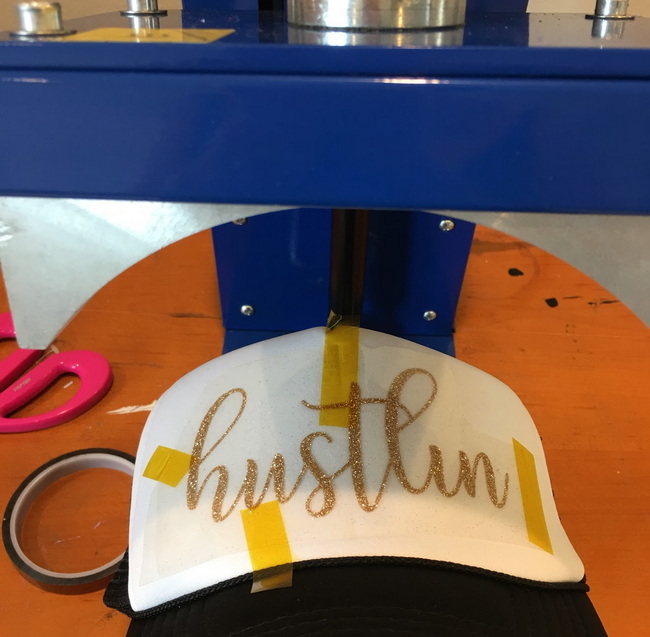
Correct time, temperature, and pressure are critical for durable dad hat transfers.
- Temperature: 375°F, approximately 190°C.
- Time: 25 seconds.
- Pressure: Medium to firm, with firm pressure preferred for consistent results.
Preheat your cap press and ensure the curved lower platen matches the profile of your dad hat. For many dark transfer papers, firm pressure helps the adhesive properly bond to the fabric.
Now you are ready to press your custom dad hat with transfer paper.
- Mount the hat onto the lower platen, tightening the strap or clamp so the front panel is stretched flat and wrinkle‑free.
- Smooth out any seams or folds that might sit beneath the transfer area.
1. Position your cut graphic on the front of the hat, centering it visually and keeping it level with the brim.
2. Cover the transfer with a protective sheet such as a Teflon sheet or parchment paper.
3. Close the heat press and apply firm pressure for 25 seconds at 375°F.
- Open the press and allow the transfer to cool down while it is still on the hat.
- Once cooled, peel away the protective sheet to reveal the finished, colorful graphic on your dad hat.
The result is a vivid, durable decoration that is ready to wear or sell immediately.
To take your custom dad hats with transfer paper from good to great, focus on consistency and finish.
- Test before production by using one hat as a sample to dial in temperature, time, and pressure.
- Use lint rollers or light pre‑pressing to remove moisture and wrinkles before applying the transfer.
- Avoid pressing directly over thick seams or stiff buckram and instead position the design in a flatter area on the front panel.
- Store transfer paper in a cool, dry space and handle edges to avoid fingerprints or smudges.
For complex artwork or large batch orders, document your exact settings and hat style so you can repeat successful results later.
Even experienced decorators occasionally run into issues when applying transfer paper to dad hats. Identifying patterns makes troubleshooting much easier.
- Confirm that you used the correct printer preset such as transfer paper or matte photo paper and high‑quality mode.
- Check that you printed on the correct side of the transfer paper.
- Verify that your press reached the full target temperature and maintained it throughout the press cycle.
- Increase pressure slightly to ensure firm contact between the transfer and fabric.
- Make sure the hat front is fully supported by the platen with no gaps or sagging.
- Allow the transfer to cool fully before peeling the protective sheet if recommended for your paper type.
- Reduce the size of the design so it does not wrap too far around the curved sides of the hat.
- Ensure the hat is mounted flat and taut without diagonal tension that can warp the design during pressing.
Both heat transfer vinyl and transfer paper have a place in hat decoration. Choosing the right method depends on your artwork, volume, and desired finish.
Method | Best For | Advantages | Considerations |
Transfer paper | Full-color images, photos, gradients, and small runs | Fast setup, works with inkjet printers, supports detailed graphics | Requires careful trimming, may have a noticeable hand feel |
Heat transfer vinyl | Single or few solid colors, bold logos, and text | Very durable, clean edges, various matte or specialty finishes | Multi-color designs require layering or separate presses |
If you frequently produce multicolor or photo‑realistic dad hats, transfer paper is usually the more efficient option, especially for short runs and customized orders.
Custom dad hats are popular across many markets and niches. Thoughtful design selection can help you reach different audiences.
- Local city or neighborhood pride graphics that highlight landmarks or slogans.
- Event hats for festivals, reunions, charity runs, corporate retreats, and school functions.
- Personalized monograms, names, or inside jokes for small teams and friend groups.
- Brand or merch hats for small businesses, bands, and content creators.
- Limited‑edition drops with seasonal artwork, collaborations, or trending themes.
By batching orders and optimizing your sheet layout, you can keep costs low while offering high‑margin, personalized products.
High‑quality transfers depend not only on the paper and artwork but also on reliable heat press equipment. Consistent temperature, even pressure, and a well‑designed cap platen directly affect durability and color vibrancy.
A professional‑grade cap press helps you maintain stable temperatures from hat to hat and apply uniform pressure across curved surfaces. This reduces misprints, wasted blanks, and re‑do costs.
When you plan to scale your dad hat business, investing in robust, commercial‑ready machines gives you the control and repeatability needed for large orders and long production runs.
If you are ready to expand your product line, custom dad hats with transfer paper are a practical, profitable next step.
1. Choose quality blank dad hats and compatible dark transfer paper.
2. Set up your artwork with correct sizing and printer settings.
3. Dial in your cap press temperature, time, and pressure using test hats.
4. Record your successful settings so you can repeat them consistently.
5. Build a small catalog of proven designs that fit your brand and target audience.
With the right process and equipment in place, you can confidently add custom dad hats to your offerings and deliver vibrant, long‑lasting designs to your customers.
If you want every custom dad hat to look sharp and last longer, the most important decision you can make is choosing stable, professional heat transfer equipment. Upgrade your workflow today with reliable machines and accessories that deliver consistent temperature, even pressure, and repeatable results from the first hat to the last in every run.
Contact us to get more information!
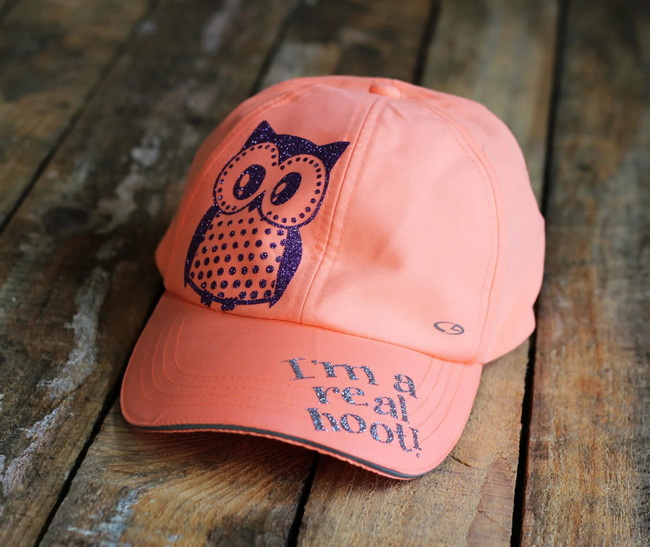
No. For most dark transfer papers, you do not mirror your artwork. You print it right‑reading, cut it, and apply it face up on the hat before pressing.
A common starting point is 375°F for 25 seconds with medium to firm pressure. Always confirm these settings with the specific instructions provided with your transfer paper.
Yes. Simple shapes can be trimmed with scissors, then peeled from the carrier sheet and applied directly. A vinyl cutter is most useful when you need precise contour cutting for complex shapes.
Most cotton and standard polyester dad hats work well, as they can handle the recommended temperatures and allow the transfer to bond securely. Avoid hats with heavy surface textures that can interfere with adhesion.
Use the correct time, temperature, and firm pressure, and make sure the hat front is flat during pressing. After pressing, follow care instructions such as washing inside‑out on gentle settings and avoiding harsh detergents.
1. https://www.heatpressnation.com/blogs/blog/produce-custom-dad-hats-with-transfer-paper


