If you have any questions, please feel free to contact us.| Email Us: info@dcheatpress.com


Views: 222 Author: Amanda Publish Time: 2026-01-16 Origin: Site


Content Menu
● What Is An “Always Customizable” Tote Bag
● Why Customizable Tote Bags Are Popular Now
● Materials Needed For A Customizable Tote Bag
● Step‑By‑Step Process For A Customizable Tote Bag
>> Step 2: Create Or Import Artwork
>> Step 3: Cut And Weed The Vinyl
>> Step 4: Prepare The Tote Bag
>> Step 5: Press The Chalkboard Panel
>> Step 6: Use And Refresh The Customizable Area
● Current Design Ideas For Custom Tote Bags
● Comparison Of Common Tote Decoration Methods
>> Decoration Methods Overview
● Practical Tips To Improve Results
>> 1. What fabric works best for a customizable tote bag with HTV?
>> 2. Can an iron replace a heat press for this type of project?
>> 3. How can the writable vinyl area be kept clean over time?
>> 4. Is HTV durable enough for everyday shopping and carrying heavier items?
>> 5. Which design styles are currently popular for custom tote bags?
Transforming a plain tote into an always customizable bag is simple when using heat transfer vinyl and a reliable heat press. With the right workflow, you can create reusable, rewritable tote designs suitable for personal projects or small‑batch production.[1][2][3]

An always customizable tote bag is a fabric bag that includes a rewritable or easily updatable design area created with special vinyl or modular graphics. The goal is to combine permanent branding or decoration with a surface that can be changed frequently for messages, lists, or event details.[3][4][1]
Popular approaches include:
- Using chalkboard‑style HTV as a panel that can be written on and wiped clean.[1]
- Applying removable or interchangeable vinyl elements over a fixed background.[3]
- Leaving a defined blank “message box” framed by permanent artwork or logos.[5][1]
Custom tote bags have become a staple for eco‑conscious shoppers and brands that want reusable, high‑visibility items. In recent seasons, large canvas totes with natural materials and versatile designs have been especially in demand.[4][5]
Key trends include:
- Preference for large, soft‑shaped canvas totes that balance practicality and style.[5]
- Increased use of custom totes as sustainable alternatives to disposable packaging.[4]
- Bold, travel‑inspired graphics and abstract patterns that make each bag feel personal.[6][5]
Carefully selected materials help ensure strong adhesion, clean design edges, and long‑lasting results. Durable totes and suitable vinyl are especially important when the design will be handled, written on, and wiped repeatedly.[7][1][3]
Recommended materials:
1- Blank tote bag
- Cotton or cotton‑poly canvas tote for a smooth, heat‑tolerant base.[7][3]
2- Chalkboard or specialty HTV
- Blackboard‑type vinyl that can be written on with chalk and cleaned off.[1]
3- Cutting device
- Vinyl cutter with design software or a craft knife for simpler shapes.[7][1]
4- Heat press
- Flat heat press with adjustable time, temperature, and pressure.[2][7]
5- Pressing pillow or pad
- Inserted inside the tote to raise the print area and clear seams.[8][1]
6- Weeding tools, protective sheet, and chalk
- Tools to remove excess vinyl, protect the design during pressing, and write on the finished panel.[1][7]
Planning ensures that the customizable panel fits the tote and complements any surrounding graphics.[7][1]
- Measure the usable area on the tote, avoiding thick seams and handles.[8][1]
- In design software, draw a rounded rectangle or frame as the main writing panel.[1]
- Keep a small margin around the edges so the press can apply heat evenly.[8][1]
Thoughtful artwork improves both aesthetics and readability of the changeable area.[2][1]
- Combine a solid chalkboard panel with permanent design elements such as icons or text.[1]
- Use vector artwork where possible for crisp edges during cutting.[7][1]
- Mirror any text or directional designs before cutting if required by your workflow.[7]
Accurate cutting and careful weeding are essential for a professional finish.[1][7]
- Place the HTV shiny side down on the mat when using a cutter.[7]
- Cut the panel and any surrounding details according to the manufacturer's settings.[7]
- Weed excess vinyl, leaving only the intended design on the carrier sheet.[1][7]
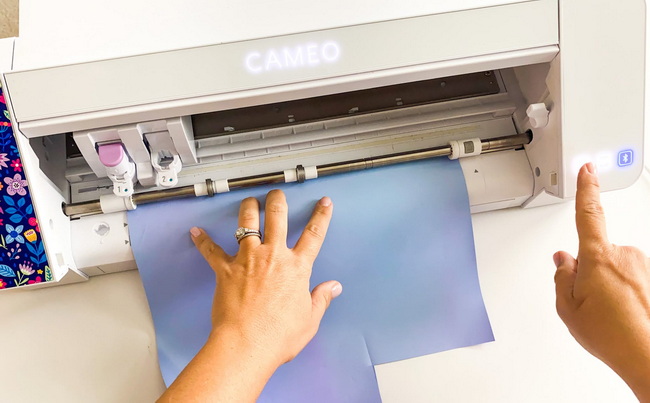
Good preparation improves adhesion and prevents defects such as bubbles or lifting edges.[8][7]
- Insert a pressing pillow or firm pad inside the tote so the print area is level.[8][1]
- Pre‑press for a few seconds to remove moisture and wrinkles.[7]
- Clean away lint or loose fibers with a lint roller.[8]
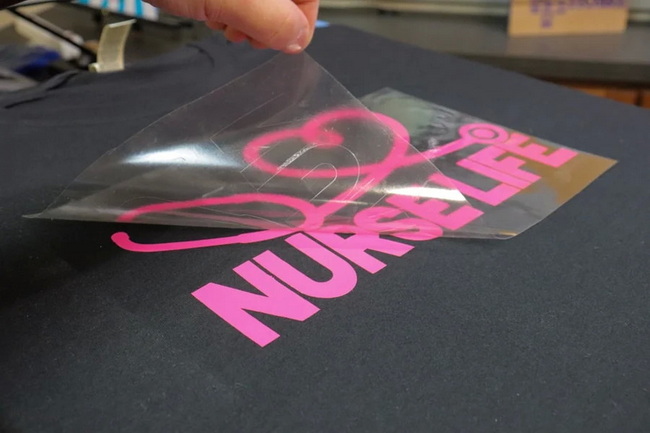
Pressing according to the vinyl specifications helps the panel withstand repeated writing and wiping.[1][7]
Typical steps:
1. Position the vinyl panel where it should sit on the tote.[1]
2. Cover with a Teflon sheet or parchment to protect the surface.[7]
3. Press at the recommended time and temperature for the specific HTV.[7]
4. Peel the carrier sheet at the indicated peel temperature, then check the edges.[1][7]
5. Re‑press briefly if any edges appear loose, adjusting pressure as needed.[8][1]
Once cooled, the surface is ready for ongoing, changeable content.[1]
- Write messages with standard chalk, such as lists, reminders, or quotes.[1]
- Wipe gently with a dry or slightly damp cloth to clear the panel.[1]
- Allow the surface to dry completely before writing again.[1]
Design choices can align with current trends while still allowing for personalization in the writing panel.[6][5]
Examples of on‑trend concepts:
- Bold typography above or below the chalkboard panel for slogans or names.[5]
- Travel‑inspired artwork that frames the panel, giving the tote a souvenir feel.[5]
- Abstract, geometric, or brushstroke patterns around the border of the bag.[6]
- Seasonal or themed icons that remain constant while the message changes.[6][5]
Different methods offer varying strengths in cost, speed, and visual effect for tote bag production.[3][4]
Method | Ideal Use Case | Advantages | Limitations |
HTV / Heat Transfer Vinyl | Small runs, personalization, customizable panels | Flexible, supports specialty and layered effects | Slower for very large orders, requires pressing each tote individually |
Screen printing | High-volume orders with simple logo designs | Economical at scale, durable prints | Less suited to frequent individual customization |
Digital / DTG | Complex, full-color artwork on cotton totes | Handles gradients, photos, and detailed images | Needs specialized equipment and pretreatment |
Embroidery | Premium branding and textured logos | High perceived value and durability | Limited fine detail, not suitable for writable panels |
Combining a fixed decoration method such as embroidery or screen printing with a chalkboard vinyl panel can create totes that are both branded and changeable.[4][1]
A few adjustments in technique can significantly enhance durability and user experience for customizable totes.[8][7]
Useful tips:
- Avoid seams under the design by positioning the print area away from thick seams and using a pressing pillow.[8][1]
- Confirm the correct time, temperature, and pressure for each HTV to prevent scorching or poor adhesion.[7]
- Use vinyl formulated for low‑temperature, quick pressing when working with more delicate or coated materials such as clear plastic totes.[8]
- Test the full process on a spare tote before producing multiple pieces.[7]
A customizable tote bag created with heat transfer vinyl is more than a simple accessory, because it becomes a rewritable space for daily messages, branding, and creativity. Put these steps into practice now by preparing your materials, planning a layout that includes a writable panel, and completing your first tote from design to final chalk message so you can evaluate the results, improve your workflow, and confidently move on to personal gifts, event merch, or small‑batch production.[5][7][1]
Sturdy cotton or cotton‑blend canvas provides a smooth, heat‑resistant base that bonds well with HTV. This type of fabric is ideal for chalkboard panels that will be used and cleaned repeatedly.[3][7][1]
An iron can be used for basic projects, but it is harder to control temperature and pressure consistently across the tote. A heat press delivers more even results, which is especially helpful for rewritable panels.[2][7]
Allow the panel to cool after pressing and only use standard chalk rather than oil‑based markers. Wipe messages away gently and let the surface dry before writing again to preserve clarity.[1]
When applied according to recommended settings, quality HTV adheres strongly to canvas and withstands regular handling and light washing. Keeping the design away from heavy creases and seams further improves longevity.[3][8][7][1]
Large canvas totes with natural tones, bold lettering, and travel‑inspired motifs are widely favored. Many designs also incorporate abstract or geometric patterns for a modern, expressive look.[6][5]
[1](https://www.heatpressnation.com/blogs/blog/how-to-make-a-tote-bag-thats-always-customizable)
[2](https://www.youtube.com/watch?v=lkBr73bYPdk)
[3](https://www.bagzdepot.com/blog/guide-to-custom-designing-tote-bags-screen-printing-heat-transfer-embroidery/)
[4](https://www.universepack.com/knowledge/wholesale-tote-bag-manufacturers-your-ultimate-guide-to-custom-tote-bags-in-2025/)
[5](https://www.printful.com/blog/tote-bag-design-ideas)
[6](https://www.tissus-print.com/en/blog/5-design-trends-for-summer-2025)
[7](https://www.instructables.com/Custom-Totebag-With-HTVRONT-Auto-Heat-Press-Beginn/)
[8](https://www.heattransferwarehouse.com/blog/heat-transfer-vinyl-clear-plastic-backpacks-tote-bags-project/)
[9](https://www.lemon8-app.com/applemeomeoz/7422370806980100614?region=us)
[10](https://www.heatpressnation.com/blogs/blog/how-to-print-custom-tote-bags)
[11](https://www.youtube.com/watch?v=RaJSTXpkjpA)
[12](https://www.tiktok.com/@totesforyouu/video/6949458522442665222)
[13](https://www.htvront.com/blogs/tutorials/how-to-make-a-tote-bag-with-htvront-heat-press)
[14](https://www.youtube.com/watch?v=md7LU-MKQa8)
[15](https://www.youtube.com/watch?v=K0jrW4aPDYg)
[16](https://www.youtube.com/watch?v=tqvPnVfnKp4)
[17](https://www.youtube.com/watch?v=PQY97dNA9Rw)
[18](https://www.tiktok.com/discover/how-to-heat-press-a-tote-bag-using-sublimation)


