If you have any questions, please feel free to contact us.| Email Us: info@dcheatpress.com


Views: 222 Author: Amanda Publish Time: 2026-01-16 Origin: Site


Content Menu
● What Are Sublimation Skinny Tumblers?
● Why Full‑Wrap Personalization Matters
● Core Equipment and Materials
● Press Versus Oven for Skinny Tumblers
>> Using Size‑Correct Templates
● Creating One‑Sided and Two‑Sided Layouts
● Printing Sublimation Transfers
>> General Printing Guidelines
>> Example: Stainless Steel / Metal Setting
● Trimming the Transfer for a Clean Seam
● Wrapping and Taping the Tumbler
● Installing and Adjusting the Tumbler Attachment
>> Attachment Installation Steps
● Time and Temperature Settings
● Cooling, Peeling, and Quality Checks
● Troubleshooting Common Issues
● Scaling Skinny Tumbler Production
● Safety and Maintenance Essentials
● Improving Skills and Staying Current
● Level Up Your Skinny Tumbler Workflow Today
● FAQs About Sublimation Skinny Tumblers
>> 1. Do I need a specific press for skinny tumblers?
>> 2. Why do my prints look dull after pressing?
>> 3. How can I avoid visible seams on full‑wrap designs?
>> 4. What resolution should I use for tumbler artwork?
>> 5. Are sublimation skinny tumblers dishwasher safe?
Personalizing sublimation skinny tumblers has moved far beyond simple spot graphics into full‑wrap, high‑impact designs that customers now expect from serious customization brands. This guide explains how to handle design, printing, wrapping, pressing, and quality control so your skinny tumblers look professional and stay consistent at scale.
Sublimation skinny tumblers are double‑walled, vacuum‑insulated metal tumblers coated with a polyester layer that bonds permanently with sublimation ink when exposed to heat and pressure.
They typically come in 16, 20, and 30 oz sizes and allow vivid, full‑color artwork to wrap around the entire surface of the drinkware.
- Common capacities: 16 oz, 20 oz, 30 oz.
- Surfaces: white or stainless steel sublimation‑ready coatings.
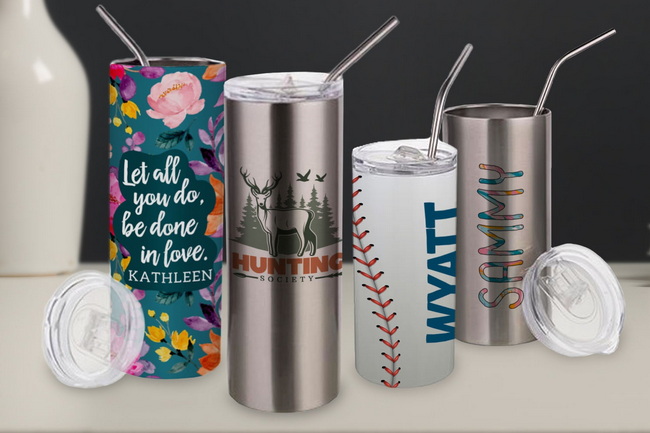
Upgrading from small spot prints to full‑wrap designs turns basic drinkware into premium, high‑margin products. Full‑wrap coverage lets patterns, photos, and branding flow seamlessly around the tumbler, which increases perceived value and customer satisfaction.
- Full‑wrap tumblers often support higher pricing than standard logo mugs.
- They are ideal for weddings, corporate branding, fan merch, and seasonal collections.
Suggested visual: Side‑by‑side image comparing a spot‑printed tumbler with a full‑wrap tumbler.
Achieving consistent results depends on using compatible equipment, consumables, and templates that work together as a system.
- Tumbler‑capable heat press: A mug press that accepts a dedicated tumbler heating attachment for tall drinkware.
- Sublimation printer: A compatible sublimation printer paired with matching inks and drivers.
- Sublimation skinny tumblers in 16, 20, or 30 oz sizes.
- Sublimation transfer paper chosen for your printer and ink set.
- Heat‑resistant tape and heat‑resistant gloves.
- Design software and correctly sized tumbler templates.
Suggested visual: Simple flow diagram: Design → Print → Wrap → Press → Cool → Peel.
Skinny tumblers can be produced with either a tumbler‑ready mug press or a convection oven with wraps, and each approach has strengths.
Factor | Tumbler Heat Press | Convection Oven + Wraps |
Space | Compact, bench-friendly | Larger footprint, needs more ventilation |
Speed | Quick warm-up and direct pressing | Slower cycle times for some setups |
Consistency | Stable pressure with a tuned attachment | Depends on wrap tension and oven hot spots |
Ease of use | Medium learning curve for pressure and alignment | Medium learning curve for wraps and timing |
Best use case | Regular daily production, small to mid-size shops | Batch production and multi-item baking-style workflows |
For many small operations, a mug press with a tumbler attachment is a compact and efficient way to produce full‑wrap skinny tumblers on a regular basis.
Good results start with accurate digital layouts that match your physical tumblers.
Templates built for specific skinny tumbler sizes provide imprint dimensions, trim marks, bleed, and center guides.
Lock or hide guideline layers so they cannot be moved accidentally while arranging graphics and text.
- Select templates that match each tumbler model and ounce size.
- Check orientation so the “top” of the file matches the drinking end of the tumbler.
Bleed areas prevent white edges, while safe zones protect critical design elements. Extending background colors and patterns beyond cut lines helps guarantee full coverage after trimming.
- Extend backgrounds past cutoff or bleed areas in the template.
- Keep important text, faces, and logos comfortably inside safe zones.
Suggested visual: Flat template image with bleed, trim, and safe zones highlighted.
Many projects use a single large artwork, while others need two main focal areas such as a logo and a name. Template center guides make both approaches predictable.
- Place focal elements at the left and right guideline centers to create two balanced “sides.”
- For wrap‑around patterns, ensure the design tiles cleanly at the seam to avoid visible jumps.
This keeps the tumbler visually balanced whether viewed from the front, back, or side.
Once the layout is ready, the next step is a clean, accurate sublimation print on the correct paper.
- Use the manufacturer's recommended print quality for sublimation.
- Mirror the artwork so text and images appear correctly on the final tumbler.
- Select the matching paper profile in the print manager.
When using software that supports different substrate profiles, choose settings built for metal drinkware.
- Substrate: stainless steel tumbler or metal category.
- Paper: set to the exact sublimation paper type.
- Color mode: use a photographic option for detailed images or a vivid option for bold graphics, depending on the artwork style.
Allow the print to dry fully before trimming to prevent smudging.
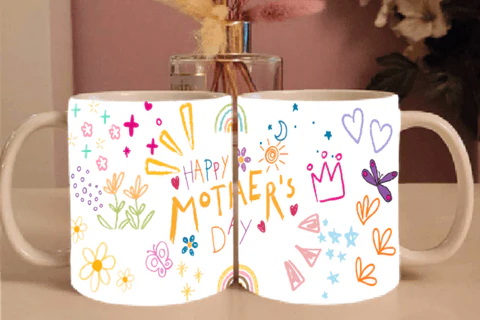
Precise trimming is essential for invisible seams and full coverage.
- Trim the designated edge on the inside of the artwork by about 1 mm or less so the opposite edge can overlap slightly.
- Keep the cut straight and square to avoid a tapered seam.
On some sizes, especially certain 20 oz models, paying attention to the top and bottom edges improves overall appearance.
- Trim the image to the template's top and bottom marks.
- Leave about 1–2 mm of clearance at the bottom edge to help avoid visible distortion near the base.
Suggested visual: Close‑up of a trimmed sheet showing overlap and edge spacing.
Correct wrapping prevents shifting and ghosting, and it also defines how the seam will look.
- Wrap the transfer tightly and evenly so both vertical edges meet or slightly overlap along a straight line.
- Apply heat‑resistant tape along the seam from top to bottom.
- Add tape around the top and bottom edges to hold the paper firmly against the surface during pressing.
This combination keeps the transfer stable while the coating and ink reach sublimation temperature.
Before running production, ensure the tumbler attachment is installed and adjusted on the heat press.
1. Loosen the front knobs of the press.
2. Remove the existing attachment by undoing the thumbscrews and disconnecting its cable.
3. Slide in the tumbler attachment and align it with the mounting holes.
4. Secure it with the thumbscrews and reconnect the cable.
The heating surface should sit centered and parallel to the tumbler wall.
- Start with the front knobs loosened.
- Insert a tumbler and tighten the rear knobs evenly until closing the handle produces light, even resistance.
- Adjust the front knobs to fine‑tune pressure without making the press difficult to close or open.
Medium pressure helps ink transfer consistently across the surface.
Time and temperature determine how completely the ink transfers into the coating.
- Temperature: around 365°F (approximately 185°C) is a common starting point for stainless steel sublimation tumblers.
- Time: typically 60–90 seconds per side, depending on the exact tumbler, paper, and press combination.
Always test with your own equipment, then document the settings that give the best results.
1. Place the wrapped tumbler into the preheated attachment and press for the chosen time.
2. Open the press, rotate the tumbler 180 degrees using heat‑resistant gloves, and press again for the same duration.
This ensures even heat exposure around the full circumference.
Good finishing habits turn a technically correct press into a market‑ready product.
- Place the tumbler on a heat‑safe surface to cool until it can be handled comfortably.
- Remove the tape carefully and peel away the transfer to reveal the print.
- Inspect the tumbler for even color, a clean seam, and consistent top and bottom edges.
A simple checklist at this stage helps keep your quality high across batches.
Even with solid workflows, occasional defects can appear. Addressing them quickly protects both profit and reputation.
1- White vertical line at seam
- Likely cause: insufficient overlap or misaligned trimming.
- Action: adjust the trim cut and slightly increase overlap while keeping the seam straight.
2- Dull or washed‑out colors
- Likely cause: low temperature, short dwell time, or mismatched substrate setting.
- Action: verify that a metal or stainless steel profile is in use and increase time in small increments.
3- Horizontal banding
- Likely cause: uneven pressure or movement during pressing.
- Action: re‑balance pressure and secure the transfer more firmly.
4- Ghosting at edges
- Likely cause: paper lifting as the press opens or inadequate taping near the rim and base.
- Action: add tape at the edges and open the press smoothly.
Suggested visual: Table or graphic showing photographic examples of each defect and its probable cause.
Once the process works consistently, scaling production becomes a matter of organization and documentation.
- Create standard templates and file naming for each tumbler size.
- Document finalized press settings for every substrate and keep them visible at the workstation.
- Batch similar jobs together to reduce attachment changes and setup time.
These habits increase output per hour while maintaining reliable quality.
Professional‑level production includes safety and maintenance routines as part of daily operations.
- Use heat‑resistant gloves when inserting, rotating, or removing hot tumblers.
- Keep the work area clear of loose materials that could be damaged by heat.
- Inspect cables, attachments, and knobs periodically for wear or looseness.
- Allow the press to cool fully before switching attachments or doing deeper cleaning.
Regular care extends the life of both the machine and its accessories.
Ongoing learning makes it easier to keep up with changing designs, substrates, and equipment. Online communities dedicated to heat transfer and sublimation offer real‑world tips and shared experiences.
- Participate in groups where members discuss settings, materials, and workflow ideas.
- Watch tutorials, project breakdowns, and live demonstrations focused on tumbler projects.
Adopting proven techniques from other decorators can shorten your own testing cycle.
You now have a clear framework for designing, printing, wrapping, pressing, and finishing full‑wrap sublimation skinny tumblers with reliable, repeatable quality. Put these steps into practice on your next project, refine your own time and temperature notes, and build a documented workflow that every team member can follow. Start optimizing your setup today so you can deliver consistent, professional skinny tumblers that strengthen your brand, win repeat orders, and open new opportunities in custom drinkware.
Contact us to get more information!
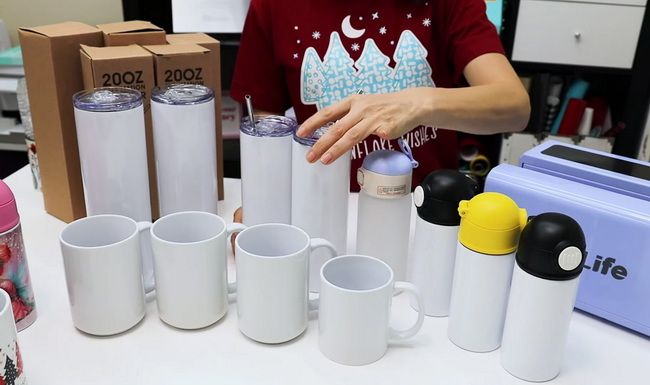
You need either a compatible mug press with a tumbler heating attachment sized for tall drinkware, or a convection oven with appropriate wraps designed for skinny tumblers.
Dull prints usually indicate low temperature, insufficient time, or an incorrect substrate profile in the print manager; confirm the metal or stainless steel setting and test slightly longer press times.
Use accurate templates, trim one edge slightly inside the artwork, keep the overlap around 1 mm, and align the seam carefully before taping so both edges meet in a straight line.
Design at 300 DPI at the final print size of your tumbler; this keeps small text legible and images crisp after sublimation.
Many sublimation‑coated tumblers tolerate gentle hand washing best; test samples under your own conditions before advertising any dishwasher‑safe claims to customers.


