If you have any questions, please feel free to contact us.| Email Us: info@dcheatpress.com


Views: 222 Author: Amanda Publish Time: 2026-01-08 Origin: Site


Content Menu
● What Is the Prestige R1 DTF Printer
● Key Specifications and Technical Overview
● Beginner Focused Features That Matter in Real Use
● Why It Suits Crafters and Small Businesses
● How It Compares to Other Entry Level DTF Options
>> Entry Level DTF Options Overview
● Step by Step Workflow From Design to Finished DTF Transfer
>> 1. Preparing Artwork and RIP Settings
>> 2. Loading Film and Readying the Printer
>> 3. Printing, Powdering, and Curing
>> 4. Pressing the Transfer to the Garment
● Maintenance and Best Practices for Reliability
● Is This Entry Level DTF Printer Right for You
● Clear Call To Action for DTF Beginners
● FAQs About Entry Level DTF and Desktop DTF Printers
>> 1. Is an entry level DTF printer suitable for complete beginners
>> 2. How many T shirts can a typical desktop DTF printer produce in a day
>> 3. What fabrics can DTF transfers be applied to
>> 4. Do I need special software to run a DTF printer
>> 5. How does a desktop DTF printer compare to larger 24 inch systems
The Prestige R1 is a compact, beginner friendly desktop DTF solution designed for crafters, hobbyists, and small businesses that need professional quality transfers without a steep learning curve. It bridges the gap between hobby grade and commercial DTF equipment, combining a small footprint with features that support reliable daily production.
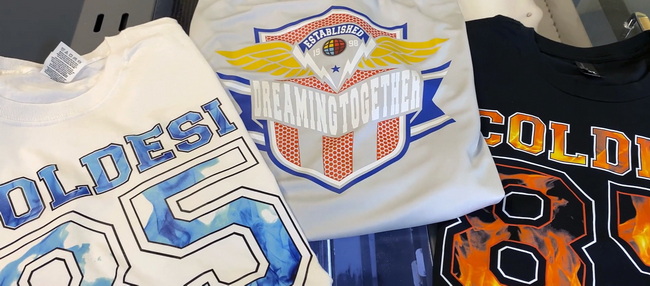
The Prestige R1 is a 13 inch entry level Direct To Film printer created for new DTF users who still demand professional output and consistent color. It fits comfortably on a desktop and is optimized for apparel decorators, craft sellers, and startup print shops that want to bring transfer production in house.
Unlike improvised or converted inkjet systems, this device is manufactured specifically for DTF, with a dedicated RIP workflow, integrated ink management, and safety features that help reduce the risk of costly downtime. This purpose built design makes it attractive for users upgrading from vinyl cutting, sublimation, or outsourced transfers.
Understanding the main specifications helps beginners evaluate whether this entry level DTF solution matches their production goals and workspace. Key performance parameters such as width, speed, and footprint make it easier to plan equipment placement and output capacity.
Core technical aspects include a 13 inch maximum print width, a compact desktop frame, and a print engine designed around a professional grade inkjet head suitable for DTF inks. Typical production speeds are positioned in the starter production range, supporting small batch orders while remaining manageable for one person to operate.
The physical footprint is small enough for spare rooms and shared studios, allowing new businesses to launch without renting a large production space. Weight and dimensions are tailored so that a sturdy table or bench is sufficient for installation.
For new users, the most valuable qualities are ease of operation, protection against common mistakes, and simplified maintenance. This entry level DTF printer integrates several systems that directly address typical pain points experienced by beginners.
A key highlight is the inclusion of a head protection mechanism that can detect potential strikes between the print head and the film surface. This helps prevent serious damage caused by curled film, debris, or improper media loading. A feature like this can significantly reduce unexpected repair costs for first time owners.
Ink management is another beginner critical area. Automated or assisted white ink circulation helps keep pigment from settling, which reduces the risk of clogs and inconsistent opacity. Timed stirring and controlled circulation patterns support stable performance even when the printer is not running continuously.
Auto cleaning routines add further convenience by simplifying daily upkeep. Instead of complex manual procedures, users can trigger built in sequences that maintain nozzle health and minimize banding, while ink level alerts help users avoid running the tanks dry.
A front vacuum system and controlled preheating of the film surface improve print stability. These functions help keep the film flat and encourage more consistent ink laydown, supporting sharp detail and reduced smudging before curing and pressing.
The central question for many buyers is whether an entry level DTF printer can support a profitable workflow, not just whether it can print. This desktop model is positioned for crafters, hobbyists, and small business owners who want reliable production without the complexity of industrial systems.
Its daily output range is well aligned with common order volumes seen in online shops, local brands, school merchandising, and event based apparel sales. Users can produce dozens of shirt sized transfers per day, making it realistic to fulfill customer orders internally rather than relying entirely on external transfer suppliers.
Because it shares ink and film compatibility with larger systems from the same ecosystem, it can function as a stepping stone for growth. Users who outgrow desktop capacity can upgrade to wider or faster models without needing to completely relearn materials or color behavior.
Typical applications include custom T shirts, hoodies, team jerseys, tote bags, caps, and a broad array of promotional textiles. The process supports cotton, polyester, blends, and many treated synthetic fabrics, which fits the needs of small brands offering varied product catalogs.
New buyers often evaluate several starter level solutions, including converted photo printers and other compact DTF models. Comparing the major attributes side by side helps reveal why a purpose built machine can be more suitable for long term use.
Feature / Aspect | Prestige R1 Desktop DTF | Typical Converted Photo Printer DTF | Generic A3 Desktop DTF |
Max print width | Around 13 inches | About 11.7 to 13 inches depending on base model | Usually 11.8 to 13 inches |
Design origin | Purpose built DTF device | Consumer photo printer modified for DTF | Mixed, some OEM and some modified |
White ink management | Integrated circulation and stirring | Often manual or external, higher clog risk | Varies by brand and configuration |
Head protection | Dedicated head detection feature | Rarely includes collision sensing | Less common in low cost units |
Cleaning routines | Built in auto cleaning sequences | Often depends on manual procedures | Implementation varies widely |
Target user | Crafters and small businesses seeking reliability | DIY focused users comfortable with tinkering | Ranges from hobbyists to prosumers |
A purpose designed printer usually offers more predictable behavior and better vendor support than heavily modified consumer models. For users who value uptime and warranty backed components, this can be a decisive factor.
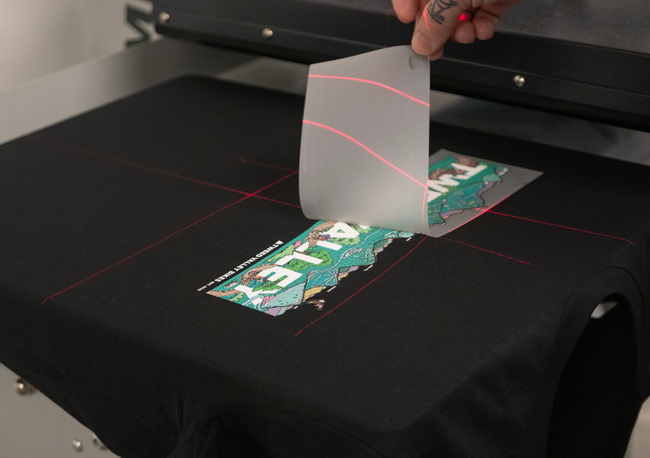
Clear, practical workflow guidance improves confidence for first time operators. The typical process with a desktop DTF setup follows several repeatable steps, from artwork preparation to final pressing.
1. Create or import the design in a graphics program such as Adobe Illustrator, CorelDRAW, or Photoshop.
2. Open the artwork in the associated DTF RIP software and set color profiles, resolution, and white underbase behavior.
3. Arrange multiple graphics into a gang sheet to maximize film usage and reduce waste along the 13 inch width.
Short paragraphs and visual screenshots of RIP layouts can be inserted here to improve clarity. A simple diagram showing how to place multiple logos on one sheet would be particularly effective.
1. Load compatible DTF film matte side up, ensuring it sits flat on the platen or within the roll feed path.
2. Check ink levels and allow any automatic white ink circulation cycle to finish before printing.
3. Run a nozzle check, then trigger cleaning only if necessary to restore missing nozzles.
A close up image of a correctly loaded film sheet on the vacuum platen would greatly assist new users, especially those migrating from sheet fed office printers.
1. Send the job from the RIP and monitor initial prints to verify color, registration, and coverage.
2. While the ink remains wet, apply hot melt adhesive powder evenly and remove excess powder by shaking or using a dedicated shaker.
3. Cure the powdered film with a curing oven or a heat press in hover mode according to the powder and film specifications.
At this point, a small flowchart style visual showing “Print → Powder → Cure” can make the process less intimidating. An infographic could highlight recommended temperature and time ranges in a non technical way.
1. Position the cured transfer on the garment and press with the specified temperature, time, and pressure for the film type.
2. Peel the carrier hot, warm, or cold depending on film characteristics.
3. Optionally apply a brief second press to enhance wash durability and smoothness of the print.
A photo or line illustration of the transfer being peeled from the garment would be a strong UX enhancement here.
DTF printing can be sensitive to inconsistent maintenance, particularly due to the nature of white ink. While entry level machines integrate helpful safeguards, users still need simple routines to ensure reliable performance.
- Run a nozzle check before starting production.
- Allow or trigger white ink circulation and gentle stirring, especially after periods of inactivity.
- Keep the platen, film path, and surrounding surfaces free of dust, lint, and stray powder.
- Clean the capping station, wiper, and surrounding ink buildup according to recommended guidelines.
- Gently agitate white ink containers and confirm storage conditions such as temperature and humidity stay within the recommended range.
- Review firmware or software updates for the printer and RIP to maintain compatibility and stability.
To improve usability, consider adding a small maintenance checklist table with separate rows for daily, weekly, and monthly tasks. Icons or color coding would further support rapid scanning.
Choosing a beginner DTF system depends on order volume, learning curve tolerance, and available workspace. A compact 13 inch printer is particularly well matched to specific business models and production goals.
You are likely an ideal user if your current or near term workload involves dozens rather than hundreds of garments per day, and if you need a device that fits in a craft room, office, or small studio. Those who value vendor backed support and a more guided learning experience, rather than heavy DIY experimentation, will also appreciate a purpose built system.
On the other hand, businesses planning very high daily output, continuous roll to roll production, or multi shift operation may prefer to start directly with midrange or 24 inch platforms. In such cases, desktop models can still serve as backup or sample units, but not as the main production engine.
A visual “decision tree” style graphic could work well here, guiding readers through a few yes or no questions about their volume, space, and budget to determine suitability.
If you are ready to move beyond basic crafting methods and want a reliable entry point into professional Direct To Film production, now is the time to turn interest into action. Evaluate your current order volume, available space, and budget, then choose an entry level DTF printer configuration that aligns with your growth plans instead of limiting them.
Contact a trusted DTF equipment supplier today to request a tailored consultation, live demonstration, or sample print set. Use that conversation to clarify which desktop setup, accessories, and workflow tips best fit your specific application, so you can launch or upgrade your apparel decorating business with confidence and a clear roadmap.
Yes, many entry level DTF printers are designed specifically with first time users in mind, providing user friendly interfaces, guided maintenance routines, and straightforward RIP workflows. With clear instructions and consistent habits, beginners can quickly achieve sale ready results.
Output depends on design size, print settings, and workflow efficiency, but many 13 inch desktop units can realistically produce dozens of shirt sized transfers in a standard eight hour day. When properly organized, this is usually enough to support small online shops and local brands.
DTF transfers are compatible with a wide range of textiles, including cotton, polyester, cotton polyester blends, and many treated synthetic materials. This versatility makes DTF attractive for fashion apparel, sportswear, uniforms, tote bags, and a variety of promotional textile products.
Yes, a dedicated RIP software is typically required to manage color, generate white underbases, and arrange gang sheets. Such software is usually supplied or recommended with the printer and is configured for the specific print engine, ink set, and film types used.
Desktop models offer lower initial investment, reduced space requirements, and simpler installation, making them ideal for startups and home based businesses. Larger 24 inch systems, by contrast, deliver higher speed, automated roll to roll workflows, and greater scalability for shops with consistently high order volumes.


