If you have any questions, please feel free to contact us.| Email Us: info@dcheatpress.com


Views: 222 Author: Amanda Publish Time: 2025-12-26 Origin: Site


Content Menu
● What Is a Sublimation Printer
● Quick Picks For Every Business Stage
● Core Sublimation Printer Types
>> Desktop True Sublimation Printers
>> Converted Inkjet Sublimation Printers
>> Mobile-First Sublimation Printers
>> Large-Format Sublimation Printers
● Detailed Pros And Cons By Use Case
>> Small Business And Serious Crafter Setup
>> Budget Hobbyist And Test-Phase Brand
>> Mobile Creator And Event Vendor
>> Growing Apparel Or Merch Brand
>> Commercial And Industrial Production
● Best Sublimation Printer Scenarios Table
● How To Choose The Right Sublimation Printer
>> Step 1: Define Your Product Line
>> Step 2: Estimate Your Monthly Volume
>> Step 3: Decide Your Risk Tolerance
>> Step 4: Plan Your Heat Transfer Workflow
● Printer And Heat Press Workflow Tips
>> Achieving Consistent Color And Sharpness
>> Scaling From Single Orders To Batches
● Take The Next Step For Your Sublimation Business
● Frequently Asked Questions (FAQs)
>> 1. What is the easiest sublimation printer for beginners
>> 2. Can any inkjet printer be used for sublimation
>> 3. Do I need a special heat press for sublimation
>> 4. How much does it cost to start a sublimation business
>> 5. How do I avoid banding, ghosting, and faded prints
Choosing the best sublimation printer for your business in 2025 comes down to the size of your operation, your budget, and the products you actually plan to sell. This guide is written to be clear, easy to scan, and optimized around high-intent keywords while keeping a natural reading experience.[1]
Sublimation printers use special sublimation ink that turns into gas under heat and bonds permanently with polymer-coated surfaces such as mugs, tumblers, fabrics, and metal plates. Compared with vinyl or screen printing, sublimation produces long-lasting, vibrant prints that do not peel, crack, or wash off under normal use.[1]
Because sublimation prints must be heat-transferred, most businesses pair a printer with a professional heat press, fusing machine, or embossing machine to ensure consistent temperature, pressure, and productivity across different products. This combination is critical if you want your prints to look professional and scale as orders grow.[1]

This section gives a fast overview so you can match a sublimation printer to your business model before diving into details. Each recommendation connects a printer type to a typical use case.[1]
- Best for small businesses and serious crafters: a compact, true sublimation printer with reliable support.
- Best budget option: a converted inkjet model that uses third-party sublimation ink but carries more risk.
- Best for phone and tablet workflows: a mobile-focused sublimation printer with an integrated design app.
- Best for apparel and larger garments: a 24″-class sublimation printer that supports sheet and roll media.
- Best for commercial production: a 44″ wide, roll-fed, high-speed sublimation printer with advanced ink sets.
These quick picks help narrow the field so you can focus on the models that truly match your production goals instead of chasing generic “best of” lists.[1]
Desktop true sublimation printers are designed from the factory specifically for sublimation ink and media. They typically ship with dedicated sublimation ink sets, ICC profiles, and warranty coverage for sublimation use.[1]
These printers are ideal for home studios, small shops, and new businesses that want to avoid the maintenance risks of conversion. They often support up to letter-size or slightly longer media, which is perfect for tumblers, mugs, small apparel designs, coasters, and similar items.[1]
Converted inkjet printers begin life as ordinary inkjet models and are manually filled with sublimation ink instead of the manufacturer's standard ink. This approach lowers entry costs but usually voids the printer's warranty and raises the likelihood of clogs and failures.[1]
In exchange, you gain flexibility in choosing third-party inks and often benefit from very low ink cost per milliliter. This path works best for experimental users and hobbyists who accept more hands-on maintenance and possible downtime.[1]
Mobile-first sublimation printers are optimized for users who design and manage orders from phones or tablets. They usually integrate tightly with proprietary mobile apps that let you create, edit, and send designs directly to the printer without a desktop computer.[1]
This workflow is attractive for creators who sell at markets, events, or pop-up shops and want to keep equipment light and flexible. However, app-based design tools are often less powerful than professional desktop software, and ink costs can be higher than average.[1]
Large-format sublimation printers are built for production environments and support wide media, such as 24″ and 44″ rolls. They can produce all-over t-shirt prints, banners, soft signage, textiles, and complex patterns at high speed.[1]
These printers usually use large ink tanks or ink packs, roll media handling, and advanced RIP or print management software. They require a larger workspace and more substantial heat equipment but deliver much lower cost per print when used at scale.[1]
For most small businesses, a true desktop sublimation printer strikes the best balance of reliability, print quality, and long-term support. Maintenance routines tend to be simple, and color output can be consistent enough for repeat orders and wholesale clients.[1]
The main limitation of this category is print width, which restricts you to smaller designs and partial garment coverage. If your product line consists mostly of mugs, tumblers, keychains, and small apparel graphics, this is usually not a problem.[1]
Budget-oriented users are often drawn to converted inkjet printers because of the low initial purchase price. These setups can produce surprisingly good results when configured correctly, especially for personal use and test-phase product lines.[1]
On the downside, you are responsible for color management, clog prevention, and repair decisions without official manufacturer support. Frequent nozzle checks, regular printing, and careful ink selection become essential to keep the system running smoothly.[1]
Mobile creators who design and print from a tablet or smartphone benefit from mobile-first printers and their companion apps. The ability to create designs on the go, import photos, and print immediately can simplify on-site personalization and live events.[1]
These systems often favor convenience over raw cost efficiency. Ink cartridges may carry less ink for a higher price per milliliter, and the design app's feature set can limit complex layouts, color control, or advanced file formats.[1]
Once you start offering full-size t-shirts, hoodies, tote bags, or textiles, a 24″-class large-format sublimation printer becomes a strong choice. The ability to print on rolls allows you to gang multiple designs together, reduce paper waste, and handle larger artwork in one pass.[1]
This category demands a larger upfront investment, both in the printer and in matching heat equipment. However, for a growing brand, the increase in efficiency and the ability to offer bigger, more premium designs can quickly justify the cost.[1]
In high-volume print shops or industrial sublimation environments, 44″-wide printers with roll-to-roll capability dominate. They are designed to run for long hours, support advanced ink configurations, and integrate with automated finishing equipment.[1]
These systems deliver very low cost per square foot at scale but require careful space planning, environmental control, and staff training. They are best suited to businesses with steady demand, recurring contracts, or established product lines.[1]
To make selection easier, this table links typical business scenarios to the most appropriate printer category, along with key strengths and trade-offs.[1]
Business scenario | Recommended printer type | Typical max print size | Typical investment level | Key strengths | Main trade-off |
New small business, limited space | Desktop true sublimation printer | Up to 8.5″ wide | Low to mid | Reliable, compact, supported for sublimation | Limited to partial garment coverage |
Hobbyist testing sublimation | Converted inkjet sublimation printer | Up to 8.5″ wide | Low | Lowest entry cost, flexible third-party ink use | No official warranty, higher clog risk |
Mobile creator or event vendor | Mobile-first sublimation printer | Up to letter size | Low to mid | Easy smartphone and tablet workflow | Higher ink cost, app feature limitations |
Growing apparel or merch brand | 24″ large-format sublimation printer | Around 24″ wide | Mid to high | Roll printing, full-size apparel designs | Larger footprint and higher upfront cost |
Industrial or commercial shop | 44″ large-format sublimation printer | Around 44″ wide | High | High speed, advanced ink sets, roll-to-roll | Requires substantial space, power, and expertise |
This overview lets you quickly map where your business is today and where you want it to be within the next one to three years.[1]
Start by listing the products you want to sell in the next 12 to 24 months. Focus on real revenue items such as tumblers, mugs, t-shirts, hoodies, blankets, signage, or textile panels rather than one-off experiments.[1]
If your revenue plan is built around smaller blanks, a desktop true sublimation printer will typically cover everything. If apparel, larger textiles, or all-over prints are central to your brand, plan for large-format sublimation from the beginning instead of upgrading later under pressure.[1]
Next, estimate how many finished pieces you realistically expect to ship per month. A few dozen to a few hundred units can be comfortably produced with a desktop or mobile-class printer and a quality heat press.[1]
If your projections exceed several hundred or into the thousands of pieces each month, especially for garments, a 24″ or 44″ system paired with matching heat equipment becomes more efficient and sustainable. Volume dictates how much downtime or manual labor you can afford.[1]
Risk tolerance is an often overlooked factor in equipment choice. If you value warranty coverage, predictable support, and minimal troubleshooting, a factory-built sublimation printer is the safest path.[1]
If you are comfortable tinkering, experimenting with ink brands, and handling occasional repairs, a converted inkjet system can be cost-effective. In that case, build time into your schedule for maintenance tasks such as nozzle checks, test prints, and manual cleaning cycles.[1]
A sublimation printer does not operate in isolation; it must be integrated with a press or fusing system that can handle your largest printed area and projected throughput. Matching printer width to press size helps you avoid bottlenecks and uneven transfers.[1]
Standardizing time, temperature, and pressure settings for each substrate type ensures consistent results and reduces waste. When volume grows, consider multi-station presses, automatic opening presses, or conveyor-style heat systems to keep pace with printing speed.[1]
Consistent color requires not only stable printing but also precise heat transfer conditions. Uneven heating or inconsistent pressure can cause hazy images, dull colors, or ghosting even when the printed transfer looks correct.[1]
To improve consistency, use high-quality sublimation paper, maintain a clean press surface, and invest in a press or fusing machine known for even temperature distribution. A small number of reliable presets will outperform constantly changing settings.[1]
When starting out, it is common to press items one by one, adjusting technique as you go. As your order volume increases, batching similar items and using templates on your sublimation paper can dramatically reduce handling time.[1]
At this stage, upgrading to a press with a larger platen or a semi-automatic mechanism can save labor and minimize fatigue. Consistent workflows also make it easier to train staff and maintain quality standards.[1]
You now have a clear framework for choosing the best sublimation printer for your specific business stage, along with practical guidance on planning your heat transfer workflow and avoiding common pitfalls. Do not delay critical upgrades until equipment limits force rushed decisions and lost orders.[1]
Define your target products, estimate your real monthly volume, decide how much risk you are comfortable taking, and then select a printer and heat press combination that can grow with you for the next several years. Taking focused action on equipment today is one of the fastest ways to unlock more consistent quality, higher customer satisfaction, and sustainable sublimation profits.[1]
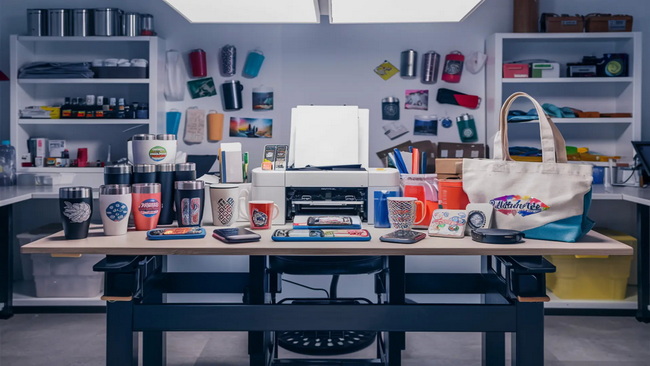
For most beginners, a factory-built desktop sublimation printer is the easiest option because it comes with dedicated ink, profiles, and support. This reduces the learning curve and minimizes technical troubleshooting so you can focus on designing and selling products.[1]
Not every inkjet printer is suitable for sublimation. Many models use incompatible printhead technologies or ink delivery systems, and manufacturers do not support filling them with sublimation ink. Using unsupported models can lead to clogs, damage, and warranty voiding.[1]
A reliable heat press, fusing machine, or embossing press is essential because it controls temperature, pressure, and time, which directly affect how well the dye bonds with the substrate. Household irons and low-quality presses often produce inconsistent results and limit your ability to scale.[1]
Startup costs vary widely depending on the printer class and heat equipment you choose. A basic desktop setup can often be assembled with a modest budget, while large-format systems require a more substantial investment that is best justified by higher projected volume and revenue.[1]
Banding and faded prints are usually related to printhead issues, incorrect settings, or unstable heat transfer conditions. Performing regular nozzle checks, using recommended substrates, and dialing in press time and temperature will prevent most issues. Using consistent workflows and high-quality materials also helps.[1]


