If you have any questions, please feel free to contact us.| Email Us: info@dcheatpress.com


Views: 222 Author: Amanda Publish Time: 2026-02-12 Origin: Site


Content Menu
● What Is a Heat Transfer Printer (And Why It Matters)
● Types of Printers for Heat Transfers
>> Inkjet Printers for Heat Transfer Paper
>> DTF (Direct‑to‑Film) Printers
>> Laser Printers for Transfer Paper
● The 3 Classic Printers from the Original Shortlist
>> Epson Stylus C88+ Inkjet Printer
>> Silhouette Cameo as a Companion Device
● Updated Best Printers for Heat Transfers in 2025–2026
>> Recommended Models by Use Case
● Key Buying Factors: How to Choose the Best Heat Transfer Printer
>> Print Technology and Compatible Media
>> Maximum Print Size (Including Near 16×20 Transfers)
>> Reliability and Maintenance
● Step‑by‑Step: How to Use a Printer for Heat Transfer T‑Shirts
>> 1. Choose Your Transfer Method
>> 3. Print Using Recommended Settings
>> 4. Dry and Prepare the Transfer
>> 5. Press with a Quality Heat Press
● How Professional Heat Press Equipment Enhances Printer Results
● Practical Scenarios: Which Printer and Press Combo Should You Choose
>> Scenario 1: Starting a Home T‑Shirt Side Business
>> Scenario 2: Launching a Sportswear or Activewear Brand
>> Scenario 3: Scaling to a Small Factory Line
● Actionable Checklist Before You Buy
● Take the Next Step: Build a Complete, Professional Heat Transfer System
● FAQ: Printers and Heat Presses for Heat Transfers
>> Q1. What is the best printer for a beginner starting a T‑shirt business?
>> Q2. Can I print 16×20 inch transfers with desktop printers?
>> Q3. Do I really need a heat press, or can I use a household iron?
>> Q4. What is the difference between sublimation and DTF for T‑shirts?
>> Q5. How can I make sure my heat transfer prints last longer?
If you want reliable, high‑quality heat transfer prints that last on T‑shirts, hoodies, mugs or bags, choosing the right printer is just as important as choosing a good heat press. Used correctly, the right printer and press combination will give you vivid colors, strong wash resistance and professional‑looking products that customers come back for.

A heat transfer printer is any inkjet, sublimation, DTF or laser printer that can produce prints designed to be transferred onto a substrate (usually fabric) using heat and pressure. Paired with a quality heat press, it lets you create durable, full‑color graphics for apparel, sportswear, uniforms, gifts and promotional items.
Typical use cases include:
- Custom T‑shirts and hoodies for small brands and events.
- Team jerseys, workwear and uniforms.
- Personalized mugs, mousepads and phone cases.
- Fashion labels testing short‑run designs before mass production.
To get consistent results, you need a printer that matches your transfer method (inkjet transfer paper, sublimation, DTF, etc.) and the scale of your business.
Understanding the main printer categories helps you choose the right technology for your workflow and budget.
Inkjet printers use dye or pigment ink with special heat transfer paper and are popular for home and small‑business T‑shirt printing.
Key advantages:
- Lower starting cost than sublimation or DTF.
- Good color quality for cotton and cotton‑blend shirts.
- Easy to set up and use with a standard computer.
Main limitations:
- Transfers can feel heavier on the fabric.
- Durability depends heavily on paper, ink and press settings.
Sublimation printers use special sublimation ink that turns into gas under heat and bonds with polyester fibers or coated substrates.
Key advantages:
- Extremely durable, wash‑resistant prints on polyester.
- Prints feel soft because the ink becomes part of the fabric.
- Ideal for sportswear, jerseys, flags and soft signage.
Main limitations:
- Works best on light‑colored, polyester‑rich materials.
- Requires sublimation blanks or polyester‑coated products for hard goods.
DTF printers print a design onto a special film, apply adhesive powder and then cure it before pressing the design onto textiles.
Key advantages:
- Can print on cotton, polyester and blends, light or dark garments.
- Soft hand feel and strong wash durability when cured correctly.
- Great choice for scaling a T‑shirt or fashion printing business.
Main limitations:
- Higher entry cost than basic inkjet setups.
- Requires more maintenance and a controlled workspace.
Color laser printers can work with compatible laser heat transfer paper, especially for hard goods and some garment applications.
Key advantages:
- Fast printing and sharp text and graphics.
- Suitable for office environments that also run a merch side project.
Main limitations:
- Transfer papers are more specialized and can be more expensive.
- Color density and stretch may be less ideal for fashion‑grade apparel.
Earlier lists of recommended models helped many beginners get started with heat transfer printing. While technology has advanced, it is useful to understand why these devices became popular.
The Epson Stylus C88+ has long been considered a dependable entry‑level inkjet printer for heat transfer paper thanks to its pigment‑based ink and low operating cost. It can reach decent printing speeds, supports both Windows and Mac systems, and connects via USB or older parallel ports.
Highlights:
- Suitable for small‑scale T‑shirt and gift printing with transfer paper.
- Capable of printing on fabric transfer sheets and certain coated materials.
- Often used with a second “baking” or pressing step to improve color and durability.
The Epson WorkForce WF‑7110 is a wide‑format inkjet printer that offers higher print quality and wireless connectivity for transfer paper users. With its ability to handle larger sheet sizes and faster output than many entry‑level units, it serves small studios that need bigger designs and more volume.
Highlights:
- Supports larger print sizes than many standard desktop printers.
- Wireless printing functionality for flexible placement in the workspace.
- Handles a range of media types for transfer and general office use.
The Silhouette Cameo is not a conventional printer; it is primarily a cutting plotter used alongside a printer for vinyl and transfer applications. It can work with more than 100 materials and is popular among DIY creators who cut heat transfer vinyl, stickers and decals.
Highlights:
- Ideal companion device for cutting heat transfer vinyl after printing.
- Excellent for craft users and small personalization shops.
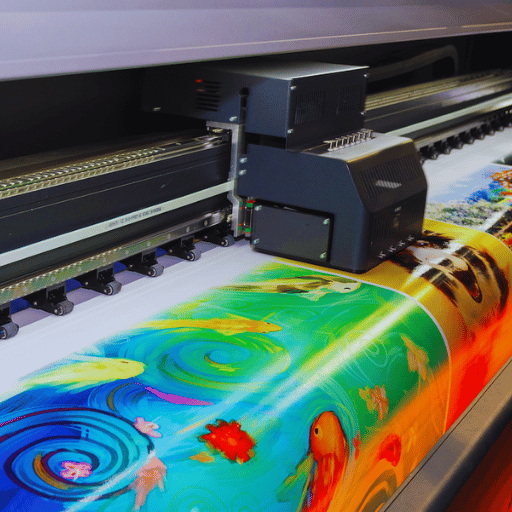
Today, there are more advanced options than the older models listed above, especially for users who need higher durability, lower ink costs and support for larger formats. Below is a practical overview of recommended printers based on application and business size.
| Use case / need | Recommended printer | Type | Why it works well for heat transfers |
|---|---|---|---|
| Beginner home T‑shirts (cotton) | Epson Expression Photo HD XP‑15000 | Inkjet + transfer paper | Affordable wide‑format unit with vibrant 6‑color prints and strong color quality on heat transfer paper. |
| Eco‑friendly, low ink cost | Epson EcoTank ET‑2750 / ET‑2800 series | Inkjet tank | Refillable ink tanks reduce ink cost per print and work well with printable transfer vinyl and papers. |
| Small sublimation shop | Epson WorkForce Pro WF‑7820 (conversion) or Sawgrass SG500 | Sublimation | Reliable print quality and durability on polyester garments and sublimation blanks. |
| Growing T‑shirt business | PUNEHOD L1800 DTF or Epson SureColor G‑series | DTF | Excellent durability, works on cotton and blends, ideal for scaling volumes and offering more fabric options. |
| Office + merch side hustle | HP Color LaserJet Pro M454dw | Color laser | Fast, sharp output on compatible laser transfer papers for shirts and hard goods. |
These models represent different budgets and production scales, but all support high‑quality heat transfer applications when combined with the correct papers, films and a professional heat press.
When selecting the best printer for heat transfers, focus on the factors that truly affect print quality, durability and cost, rather than just price or brand.
Match your printer to your core business model:
- Cotton fashion and streetwear: Inkjet printer with high‑quality transfer paper, or DTF for higher durability and versatility.
- Polyester sportswear: Sublimation printer for permanent, lightweight prints that do not crack or peel.
- Mixed textile orders: DTF printer for flexibility across fabrics, colors and garment types.
Choosing the right technology from the start will save you time, reduce waste and make it easier to maintain consistent quality.
If you want to print large back or front graphics, pay attention to maximum print size. Most desktop printers max out around 13×19 inches, which can still be used for large T‑shirt designs, especially when paired with a 16×20 heat press. For all‑over prints or extra‑large designs, you will need a wide‑format printer and a corresponding large‑format or roll‑to‑roll press.
Ink cost per print is a critical factor for any business. EcoTank and other ink tank systems are attractive for higher‑volume operations because they allow you to refill tanks rather than replace cartridges. Dedicated sublimation or DTF inks should come from reputable suppliers so that you maintain consistent color, avoid clogging and reduce downtime.
More advanced systems like DTF and converted sublimation printers tend to require more regular maintenance, including frequent cleaning and a controlled environment. If you prefer low maintenance, a robust inkjet or laser printer with compatible transfer papers is often the safest starting point. Set clear routines for head cleaning, test prints and storage of inks and media.
The following workflow applies to most inkjet or sublimation setups paired with a professional heat press.
- Use inkjet transfer paper for cotton and basic fashion T‑shirts.
- Use sublimation paper for polyester sportswear and coated blanks.
- Use DTF film if you want one solution that can handle many different fabric types.
- Set artwork resolution to 300 dpi for sharp, clean edges.
- Mirror the design when required by your transfer paper or sublimation process.
- Leave enough margin around the design if you need to trim or weed.
- Select the correct media type in the printer driver (for example, matte paper, photo paper or film).
- Use a “high quality” or “photo” mode for full‑color designs where color accuracy matters.
- Print a small test sample before starting a full production run.
- Allow the print to dry completely before pressing, especially with pigment and sublimation inks.
- For DTF, apply the adhesive powder evenly and cure it for the recommended time and temperature.
- Keep printed sheets away from dust and moisture while they cure or dry.
- Pre‑press the garment to remove moisture and wrinkles.
- Press using the temperature, pressure and time recommended for the paper or film you are using.
- Use a smooth, stable heat press to ensure even temperature and pressure across the entire print area.
- Follow the correct peel method (hot, warm or cold) exactly as specified.
- Consider a brief post‑press to improve wash resistance and surface feel.
- Let the garment cool fully before folding or packaging.
Even the best printer for heat transfers will underperform if the heat press is inconsistent. Industrial‑grade presses deliver stable temperature, pressure and dwell time, which are crucial for maximizing color vibrancy, adhesion and durability.
Key advantages of pairing a good printer with professional heat press equipment include:
- Uniform heating across large platens, which is especially important for 16×20 and oversized prints.
- Higher production efficiency with double‑station, conveyor‑belt or roll‑to‑roll machines.
- Configurable solutions (flat‑bed, roll‑to‑roll, embossing and bonding equipment) that can match different production lines and materials.
If you already own or plan to purchase large‑format printers, roll‑to‑roll heat press and fusing lines can help you scale from small studio production to continuous industrial output without sacrificing quality.
If you are printing around 20–50 shirts per week on mostly cotton garments:
- Choose an inkjet printer such as the Epson Expression Photo HD XP‑15000 or an EcoTank model for low initial cost and simple operation.
- Use a 38×38 cm or 40×50 cm flat heat press for stable, repeatable results.
This combination balances affordability, quality and ease of use while you validate your business model.
If your focus is performance polyester apparel:
- Choose a dedicated sublimation setup such as the Sawgrass SG500 or a converted wide‑format Epson for all‑over prints.
- Use a large‑format or roll‑to‑roll sublimation press for jerseys, leggings, cycling wear and similar garments.
This setup provides soft, breathable prints that integrate with the fibers and stand up to intense use and frequent washing.
If you are moving from craft scale to light industrial production:
- Choose a DTF printer such as a PUNEHOD L1800 or an Epson SureColor model designed for higher throughput.
- Use conveyor belt fusing machines or double‑station hydraulic presses to increase productivity and reduce manual handling.
This type of system lets you handle larger orders, standardize quality and shorten lead times.
Use this quick checklist to avoid costly mistakes when investing in your next heat transfer printer and press:
- Define your main material: cotton, polyester, blends or hard goods.
- Decide your expected monthly volume: hobby, side hustle or full‑time production.
- Choose your printing method: inkjet with transfer paper, sublimation, DTF or laser.
- Confirm maximum print size and whether you need near 16×20 inch designs.
- Calculate ink and consumable cost per print and your target margin.
- Match your printer setup with a reliable heat press in the right size and configuration.
- Plan for maintenance routines, spare parts and technical support.
Choosing the right printer for heat transfers is only half of the equation. To turn sharp prints into real, sellable products, you also need a stable, industrial‑grade heat press that delivers consistent temperature and pressure on every job. Whether you are launching a small T‑shirt brand, building a sportswear label or scaling a factory line, now is the time to review your current setup, define your target production volume and upgrade to a printer and heat press combination that can grow with your business. Reach out to your equipment supplier today, share your materials, formats and capacity requirements, and request a tailored solution that integrates printers, presses and accessories into one efficient, profitable workflow.
Contact us to get more information!
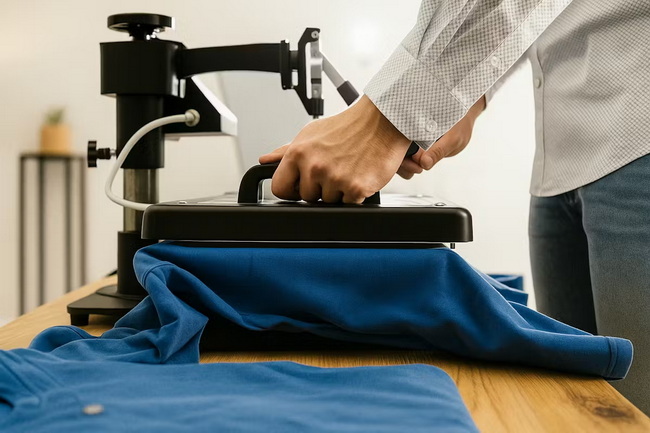
For beginners, an inkjet printer with high‑quality heat transfer paper, such as the Epson Expression Photo HD XP‑15000 or an EcoTank model, is a practical starting point. It offers a lower initial cost, simple setup and enough print quality to produce attractive T‑shirts and gifts while you learn the process.
Most desktop printers are limited to around 13×19 inches, but you can still create large front or back graphics by optimizing your design and using a 16×20 heat press. If you consistently need full 16×20 inch or larger artwork, consider investing in a wide‑format printer that supports larger media sizes and pair it with a suitable large‑format press.
A household iron cannot provide consistent temperature, pressure or timing across a large area, which leads to uneven adhesion, premature fading and peeling. A dedicated heat press is strongly recommended if you want commercial‑grade results, repeatable quality and efficient production, even at small volumes.
Sublimation chemically bonds with polyester fibers and works best on light‑colored, polyester‑rich garments, producing soft, breathable prints that do not crack. DTF uses a printed film and adhesive powder, works on cotton, polyester and blends, and is ideal for darker garments and mixed orders when you want one solution for many fabric types.
Use high‑quality inks and transfer media, follow the correct press time, temperature and pressure, and consider a brief post‑press to lock in the print surface. Educate customers to wash garments inside‑out, in cold or warm water, avoid bleach and minimize high‑heat tumble drying, as these habits significantly extend print life.
1. https://www.heatpressnation.com/blogs/blog/the-3-best-printers-for-heat-transfers
2. https://justcreative.com/best-heat-transfer-printers
3. https://crazymos.com/best-printers-for-printable-heat-transfer-vinyl/
4. https://www.heatpressnation.com/collections/printers
5. https://www.dcsbheatpress.com
6. https://www.dcsbheatpress.com/es/products.html


