If you have any questions, please feel free to contact us.| Email Us: info@dcheatpress.com


Views: 222 Author: Amanda Publish Time: 2026-01-05 Origin: Site


Content Menu
● What Is Siser Heat Transfer Vinyl (HTV)?
● Why Choose Siser HTV in 2026?
● Core Keywords and Search Intent
● Understanding HTV: Basic Concepts
● Overview of Siser “Easy” HTV Products
● EasyPatterns, EasyPuff, Easy Glow, and EasyColor DTV
● Glitter, Sparkle, and Twinkle: Three Ways to Add Shine
● Holographic, Aurora, and Metal HTV
● Dimensional and Flocked HTV: Brick 600 and StripFlock Pro
● BlackBoard HTV and Specialty Use Cases
● Recommended Application Settings (Heat Press Basics)
● Step‑by‑Step: How to Use Siser HTV with a Heat Press
● Common Mistakes and Troubleshooting Tips
● Beginner vs Small Business: Choosing the Right Siser HTV Line
● Where to Buy and How to Test New Siser HTV
● Action Steps: Start Pressing with Siser HTV
● FAQs About Siser Heat Transfer Vinyl
>> 1. What temperature should I use for Siser EasyWeed?
>> 2. Do I need a heat press, or can I use a home iron?
>> 3. How long should I wait before washing garments with Siser HTV?
>> 4. Why is my Siser HTV peeling after a few washes?
>> 5. Can Siser HTV be layered on top of itself?
>> 6. Which fabrics are not recommended for Siser HTV?
>> 7. Can I use Siser HTV on sublimated garments without dye bleed?
Siser heat transfer vinyl (HTV) remains one of the most reliable ways to create durable, vibrant graphics on garments and soft goods for both hobby crafters and growing apparel businesses. This enhanced guide explains what Siser HTV is, how its main product families differ, and how to apply it correctly with a heat press for consistent, professional-quality results.[1][2][3][4]
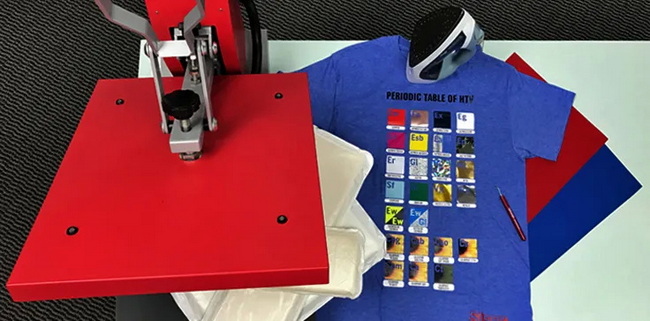
Siser heat transfer vinyl is a thin, heat‑activated polyurethane film that bonds permanently to fabric when you apply the right time, temperature, and pressure. Each sheet or roll comes on a clear plastic carrier so you can cut, weed, position, and press your design accurately onto the garment.[2][1]
HTV is ideal for:[3][1]
- Cotton, polyester, and many cotton‑poly blends.
- T‑shirts, hoodies, team uniforms, tote bags, and caps.
- Small‑batch production where fast design changes and low setup costs matter.
For decorators running multiple jobs per day, pairing Siser HTV with a stable clamshell or swing‑away heat press helps maintain consistent pressure and temperature, which directly impacts wash durability and color vibrancy.[4][2]
Siser has more than 40 years of experience in heat transfer materials and maintains detailed technical sheets for each line, which supports repeatable E‑E‑A‑T‑style workflows in commercial environments. Their catalog covers everything from basic single‑color films to reflective, glitter, and dimensional finishes, plus printable options for full‑color graphics.[1][2][4]
Key advantages of Siser HTV:[5][2][3]
- Wide compatibility with common textiles, including performance fabrics.
- Clear application instructions (time, temperature, pressure, and peel type) for heat presses and home irons.
- Specialized products for blocking dye migration, adhering to nylon, and achieving reflective or 3D textures.
When combined with a reliable heat press from manufacturers like COLORFUL, users can standardize pressing settings and scale from hobby to small‑business production without changing their HTV brand.[3]
For SEO and user experience, the target reader is searching phrases like “Siser HTV beginner guide,” “how to use Siser heat transfer vinyl,” and “Siser EasyWeed settings.” This article therefore focuses on:[2][1]
- What Siser HTV is and how it works.[1][2]
- Differences between Siser EasyWeed, Glitter, Sparkle, Twinkle, Holographic, Aurora, Metal, Brick 600, StripFlock Pro, and BlackBoard.[2][1]
- Practical application settings, step‑by‑step workflows, and troubleshooting tips using a heat press.[6][7][4]
Heat transfer vinyl relies on a carrier, adhesive layer, and face film.[2]
- The carrier is the clear plastic sheet that holds your cut design in place and tolerates pressing temperatures.[2]
- The adhesive layer melts and bonds to fibers when heated with sufficient pressure.[4][2]
- The face film determines the finish: matte, glossy, glitter, flock, metallic, or puff.[1][2]
Correct application depends on three variables: time, temperature, and pressure, often summarized in Siser's technical PDFs and reference charts. Skipping pre‑pressing or using uneven pressure can cause edges to lift, cracking, or premature failure in the wash.[6][5][4]
Siser's “Easy” series is designed to make cutting, weeding, and pressing straightforward even for beginners, while still satisfying production needs for small shops.[1][2]
Main characteristics of the Easy line:[4][1][2]
- EasyWeed: Thin, flexible, and easy to weed with relatively low temperature requirements.
- EasyWeed Electric / Fluorescent: Adds a metallic or high‑visibility neon effect while keeping similar handling to standard EasyWeed.
- EasyWeed Extra: Engineered for adhesion to nylon and tricky synthetic surfaces.
- EasyWeed Sub Block: Formulated to resist dye migration when pressing onto sublimated or highly dyed garments.
For most EasyWeed‑type films, typical heat press settings are around 305–310 °F (about 150–155 °C) with medium pressure for roughly 10–15 seconds, followed by a hot or warm peel depending on the specific variant's instructions. Always verify the exact recommendation on the tech sheet before running production.[7][8][5][4]
Beyond solid colors, Siser offers additional Easy‑family materials that unlock more creative and commercial possibilities.[1][2]
- EasyPatterns gives pre‑printed patterned films for full‑pattern fills without needing a separate printer.[2][1]
- EasyPuff expands during pressing to create a raised, 3D texture, which works well for bold text and simple logos.[9][1]
- Easy Glow is a glow‑in‑the‑dark HTV available in neon and white, useful for safety garments and night‑themed designs.[1][2]
- EasyColor DTV lets users print full‑color designs on a compatible desktop printer and then press them, blending the advantages of printable media with HTV handling.[2][1]
Because EasyPuff and some specialty films may use different time, temperature, and pressure combinations from standard EasyWeed, decorators should always follow the dedicated tech sheet for each product.[9][5][4]
Siser offers three glitter‑oriented heat transfer vinyls—Glitter, Sparkle, and Twinkle—that each deliver a different tactile and visual effect.[1]
- Glitter uses surface glitter flakes that create a textured, high‑sparkle finish popular for cheer, dance, and fashion designs.[1]
- Sparkle embeds glitter into the film so it retains sparkle while feeling smoother and more flexible on the garment.[2][1]
- Twinkle combines glitter with reflective particles, giving both daytime shimmer and nighttime visibility under direct light.[1]
When applying thicker glitter films, decorators often need slightly firmer pressure and careful peeling at the recommended temperature (hot, warm, or cold) to avoid lifting the edges. For layered designs, it is common to “tack” each layer for a shorter time before a final full‑time press to prevent scorching.[7][5][4]
For more eye‑catching finishes, Siser Holographic, Aurora, and Metal HTVs offer unique surface effects that can differentiate premium products or limited‑edition runs.[10][2][1]
- Holographic incorporates reflective holographic flakes that create a color‑shifting effect similar to prismatic foil.[2][1]
- Aurora has an iridescent look that changes depending on light and garment color, often used for fashion or festival apparel.[2][1]
- Metal provides a smooth metallic finish with high reflectivity and is usually pressed with specific time and temperature settings, such as around 150 °C for about 10 seconds with medium pressure and a cold peel.[10][4]
These specialty films typically require precise peel timing (often warm or cold) to preserve the surface and avoid texture changes, which makes a consistent heat press particularly important.[10][4]
If a flat print is not enough, Siser offers thicker and textured films such as Brick 600 and StripFlock Pro.[1]
- Brick 600 is a 600‑micron thick vinyl that creates a pronounced, embossed style effect on garments, best suited to simple shapes or bold lettering.[2][1]
- StripFlock Pro is a soft, suede‑like flock material that adds depth and a premium tactile feel, often used for retro athletic designs and caps.[1]
Dimensional and flock films require careful pressure distribution; uneven or low pressure can cause partial bonding, especially around small corners. Many decorators use a swing‑away heat press, which tends to deliver more uniform contact on thicker transfers.[5][3][4]
Siser BlackBoard HTV is a chalk‑receptive vinyl that allows you to write with standard chalk and then erase, making it ideal for labels, reusable signs, and educational products. When pressed correctly, the surface can be written on multiple times as long as abrasive tools are avoided.[5][1]
For sampling and color matching, many distributors and brands provide Siser HTV color guides, swatch books, or sample packs so decorators can test adhesion and finish on their specific fabrics. This testing is especially important when working with performance wear, coated fabrics, or items exposed to high heat or laundering cycles.[5][1]
While exact settings vary by product, there are some widely accepted guidelines for pressing Siser HTV with a heat press.[8][4][5]
General principles:
- Pre‑press the garment for 2–3 seconds to remove moisture and wrinkles.[4]
- Use medium, even pressure—not just high temperature—to ensure the adhesive layer fully contacts the fibers.[7][4]
- Follow the recommended peel temperature (hot, warm, or cold), because peeling at the wrong time can stretch or distort the film.[6][4][5]
Typical ranges (check the specific tech sheet):[8][4][5]
- Temperature: roughly 250–320 °F (about 120–160 °C).
- Time: usually 10–20 seconds depending on film thickness.
- Pressure: medium to firm for thicker or specialty products.
Using a digital heat press with accurate temperature and pressure control simplifies standardization across jobs and multiple operators.[3][5]
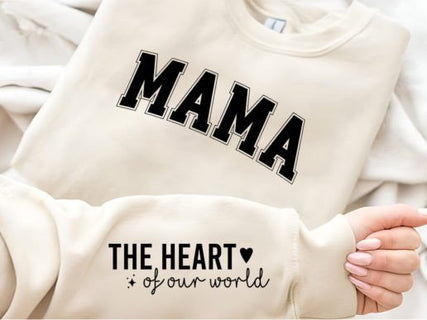
A simple, repeatable workflow helps both beginners and small businesses avoid costly mistakes.[6][4][2]
1. Design and mirror
- Create your artwork in design software and mirror it horizontally, since HTV is cut face‑down on the carrier.[2]
- Keep fine details within your cutter's capabilities to make weeding easier.[11]
2. Cut the HTV
- Place the HTV shiny (carrier) side down on the cutting mat or feed it directly into a vinyl cutter.[11][2]
- Use recommended blade depth and test cuts so the blade cuts through the vinyl but not the carrier.[11]
3. Weed the excess
- Remove unwanted vinyl (“negative space”) with a weeding tool, leaving only the design on the carrier.[11][2]
- For sticky carriers, some decorators slightly warm the lower platen to make weeding smoother.[2]
4. Position and pre‑press
- Pre‑press the garment for a few seconds to remove moisture.[4]
- Align the design on the garment, typically a few centimeters below the neckline for front chest prints.[2]
5. Press
- Cover with a Teflon sheet or multipurpose paper to protect the garment and upper platen.[7][4]
- Press at the specified time, temperature, and pressure for the chosen Siser film.[8][4]
6. Peel and inspect
- Peel the carrier hot, warm, or cold according to the product's instructions.[5][4]
- Check edges and fine lines for lifting; if needed, re‑press for a few seconds with a cover sheet.[6][7]
7. Curing and washing
- Wait at least 24 hours before the first wash to allow the adhesive to fully cure.[8][4]
- Recommend machine washing inside out with mild detergent and avoiding bleach, fabric softeners, and high‑heat drying.[4][5]
Many issues with HTV come from incorrect pressure, insufficient time, or ignoring peel instructions rather than the material itself.[6][5][4]
Frequent problems and solutions:
- Edges lifting after washing: often caused by low pressure or under‑pressing; increase pressure slightly and ensure full contact across the design.[5][4]
- Scorch marks or color shifts: usually from excessive temperature or time; reduce temperature within Siser's recommended range and avoid pressing the same area too long.[7][4]
- Distorted or stretched film when peeling: often due to peeling too hot when a warm or cold peel is specified; allow the transfer to cool to the recommended level before removing the carrier.[4][6]
For consistent production, decorators often log successful settings for each Siser product and garment type, then replicate them on calibrated heat presses across different operators and shifts.[3][5]
Different Siser HTV lines align with different experience levels and business goals.[3][1][2]
User type | Recommended Siser HTV lines | Typical use cases |
Beginner hobbyist | EasyWeed, EasyWeed Fluorescent, EasyPatterns | Simple T-shirts, gifts, occasional projects. |
Growing side business | EasyWeed, Glitter, Sparkle, Twinkle | Boutique apparel, school merch, team wear. |
Fashion / premium shop | Holographic, Aurora, Metal, Brick 600, StripFlock Pro | Limited editions, textured branding, bold designs. |
Custom signage / labels | BlackBoard, select standard HTV lines | Reusable signs, chalk-label products, promos. |
Pairing the right HTV line with a dependable heat press and clear application notes helps shops move from trial‑and‑error to predictable, profitable workflows.[3][5]
Siser HTV is widely available through authorized dealers, craft retailers, and online platforms that specialize in heat transfer materials. Many suppliers also carry sample packs and swatch charts so decorators can test adhesion and color on their typical fabrics before committing to large rolls.[3][5][1]
When testing a new film:[5][4]
- Press small swatches on scrap garments, checking edge bond and stretch.
- Run at least one wash and dry cycle to evaluate long‑term durability.
Commercial users often standardize on a few core Siser lines (such as EasyWeed and Glitter) and add specialty films as seasonal or campaign‑specific add‑ons.[5][1]
To move from reading to doing, users can follow this simple action plan.[4][3][2]
- Choose a basic, versatile Siser HTV like EasyWeed or EasyWeed Electric for your first designs.
- Prepare a stable heat press with accurate temperature and pressure controls, and keep a cover sheet nearby.
- Run test presses on scrap garments at the recommended settings before fulfilling real orders.
For decorators who want to scale beyond a hobby, investing in a reliable heat press and standardized Siser HTV lineup allows them to handle larger volumes, more complex designs, and a wider variety of fabrics with confidence.[3][5]
Most Siser EasyWeed applications recommend around 305 °F (about 150 °C) with medium pressure for 10–15 seconds, followed by a hot or warm peel. Always confirm the exact value on the product's technical sheet, as different EasyWeed variants may vary slightly.[8][4][5]
Siser provides instructions for both heat presses and home irons, and many crafters start with a household iron. However, a heat press delivers more consistent pressure and temperature over the entire design, which is especially important for business use and larger graphics.[6][4][5][3][2]
Siser HTV should not be washed for at least 24 hours after pressing so the adhesive layer can fully cure. After that, wash inside out with mild detergent and avoid bleach, fabric softeners, and very high dryer temperatures to maximize durability.[8][4][5]
Peeling is usually due to insufficient pressure, pressing too short, or ignoring peel instructions rather than a material defect. Try increasing pressure, confirming temperature with a heat gun or thermometer, and peeling at the recommended hot/warm/cold stage for the specific Siser film.[7][6][4][5]
Many Siser HTV lines, including EasyWeed, are designed for layering, although some specialty finishes are better used as top layers only. A common approach is to tack each layer for a shorter time, then apply full time on the final press to avoid over‑heating lower layers.[7][4][5][2]
Siser generally advises testing on heavily coated, heat‑sensitive, or low‑melting‑point materials and checking reference charts before full production. Fabrics that cannot tolerate typical HTV temperatures (around 250–320 °F) or that deform easily under heat and pressure may not be suitable.[4][5]
For sublimated or heavily dyed polyester garments, Siser EasyWeed Sub Block is formulated to reduce dye migration compared to standard films. Even so, running controlled tests on each fabric type is recommended to confirm that color bleed does not occur under your press settings.[5][1]
[1](https://www.heatpressnation.com/blogs/academy/a-beginners-guide-to-siser-heat-transfer-vinyl-htv)
[2](https://www.siserna.com/heat-transfer-vinyl-beginner-basics/)
[3](https://www.siserna.com/getting-started-htv/)
[4](https://www.siserna.com/files/heat-transfer-vinyl-instructions.pdf)
[5](https://www.siserna.com/files/material-reference-chart.pdf)
[6](https://www.youtube.com/watch?v=QTlE3SHSnxY)
[7](https://www.youtube.com/watch?v=yOTAW6H1rVo)
[8](https://uscutter.com/content/PDFs/Siser-HTV-Instructions-3-2020.pdf)
[9](https://www.youtube.com/watch?v=QsdmX8llWeo)
[10](https://www.siser.com/news/how-to-use-metal-htv/)
[11](https://www.youtube.com/watch?v=Kblq37pBuJA)
[12](https://www.youtube.com/watch?v=pK9Uk6yQWV4)
[13](https://www.youtube.com/watch?v=AjiMVQPGN0M)
[14](https://www.youtube.com/watch?v=_uOrpXyN6CU)
[15](https://www.youtube.com/watch?v=_TAgu7JBsgY)
[16](https://www.youtube.com/watch?v=g49CDDVhItk)
[17](https://www.facebook.com/groups/4513942185340216/posts/6368431549891261/)
[18](https://atlantavinylstore.com/pages/easyweed-electric-htv-application-instructions)
[19](https://www.facebook.com/SiserNorthAmerica/videos/a-guide-to-siser-heat-presses/453598241826644/)
[20](https://www.facebook.com/groups/4513942185340216/posts/8868077159926675/)


